
Introducere
This manual provides detailed instructions for the installation, operation, and maintenance of your UNITOPSCI Android 13 Car Stereo Radio. Designed specifically for Honda Odyssey models from 2005 to 2010, this 10.1-inch touch screen unit integrates advanced features such as Bluetooth, GPS navigation, Mirror Link, and backup camera support to enhance your driving experience. Please read this manual thoroughly before use to ensure proper functionality and safety.

Figure 1: UNITOPSCI Android 13 Car Stereo Radio with accessories.
Informații de siguranță
- Instalare profesională recomandată: Din cauza complexității sistemelor electrice ale vehiculelor, instalarea profesională este foarte recomandată pentru a preveni deteriorarea unității sau a vehiculului dumneavoastră.
- Alimentare electrică: Ensure the unit is connected to a 12V DC power supply with a negative ground. Incorrect voltage poate provoca daune.
- Cablaj: Do not modify or cut the wiring harness. Refer to the wiring diagram for correct connections.
- Temperatura de functionare: The unit is designed to operate within a temperature range of -40℃ to 80℃.
- Siguranța la conducere: Nu utilizați unitatea sau view videos that may distract you while driving. Always prioritize road safety.
- Ventilare: Asigurați o ventilație adecvată în jurul unității pentru a preveni supraîncălzirea.
Conținutul pachetului
Verificați dacă toate articolele enumerate mai jos sunt incluse în pachetul dumneavoastră:
- 1 x Android Car Stereo (pre-installed with trim)
- 1 x Cameră de rezervă
- 1 x cablu de alimentare
- 1 x Antenă GPS
- 1 x Cablu de intrare cameră
- 1 x Cablu de intrare și ieșire RCA
- 2 x cabluri USB
- 1 x manual de instrucțiuni
- 1 x Set de scule de instalare
- 1 x microfon extern
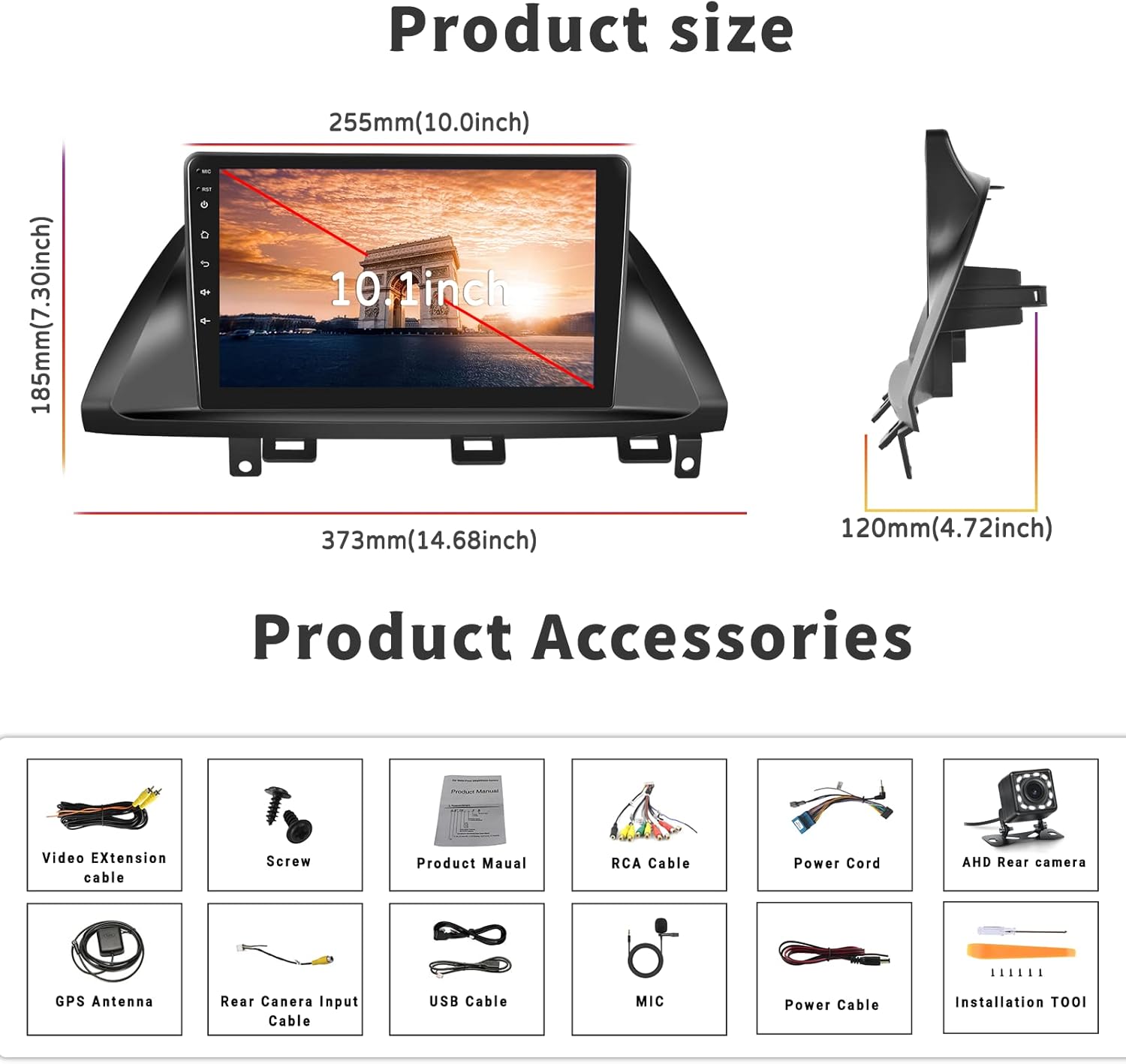
Figura 2: Dimensiunile produsului și accesoriile incluse.
Configurare și instalare
Compatibilitate
This car stereo is designed for Honda Odyssey models from 2005 to 2010. It is compatible with vehicles that have an original car radio with a DVD player. It is incompatibil with original car radios that have a factory screen or GPS. In such cases, an additional wire harness may be required. Please verify your car's center console size and wire harness details before installation.

Figure 3: Car compatibility and wiring harness details.
Schemă de cablare pentru camera de marșarier
Proper connection of the backup camera is crucial for its automatic activation. Follow these steps:
- Conexiune cablu de alimentare: Connect the red wire of the backup camera's power cable to the positive reversing light, and the black wire to the negative reversing light.
- RCA Cable Connection: Insert the yellow RCA cable from the camera into the 'CAM-IN' (yellow) port on the back of the radio unit.
- Reverse Trigger Wire: Ensure the 'reverse (+)' wire connection (typically a pink wire on the power wire harness labeled 'back') is securely connected to the positive wire of the reversing light. This enables the unit to automatically display the rear view image when the vehicle is in reverse.
Nota 1: The short red wires next to the RCA port do not require connection in this wiring setup.
Nota 2: When the device is in parking mode (displaying the rear view), other functions will temporarily pause.

Figura 4: Spate view schema de cablare a camerei.
Etape generale de instalare
While specific steps may vary by vehicle, the general installation process involves:
- Deconectați bateria: Înainte de pornire, deconectați borna negativă a bateriei vehiculului pentru a preveni scurtcircuitele.
- Eliminați unitatea veche: Carefully remove the existing car stereo and trim.
- Conectare cablare: Connect the new stereo's power harness, speaker wires, antenna, and other necessary cables according to the provided wiring diagram.
- Instalați antena GPS: Montați antena GPS într-un loc cu lumină naturală view ale cerului, de obicei pe bord sau sub parbriz.
- Install Backup Camera: Route the backup camera cable from the rear of the vehicle to the head unit, connecting it as described in the wiring section.
- Testare conexiuni: Before fully securing the unit, reconnect the battery and perform a quick test of all functions (power, audio, radio, GPS, camera, etc.).
- Unitate securizată: Once tested, carefully slide the new stereo into the dash opening and secure it with screws. Reinstall the trim.
- Verificare finală: Perform a comprehensive test of all features to ensure proper operation.
Instrucțiuni de operare
Bluetooth & FM/RDS Radio Function
The unit features built-in Bluetooth 4.2 and an FM/RDS radio. The integrated microphone supports hands-free calling, Bluetooth music streaming, and automatic phone book download. The FM radio includes 18 preset stations for news, music, and weather broadcasts. You can also adjust sound settings with the EQ balance function and connect to a subwoofer.

Figure 5: Bluetooth and FM Radio interface.
Navigație GPS și WiFi
The head unit comes with preloaded offline maps and supports both online and offline navigation. With a WiFi connection, you can access online maps and download additional maps as needed. To download maps, connect to WiFi, open the 'Here We Go' app, click the 'folder' icon, select 'download maps', and choose the appropriate region. WiFi connectivity also allows you to surf the internet and download various applications.

Figure 6: GPS Navigation and WiFi features.
Mirror Link for Android and iOS Phones
The unit supports mirror link functionality for both Android and iOS mobile phones. For iOS devices, it supports one-way projection via WiFi. For Android phones, it supports two-way connection via WiFi or the original USB phone cable, allowing you to control your phone's apps directly from the 10.1-inch screen. This feature is convenient for displaying videos or navigation maps from your phone. Note: Not compatible with Samsung phones for two-way control.

Figura 7: Funcționalitatea Mirror Link.
Intrare cameră de rezervă
A backup camera is included with the unit. When the vehicle is shifted into reverse gear, the screen will automatically switch to display the reversing image, providing a clear view of the area behind your car. The camera features waterproof design, night vision, and a 170° wide-angle view pentru o siguranță sporită.

Figure 8: Backup Camera Input display.
Video Output & Split Screen
The unit supports video output, allowing you to share entertainment with a backseat monitor. Additionally, the split-screen function enables you to display two applications side-by-side simultaneously, such as navigation and music playback, for improved multitasking.

Figure 9: Video Output and Split Screen functionality.
Controlul volanului (SWC)
The unit supports steering wheel control functions, allowing you to manage various features directly from your vehicle's steering wheel buttons. Please note that a steering wheel controller may need to be ordered separately if your vehicle does not have compatible controls or if the existing system works with a CANbus (this unit does not support CANbus). Refer to the unit's settings to map your steering wheel buttons.
Întreţinere
- Curățarea ecranului: Folosiți o lavetă moale, fără scame, pentru a șterge ușor ecranul tactil. Pentru petele persistente, ștergeți ușor.ampClătiți laveta cu apă sau cu un produs de curățare a ecranelor conceput pentru electronice. Evitați substanțele chimice dure sau materialele abrazive.
- Curatenie generala: Keep the unit and surrounding area free from dust and debris. Use a soft brush or compressed air to clean vents and ports.
- Actualizări de software: Periodically check for software updates from the manufacturer's official channels to ensure optimal performance and access to new features.
- Evitați temperaturile extreme: While the unit is designed for a wide temperature range, prolonged exposure to extreme heat or cold can affect its lifespan.
Depanare
Această secțiune abordează problemele frecvente pe care le puteți întâmpina. Dacă problema persistă, vă rugăm să contactați serviciul de asistență pentru clienți.
| Problemă | Cauza posibila | Soluţie |
|---|---|---|
| Unitatea nu pornește. | Cablare incorectă; Siguranță arsă; Conexiune slăbită. | Check power cable connections (red and yellow wires); Inspect vehicle's fuse box; Ensure all harnesses are securely plugged in. |
| Niciun sunet de la difuzoare. | Cablurile difuzorului sunt conectate incorect; Volum prea scăzut; Funcția Mute este activă. | Verify speaker wire connections; Increase volume; Check if unit is muted. |
| Semnal GPS slab sau indisponibil. | Antena GPS nu este instalată corect sau este obstrucționată. | Ensure GPS antenna is mounted in a clear, unobstructed location; Check antenna connection to the unit. |
| Camera video pentru marșarier nu afișează. | Incorrect camera wiring; 'Reverse' trigger wire not connected. | Review the 'Wiring Diagram for Backup Camera' section; Ensure the camera's power and RCA cables are correctly connected, and the 'reverse' trigger wire is properly linked to the vehicle's reversing light positive. If the camera has an LED light, check if it illuminates when reverse is engaged. |
| Mirror Link not connecting. | Incorrect connection method; Incompatible phone model; App issues. | For iOS, use WiFi only. For Android, try both WiFi and USB (original phone cable). Ensure your phone is not a Samsung model (known compatibility issue). Restart both phone and head unit. |
| Unit lags or freezes. | Too many apps running; Low memory. | Close unnecessary applications; Restart the unit. |
Specificații
| Caracteristică | Caietul de sarcini |
|---|---|
| Sistem | Android 13.0 |
| Chipset | 8227L-DEMO |
| Dimensiunea ecranului | 10.1 inci |
| Rezoluția ecranului | 1024 x 600 |
| Memorie (RAM+ROM) | 1 GB RAM + 32 GB ROM |
| Link în oglindă | Android/iOS (Android two-way, iOS one-way) |
| Video Output/WiFi | Sprijinit |
| Trupa Radio | FM |
| Radio Chip | NXP6851 |
| Putere Amplifier Chip | AC7315 |
| Putere de ieșire | 4*45W |
| Temperatura de lucru | -40℃ până la 80℃ |
| Control la volan | Supported (controller may be separate) |
| Versiune Bluetooth | 4.2 |
| Hărți | Hărți offline încorporate |
| Interfață USB | USB dublu |
| Suport format audio | APE/FLAC/WAV/MP3/WMA etc. |
| Suport format video | MKV/RMVB/AVI/MP4/MDV etc. |
| Suport pentru format de imagine | PNG/JPEG/JPG/GIF/WBMP/BNP etc. |
| Dimensiunile produsului | 0.39 x 0.39 x 0.39 inci |
| Greutatea articolului | 3.27 lire sterline |
Garanție și suport
UNITOPSCI is committed to providing high-quality products and satisfactory services. We offer the following support:
- Replacement Availability: Replacements are available within 24 months of purchase.
- Răspuns rapid: Așteptați un răspuns la solicitări în termen de 16 de ore.
- Asistență post-vânzare pe viață: We provide lifetime after-sales consultation and technical support.
- POLITICA DE RETURNARE: Enjoy a 60-day no-worry return period.
For any questions, technical assistance, or warranty claims, please contact us directly via email:
E-mail: UNITOPSCI@126.com

Figure 10: UNITOPSCI Customer Support Information.