
Introducere
This manual provides comprehensive instructions for the setup, operation, and maintenance of your Yealink W78P DECT IP Phone System. Please read this manual thoroughly before using the device to ensure proper functionality and to prevent damage. Keep this manual for future reference.
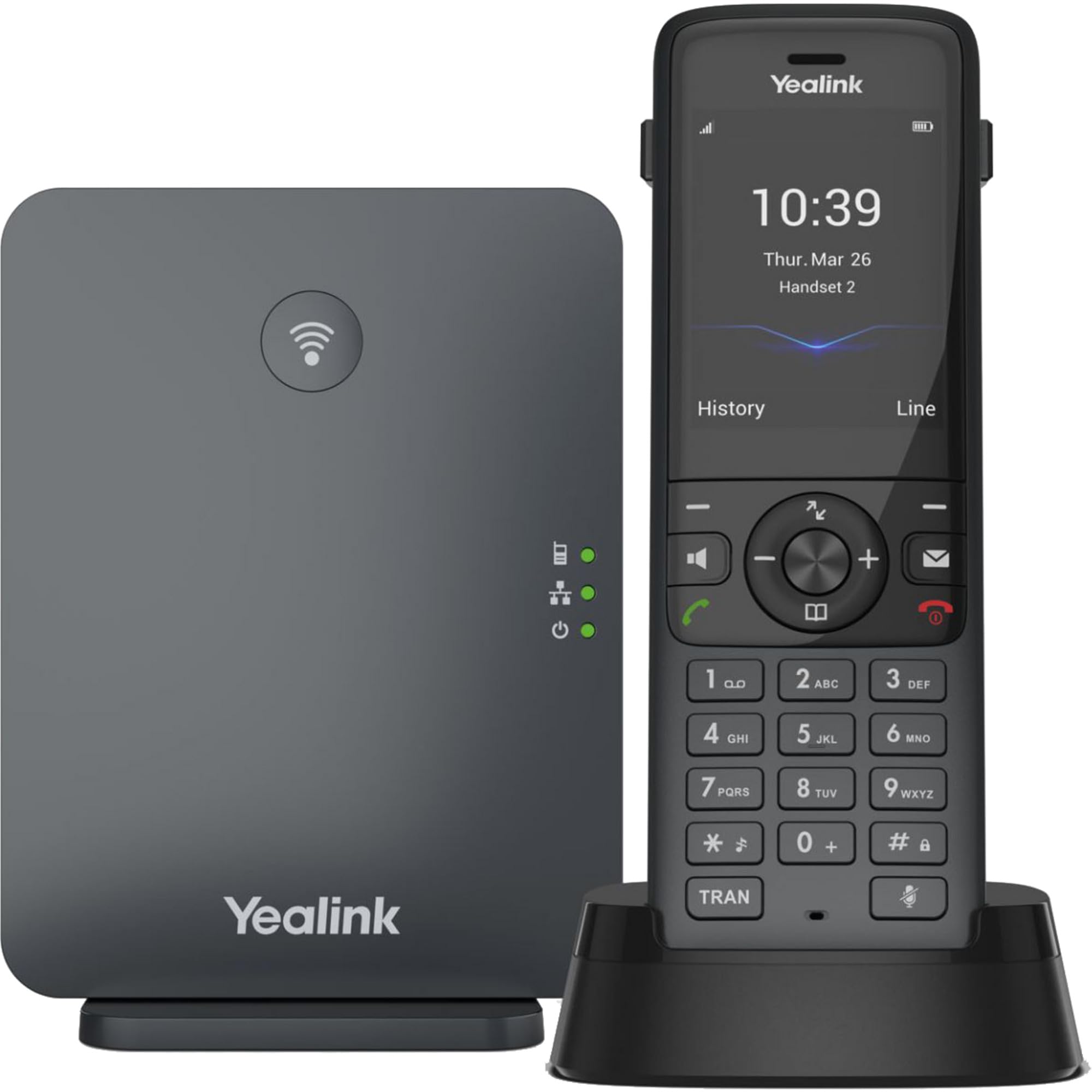
Image: The Yealink W78P system, featuring the W70B base station and the W78H cordless handset in its charging cradle.
Ce este în cutie
Verificați dacă toate articolele sunt prezente în colet:
- Receptor W78H
- Stația de bază W70B
- Suport de încărcare pentru telefon
- Power Adapter for Handset Charging Cradle and Base Station
- Cablu de rețea
Ghid de instalare
1. Connecting the Base Station (W70B)
- Conexiune de alimentare: Connect the power adapter to the W70B base station and plug it into a power outlet. Alternatively, if your network supports Power over Ethernet (PoE), connect the base station to a PoE-enabled network switch using the provided network cable.
- Conexiune retea: Connect one end of the network cable to the LAN port on the W70B base station and the other end to your router or network switch.
- Wait for the base station to power on and obtain an IP address. The network indicator LED on the base station will illuminate steadily when connected.
2. Charging the Handset (W78H)
- Connect the power adapter to the handset charging cradle and plug it into a power outlet.
- Place the W78H handset into the charging cradle. The battery icon on the handset display will indicate charging status. Allow the handset to charge fully before initial use.
3. Initial Handset Registration
The W78H handset typically comes pre-registered to the W70B base station in a W78P package. If registration is required or if you are adding a new handset:
- On the W70B base station, press and hold the registration button until the registration LED flashes.
- On the W78H handset, navigate to Meniu > Setări > Înregistrare > Înregistrare receptor.
- Select the desired base station (if multiple are detected) and enter the base station PIN (default is 0000).
- The handset will display "Handset Subscribed" upon successful registration.
Instrucțiuni de operare
Efectuarea și primirea apelurilor
- Pentru a efectua un apel: Formați numărul și apăsați tasta Apel key (green phone icon).
- Pentru a răspunde la un apel: Apăsați tasta Apel cheia sau Difuzor cheie.
- Pentru a încheia un apel: Apăsați tasta Terminați apelul key (red phone icon).
- Reapelare: Apăsați tasta Apel key to access the call history and select a number to redial.
Funcții avansate de apel
- Ține: În timpul unui apel, apăsați tasta Ține Apăsați din nou tasta funcțională pentru a relua apelul.
- Transfer: În timpul unui apel, apăsați tasta Transfer tasta funcțională, formați noul număr și apăsați Transfer din nou.
- Conferinţă: În timpul unui apel, apăsați tasta Conf tasta funcțională, formați numărul celui de-al doilea interlocutor și, odată conectat, apăsați Conf din nou să se alăture tuturor partidelor.
Conexiune căști
- Casti prin Bluetooth: The W78H handset supports Bluetooth connectivity. Navigate to Meniu > Setări > Bluetooth to enable Bluetooth and pair with your headset.
- 3.5mm Jack Headset: Connect a compatible 3.5mm headset to the headset jack on the side of the W78H handset.
DECT Radio Coverage
The W78P system offers a radio coverage of up to 50 meters indoors and up to 300 meters outdoors, under ideal conditions. Environmental factors may affect actual range.
Întreţinere
Curatenie
- Ștergeți receptorul și stația de bază cu o lavetă moale șiamp pânză.
- Nu utilizați agenți de curățare abrazivi sau solvenți.
- Asigurați-vă că dispozitivul este oprit și deconectat înainte de curățare.
Îngrijirea bateriei
- The W78H handset provides up to 21 hours of talk time and 166 hours of standby time under ideal conditions.
- Pentru o durată optimă de viață a bateriei, evitați temperaturile extreme.
- Charge the handset regularly. A 10-minute charge provides approximately 2 hours of talk time.
Depanare
If you encounter issues with your Yealink W78P system, refer to the table below for common problems and solutions.
| Problemă | Cauza posibila | Soluţie |
|---|---|---|
| Fără ton de apel | Base station not powered or not connected to network. | Check power and network cable connections to the W70B base station. Ensure network indicator LED is steady. |
| Telefonul afișează „Neînregistrat” | Handset lost registration with base station. | Re-register the handset to the base station following the steps in the "Initial Handset Registration" section. |
| Calitate audio slabă | Out of DECT range, interference, or network issues. | Move closer to the base station. Check for sources of interference (e.g., Wi-Fi routers, microwaves). Verify network stability. |
| Telefonul nu se încarcă | Charging cradle not powered or handset not seated correctly. | Ensure the charging cradle's power adapter is connected. Re-seat the handset firmly in the cradle. |
Specificatii tehnice
| Caracteristică | Detaliu |
|---|---|
| Marca | Yealink |
| Numărul de model | W78P |
| Culoare | Negru |
| Material | Acrilonitril Butadien Stiren (ABS) |
| Dimensiuni articol (L x l x H) | 24 x 51 x 157 milimetri |
| Greutatea articolului | 500 grame |
| Sursa de alimentare | Alimentat cu baterie |
| Numărul de baterii | 1 Litiu-ion |
| Timp de convorbire telefonică | 21 de ore |
| Timp de așteptare al telefonului | 166 de ore |
| Dispozitive compatibile | Yealink W56H, Yealink W57R, Yealink W59R, Yealink W73H, Yealink W78H |
| ID apelant | Da |
| Operațiune pe mai multe linii | Da |
| Țara de origine | STATELE UNITE ALE AMERICII |
| UPC | 841885125675, 841885109125 |
Informații despre garanție
The Yealink W78P DECT IP Phone System comes with a Garanție de 2 an de la producător. Please retain your proof of purchase for warranty claims. For detailed terms and conditions, refer to the warranty documentation included with your product or visit the official Yealink website-ul.
Asistență pentru clienți
For technical assistance, troubleshooting beyond this manual, or service inquiries, please contact Yealink customer support. You can find contact information on the official Yealink website-ul sau prin intermediul furnizorului produsului dumneavoastră.