
1. Introducere
This manual provides detailed instructions for the installation, operation, and maintenance of your SOGTICPS BL912-40A-WIFI MPPT Solar Charge Controller. This advanced charge controller is designed for off-grid solar applications, compatible with 12V/24V battery systems, including Gel, Flooded, and Lithium types. It features efficient MPPT tracking, an LCD display, dual USB outputs, and WiFi connectivity for remote monitoring.
Caracteristici cheie:
- Innovative MPPT (Maximum Power Point Tracking) technology for up to 99% tracking efficiency.
- Volumul sistemului automat de 12V/24Vtage detectare.
- Integrated LCD display for real-time monitoring of temperature, charge current, discharge current, and power generation.
- Comprehensive system protection: over-temperature, over-current, short-circuit, open-circuit, and reverse polarity.
- Compatibility with Gel, Flooded, and Lithium battery types.
- Dual 5V 2A USB outputs for charging mobile devices.
- WiFi communication for remote parameter adjustment and monitoring via a dedicated application.
- Industrial-grade main control chip with 16AD sampprecizie ling.
- Two-way MOS tube anti-reverse circuit for high-power charging and low heat generation.
2. Instrucțiuni de siguranță
Please read all instructions carefully before installation and operation. Failure to follow these instructions may result in damage to the unit, personal injury, or property damage.
- Asigurați-vă că toate conexiunile sunt strânse și corecte pentru a evita supraîncărcarea.tagcăderea de e și pericolele potențiale.
- Instalați controlerul în interior, ferit de lumina directă a soarelui, temperaturi ridicate și umiditate.
- The controller generates heat during operation; ensure adequate ventilation.
- Connect the battery first, then the solar panel, and finally the load. Disconnect in the reverse order: load, solar panel, then battery.
- Do not connect any inverter directly to the load terminals of the controller.
- Ensure the solar panel's open-circuit voltage (Voc) does not exceed the controller's maximum input voltage.
- Use appropriate circuit breakers or fuses for the battery and solar panel circuits.
- Țineți copiii departe de sistemul de energie solară.
- Nu încercați să dezasamblați sau să reparați singur controlerul. Contactați personal calificat pentru service.
3. Produs terminatview
The SOGTICPS BL912-40A-WIFI solar charge controller features a robust design with an intuitive LCD display and multiple connection points.

Imagine: Faţă view of the SOGTICPS BL912-40A-WIFI Solar Charge Controller, highlighting its security protection features such as short-circuit, overload, overcharge, under-voltage, și supra-voltagprotecție.
Componente:
- Display LCD: Shows real-time system status and parameters.
- Butoane de control: For navigating menus and setting parameters.
- Solar Panel Input Terminals: Conectați-vă la panouri solare.
- Terminale baterie: Conectați la banca de baterii.
- Terminale de ieșire de încărcare: Conectați la sarcini de curent continuu.
- Dual USB Ports (5V 2A): Pentru încărcarea dispozitivelor externe.
- Antena WiFi: Pentru comunicații fără fir.
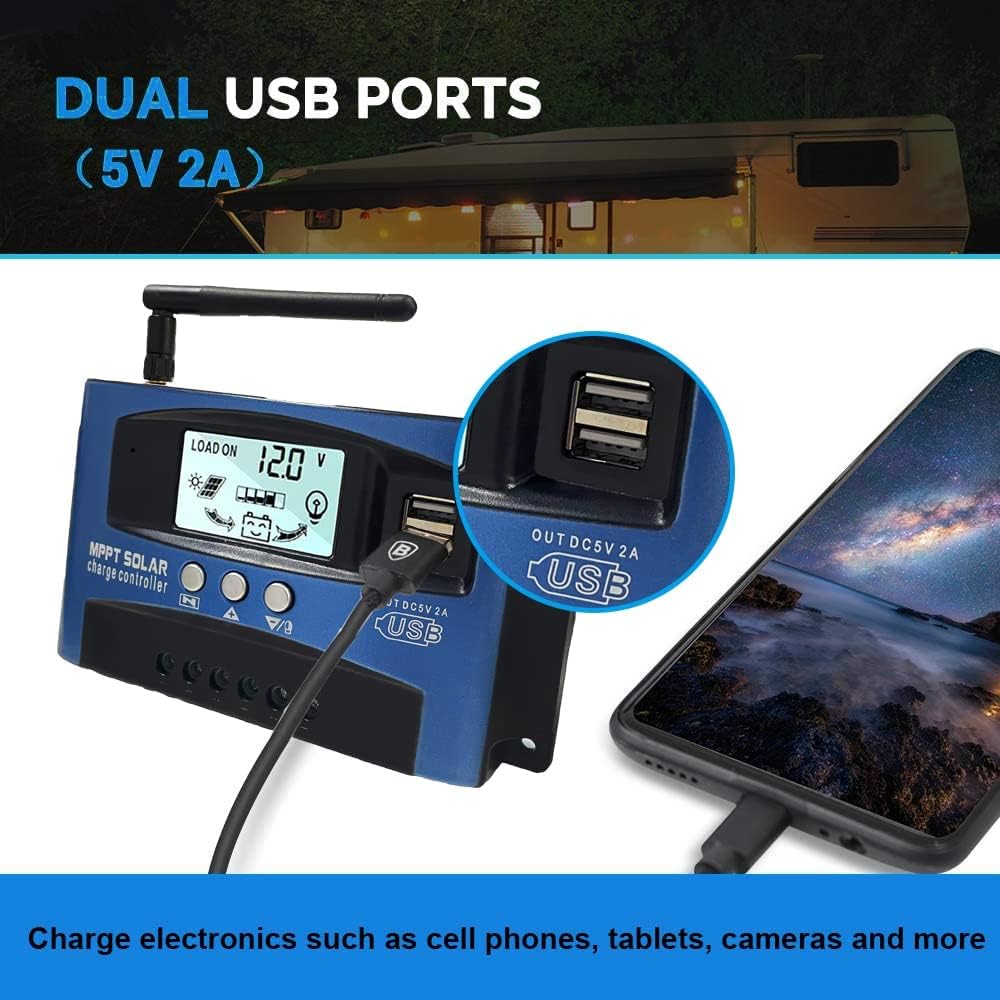
Imagine: A închide view of the SOGTICPS BL912-40A-WIFI Solar Charge Controller, showing the dual 5V 2A USB ports in use, charging a smartphone.
4. Configurare și instalare
Proper installation is critical for the safe and efficient operation of your solar charge controller. Follow the connection order precisely.
Ordinea de conectare:
- Connect the Battery First: Connect the battery to the charge controller's battery terminals. Ensure correct polarity (+ to + and - to -). The controller will automatically detect 12V or 24V system voltage.
- Conectați panourile solare: Connect the solar panels to the charge controller's solar input terminals. Again, observe correct polarity.
- Conectarea sarcinii CC (opțional): Connect your DC loads to the load output terminals.
Important: When disconnecting, reverse the order: first disconnect the load, then the solar panels, and finally the battery. Failure to follow this order may damage the controller or other components.
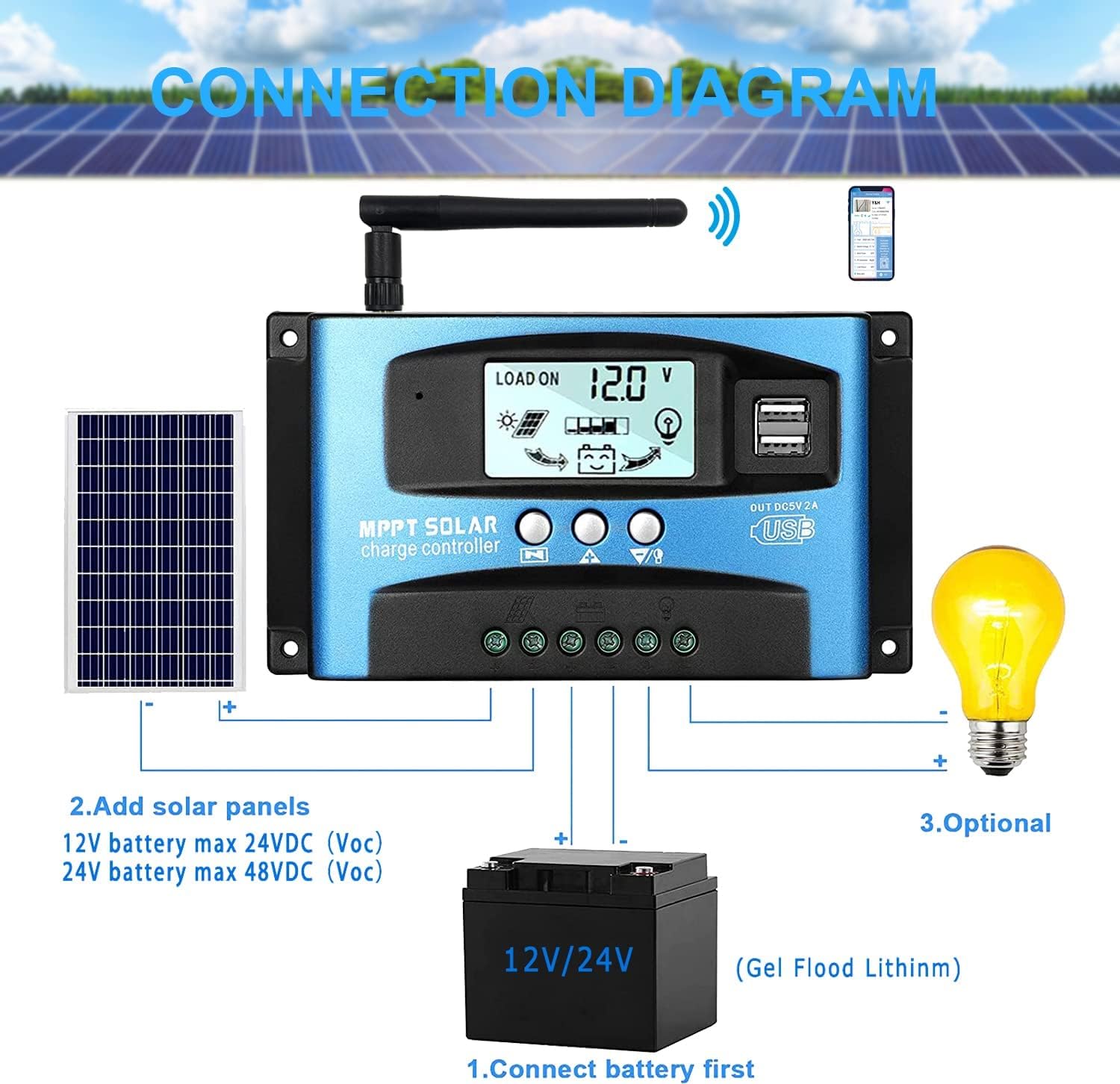
Imagine: A clear connection diagram illustrating the proper wiring sequence for the solar charge controller, connecting to a battery, solar panels, and an optional DC load. It emphasizes connecting the battery first.
Compatibilitate baterie:
The controller is compatible with various battery types, including Gel, Flooded (Lead-Acid), and Lithium batteries. Ensure the correct battery type is selected in the controller settings for optimal charging.

Imagine: Visual representation showing the SOGTICPS BL912-40A-WIFI Solar Charge Controller's compatibility with Gel, Flooded, and Lithium battery types, indicated by arrows pointing between battery icons and the controller.
5. Instrucțiuni de utilizare
LCD Display and Navigation:
The LCD provides real-time information about your solar system. Use the control buttons to navigate through the display interfaces and adjust parameters.

Imagine: A series of LCD screen captures demonstrating the browsing interface and parameter setting process for the SOGTICPS BL912-40A-WIFI Solar Charge Controller. It shows main display, float voltage, discharge reconnect, discharge stop, load work mode, battery type, and work parameter display.
- Browsing Interface: Apăsați tasta MENIU button to cycle through different display interfaces, showing information such as main display, float voltage, discharge reconnect voltage, discharge stop voltage, load work mode, battery type, and other work parameters.
- Setarea parametrilor: In interfaces 2-8, press the MENIU button to enter the setting mode. Use the UP şi JOS buttons to adjust the values. Press MENIU din nou pentru a confirma și a ieși din modul de setare.
Monitorizare WiFi:
The controller supports WiFi connectivity, allowing you to monitor and control your solar system remotely via a smartphone application.

Imagine: The SOGTICPS BL912-40A-WIFI Solar Charge Controller shown alongside a smartphone displaying its monitoring application interface. This illustrates the wireless monitoring capability of the PV system.
- Instalare aplicație: Download the dedicated application for your smartphone (Android). Refer to the QR code or instructions provided with the product for app download.
- Conexiune: Follow the in-app instructions to connect your controller to your local WiFi network.
- Monitorizare de la distanță: Odată conectat, poți view real-time data such as temperature, charge current, discharge current, accumulated power generation, battery voltage, and adjust charging modes from anywhere.
6. Întreținere
Întreținerea regulată asigură longevitatea și performanța optimă a regulatorului de încărcare solară.
- Verificați conexiunile: Verificați periodic toate conexiunile cablurilor pentru a vă asigura că sunt strânse și fără coroziune.
- Curățare controler: Păstrați controlerul curat și fără praf și resturi. Folosiți o cârpă uscată pentru curățare.
- Ventilare: Ensure the installation area has adequate ventilation to prevent overheating.
- Verificarea bateriei: Regularly check battery terminals for corrosion and ensure battery fluid levels (for flooded batteries) are correct.
- Monitorizarea sistemului: Use the LCD display or the WiFi app to monitor system performance and identify any anomalies early.
7. Depanare
Dacă întâmpinați probleme cu regulatorul de încărcare solară, consultați următoarele probleme și soluții comune:
| Problemă | Cauza posibila | Soluţie |
|---|---|---|
| Fără afișaj pe LCD | Bateria nu este conectată sau are un volum scăzuttage; polaritate inversă. | Verificați conexiunile bateriei și voltage. Asigurați polaritatea corectă. |
| Bateria nu se încarcă | Solar panels not connected; insufficient sunlight; faulty solar panel; incorrect battery type setting. | Check solar panel connections and ensure adequate sunlight. Verify solar panel functionality. Confirm battery type setting. |
| Sarcina nu funcționează | Sarcină deconectată; tensiune scăzută a baterieitage protection; overload protection. | Check load connections. Charge battery. Reduce load or check for short circuits. |
| WiFi app issues (connection/language) | Incorrect WiFi setup; app region/language settings; firmware issues. | Ensure correct WiFi network and password. Check app settings for language. Contact support if issues persist. |
8. Specificații
| Parametru | Valoare |
|---|---|
| Model | BL912-40A-WIFI |
| Curent nominal de încărcare | 40 A |
| Sistem Voltage | Autodetecție 12V/24V |
| Putere maximă de intrare fotovoltaică (12V) | 480 W |
| Putere maximă de intrare fotovoltaică (24V) | 960 W |
| Panou solar recomandat Voltage | 18V for 12V battery; 36V for 24V battery |
| Autoconsum | <10 mA |
| Temperatura de operare | -14 °F până la 140 °F (-10 °C până la 60 °C) |
| Tip de afișare | LCD |
| Ieșire USB | Dublu 5V 2A |
| Comunicare | Wifi |
| Dimensiuni (pachet) | 18 x 11 x 5 cm |
| Greutate (pachet) | 330 de grame |
| Referința producătorului | 2-BL912-40A-WIFI-DE |
| UPC | 732246237116 |
9. Garanție și asistență
For warranty information and technical support, please refer to the documentation included with your purchase or contact SOGTICPS customer service. Keep your purchase receipt as proof of purchase.