
1. Introducere
This manual provides detailed instructions for the installation, operation, and maintenance of your Voktta 100A DC Power Meter. This device is designed to accurately measure DC voltage, current, power, and energy consumption in various applications, including RVs, solar systems, and battery monitoring. Please read this manual thoroughly before use to ensure proper function and safety.
2. Informații de siguranță
- Ensure all power is disconnected before installation or wiring to prevent electric shock.
- Acest dispozitiv este destinat exclusiv circuitelor de curent continuu. Nu îl conectați la sursa de alimentare cu curent alternativ.
- Observe correct polarity (+/-) during wiring to avoid damage to the meter and connected equipment.
- Use appropriate wire gauges (30-12 AWG copper wires recommended) for connections to handle the expected current.
- Nu depășiți volumul maximtage (100V DC) or current (100A) ratings.
- Păstrați dispozitivul departe de umiditate, praf și temperaturi extreme.
- Do not attempt to disassemble or modify the meter. Refer all servicing to qualified personnel.
3. Produs terminatview
3.1 Caracteristici cheie
- Gamă largă de măsurare: DC voltage 6.5-100V, current 0-100A, power 0-10kW, energy 0-9999kWh.
- Display LCD: Afișează simultan volumultage, curent, putere și energie.
- Power-off Data Storage: All parameters are automatically saved when power is lost.
- Energy Reset Function: Accumulated energy data can be manually reset.
- Over-threshold Alarm: Backlight and power display flash if active power exceeds a set threshold.
- Manual Backlight Control: Backlight can be manually turned on or off.
3.2 Dimensiunile produsului

Figura 1: Voktta 100A DC Power Meter with labeled dimensions (89.6mm x 44.6mm x 24.4mm).
3.3 Funcții de afișare
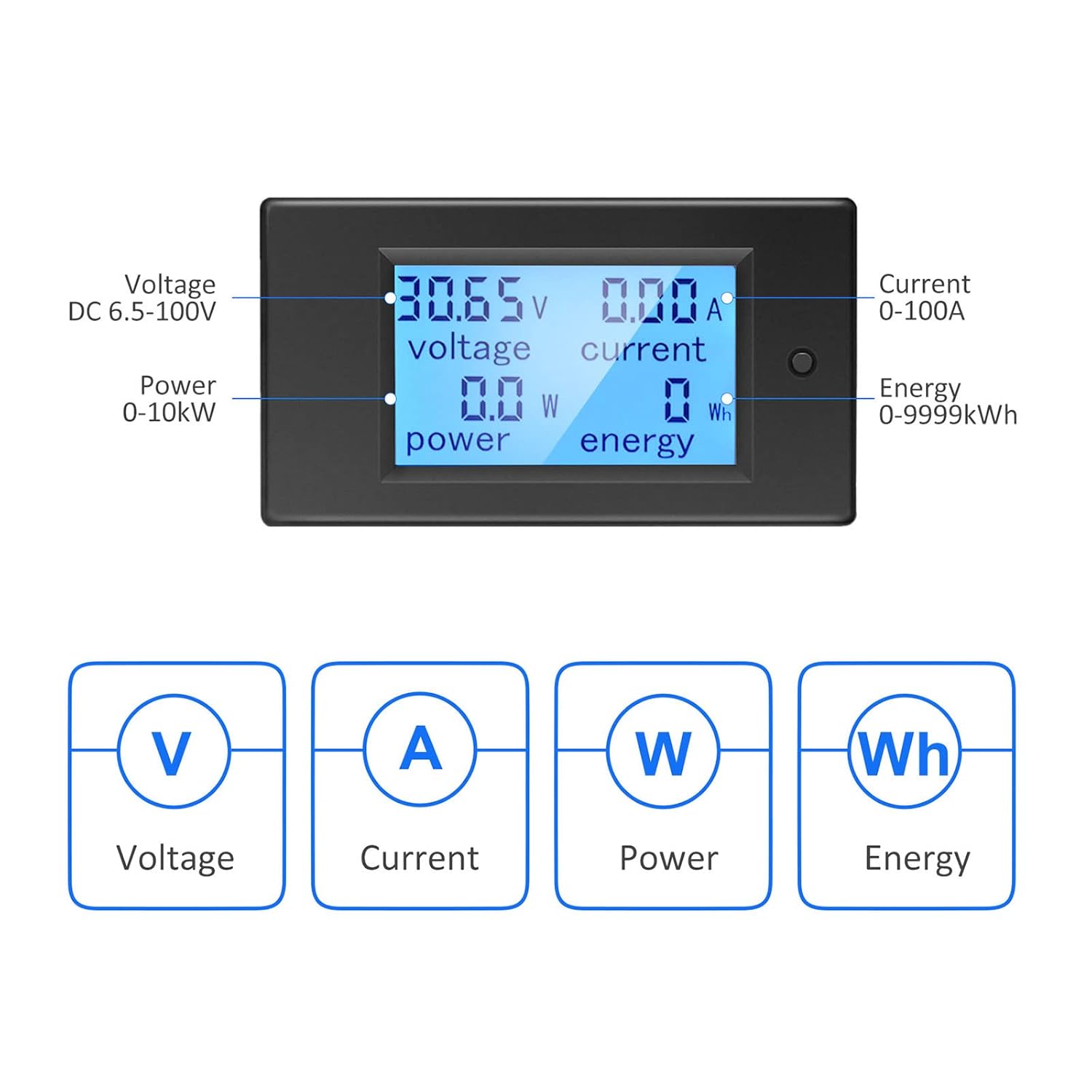
Figura 2: LCD display showing Voltage (V), Current (A), Power (W), and Energy (Wh) measurements.
4. Specificații
| Parametru | Valoare |
|---|---|
| Numărul de model | B0B87458J7 |
| Vol. De operaretage Gama | CC 6.5V - 100V |
| Gama de măsurare a curentului | 0 - 100A |
| Interval de măsurare a puterii | 0 - 10 kW |
| Interval de măsurare a energiei | 0 - 9999kWh |
| Tip de măsurare | Voltmeter, Ammeter, Wattmeter, Energy Meter |
| Tip de afișare | LCD cu iluminare din spate |
| Componente incluse | 1*Digital Voltmeter Ammeter DC 100A, 1*100A/75mV Shunt |
| Specificații conforme | IEC 61010-1 |
| Dimensiuni produs (L x l x H) | 10 x 10 x 10 milimetri (aproximativ) |
| Greutate | 220 de grame (aproximativ) |
| Țara de origine | China |
5. Configurare și instalare
5.1 Basic Wiring Instruction
The meter requires a 100A/75mV shunt for current measurement. The shunt must be installed in series with the load. The meter itself connects with four wires (not included) to the shunt and the power source.
- Pasul 1: Install the 100A/75mV shunt in series with the DC circuit, between the power source (e.g., battery) and the load. Ensure correct polarity.
- Pasul 2: Connect the meter to the shunt and the power source using four wires. The meter's small wires are for its own power supply and voltage measurement, while the shunt handles the main current. Recommended wire gauge for connections to the meter is 30-12 AWG copper wires.

Figura 3: Basic wiring diagram for the Voktta DC Power Meter with shunt.
5.2 Solar System Wiring Instruction
This diagram illustrates wiring for a solar system where an inverter connects directly to the battery. The meter's four wires do not carry large current; they are for measurement and power. Any copper wire from 30 AWG to 12 AWG can be used for these connections.

Figura 4: Solar system wiring diagram with the Voktta DC Power Meter.
You do not need to wire both meters if monitoring a solar system; just connect the voltmeter(s) to monitor the specific parameters you require.
6. Instrucțiuni de utilizare
- Pornire: Once correctly wired, the meter will power on and display real-time voltage, current, power, and accumulated energy.
- Controlul luminii de fundal: The backlight can be manually toggled on or off using the button on the front panel.
- Over-threshold Indication: If the active power exceeds a predefined threshold, the backlight and power display will flash to alert the user.
- Energy Data Reset: To reset the accumulated energy (kWh) data, press and hold the button on the front panel for approximately 5 seconds until the energy reading resets to zero.
- Memorie de oprire: The meter automatically saves all settings and accumulated energy data when power is disconnected. This data will be restored upon power-up.
7. Întreținere
- Curățați afișajul și casinȘtergeți cu o cârpă moale și uscată. Nu utilizați substanțe de curățare abrazive sau solvenți.
- Verificați periodic toate conexiunile cablurilor pentru a vă asigura că sunt sigure și fără coroziune.
- Asigurați-vă că mediul de operare se încadrează în intervalele de temperatură și umiditate specificate.
8. Depanare
- Fără afișare:
- Check if the power supply to the meter is connected correctly and within the 6.5-100V DC range.
- Verificați dacă toate conexiunile cablurilor sunt sigure.
- Citiri incorecte:
- Ensure the shunt is correctly installed in series with the load and its connections are tight.
- Check for correct polarity of all connections.
- Verify that the current does not exceed the 100A rating of the shunt and meter.
- Backlight Flashing:
- This indicates that the active power has exceeded the set threshold. This is a normal warning function.
- Energy Data Not Resetting:
- Ensure you are pressing and holding the reset button for at least 5 seconds.
9. Suport
If you encounter any issues or have questions not covered in this manual, please do not hesitate to contact Voktta customer support. We are committed to providing assistance and will do our best to help you resolve any problems.