
Introducere
Thank you for choosing the Varmilo MA Series V2 Summit R2 Mechanical Keyboard. This manual provides essential information for setting up, operating, maintaining, and troubleshooting your new keyboard. Please read this manual thoroughly to ensure optimal performance and longevity of your device.
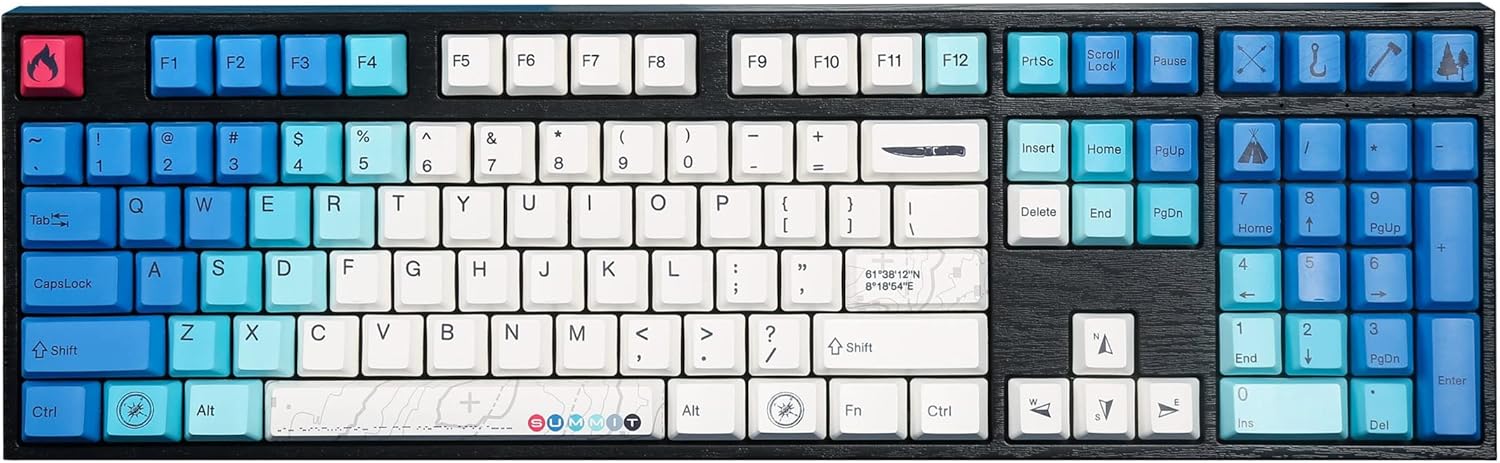
Image: The Varmilo MA Series V2 Summit R2 Mechanical Keyboard, showcasing its full layout and unique keycap design.
Înființat
1. Unboxing
Carefully remove the keyboard and all accessories from the packaging. Ensure the following items are present:
- Varmilo MA Series V2 Summit R2 Mechanical Keyboard
- Cablu USB-C
- Extractor pentru taste (dacă este inclus)
- Manual de utilizare (acest document)
2. Conectarea tastaturii
- Localizați portul USB-C pe spatele tastaturii.
- Conectați un capăt al cablului USB-C furnizat la tastatură.
- Conectați celălalt capăt al cablului USB-C la un port USB disponibil de pe computer.
- Tastatura este plug-and-play și ar trebui să fie recunoscută automat de sistemul de operare.
3. Reglarea unghiului tastaturii
The Varmilo MA Series V2 features a double-section kickstand, allowing for two different typing angles. Gently flip out the desired sections of the kickstand located on the underside of the keyboard to adjust its height and angle for ergonomic comfort.

Imagine: Side profile of the Varmilo keyboard, illustrating the adjustable kickstand in an extended position.
Instrucțiuni de operare
1. Funcții de bază ale tastelor
The keyboard features a standard full-size (104-key) layout. All alphanumeric and standard function keys operate as expected. The Varmilo EC Ivy V2 switches provide a smooth and responsive typing experience.
2. Function (Fn) Key Combinations
The Fn key (typically located near the right Alt key) allows access to secondary functions printed on certain keycaps. Hold down the Fn key and press the desired function key simultaneously.
- Fn + F1-F12: Multimedia controls (e.g., volume, play/pause, stop).
- Fn + Taste săgeată: LED brightness or effect control (refer to specific keycap legends).
- Fn + Win: Tasta de blocare/deblocare Windows.

Imagine: Un prim-plan view of the right side of the Varmilo keyboard, highlighting the special function keys and their legends.
3. Controlul iluminării de fundal cu LED-uri
The keyboard features White LED backlighting. Use the Fn key combinations to adjust the brightness and switch between various lighting effects. Specific key legends will indicate the corresponding functions for LED control.
Întreţinere
1. Curățarea tastaturii
Pentru a menține aspectul și funcționalitatea tastaturii:
- Deconectați tastatura de la computer înainte de curățare.
- Folosiți o cârpă moale, fără scame dampened with water or a mild cleaning solution to wipe the keycaps and casing.
- Pentru praf și resturi între capacele tastelor, folosiți aer comprimat.
- Avoid using harsh chemicals, abrasives, or solvents, as these can damage the PBT keycaps and finish.
2. Îndepărtarea și înlocuirea capacului tastelor
The keyboard features durable Dye Sub PBT keycaps. If you need to remove keycaps for deep cleaning or customization:
- Use the provided keycap puller (if applicable) or a similar tool.
- Gently attach the keycap puller to the keycap and pull straight up to remove it. Avoid twisting or excessive force.
- To replace, align the keycap with the switch stem and press down firmly until it clicks into place.

Image: A collection of individual Varmilo keycaps, including special design keycaps, demonstrating their PBT material and dye-sublimated legends.
Depanare
If you encounter issues with your Varmilo keyboard, please refer to the following common solutions:
- Tastatura nu răspunde:
- Asigurați-vă că este conectat corect cablul USB-C atât la tastatură, cât și la computer.
- Încercați să conectați tastatura la un alt port USB al computerului.
- Testați tastatura pe un alt computer pentru a exclude probleme specifice sistemului.
- Reporniți computerul.
- LEDs Not Working or Incorrect:
- Ensure the LED brightness is not set to the lowest level using Fn key combinations.
- Check if any specific lighting modes are active that might turn off certain LEDs.
- Cheile nu se înregistrează:
- Remove the keycap and inspect the switch for any obstructions.
- Clean around the switch stem with compressed air.
Resetare din fabrică
If issues persist, a factory reset may resolve them. Consult the Varmilo official website or support for specific reset procedures for your model, as these can vary.
Specificații
The following are the technical specifications for the Varmilo MA Series V2 Summit R2 Mechanical Keyboard:
| Caracteristică | Detaliu |
|---|---|
| Marca | Varmilo |
| Model | MA Series V2 Summit R2 |
| Aspect | Full-size (104 + 4 keys) |
| Tip comutator | Varmilo EC Ivy V2 Mechanical Switches |
| Material Keycap | Dye Sub PBT |
| Conectivitate | USB-C |
| Iluminare din spate | LED alb |
| Material | Polybutylene Terephthalate, Silicone |
| Sursa de alimentare | USB Powered |
| Dispozitive compatibile | Computer (prin USB-C) |
Garanție și suport
Varmilo products are manufactured to high-quality standards. For information regarding warranty coverage, technical support, or service inquiries, please visit the official Varmilo website-ul lor sau contactați direct serviciul de asistență pentru clienți. Păstrați bonul fiscal ca dovadă a achiziției pentru reclamațiile în garanție.
Official Varmilo Store: Varmilo Store on Amazon