
1. Introducere
Mulțumesc pentru achizițieasing the Lenco SCD-341 Portable CD-Radio. This device combines a CD player, DAB+ and FM radio, and Bluetooth connectivity in a compact design. This manual provides essential information for safe and efficient use of your new audio system. Please read it thoroughly before operation and retain it for future reference.
2. Informații de siguranță
- Nu expuneți unitatea la ploaie sau umezeală pentru a preveni incendiul sau electrocutarea.
- Asigurați o ventilație corespunzătoare. Nu blocați orificiile de ventilație.
- Utilizați numai adaptorul de alimentare furnizat împreună cu unitatea.
- Nu deschideți c.asing. Apelați la personal calificat pentru toate lucrările de service.
- Evitați amplasarea unității în apropierea surselor de căldură sau în lumina directă a soarelui.
- Țineți unitatea departe de câmpuri magnetice puternice.
3. Conținutul pachetului
Vă rugăm să verificați dacă toate articolele sunt prezente și în stare bună:
- Lenco SCD-341 Portable CD-Radio Unit
- Adaptor de alimentare
- Manual de utilizare (acest document)
- Ghid de pornire rapidă
4. Produs terminatview
The Lenco SCD-341 features a user-friendly interface with clearly labeled buttons and an LCD display.

Figura 1: Față view of the Lenco SCD-341, showing the main controls, LCD display, and stereo speakers.

Figure 2: Lenco SCD-341 with its integrated handle and telescopic antenna extended for radio reception.
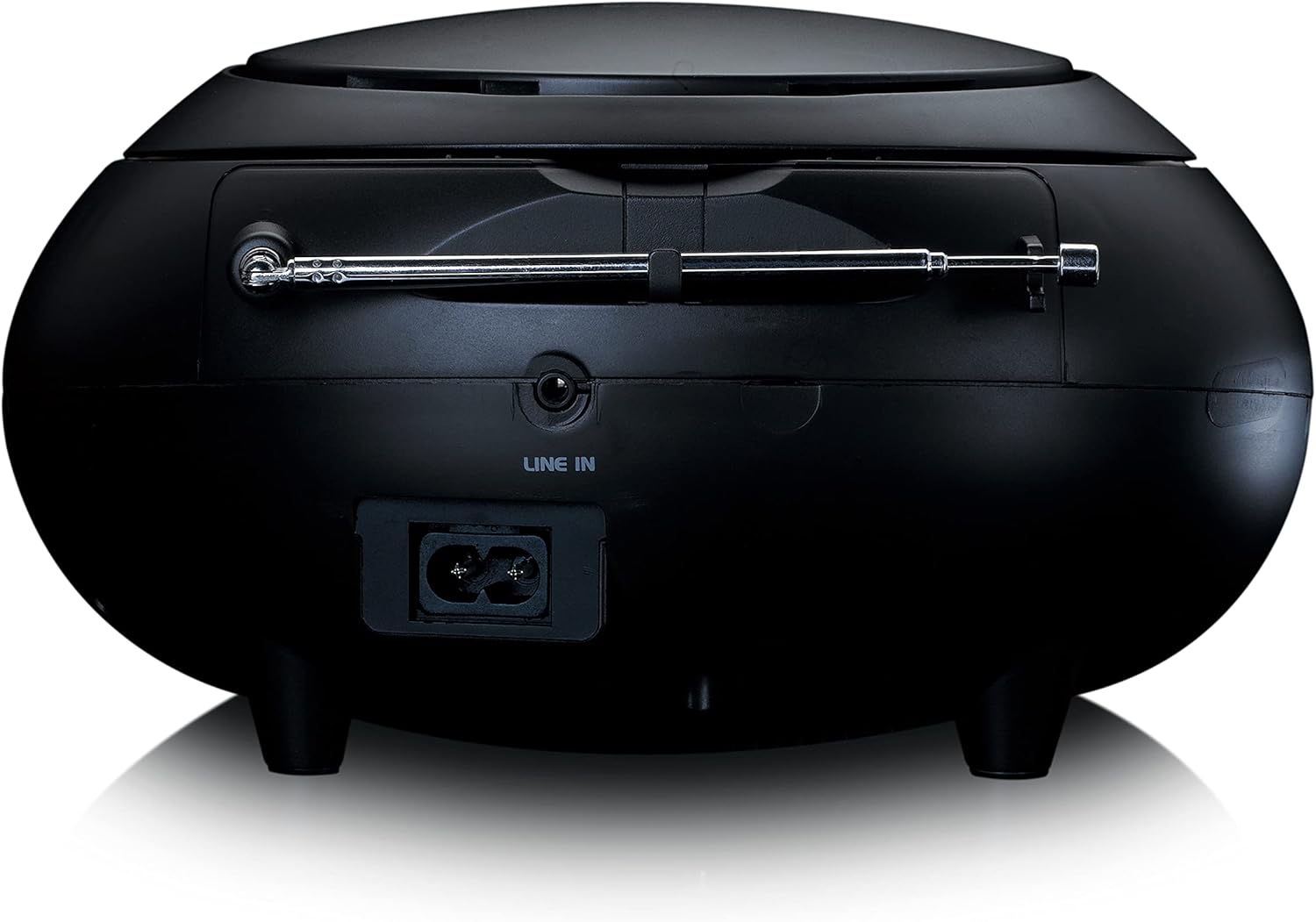
Figura 3: Spate view of the Lenco SCD-341, highlighting the power input and LINE IN audio port.
5. Configurare
5.1 Conexiune la alimentare
The Lenco SCD-341 can be powered by the included AC adapter or by batteries.
- Putere AC: Connect the supplied power adapter to the AC IN socket on the rear of the unit (refer to Figure 3) and plug the other end into a standard wall outlet.
- Putere baterie: Open the battery compartment on the bottom of the unit. Insert the required number of C-type batteries (not included), ensuring correct polarity. Close the compartment securely.
5.2 Configurarea antenei
For optimal DAB+ and FM radio reception, fully extend the telescopic antenna located on the rear of the unit. Adjust its position for the best signal.
6. Instrucțiuni de utilizare
6.1 Pornire/Oprire
Apăsați tasta PUTERE butonul pentru a porni sau opri unitatea.
6.2 Redare CD
- Apăsați tasta SURSĂ button repeatedly until "CD" is displayed on the LCD screen.
- Deschideți capacul compartimentului CD-ului ridicându-l ușor.
- Așezați un CD cu eticheta în sus pe ax.
- Close the CD compartment lid. The unit will begin reading the CD.
- Utilizați REDARE/PAUZĂ, STOP, SALTAȚI ÎNainte, și SARIT ÎNAPOI butoane pentru a controla redarea.

Figura 4: Sus view of the Lenco SCD-341 with the CD compartment open, showing a CD being inserted.
6.3 Operarea radioului DAB+
- Apăsați tasta SURSĂ apăsați butonul în mod repetat până când se afișează „DAB”.
- The unit will automatically scan for available DAB+ stations. This may take a few moments.
- Odată ce scanarea este completă, utilizați TUNE +/- buttons to navigate through the available stations.
- Pentru a salva un post ca presetare, apăsați și mențineți apăsat butonul PRESETARE butonul, apoi utilizați TUNE +/- pentru a selecta un număr presetat și apăsați PRESETARE din nou pentru a confirma.
6.4 Funcționarea radioului FM
- Apăsați tasta SURSĂ apăsați butonul în mod repetat până când se afișează „FM”.
- Țineți apăsat butonul TUNE +/- buttons to automatically scan for the next available station. Briefly press to manually tune.
- Pentru a salva un post ca presetare, apăsați și mențineți apăsat butonul PRESETARE butonul, apoi utilizați TUNE +/- pentru a selecta un număr presetat și apăsați PRESETARE din nou pentru a confirma.
6.5 Asociere Bluetooth
- Apăsați tasta SURSĂ button repeatedly until "Bluetooth" is displayed. The unit will enter pairing mode, indicated by a flashing Bluetooth icon on the display.
- On your external device (smartphone, tablet), enable Bluetooth and search for available devices.
- Select "Lenco SCD-341" from the list of found devices.
- Once paired, the Bluetooth icon on the unit's display will stop flashing and remain solid. You can now play audio from your device through the Lenco SCD-341.
6.6 Controlul volumului
Utilizați VOLUM +/- buttons to adjust the audio output level.
7. Întreținere
- curatenie: Folosiți o lavetă moale și uscată pentru a curăța exteriorul unității. Nu utilizați substanțe de curățare abrazive sau solvenți.
- Îngrijirea lentilelor CD: Dacă apar probleme la redarea CD-urilor, utilizați un disc de curățare a lentilelor CD disponibil în comerț.
- Depozitare: When not in use for extended periods, disconnect the power adapter and remove batteries. Store the unit in a cool, dry place.
8. Depanare
| Problemă | Cauza posibila | Soluţie |
|---|---|---|
| Fără putere | Power adapter not connected; batteries depleted or incorrectly inserted. | Check power adapter connection; replace batteries or ensure correct polarity. |
| Nici un sunet | Volume too low; incorrect source selected; headphones connected. | Increase volume; select correct source (CD, DAB, FM, Bluetooth); disconnect headphones. |
| CD-ul nu se redă | CD introdus incorect; CD murdar sau zgâriat; Formatul CD nu este acceptat. | Reinsert CD correctly; clean or replace CD; ensure CD is a standard audio CD. |
| Recepție radio slabă | Antenna not extended or positioned poorly; strong interference. | Fully extend and adjust antenna; move unit away from other electronic devices. |
| Asocierea Bluetooth a eșuat | Bluetooth not enabled on external device; device too far; unit not in pairing mode. | Ensure Bluetooth is on and discoverable; move device closer; select Bluetooth source on unit. |
9. Specificații
| Numărul de model | SCD-341 |
| Marca | Lenco |
| Dimensiuni (L x l x H) | 21.5 x 21 x 11.5 cm |
| Greutate | 1.09 kg |
| Sursa de alimentare | AC (adapter included) / Battery-Powered |
| Tehnologie Tuner | DAB+, FM |
| Conectivitate | Bluetooth |
| Mod ieșire audio | Stereo |
| Tip de afișare | LCD |
| Putere de ieșire | 3 wați RMS |

Figure 5: Dimensions of the Lenco SCD-341 unit.
10. Garanție și asistență
For warranty information and technical support, please refer to the warranty card included in your package or visit the official Lenco website-ul.
Producător: Lenco GmbH
Țara de origine: Hongkong
11. Videoclipuri oficiale ale produselor
Watch this official video for a visual guide to the Lenco SCD-341.
Video 1: A 360-degree product view of the Lenco SCD-341, showcasinprivind designul și caracteristicile sale din toate unghiurile.