
1. Introducere
Thank you for choosing the ICON Morpheus GX 66 Wired Gaming Mouse. This manual provides essential information for setting up, operating, and maintaining your new gaming mouse. Please read this guide thoroughly to ensure optimal performance and longevity of your device.
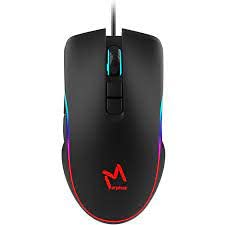
The ICON Morpheus GX 66 is a high-performance wired gaming mouse featuring customizable LED lighting and a precise 7200 DPI optical sensor, designed for an optimal gaming experience. It offers a modern style and ambidextrous design, compatible with Windows 7, Windows XP, and Linux operating systems.
2. Caracteristicile produsului
- Senzor de înaltă precizie: Equipped with a 7200 DPI optical sensor for accurate tracking and responsiveness.
- Iluminare LED personalizabila: Dynamic LED illumination enhances your gaming setup.
- 7 butoane programabile: Offers extensive customization for various gaming commands.
- Conectivitate prin cablu: Ensures a stable and lag-free connection.
- Design ambidextru: Confortabil atât pentru utilizatorii stângaci, cât și pentru cei dreptaci.
- Construcție durabilă: Designed for long-lasting use in intense gaming sessions.
- Compatibilitate largă: Supports Windows 7, Windows XP, and Linux operating systems.

3. Configurare
- Despachetați mouse-ul: Carefully remove the ICON Morpheus GX 66 mouse from its packaging.
- Conectare la computer: Locate an available USB port on your computer. Plug the USB connector of the mouse firmly into the USB port.
- Instalare driver: The mouse is plug-and-play. Your operating system (Windows 7, Windows XP, or Linux) should automatically detect and install the necessary drivers. This process may take a few moments.
- Funcționalitate de testare: Once installed, move the mouse and click the buttons to ensure it is working correctly.
4. Instrucțiuni de utilizare
4.1 Funcții de bază
- Click stânga: Primary action, selection, activation.
- Click dreapta: Context menu, secondary actions.
- Rotiță de defilare: Derulați în sus/în jos, faceți clic pe butonul din mijloc pentru funcții specifice.
4.2 Ajustare DPI
The mouse features a dedicated DPI button (often located behind the scroll wheel) to cycle through different sensitivity levels. Press this button to adjust the DPI (Dots Per Inch) to your preferred setting for various tasks or games. The LED lighting may change color to indicate the current DPI level.
4.3 Iluminare LED
The ICON Morpheus GX 66 features dynamic LED lighting. The lighting patterns and colors are typically pre-programmed and may change based on the selected DPI setting or cycle automatically. There are no user-configurable software controls for the LED lighting on this model.

5. Întreținere
- curatenie: Folosiți o lavetă moale și uscată pentru a șterge suprafața mouse-ului. Pentru murdăria persistentă, ștergeți ușor.ampClătiți cârpa cu apă. Evitați utilizarea substanțelor chimice dure sau a materialelor abrazive.
- Curățarea senzorului: Occasionally, dust or debris may accumulate around the optical sensor. Use a cotton swab or compressed air to gently clean the sensor area on the underside of the mouse.
- Îngrijirea cablului: Evitați îndoirile bruște sau tragerea excesivă a cablului mouse-ului pentru a preveni deteriorarea. Depozitați cablul cu grijă atunci când nu îl utilizați.
- Depozitare: Când nu îl utilizați pentru perioade lungi de timp, depozitați mouse-ul într-un mediu curat și uscat, ferit de lumina directă a soarelui și de temperaturi extreme.

6. Depanare
- Mouse-ul nu răspunde:
- Asigurați-vă că ați conectat cablul USB la portul USB al computerului.
- Încearcă să conectezi mouse-ul la un alt port USB.
- Reporniți computerul.
- Mișcare neregulată a cursorului:
- Curățați senzorul optic de pe partea inferioară a mouse-ului.
- Asigurați-vă că utilizați mouse-ul pe o suprafață curată, nereflectorizantă și uniformă. Evitați suprafețele din sticlă sau cele cu reflexii puternice.
- LED Lighting Not Working:
- Verificați conexiunea USB.
- The LED lighting is typically powered directly via USB. If the mouse functions but LEDs do not, contact support.
- Butoanele nu funcționează:
- Asigurați-vă că mouse-ul este conectat corect.
- Testați mouse-ul pe un alt computer pentru a exclude problemele software.
7. Specificații
| Producător | ICONA |
| Model | Morpheus GX 66 |
| ASIN | B0B5PLWQXC |
| Caracteristici speciale | Iluminare LED |
| Tehnologia de detectare a mișcării | Optic |
| DPI | 7200 |
| Orientarea mâinii | Ambidextru |
| Utilizări recomandate | Jocuri |
| Compatibilitatea sistemelor de operare | Linux, Windows 7, Windows XP |
| Stil | Modern |
| Tip de finisare | Mate |
| Sursa de alimentare | Electric cu fir (USB) |
| Culoare | Multicolor |
8. Garanție și asistență
The ICON Morpheus GX 66 Wired Gaming Mouse comes with a standard manufacturer's warranty. For specific warranty terms and conditions, please refer to the warranty card included with your product or visit the official ICON website-ul.
For technical support, troubleshooting assistance, or to inquire about replacement parts, please contact ICON customer service through their official support channels. Keep your purchase receipt and product model information (GX 66) handy when contacting support.