
Introducere
This manual provides detailed instructions for the setup, operation, and maintenance of your Amazon Basics Projection Alarm Clock. Please read this manual thoroughly before using the product to ensure proper function and to prevent damage.

Image: The Amazon Basics Projection Alarm Clock, showing its digital display and projection lens.
Instrucțiuni de siguranță
- Nu expuneți aparatul la temperaturi extreme, lumina directă a soarelui, praf sau umiditate.
- Asigurați-vă că adaptorul de alimentare este compatibil cu sursa locală de alimentare.
- Țineți unitatea departe de apă sau alte lichide.
- Nu încercați să dezasamblați sau să modificați unitatea. Aceasta va anula garanția.
- Curățați unitatea doar cu o lavetă moale și uscată. Nu utilizați detergenți lichizi.
- Aruncați bateriile în mod corespunzător, conform reglementărilor locale.
Conținutul pachetului
- Amazon Basics Projection Alarm Clock
- Adaptor de curent alternativ
- Manual de utilizare
Caracteristicile produsului
- Projection of time onto a wall or ceiling.
- FM Radio with automatic/manual scan and up to 15 preset stations.
- USB port for charging mobile phones or tablets.
- 7-inch high-definition LED display with adjustable brightness.
- Dual alarms for separate wake-up times.
- Snooze function with adjustable duration (2 to 60 minutes).
- Sleep timer for automatic radio shut-off (5 to 90 minutes).
- DST button for Daylight Saving Time adjustment.
- Battery backup (requires 2 AAA batteries, not included) to maintain time settings during power outages.

Imagine: Pesteview of key features including sleep timer, radio presets, and snooze function.
Comenzi și afișare
Familiarize yourself with the buttons and ports on your alarm clock for optimal use.

Imagine: Laterală view illustrating the location of controls, USB charging port, and projection lens.
- Butonul de setare a orei: Folosit pentru a seta ora curentă.
- Butoane Alarmă 1/2: Folosit pentru a seta și activa Alarma 1 și Alarma 2.
- Buton Amânare/Reducere intensitate: Activates snooze during an alarm; adjusts display brightness when not alarming.
- Radio/Sleep Button: Turns FM radio on/off; sets sleep timer.
- Volume/Tune Dial: Adjusts radio volume and tunes FM frequencies.
- Projection On/Off/Flip Button: Controls the projection feature and flips the projected time.
- Projection Focus Wheel: Adjusts the clarity of the projected time.
- Reglare unghi de proiecție: Changes the angle of the projected time.
- Port de încărcare USB: Pentru încărcarea dispozitivelor externe.
- Buton DST: Comută ora de vară.
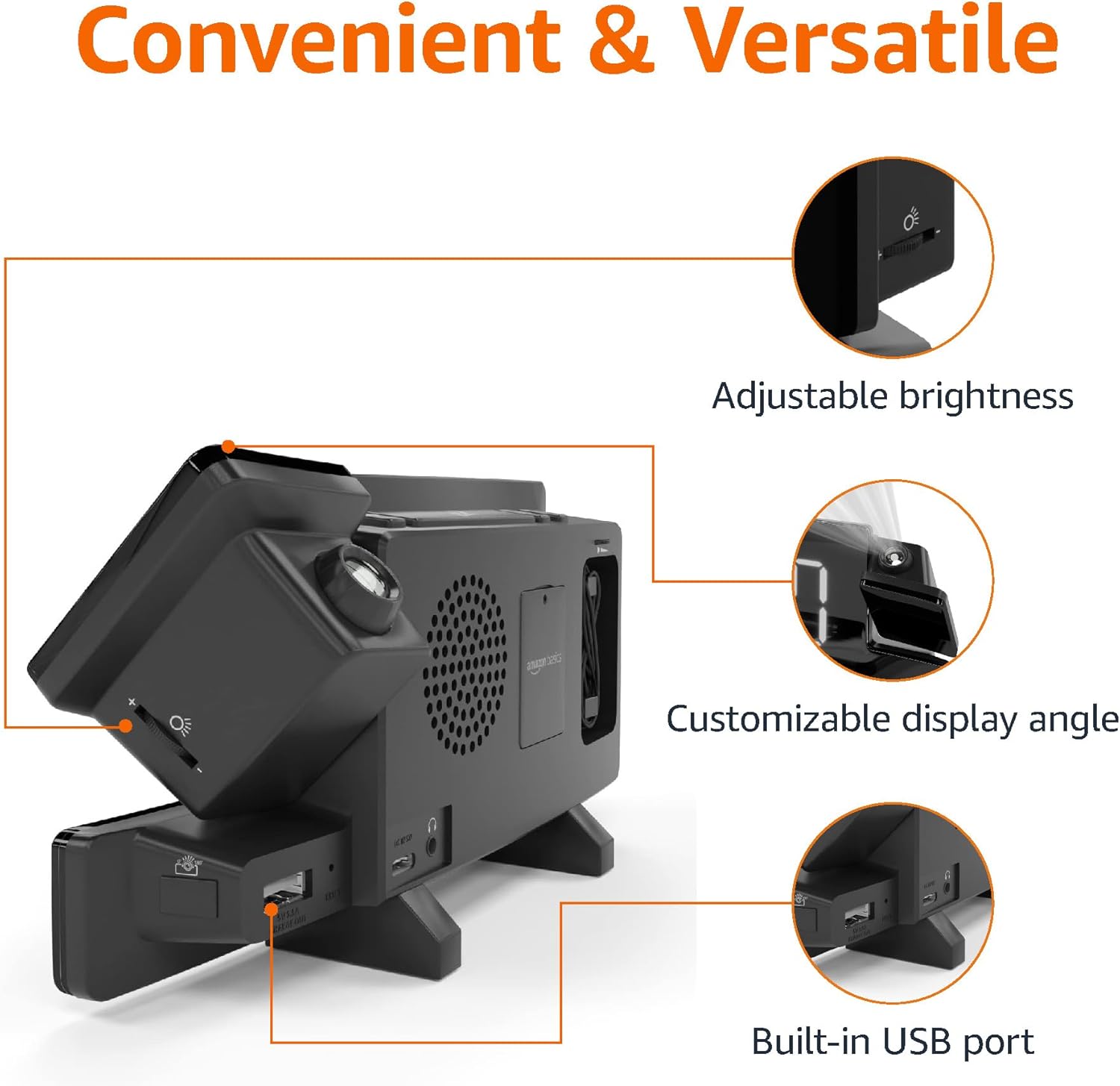
Image: Diagram highlighting the adjustable brightness, customizable projection angle, and USB charging port.
Înființat
1. Conexiune la alimentare
Connect the AC power adapter to the DC IN port on the back of the alarm clock and plug it into a standard wall outlet. The display will light up.
2. Instalarea bateriei de rezervă
For battery backup, open the battery compartment on the bottom of the unit. Insert 2 AAA batteries (not included), ensuring correct polarity (+/-). Close the compartment. The battery backup maintains time settings during power outages but does not power the display or alarm functions.
3. Setarea inițială a orei
- Țineți apăsat butonul Ora stabilită buton. Cifrele orelor vor clipi.
- Utilizați Volume/Tune Dial pentru a regla ora. presa Ora stabilită din nou pentru a confirma.
- The minute digits will flash. Use the Volume/Tune Dial pentru a regla minutele. presa Ora stabilită din nou pentru a confirma.
- The time format (12H/24H) will flash. Use the Volume/Tune Dial to select your preferred format. Press Ora stabilită pentru a confirma și a ieși din modul de setare a orei.
4. Ora de vară (DST)
Apăsați tasta DST button to toggle Daylight Saving Time on or off. The DST indicator will appear or disappear on the display.
Instrucțiuni de operare
1. Setarea alarmelor (Alarma 1 și Alarma 2)
- Țineți apăsat butonul Alarma 1 or Alarma 2 Cifrele orei alarmei vor clipi.
- Utilizați Volume/Tune Dial to adjust the alarm hour. Press the respective Alarma butonul din nou pentru a confirma.
- Cifrele minutelor alarmei vor clipi. Folosiți Volume/Tune Dial to adjust the alarm minutes. Press the respective Alarma butonul din nou pentru a confirma.
- The alarm source (FM radio or buzzer) will flash. Use the Volume/Tune Dial to select your preference. Press the respective Alarma button to confirm and activate the alarm. An alarm icon will appear on the display.
- Pentru a dezactiva o alarmă, apăsați butonul corespunzător Alarma button once. The alarm icon will disappear.
2. Using Snooze
Când sună o alarmă, apăsați butonul Amânare/Dimmer button to temporarily silence the alarm. The alarm will sound again after the set snooze duration. The default snooze duration is 9 minutes. To adjust the snooze duration, press and hold the Amânare/Dimmer , apoi utilizați butonul Volume/Tune Dial to select a duration between 2 and 60 minutes. Press Amânare/Dimmer din nou pentru a confirma.
3. Funcționare radio FM
- Pornire/Oprire: Apăsați tasta Radio/Sleep buton pentru a porni sau opri radioul FM.
- Posturi de melodie: Utilizați Volume/Tune Dial to manually tune to a desired FM frequency.
- Auto scanare: Țineți apăsat butonul Radio/Sleep button to automatically scan and save available FM stations as presets.
- Selectați presetări: Once stations are saved, short press the Radio/Sleep button to cycle through the preset stations.
- Reglați volumul: Rotiți Volume/Tune Dial to adjust the radio volume.
4. Temporizator de somn
În timp ce radioul FM este difuzat, apăsați butonul Radio/Sleep button repeatedly to set the sleep timer. Options typically range from 5 to 90 minutes. The radio will automatically turn off after the selected duration.
5. Funcția de proiecție

Image: The alarm clock projecting the time onto a bedroom ceiling.
- Activare/Dezactivare: Apăsați tasta Projection On/Off/Flip button to turn the time projection on or off.
- Reglarea unghiului: Manually adjust the projection arm to direct the time onto your desired surface (wall or ceiling).
- Focus: Rotiți Projection Focus Wheel to achieve a clear image.
- Flip Display: Apăsați tasta Projection On/Off/Flip button repeatedly to rotate the projected time 180 degrees, ensuring correct orientation.

Image: The alarm clock on a nightstand, projecting the time onto a wall, demonstrating its use in a bedroom setting.
6. Încărcare USB
Connect your mobile phone or tablet's USB charging cable to the Port de încărcare USB on the back of the alarm clock. The device will begin charging. This port is for charging only and does not support data transfer.
7. Reglarea luminozității afișajului
Apăsați tasta Amânare/Dimmer button (when no alarm is sounding) to cycle through different brightness levels for the main LED display.
Întreţinere
1. Curatenie
Wipe the unit with a soft, dry, lint-free cloth. Do not use abrasive cleaners, waxes, or solvents as they may damage the surface.
2. Înlocuirea bateriei
If the battery backup is not functioning correctly (e.g., time resets after a power outage), replace the 2 AAA batteries in the battery compartment, ensuring correct polarity.
Depanare
| Problemă | Cauza posibila | Soluţie |
|---|---|---|
| Afișajul este gol. | Fără conexiune la curent. | Asigurați-vă că adaptorul de curent alternativ este conectat corect la unitate și la o priză de perete funcțională. |
| Alarma nu sună. | Alarma nu este activată sau volumul este prea scăzut. | Check if the alarm icon is visible on the display. Re-set the alarm if necessary. Increase radio volume if FM is selected as alarm source. |
| Timpul proiectat este neclar. | Projection focus is not adjusted. | Rotiți Projection Focus Wheel până când imaginea este clară. |
| Projected time is not visible. | Projection is off or room is too bright. | Apăsați tasta Projection On/Off/Flip button to activate. The projection is best viewîntr-o cameră întunecată. |
| Recepția radio este slabă. | Antenna position or interference. | Adjust the position of the FM antenna wire. Move the unit away from other electronic devices that may cause interference. |
| Încărcarea prin USB nu funcționează. | Problemă cu cablul sau incompatibilitate cu dispozitivul. | Ensure the USB cable is functional and properly connected. Try a different cable or device. |
Specificații
- Model: MET8831-US
- Putere de intrare: Adaptor AC (inclus)
- Baterie de rezerva: 2 x baterii AAA (nu sunt incluse)
- Afişa: LED de 7 inci
- Frecventa radio: FM
- Ieșire USB: 5V, 1A (for charging)
- Dimensiuni (L x l x H): 7.1 x 1.6 x 3.7 inchi (18.03 x 4.06 x 9.4 cm)
- Greutate: Aproximativ 0.59 lbs (267.62 g)

Image: Product dimensions for the Amazon Basics Projection Alarm Clock.
Informații despre garanție
This product is covered by the Amazon Basics warranty. For detailed information regarding warranty terms and conditions, please refer to the official Amazon Basics website-ul sau contactați asistența pentru clienți.
Asistență pentru clienți
For further assistance, troubleshooting, or product inquiries, please contact Amazon Basics customer support through the Amazon website or your purchase platform. Have your product model number (MET8831-US) and purchase details ready.