
1. Introducere
Thank you for choosing the COMAOGO T002-W Mini Projector. This manual provides essential information for setting up, operating, and maintaining your projector to ensure optimal performance and longevity. The T002-W is a versatile projector featuring 9500 Lumens brightness, 1080P support, 5G WiFi, and Bluetooth 5.1 connectivity, designed for an immersive viewexperiență de până la 220 de inchi.
2. Conținutul pachetului
Vă rugăm să verificați pachetul pentru următoarele articole:
- 1 x COMAOGO T002-W Mini Projector
- 1 x telecomandă
- 1 x cablu de alimentare
- 1 x cablu HDMI
- Cablul AV 1 x AV
- 1 x Manual de utilizare
3. Produs terminatview
Familiarizați-vă cu componentele și interfețele proiectorului.

Image: COMAOGO T002-W Projector with 5G and 2.4G WiFi capabilities, showing wireless screen synchronization with a tablet and smartphone.
The projector features various ports for connectivity, including HDMI, USB, VGA, AV, and a TF card slot, along with a 3.5mm audio output. It also supports dual-band 5G and 2.4G WiFi for stable wireless connections and Bluetooth 5.1 for audio devices.

Image: COMAOGO T002-W Projector connected to various devices including a laptop, game console, and streaming stick, highlighting its multiple input ports (AV, HDMI, USB, TF, VGA).
4. Configurare
4.1 Plasarea
Position the projector on a stable, flat surface or mount it on a tripod. Ensure there are no obstructions to the ventilation vents. For optimal viewing, the projection distance should be between 1.5 meters and 5.5 meters, yielding a screen size from 45 inches to 220 inches.
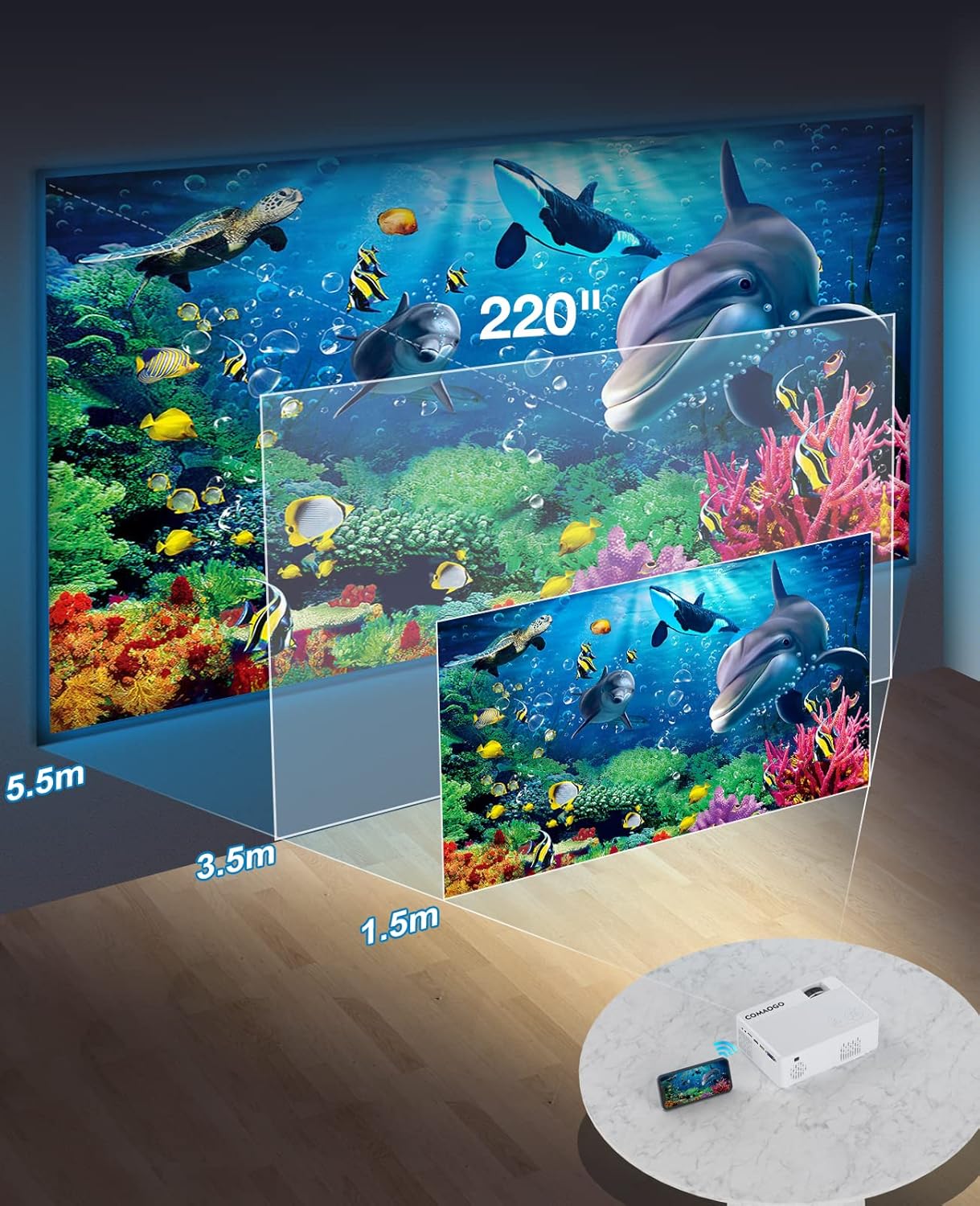
Image: Diagram illustrating the projection distances (1.5m to 5.5m) and corresponding screen sizes (45 to 220 inches) for the COMAOGO T002-W Projector.
4.2 Conexiune la alimentare
Connect the power cable to the projector's power input and then plug it into a power outlet (AC 220V).
4.3 Corecția focalizării și a trapezului
To achieve a clear and rectangular image:
- Ajustarea focalizării: Rotate the focus ring on the projector lens until the image appears sharp.
- Corecție trapezoială: Adjust the keystone correction dial (if available, or via menu settings) to correct trapezoidal distortion, ensuring the image is rectangular. The projector supports ±15° keystone correction.

Image: Illustration of keystone correction and focus adjustment for the COMAOGO T002-W Projector, showing how to achieve a clear, rectangular image.
5. Instrucțiuni de utilizare
5.1 Pornire/Oprire
- Pornire: Apăsați butonul de pornire de pe proiector sau de pe telecomandă.
- Oprire: Apăsați din nou butonul de alimentare pentru a opri proiectorul.
5.2 Selectarea sursei de intrare
Use the "Source" button on the remote control or the projector's control panel to select the desired input source (e.g., HDMI, USB, VGA, AV).
5.3 Conectivitate fără fir (WiFi)
The projector supports dual-band 5G and 2.4G WiFi for stable screen mirroring.
- Navigate to the WiFi settings on the projector's menu.
- Select your desired WiFi network (5G for faster, more stable connection; 2.4G for longer range and better penetration).
- Introduceți parola pentru a vă conecta.
- For screen mirroring, select the appropriate option (e.g., "iOS Cast" or "Android Cast") on the projector and follow the on-screen instructions to connect your smartphone or tablet.
5.4 Conectivitate Bluetooth
Connect external Bluetooth audio devices like speakers or headphones.

Image: COMAOGO T002-W Projector demonstrating Bluetooth 5.1 connection with a speaker and headphones.
- Go to the Bluetooth settings in the projector's menu.
- Asigurați-vă că dispozitivul Bluetooth este în modul de asociere.
- Selectați dispozitivul din listă pentru a-l asocia.
- Note: The projector's Bluetooth function is for connecting output devices (speakers, headphones) only.
5.5 Conexiuni cu fir
Conectați diverse dispozitive folosind porturile disponibile:
- HDMI: Connect laptops, PCs, game consoles (Xbox), TV sticks (Roku, Chromecast), DVD players.
- USB: Redați conținut media filedirect de pe unități USB.
- VGA: Connect older computers or laptops.
- DE: Connect legacy video devices.
- Card TF: Insert a TF card to play media files.
- Important: Copyright-protected content from services like Netflix or Disney+ is not directly supported via screen mirroring. For these services, use an HDMI connection with a compatible adapter (e.g., Lightning Digital AV Adapter for iOS devices) or a streaming stick.
6. Întreținere
6.1 Curățarea lentilei
Use a soft, lint-free cloth or lens cleaning paper to gently wipe the projector lens. Avoid using abrasive materials or harsh chemicals that could damage the lens coating.
6.2 Sistem de răcire
The projector features an updated cooling system designed to reduce noise and maintain optimal operating temperature. Ensure the ventilation vents are clear of dust and obstructions to prevent overheating. Regular cleaning of the vents with a soft brush or compressed air is recommended.
7. Depanare
Dacă întâmpinați probleme cu proiectorul, consultați următoarele soluții comune:
- Nicio imagine:
- Verificați conexiunea la alimentare și asigurați-vă că proiectorul este pornit.
- Verify the input source selection matches your connected device.
- Ensure all cables (HDMI, VGA, etc.) are securely connected.
- Ajustați focalizarea și corecția trapezoidală.
- Fără sunet:
- Reglați volumul proiectorului.
- Dacă utilizați difuzoare externe, asigurați-vă că sunt conectate și pornite corect.
- Check Bluetooth connection for external audio devices.
- Ensure the audio output from your source device is enabled.
- WiFi/Screen Mirroring Issues:
- Asigurați-vă că atât proiectorul, cât și dispozitivul sunt conectate la aceeași rețea WiFi.
- Check for strong WiFi signal.
- Restart both the projector and your source device.
- For Android devices, ensure "Wireless Projection" or "Screen Mirroring" is enabled. For iOS, use "Screen Mirroring" from Control Center.
- Imaginea este neclară:
- Reglați inelul de focalizare de pe obiectiv.
- Asigurați-vă că distanța de proiecție se încadrează în intervalul recomandat.
- Imaginea este trapezoidală:
- Adjust the keystone correction dial or setting.
For further assistance or software updates, please contact COMAOGO customer support.
8. Specificații
| Caracteristică | Caietul de sarcini |
|---|---|
| Marca | COMAOGO |
| Model | T002-W |
| Luminozitate | 9500 lumeni (220 ANSI) |
| Raport de contrast | 6000:1 |
| Rezoluție nativă | 1280 x 720 |
| Rezoluție acceptată | 1080P |
| Dimensiunea proiecției | 45" - 220" |
| Distanța de proiecție | 1.5m - 5.5m |
| Corecție corecție | ±15° |
| Conectivitate WiFi | Dual-band (5G + 2.4G) |
| Bluetooth | Bluetooth 5.1 |
| Interfață hardware | 3.5mm Audio, TF Card, USB 2.0, VGA, HDMI |
| Difuzor încorporat | Da |
| Nivel de zgomot | 45 de decibeli |
| Consumul de energie | 48 wați |
| Dimensiuni | 20.32 x 15.24 x 7.62 cm |
| Greutate | 1 kilogram |
9. Videoclip oficial al produsului
Watch this video for a visual guide on the COMAOGO T002-W Mini Projector's features and operation.
Video: An official product video demonstrating the features and usage of the COMAOGO T002-W Mini Projector, including connectivity and display capabilities.
10. Garanție și asistență
The COMAOGO T002-W Mini Projector comes with a standard manufacturer's warranty. For warranty claims, technical support, or inquiries regarding software updates, please contact COMAOGO customer service through the retailer where you purchased the product or visit the official COMAOGO website-ul.
SOFTWARE UPDATES can be provided; please contact us if needed.