
Minoston MT10W
Manual de utilizare pentru comutatorul temporizator WiFi Minoston cu numărătoare inversă inteligentă
Model: MT10W
Marcă: Minoston
Introducere
Thank you for choosing the Minoston MT10W WiFi Timer Switch. This smart countdown timer switch allows you to control lights, fans, and heaters with preset countdown times and remote access via a smartphone application. It integrates seamlessly with Amazon Alexa and Google Assistant for voice control. This manual provides detailed instructions for installation, operation, and maintenance to ensure optimal performance and safety.

Imagine: față view of the Minoston MT10W WiFi Timer Switch and its retail packaging, highlighting key features and certifications.
Informații importante privind siguranța
- RISC DE INCENDIU, ELECTRICE SAU RĂNIRE.
- Acest dispozitiv este destinat instalării în conformitate cu Codul electric național și cu reglementările locale.
- Consult a qualified electrician if you are unsure about any part of these instructions.
- Always turn off power at the circuit breaker or fuse box before installation or servicing.
- NEUTRAL WIRE REQUIRED. Ensure your electrical box has a neutral wire.
- Do not use with dimmable fixtures or 3-way switches.
- Temperatura de funcționare: 32°F până la 104°F (0°C până la 40°C).
- Numai pentru uz interior.
Conținutul pachetului
- Minoston MT10W WiFi Timer Switch
- Manual de instructiuni
- Șuruburi de montare
- Nuci de sârmă
Specificații
| Numărul de model | MT10W |
| Putere | 120VAC, 60Hz |
| Incandescent Load | 960W (1200W Tungsten) |
| Sarcina motorului | 1 / 2 HP |
| Sarcină rezistivă | 1800W |
| Frecvența Wi-Fi | 2.4GHz |
| Temperatura de operare | 32 ° C ~ 104 ° C (0 ° F ~ 40 ° F) |
| Umiditate | 95% RH, fără condensare |
| Certificari | ETL, FCC |
| Dimensiuni | 4.5 x 3 x 10.49 cm (1.77 x 1.18 x 4.13 țoli) |

Image: Diagram showing the physical dimensions of the Minoston MT10W WiFi Timer Switch, including depth reduction for easier installation.
Ghid de instalare
Schema de cablare
The Minoston MT10W requires a neutral wire for proper operation. Please follow the diagram below carefully.
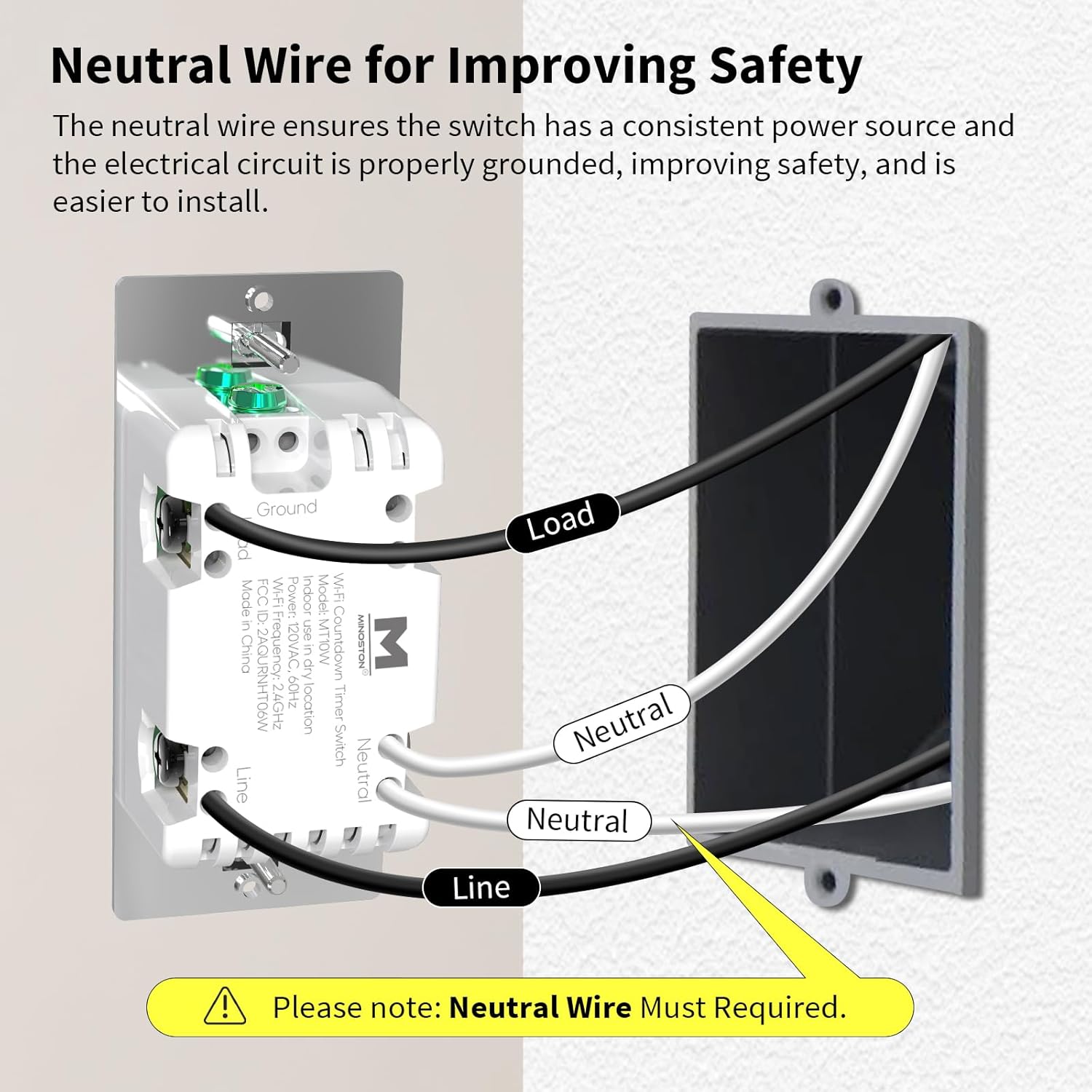
Image: Detailed wiring diagram for the Minoston MT10W WiFi Timer Switch, showing connections for Line, Load, Neutral, and Ground wires. A note emphasizes the requirement for a neutral wire.
Etape de instalare
- Opriți alimentarea: Before beginning, turn off the power to the switch location at the circuit breaker or fuse box.
- Scoateți comutatorul vechi: Scoateți cu grijă placa de perete existentă și întrerupătorul din cutia electrică.
- Identificați firele: Identify the Line (hot), Load, Neutral, and Ground wires. A neutral wire is typically white. If you do not have a neutral wire, this switch is not compatible.
- Conectați firele:
- Connect the Line wire from the wall box to the Line terminal on the MT10W switch.
- Connect the Load wire from the wall box to the Load terminal on the MT10W switch.
- Connect the Neutral wire from the wall box to the Neutral terminal on the MT10W switch.
- Connect the Ground wire from the wall box to the Ground terminal on the MT10W switch.
- Comutator de montare: Carefully push the wired switch into the electrical box. Secure it with the provided screws.
- Instalați placa de perete: Atașați placa de perete nouă sau existentă.
- Restaurați alimentarea: Reporniți alimentarea la întrerupător.
Wi-Fi and App Setup
The Minoston MT10W can be controlled via the Smart Life or Minoston APP. Ensure your Wi-Fi network is 2.4GHz.
- Descărcați aplicația: Download the "Smart Life" or "Minoston" app from the App Store (iOS) or Google Play Store (Android).
- Înregistrare/Autentificare: Deschide aplicația și creează un cont nou sau conectează-te dacă ai deja unul.
- Adăugați dispozitiv:
- Tap "+" or "Add Device" in the app.
- Select "Electrical" > "Switch (Wi-Fi)" or search for "MT10W".
- Follow the in-app instructions to put the switch into pairing mode. This usually involves holding the "30 Min" button for 5 seconds until the blue LED indicator flashes quickly.
- Introduceți numele și parola rețelei Wi-Fi de 2.4 GHz.
- Wait for the device to connect. Once connected, you can rename the switch.

Image: Screenshot of the mobile application interface demonstrating remote control of the Minoston MT10W WiFi Timer Switch.
Voice Control Setup (Alexa/Google Assistant)
- Ensure your Minoston MT10W switch is successfully added to the Smart Life/Minoston app.
- Deschide aplicația Amazon Alexa sau Google Home.
- Accesați „Abilități și jocuri” (Alexa) sau „Funcționează cu Google” (Google Home).
- Caută "Smart Life" (or "Minoston" if available) and enable the skill.
- Link your Smart Life/Minoston account with your Alexa/Google account.
- Discover devices. You can now control your switch using voice commands like "Alexa, turn on the timer for 30 minutes" or "Hey Google, turn off the fan."

Image: Illustration of a user interacting with an Amazon Echo device to control the Minoston MT10W WiFi Timer Switch via voice commands.
Instrucțiuni de operare
Funcțiile butoanelor
The Minoston MT10W features an ON/OFF override button and six preset countdown buttons.

Image: Diagram illustrating the various buttons on the Minoston MT10W WiFi Timer Switch and their corresponding functions, including ON/OFF override, preset countdowns, and LED brightness adjustments.
- ON/OFF Override Button:
- Press to manually turn the connected device ON or OFF.
- Hold for 3 seconds to exit countdown mode. Press again to resume countdown mode.
- Preset Countdown Buttons (5 Min, 10 Min, 30 Min, 60 Min, 2 Hour, 4 Hour):
- Press any button to activate the corresponding countdown timer. The connected device will turn ON and automatically turn OFF after the selected duration.
- 5 Min Button (Hold for 3s): Turn off or resume the 6 LED indicators of the countdown.
- 10 Min Button (Hold for 3s): Dim the LED indicator (backlight) of the ON/OFF button.
- 2 Hour Button (Hold for 3s): Dim LED indicators of all 7 buttons to minimum brightness. All LED indicators flash on minimum brightness.
- 4 Hour Button (Hold for 3s): Brighten LED indicators of all 7 buttons to maximum brightness. All LED indicators flash on maximum brightness.
- 30 Min Button (Hold for 5s): Until blue LED indicator flashes quickly, Wi-Fi network configuration is displayed (for pairing mode).
Indicator LED
The amber LED indicator light provides soft illumination, making it easy to locate the switch in the dark.

Image: Close-up of the Minoston MT10W WiFi Timer Switch showing the amber LED indicator light, designed for visibility in low-light conditions.
Caracteristici de economisire a energiei
Utilizing the countdown timer helps save electricity by ensuring devices like fans, ceiling lights, and other appliances automatically turn off after a set period, preventing unnecessary energy consumption.

Image: A Minoston MT10W WiFi Timer Switch installed in a bathroom setting, illustrating its use for energy saving by automatically turning off lights or exhaust fans.
Întreţinere
- Clean the switch surface with a soft, damp pânză. Nu utilizați substanțe chimice dure sau produse de curățare abrazive.
- Ensure the switch is not exposed to excessive moisture or direct water spray.
- Regularly check for any loose wiring connections during routine electrical inspections (by a qualified electrician).
Depanare
| Problemă | Cauza posibila | Soluţie |
|---|---|---|
| Comutatorul nu pornește. | No power at the circuit breaker; incorrect wiring; neutral wire not connected. | Check circuit breaker. Verify wiring connections according to the diagram. Ensure neutral wire is connected. |
| Nu se poate conecta la Wi-Fi. | Incorrect Wi-Fi password; not 2.4GHz network; switch not in pairing mode; too far from router. | Verify Wi-Fi password. Ensure you are connecting to a 2.4GHz network. Put switch into pairing mode (hold 30 Min button for 5s). Move router closer or use a Wi-Fi extender. |
| Comanda vocală nu funcționează. | Skill not enabled; account not linked; incorrect device name. | Ensure "Smart Life" skill is enabled and accounts are linked in Alexa/Google Home app. Check device name in app and use that name for voice commands. |
| Countdown not working. | Switch is in override mode. | Hold the ON/OFF button for 3 seconds to exit override mode and resume countdown functionality. |
Garanție și suport
Minoston products come with a standard manufacturer's warranty. For specific warranty details, please refer to the warranty card included with your product or visit the official Minoston website-ul.
For technical support, troubleshooting assistance, or to inquire about replacement parts, please contact Minoston Customer Service:
- Website: www.minoston.com
- E-mail: support@minoston.com
Please have your model number (MT10W) and purchase date ready when contacting support.
Ask a question about this manual
Ask about setup, troubleshooting, compatibility, parts, safety, or missing instructions. Manuals+ will review the question and use this page’s manual context to help answer it.