
Introducere
This manual provides comprehensive instructions for the setup, operation, maintenance, and troubleshooting of your T-WOLF X9 Bluetooth Mouse. Please read this manual carefully before using the product to ensure optimal performance and longevity.
Conținutul pachetului
- 1 x T-WOLF X9 Bluetooth Mouse
- 1 x baterie AA
- 1 x Manual de utilizare (acest document)
Produs terminatview

Imaginea 1: Top view of the T-WOLF X9 Bluetooth Mouse, showing the left and right click buttons, scroll wheel, and DPI switch button. The T-WOLF logo and Bluetooth icon are visible.
The T-WOLF X9 is a portable Bluetooth mouse designed for convenience and performance. It features a sleek design, Bluetooth 5.2 connectivity, and a 10-meter operating range. The mouse includes four buttons: left-click, right-click, scroll wheel (which also functions as a button), and a dedicated DPI switch button for adjusting cursor sensitivity.
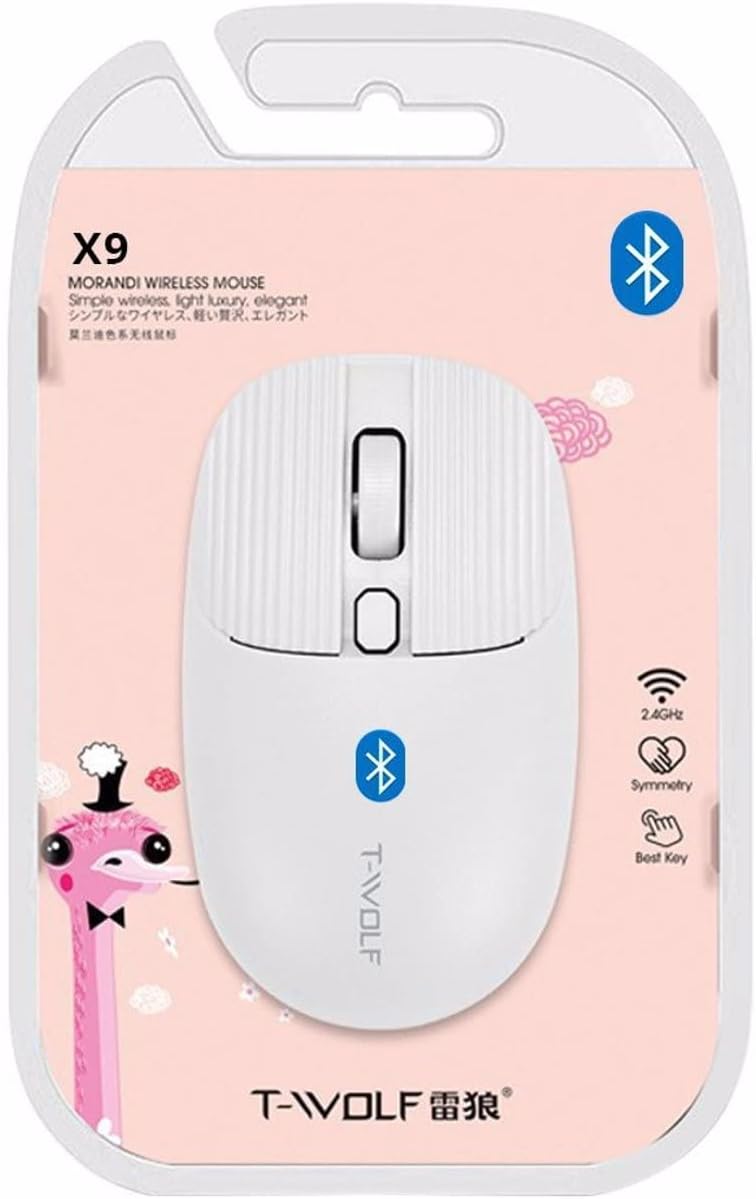
Imaginea 2: Packaging of the T-WOLF X9 Bluetooth Mouse, highlighting key features such as 2.4GHz (though product is Bluetooth, this might be a generic packaging element), symmetry, and "Best Key".

Imaginea 3: Latura view of the T-WOLF X9 Bluetooth Mouse, illustrating its ergonomic profile and non-slip roller design.
Înființat
1. Instalarea bateriei
- Localizați compartimentul bateriei pe partea inferioară a mouse-ului.
- Deschideți capacul compartimentului bateriei.
- Introduceți bateria AA furnizată, asigurându-vă că polaritatea este corectă (+/-).
- Închideți bine capacul compartimentului bateriei.
2. Asociere Bluetooth
- Ensure the mouse is powered on. There may be a power switch on the underside.
- Pe computerul sau dispozitivul dvs., navigați la setările Bluetooth.
- Activați Bluetooth și căutați dispozitive noi.
- The mouse should appear as "T-WOLF X9" or similar. Select it to initiate pairing.
- Odată asociat, mouse-ul este gata de utilizare.
Instrucțiuni de operare
1. DPI Switching
The T-WOLF X9 mouse features 3-gear DPI switching. Press the dedicated DPI button (located behind the scroll wheel) to cycle through the available DPI settings. Each press will change the cursor sensitivity, allowing you to adjust it to your preference for different tasks.
2. Funcții butoane
- Buton clic stânga: Selecție și interacțiune primară.
- Buton clic dreapta: Deschide meniuri contextuale.
- Rotiță de defilare: Derulează conținutul pe verticală. Poate fi apăsat și pentru funcționalitatea de clic cu butonul din mijloc.
- Buton comutare DPI: Ajustează sensibilitatea cursorului (DPI).
Întreţinere
- curatenie: Folosiți o cârpă moale și uscată pentru a curăța mouse-ul. Pentru murdăria persistentă, ștergeți ușor.ampClătiți cârpa cu apă. Evitați utilizarea substanțelor chimice dure sau a materialelor abrazive.
- Înlocuire baterie: Înlocuiți bateria AA când performanța mouse-ului scade sau nu mai răspunde.
- Depozitare: Depozitați mouse-ul într-un loc răcoros și uscat atunci când nu îl utilizați pentru perioade lungi de timp.
Depanare
| Problemă | Soluţie |
|---|---|
| Șoarecele nu răspunde |
|
| Mișcarea cursorului este neregulată sau lentă |
|
| Cannot pair the mouse |
|
Specificații
| Caracteristică | Detaliu |
|---|---|
| Model | X9 |
| Conectivitate | Bluetooth 5.2 |
| Interval de operare | Până la 10 metri |
| Butoane | 4 (Left, Right, Scroll Wheel/Middle, DPI Switch) |
| Setări DPI | 3-Gear Switching |
| Sursa de alimentare | 1 x baterie AA |
| Orientarea mâinii | Ambidextru |
| Dispozitive compatibile | Laptop, computer personal |
| Sisteme de operare | Linux, Windows 7, Windows XP (and newer OS with Bluetooth support) |
| Dimensiuni | 20 x 13 x 7.5 cm (Pachet) |
| Greutate | 150 g (Pachet) |
Garanție și suport
This product is covered by a standard manufacturer's warranty. For specific warranty details, please refer to the documentation provided at the time of purchase or contact your retailer. For technical support or further assistance, please reach out to the seller or manufacturer's customer service.