
Introducere
This manual provides detailed instructions for the safe installation, operation, and maintenance of your bimar Wi-Fi Ceiling Fan, Model 1 (Ø 132). Please read this manual thoroughly before using the product and retain it for future reference.
Utilizare prevăzută: This high-performance ceiling fan is designed for ventilation in indoor domestic environments. Any other use is considered improper and potentially hazardous. The manufacturer cannot be held responsible for any damages resulting from improper use or repairs performed by unqualified personnel.
Instrucțiuni importante de siguranță
Pentru a reduce riscul de incendiu, șoc electric sau rănire a persoanelor, respectați următoarele:
- Citiți toate instrucțiunile înainte de a instala ventilatorul.
- Instalarea trebuie efectuată de către un electrician calificat, în conformitate cu toate codurile electrice locale și naționale.
- Asigurați-vă că locul de instalare poate susține greutatea ventilatorului (aproximativ 6.2 kg).
- Deconectați întotdeauna alimentarea cu energie de la întrerupătorul principal înainte de instalare sau service.
- Nu utilizați ventilatorul cu un cablu de alimentare sau un ștecher deteriorat.
- Keep hands, hair, and clothing away from moving blades.
- Do not insert any objects into the fan blades while it is operating.
- Acest aparat nu este destinat utilizării de către persoane (inclusiv copii) cu capacități fizice, senzoriale sau mentale reduse sau cu lipsă de experiență și cunoștințe, cu excepția cazului în care acestea au fost supravegheate sau instruite cu privire la utilizarea aparatului de către o persoană responsabilă pentru siguranța lor.
- Copiii trebuie supravegheați pentru a se asigura că nu se joacă cu aparatul.
Ce este în cutie
Your bimar Wi-Fi Ceiling Fan package includes the following components:
- bimar Wi-Fi Ceiling Fan unit (with 3 blades)
- Telecomanda
- Elemente de montare (șuruburi, console etc.)
- Manual de instrucțiuni (acest document)

Image: The bimar Wi-Fi Ceiling Fan, featuring three light-colored wooden blades and a brushed metal motor housing and downrod.
Configurare și instalare
1. Instalarea ventilatorului
Se recomandă insistent instalarea profesională de către un electrician calificat. Ensure the ceiling structure can safely support the fan's weight and that all wiring complies with local electrical codes.
- Pregătiți locul de montare: Turn off power at the circuit breaker. Securely attach the mounting bracket to a ceiling joist or a fan-rated outlet box.
- Asamblați tija de susținere și motorul: Attach the downrod to the fan motor housing.
- Agățați ventilatorul: Ridicați cu grijă ansamblul ventilatorului și agățați-l de suportul de montare.
- Conectați ventilatorul: Connect the electrical wires (live, neutral, ground) from the ceiling to the fan's wiring, following the wiring diagram provided in the separate installation guide (if applicable).
- Atașați lamele: Securely fasten the three blades to the motor housing.
- Asigurați baldachinul: Raise the canopy to cover the wiring and mounting bracket, securing it in place.

Imagine: Laterală view of the bimar ceiling fan, illustrating the angle of the light wood blades and the connection to the downrod.
2. Wi-Fi și conexiune prin aplicație
The bimar Wi-Fi Ceiling Fan is compatible with the Bimar Live Smart app for advanced control and scheduling.
- Descărcați aplicația: Caută "Bimar Live Smart" in your smartphone's app store (iOS or Android) and install it.
- Creați un cont: Deschide aplicația și urmează instrucțiunile de pe ecran pentru a crea un cont de utilizator nou sau pentru a te conecta dacă ai deja unul.
- Adăugați dispozitiv: Power on the ceiling fan. In the Bimar Live Smart app, tap "Add Device" or the "+" icon. Select "Ceiling Fan" or the appropriate device type.
- Conectați-vă la Wi-Fi: Follow the app's instructions to put the fan into pairing mode (usually by pressing a button on the fan or remote for a few seconds). Connect the fan to your home 2.4GHz Wi-Fi network.
- Denumiți dispozitivul: Once connected, you can name your fan for easy identification within the app.

Image: A modern living room featuring the bimar ceiling fan installed, with a smartphone displaying the Bimar Live Smart app interface, indicating Wi-Fi and voice control capabilities.
Instrucțiuni de operare
Your bimar Wi-Fi Ceiling Fan offers multiple control options for convenience.
1. Operare telecomandă
The included remote control allows direct access to all fan functions.
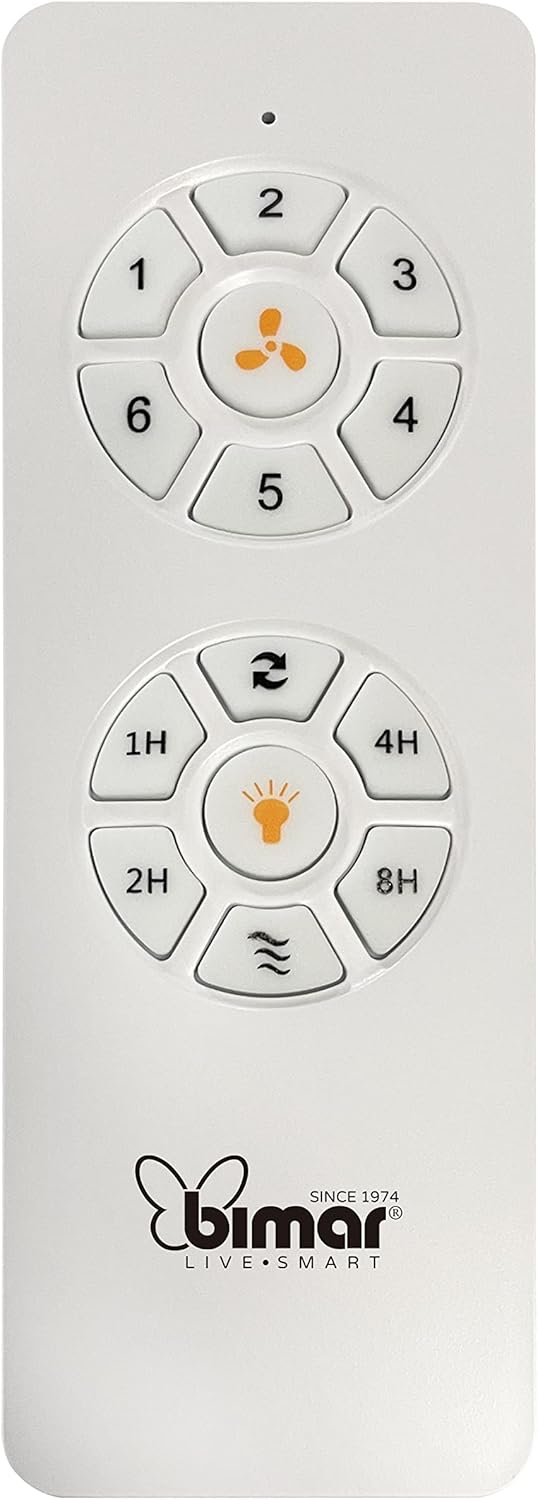
Image: The white remote control for the bimar ceiling fan, showing buttons for fan speed (1-6), fan on/off, timer (1H, 2H, 4H, 8H), mode selection, and reverse function.
- Pornire/Oprire: Apăsați butonul cu pictograma ventilatorului pentru a porni sau opri ventilatorul.
- Reglarea vitezei: Use buttons 1-6 to select one of the six available fan speeds.
- Funcția de cronometru: Press 1H, 2H, 4H, or 8H to set the fan to automatically turn off after the selected duration.
- Selectarea modului: Use the mode button (often represented by waves or arrows) to cycle through Normal, Natural, Sleep, and Breeze modes.
- Mod vară/iarnă: The reverse button (often two arrows forming a circle) changes the blade rotation direction.
2. App Control (Bimar Live Smart)
Once connected to the Bimar Live Smart app, you can access enhanced features:
- Funcționare la distanță: Control all fan functions from anywhere with an internet connection.
- Programare: Program daily and weekly on/off times for automated operation.
- Cronometru: Adjust the timer from 1 to 8 hours.
- Mode and Speed Selection: Easily switch between the 6 speeds and 4 operating modes.
3. Control vocal
The bimar Wi-Fi Ceiling Fan is compatible with popular voice assistants like Amazon Alexa and Google Assistant. After connecting the fan to the Bimar Live Smart app, link your Bimar account to your voice assistant app (e.g., Alexa app or Google Home app).
Example Comenzi vocale:
- „Alexa, pornește ventilatorul de tavan.”
- „Hei Google, setează viteza ventilatorului de tavan la 3.”
- "Alexa, turn off the ceiling fan in 1 hour."
4. Operating Modes and Speeds
- 6 Ventilation Speeds: Adjust the airflow intensity to your preference.
- Modul normal: Consistent airflow at the selected speed.
- Mod natural: Simulates natural breezes by varying fan speed.
- Modul de somn: Funcționează la o viteză mai mică și mai silențioasă pentru odihnă netulburată.
- Modul briză: Provides a gentle, intermittent airflow.
5. Summer/Winter Function
The reversible blade function allows for year-round use:
- Mod Vară (rotație în sens invers acelor de ceasornic): Creează un flux de aer descendent, generând o adiere răcoritoare.
- Mod de iarnă (rotație în sensul acelor de ceasornic): Creates an upward airflow, circulating warm air trapped near the ceiling, improving heating efficiency.

Image: A diagram illustrating the airflow patterns for summer (indirect ventilation, pushing air upwards) and winter (direct ventilation, pulling air downwards) modes of a ceiling fan.
Întreţinere
Întreținerea regulată asigură performanța optimă și durata de viață a ventilatorului de tavan.
- curatenie: Before cleaning, ensure the fan is turned off and power is disconnected at the circuit breaker. Use a soft, damp o lavetă pentru a șterge lamele și carcasa motorului. Nu folosiți produse de curățare abrazive sau solvenți.
- Inspecția lamei: Periodically check the blades for any signs of damage or warping. Ensure all blade screws are tight.
- Ungerea motorului: The fan's DC motor is designed for maintenance-free operation and does not require lubrication.
- Strângeți elementele de fixare: Over time, some fasteners may become loose. Check and tighten all screws and connections annually.

Imagine: Un prim-plan view of the bimar ceiling fan's brushed metal motor housing and the attachment points for the light wood blades, highlighting areas for cleaning and inspection.
Depanare
| Problemă | Cauza posibila | Soluţie |
|---|---|---|
| Ventilatorul nu pornește | No power supply; Remote control battery low; Incorrect wiring. | Check circuit breaker and wall switch. Replace remote batteries. Verify wiring connections (consult electrician). |
| Ventilatorul se clătină | Lame sau accesorii de montare slăbite; Lame dezechilibrate. | Ensure all blade screws and mounting screws are tight. Use a balancing kit (not included) if necessary. |
| Telecomanda nu funcționează | Low battery; Obstruction between remote and receiver; Remote not paired. | Replace remote batteries. Ensure clear line of sight. Refer to pairing instructions in the full manual. |
| Probleme de conexiune Wi-Fi | Incorrect Wi-Fi password; Router too far; 5GHz network selected. | Verify Wi-Fi password. Move router closer or use a Wi-Fi extender. Ensure you are connecting to a 2.4GHz network. Reset fan and re-attempt pairing. |
| Ventilatorul este zgomotos | Loose screws; Blades hitting an obstruction; Motor issue. | Check and tighten all screws. Ensure nothing is obstructing the blades. If noise persists, contact customer support. |
Specificații
| Caracteristică | Detaliu |
|---|---|
| Marca | bimar |
| Numărul de model | 1 |
| Dimensiunile produsului | 132 x 132 x 27.5 cm (diametru x diametru x înălțime) |
| Greutate | 6.2 kg |
| Numărul de lame | 3 |
| Material | Lemn |
| Culoare | Black (Note: Blades are light wood finish as shown in images) |
| Tip motor | DC (Brushless, energy-saving) |
| Consumul de energie | 35W |
| Metode de control | Remote Control, Bimar Live Smart App, Voice Control (Amazon Alexa, Google Assistant) |
| Vitezele ventilatorului | 6 |
| Moduri de operare | Normal, Natural, Sleep, Breeze |
| Cronometru | 1 până la 8 ore |
| Caracteristici suplimentare | Silent operation, Summer/Winter mode (reversible blades) |
| Sursa de alimentare | Electric |
| Tip de instalare | Montare pe tavan |

Image: The three light wood fan blades, detached and laid flat, showcasindesignul și textura lor.


Imagine: Două views of the bimar ceiling fan, illustrating different downrod lengths: one with a 25 cm downrod and another with a 13 cm downrod, affecting the overall height of the fan.
Garanție și suport
For warranty information, technical support, or service inquiries, please refer to the warranty card included with your product or visit the official bimar webPăstrați dovada achiziției pentru reclamații în garanție.
Producător: Bimar S.r.l.
Contact: Vă rugăm să vizitați the bimar store on Amazon or the official bimar website pentru detalii de contact.