
1. Introducere
This manual provides essential information for the safe and efficient use of your Princess 357250 Smart Air Cooler Fan. Please read these instructions carefully before operating the appliance and retain them for future reference.

Figure 1: Princess 357250 Smart Air Cooler Fan in operation, illustrating air circulation.
The Princess 357250 is a versatile 3-in-1 appliance functioning as a fan, air cooler, and air freshener. It features a 3.5-liter water reservoir, three operating modes, and can be controlled via the HomeWizard Climate app, voice commands, or the included remote control.
2. Instrucțiuni importante de siguranță
Respectați întotdeauna măsurile de siguranță de bază atunci când utilizați aparate electrice pentru a reduce riscul de incendiu, electrocutare și vătămare corporală.
- Citiți toate instrucțiunile înainte de utilizare.
- Asigurați-vă că voltagIndicat pe aparat corespunde volumului de rețea localtage înainte de conectare.
- Nu scufundați aparatul, cablul sau ștecherul în apă sau alte lichide.
- Este necesară supravegherea atentă atunci când orice aparat este folosit de copii sau în apropierea acestora.
- Deconectați aparatul de la priză atunci când nu îl utilizați, înainte de asamblarea sau dezasamblarea pieselor și înainte de curățare.
- Nu utilizați niciun aparat cu cablul sau ștecherul deteriorat sau după ce aparatul funcționează defectuos sau a fost deteriorat în vreun fel.
- Nu utilizați în aer liber.
- Nu lăsați cablul să atârne peste marginea unei mese sau a unui blat sau să atingă suprafețele fierbinți.
- Nu așezați pe sau lângă un arzător electric sau cu gaz fierbinte sau într-un cuptor încălzit.
- Always place the appliance on a dry, stable, and level surface.
- Utilizați numai atașamente recomandate sau vândute de producător.
- Nu blocați orificiile de ventilație.
- Do not fill the water tank above the MAX level indicator.
- Asigurați-vă întotdeauna că rezervorul de apă este fixat corect înainte de utilizare.
3. Componentele produsului
The Princess 357250 Smart Air Cooler Fan comes with the following components:
- Princess 357250 Smart Air Cooler Fan unit
- Telecomanda
- 2 x CR2032 batteries (for remote control)
- Manual de instructiuni
- Ice packs (typically 2, for enhanced cooling)

Figure 2: Included remote control for convenient operation.

Figura 3: Example of an ice pack used to enhance cooling performance.
4. Configurare și utilizare inițială
4.1 Despachetarea
Carefully remove the air cooler from its packaging. Retain the packaging for future storage or transport. Check that all components listed in Section 3 are present and undamaged.
4.2 Plasarea
Place the air cooler on a firm, level surface. Ensure there is adequate space around the unit for proper air circulation. Do not place it directly against a wall or furniture that could obstruct the air intake or outlet.
4.3 Umplerea rezervorului de apă
- Trageți afară rezervorul de apă din partea inferioară din spate a unității.
- Fill the water tank with clean, cool water. Do not exceed the 'MAX' fill line.
- For enhanced cooling, place the included ice packs in a freezer until frozen. Once frozen, add them to the water tank.
- Introduceți cu grijă rezervorul de apă înapoi în unitate până când se fixează în poziție cu un clic.
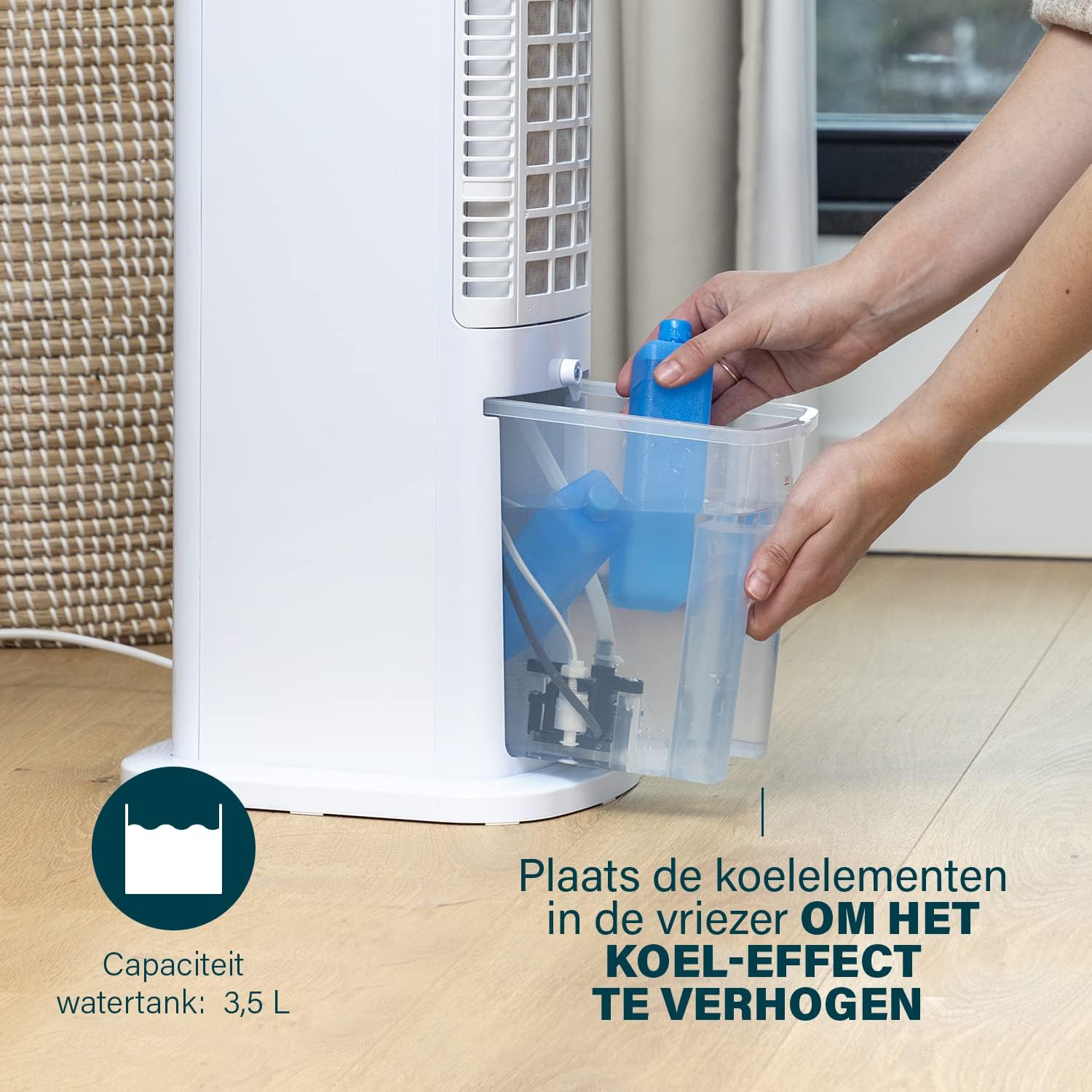
Figure 4: Adding ice packs to the water reservoir to increase cooling effect.
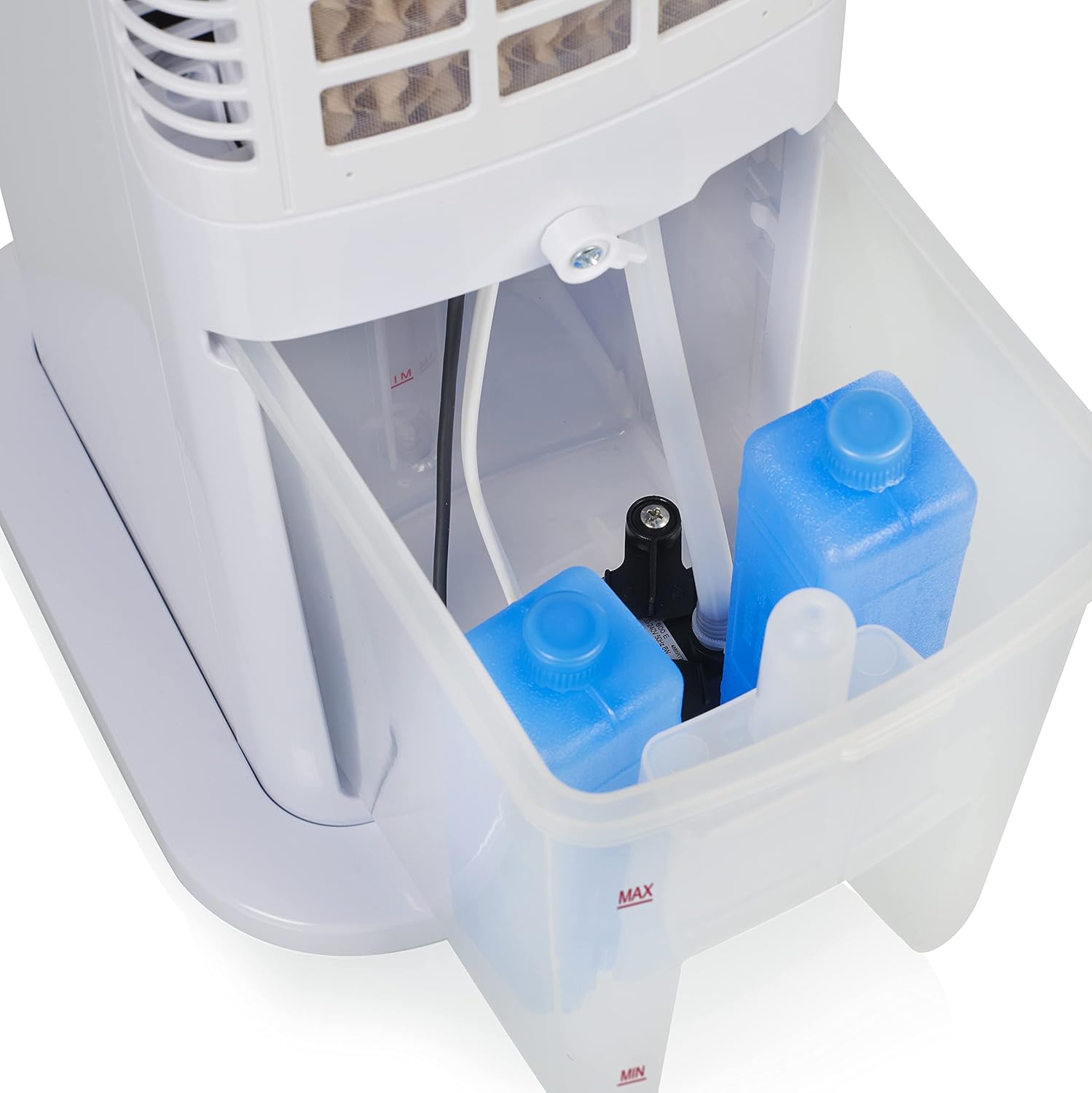
Figure 5: Water tank with ice packs, indicating fill levels.
4.4 Conexiune la alimentare
Plug the power cord into a suitable electrical outlet (230V). The unit will enter standby mode.
5. Instrucțiuni de utilizare
The Princess 357250 can be operated via its control panel, remote control, or the HomeWizard Climate app.
5.1 Panoul de control pesteview
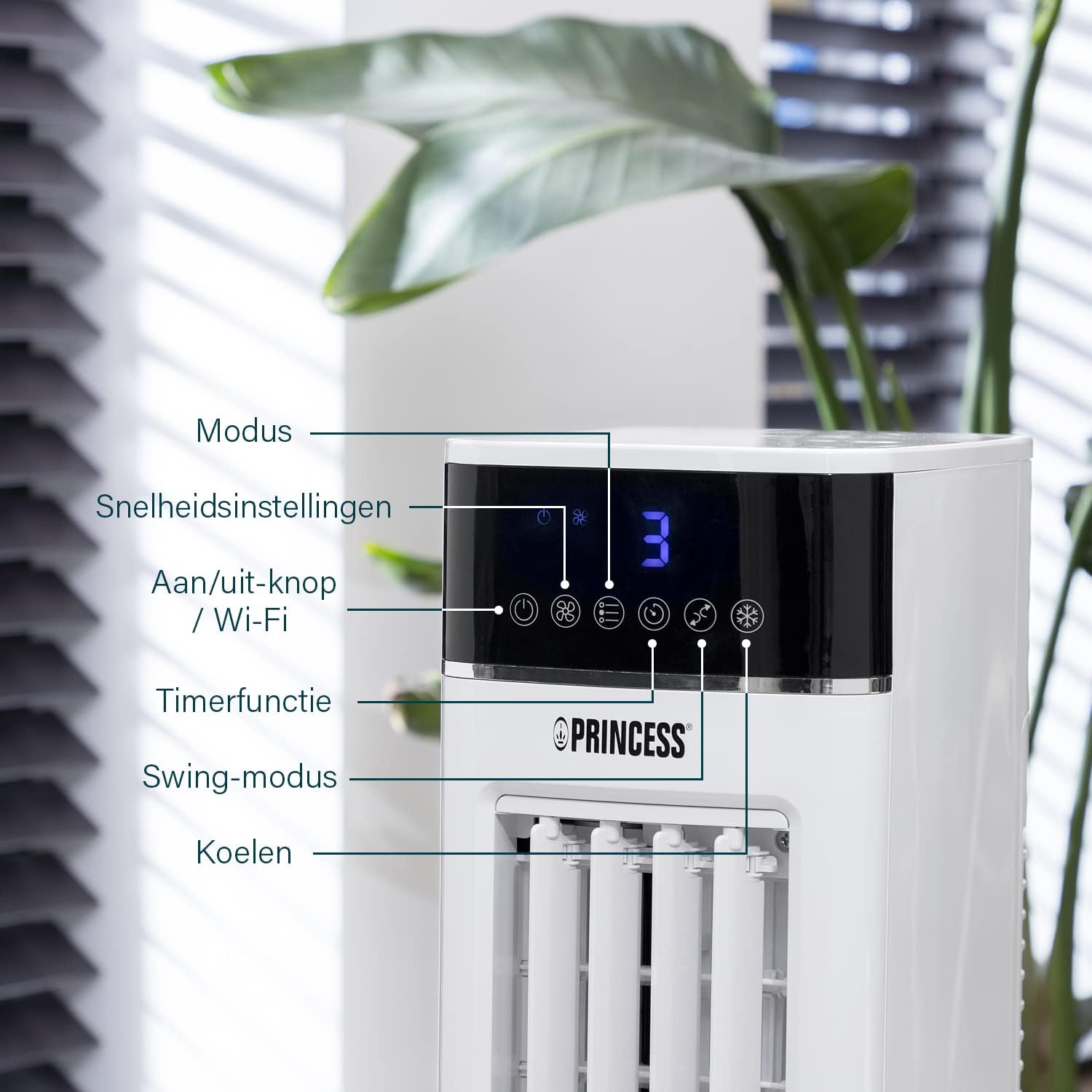
Figure 6: Control panel with various function buttons.
- Power Button (On/Off / Wi-Fi): Turns the unit on or off. Press and hold to activate Wi-Fi pairing mode.
- Butonul de mod: Cycles through operating modes (Normal, Natural, Sleep).
- Buton de viteză: Adjusts fan speed (Low, Medium, High).
- Butonul Timer: Sets the operating timer.
- Buton Swing: Activates or deactivates the oscillation function.
- Buton rece: Activates or deactivates the evaporative cooling function (requires water in the tank).

Figure 7: Manual control via the top panel buttons.
5.2 Moduri de operare
- Modul normal: Provides a constant airflow at the selected speed.
- Mod natural: Simulates natural breeze by varying fan speed intermittently.
- Modul Sleep: Operates at a lower, quieter speed, gradually decreasing fan speed over time for undisturbed sleep.
5.3 Funcția de oscilație
Press the 'Swing' button to activate the oscillation function. The unit will rotate horizontally to distribute air across a wider area (Oscillation range: 50°). Press again to stop oscillation.
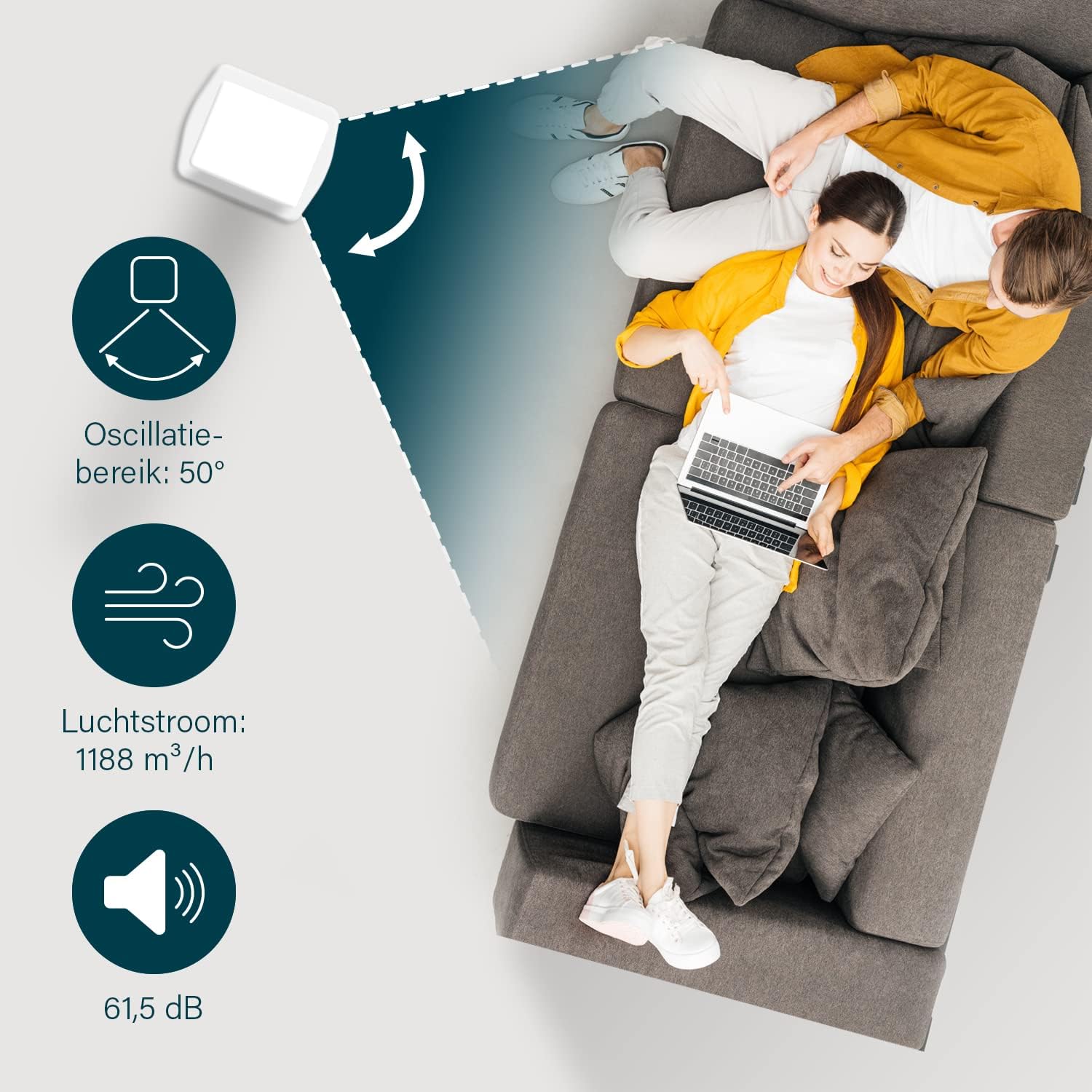
Figure 8: The oscillation function distributes cool air across a 50° range.
5.4 Evaporative Cooling Function
To activate the cooling function, ensure the water tank is filled. Press the 'Cool' button. The unit will use the water from the reservoir to cool the air through evaporation. This function works best in dry climates.

Figure 9: Innovative cooling technology utilizes a membrane system to cool air particles.
5.5 Smart Control (HomeWizard Climate App & Voice Control)
The Princess 357250 can be controlled remotely via the HomeWizard Climate app or voice commands (compatible with Siri and Google Assistant).
- Download the HomeWizard Climate app from your device's app store.
- Follow the in-app instructions to pair your air cooler with your Wi-Fi network. This typically involves pressing and holding the Power/Wi-Fi button on the unit until the Wi-Fi indicator blinks.
- Once paired, you can control all functions of the air cooler from your smartphone or tablet.
- For voice control, link your HomeWizard Climate account with your preferred voice assistant (Siri or Google Assistant) through their respective apps.

Figure 10: Control your air cooler using the HomeWizard Climate app and voice assistants.
6. Întreținere și curățare
Regular cleaning ensures optimal performance and extends the lifespan of your air cooler.
6.1 Curățare generală
- Deconectați întotdeauna aparatul înainte de curățare.
- Ștergeți suprafețele exterioare cu un material moale, damp pânză. Nu utilizați agenți de curățare abrazivi sau solvenți.
- Asigurați-vă că nu pătrunde apă în panoul de control sau în alte componente electrice.
6.2 Curăţarea rezervorului de apă
The water tank should be cleaned regularly, especially if using the cooling function frequently, to prevent mold and bacteria growth.
- Unplug the air cooler.
- Scoateți rezervorul de apă din unitate.
- Goliți orice cantitate de apă rămasă.
- Clean the inside of the tank with a mild detergent and warm water. Use a soft brush if necessary to remove any residue.
- Clătiți bine cu apă curată.
- Lăsați rezervorul să se usuce complet la aer înainte de a-l reintroduce în unitate.
6.3 Cooling Pad Cleaning/Replacement
The cooling pad (evaporative filter) may accumulate dust and mineral deposits over time. Refer to the diagram for its location.

Figure 11: The cooling pad, which should be cleaned periodically.
- Unplug the air cooler.
- Carefully remove the back panel to access the cooling pad.
- Gently remove the cooling pad.
- Rinse the cooling pad under running water to remove dust and deposits. For stubborn deposits, soak in a mild descaling solution (e.g., vinegar and water) for 30 minutes, then rinse thoroughly.
- Allow the cooling pad to dry completely before reinserting.
- Replace the cooling pad if it is damaged or heavily soiled and cannot be cleaned effectively.
7. Depanare
If you encounter issues with your air cooler, refer to the following table for common problems and solutions.
| Problemă | Cauza posibila | Soluţie |
|---|---|---|
| Unitatea nu pornește. | Fără alimentare. | Verificați dacă cablul de alimentare este conectat corect la o priză funcțională. |
| No cool air/weak cooling effect. | Rezervorul de apă este gol sau are un nivel scăzut. Funcția de răcire nu este activată. Cooling pad is dirty. | Umpleți rezervorul de apă. Press the 'Cool' button. Clean or replace the cooling pad (see Section 6.3). |
| Miros neplăcut din partea unității. | Stagnant water or dirty water tank/cooling pad. | Clean the water tank and cooling pad thoroughly (see Section 6.2 & 6.3). Use fresh water. |
| Telecomanda nu funcționează. | Bateriile sunt descărcate sau introduse incorect. | Replace the CR2032 batteries. Ensure they are inserted with correct polarity. |
| Controlul aplicației nu funcționează. | Problemă cu conexiunea Wi-Fi. App not paired correctly. | Check your Wi-Fi network. Re-pair the device with the HomeWizard Climate app (see Section 5.5). |
Dacă problema persistă după ce încercați aceste soluții, vă rugăm să contactați serviciul de asistență pentru clienți.
8. Specificatii tehnice
| Caracteristică | Detaliu |
|---|---|
| Numărul de model | 01.357250.01.001 |
| Marca | Prinţesă |
| Tip | Smart Air Cooler Fan (3-in-1: fan, air freshener, air cooler) |
| Material | Acrilonitril Butadien Stiren (ABS) |
| Culoare | Alb |
| Tip de montare | Freestanding |
| Tip control | Remote control, Control Panel, HomeWizard Climate App, Voice Control (Siri, Google Assistant) |
| Capacitatea rezervorului de apă | 3.5 litri |
| Moduri de operare | Normal, Natural, Somn |
| Numărul de viteze | 3 |
| Interval de oscilație | 50 de grade |
| Wattage | 70 wați |
| Voltage | 230 volți |
| Nivel de zgomot | 61.5 de decibeli |
| Greutatea articolului | 4 kilograme |
| Dimensiuni (D x W x H) | 28A x 22L x 76Î centimetri |
| Disponibilitatea pieselor de schimb (UE) | 2 ani |

Figure 12: Dimensions and key specifications of the air cooler.
9. Garanție și asistență
9.1 Informații despre garanție
This Princess 357250 Smart Air Cooler Fan comes with a Garanție de 2 an de la producător from the date of purchase. This warranty covers manufacturing defects and material faults under normal use conditions. It does not cover damage resulting from misuse, neglect, accident, alteration, or unauthorized repair.
Vă rugăm să păstrați dovada achiziției pentru cererile de garanție.
9.2 Asistență pentru clienți
For technical assistance, warranty claims, or questions regarding your Princess 357250 Smart Air Cooler Fan, please contact your retailer or visit the official Princess website pentru detalii de contact pentru asistență.
De asemenea, vă puteți referi la pagina produsului pe Amazon.nl pentru informații și resurse suplimentare.