
1. Introducere
The LAUNCH Creader Elite is a professional-grade OBD2 diagnostic scanner designed specifically for BMW, MINI, and Rolls-Royce vehicles manufactured between 1996 and 2023. This powerful bi-directional scan tool offers comprehensive full system diagnostics, a wide range of reset services, ECU coding capabilities, and lifetime free updates to ensure continuous compatibility and functionality.
The device features a 4-inch LCD touchscreen, Wi-Fi connectivity for updates, and supports 11 languages for user convenience. It is built with a robust, orange-colored body with rubberized ends for durability and a secure grip.

Image: The LAUNCH Creader Elite diagnostic tool displaying its main menu with options like Diagnose, OBD II, Reset, Upgrade, Mall, and Settings. This image provides an overview of the device's user interface.
2. Configurare
2.1. Dispozitiv terminatview
The Creader Elite features a 4-inch high-resolution color touchscreen and three physical buttons at the bottom for navigation. The device's body is rubberized for enhanced durability. On the bottom of the tool, a dust cover protects a USB-C connector and a slot for a memory card.

Image: The LAUNCH Creader Elite diagnostic tool, showcasing its robust orange casing, 4-inch screen, and the attached OBD2 cable. A separate USB-C cable is also visible, highlighting the device's connectivity options.
2.2. Initial Setup and Registration
- Pornire: Connect the device to your vehicle's OBD2 port. The device will power on automatically.
- Selectarea limbii: Urmați instrucțiunile de pe ecran pentru a selecta limba preferată.
- Fus orar: Set the correct time zone for your location.
- Conexiune Wi-Fi: Connect the device to a stable Wi-Fi network. This is crucial for software updates and device registration.
- Înregistrare: The device requires registration to access full diagnostic and update features. Use the provided QR code or visit the LAUNCH website to register your device using its serial number.
- Actualizare software: After successful registration and Wi-Fi connection, navigate to the 'Upgrade' section to download and install the latest software for BMW, MINI, and Rolls-Royce.
3. Operarea dispozitivului
The main menu provides six primary functions: Diagnose, OBD II, Reset, Upgrade, Mall, and Settings.
3.1. Diagnosticați
This function is used for in-depth vehicle diagnostics. It offers several options:
- AutoDetect: The device attempts to automatically identify the vehicle's VIN and model.
- Raport de sănătate: Performs a comprehensive scan of all modules in the vehicle, identifies fault codes, and generates a full status report. This report can be shared.
- Scanare sistem: Scans the vehicle to determine which modules are present and equipped.
- Selectarea sistemului: Allows direct access to specific vehicle modules (e.g., PCM, TCM, ABS, IMMO) to read fault codes, clear codes, or view fluxuri de date în direct.
Video: Demonstration of the Health Report function on the LAUNCH Creader Elite, showing how it scans various vehicle modules and displays diagnostic trouble codes (DTCs).
3.2. OBD II
This mode provides standard OBD II diagnostic functions, compatible with various vehicle brands (not limited to BMW/MINI/Rolls-Royce). While it may not offer full bi-directional control or all service functions for non-BMW brands, it allows access to basic and advanced OBD II functionalities:
- Read I/M Readiness: Checks if the vehicle is ready for a smog inspection.
- Citiți datele în timp real: Displays real-time data from various sensors (e.g., engine coolant temperature, oxygen sensor voltage). This data can be viewed in numerical format or as a graph, and can also be recorded for later review.
- Citire cadru înghețat: Captures a snapshot of sensor data at the moment a fault code was set.
- Read Fault Code (Mode $03/$07/$0A): Retrieves diagnostic trouble codes.
- Clear Fault Code (Mode $04): Erases diagnostic trouble codes and turns off the Check Engine Light.
- Test Results: O2 Sensor Monitor (Mode $05): Displays oxygen sensor monitoring test results.
- Test Results: On-Board Monitoring Test (Mode $06): Accesează rezultatele testelor de monitorizare a diagnosticării la bord pentru componente/sisteme specifice.
- Read Vehicle Information (Mode $09): Preia informații despre vehicul, cum ar fi VIN-ul, ID-urile de calibrare și numerele de verificare a calibrării.
3.3. Resetare servicii
The device supports a wide array of maintenance reset services for BMW, MINI, and Rolls-Royce vehicles:
- Resetare ulei
- Transmission Reset
- Resetare EPB (frână electronică de parcare)
- SAS (Steering Angle Sensor) Service Reset
- Airbag Service Reset
- ABS Sângerare
- Regenerare DPF (filtru de particule diesel).
- Battery Replacement/Registration
- Resetare TPMS (Sistem de monitorizare a presiunii în anvelope)
- IMMO (Immobilizer) Service
- Codificarea injectorului

Image: A visual representation of the 'All Maintenance Service Functions' available on the LAUNCH Creader Elite, including Oil Reset, Transmission Reset, EBP Reset, SAS Service Reset, Airbag Service Reset, ABS Bleeding, DPF Regeneration, Battery Replacement, TPMS Reset, IMMO Service, and Injector Coding.
Video: This video demonstrates the 'All Systems All Maintenance Service' capabilities of the LAUNCH BMW Scanner, highlighting its ability to perform various reset and service functions across different vehicle systems.
3.4. Upgrade
This function allows you to update the device's software. Ensure the device is connected to Wi-Fi or a computer via USB-C for updates.
3.5. Mall
The 'Mall' section typically allows users to purchase additional software packages or functionalities for other vehicle brands, if available.
3.6. Setări
Configure various device settings, including units of measurement, brightness, sound, network connection, time zone, and language.
4. Funcții speciale
The LAUNCH Creader Elite offers advanced special functions beyond standard diagnostics:
4.1. Codarea ECU
This feature allows for customization and improvement of vehicle comfort and functionality. It can be used to:
- Refresh hidden functions (e.g., fold/unfold mirrors automatically, unlock doors automatically).
- Disable annoying functions (e.g., auto start-stop, seat belt warning sounds).
- Perform retrofits (e.g., installing fog lights, retrofitting headlamps, changing battery type).
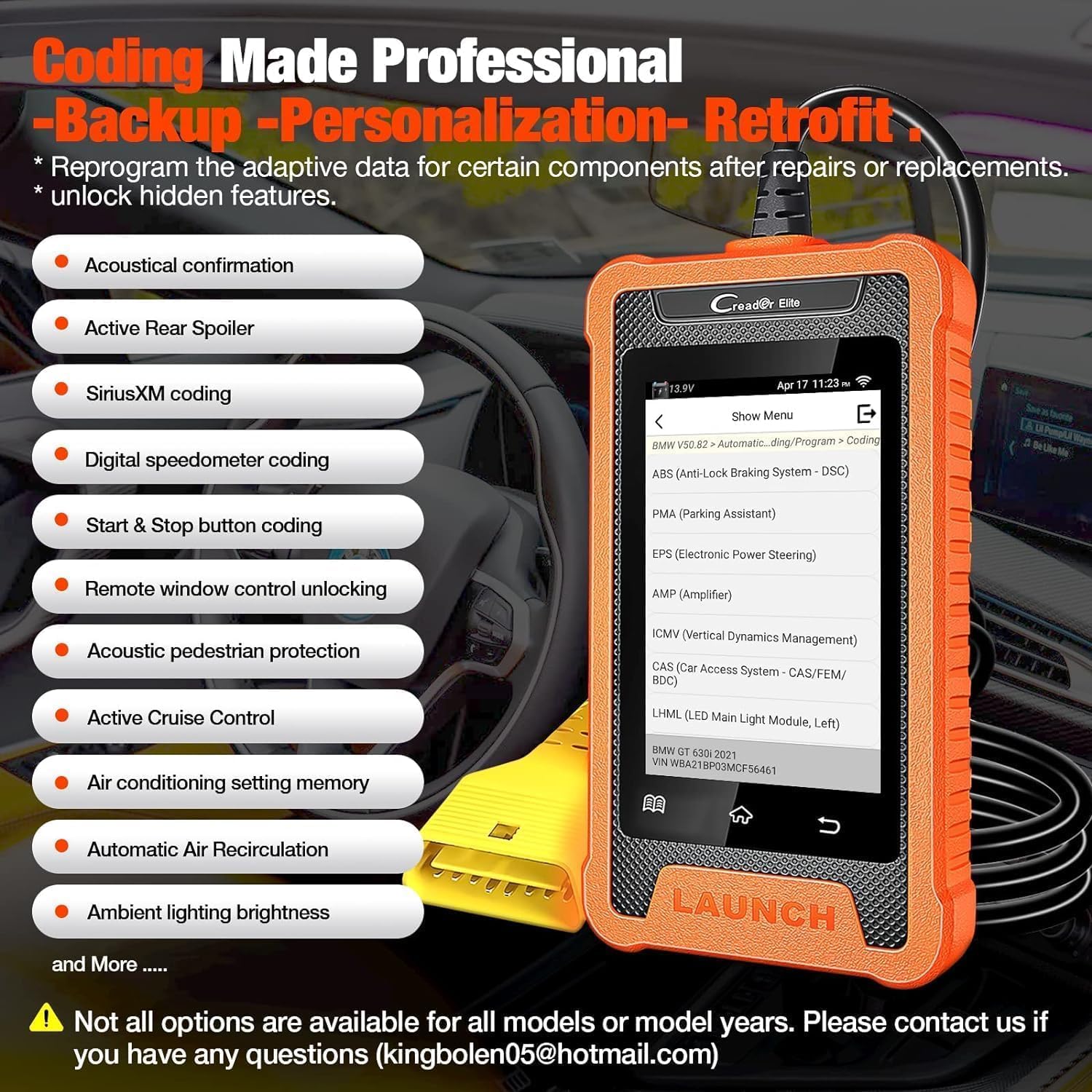
Image: The LAUNCH Creader Elite displaying 'Coding Made Professional' options, including Acoustical confirmation, Active Rear Spoiler, SiriusXM coding, Digital speedometer coding, Start & Stop button coding, Remote window control unlocking, Acoustic pedestrian protection, Active Cruise Control, Air conditioning setting memory, Automatic Air Recirculation, and Ambient lighting brightness.
Video: This video illustrates the 'Coding/Program' function of the LAUNCH BMW Full Diagnostic Tool, demonstrating how users can access and modify vehicle settings.
4.2. Control bidirecțional (teste active)
This feature allows the diagnostic tool to send commands to vehicle ECUs and control specific components, helping to accurately locate issues. Exampfișierele includ:
- Turning on the radiator fan
- Modularea accelerației
- Oglinzi operaționale
- Turning ON/OFF lights
- Turning ON/OFF the horn
- Activating door lock actuators
- A/C compressor activation
- Activation radiator shutter
- Testul EGR
- Testul de bâzâit al injectorului
- IMRC Test
- Fuel Rail Pressure Test
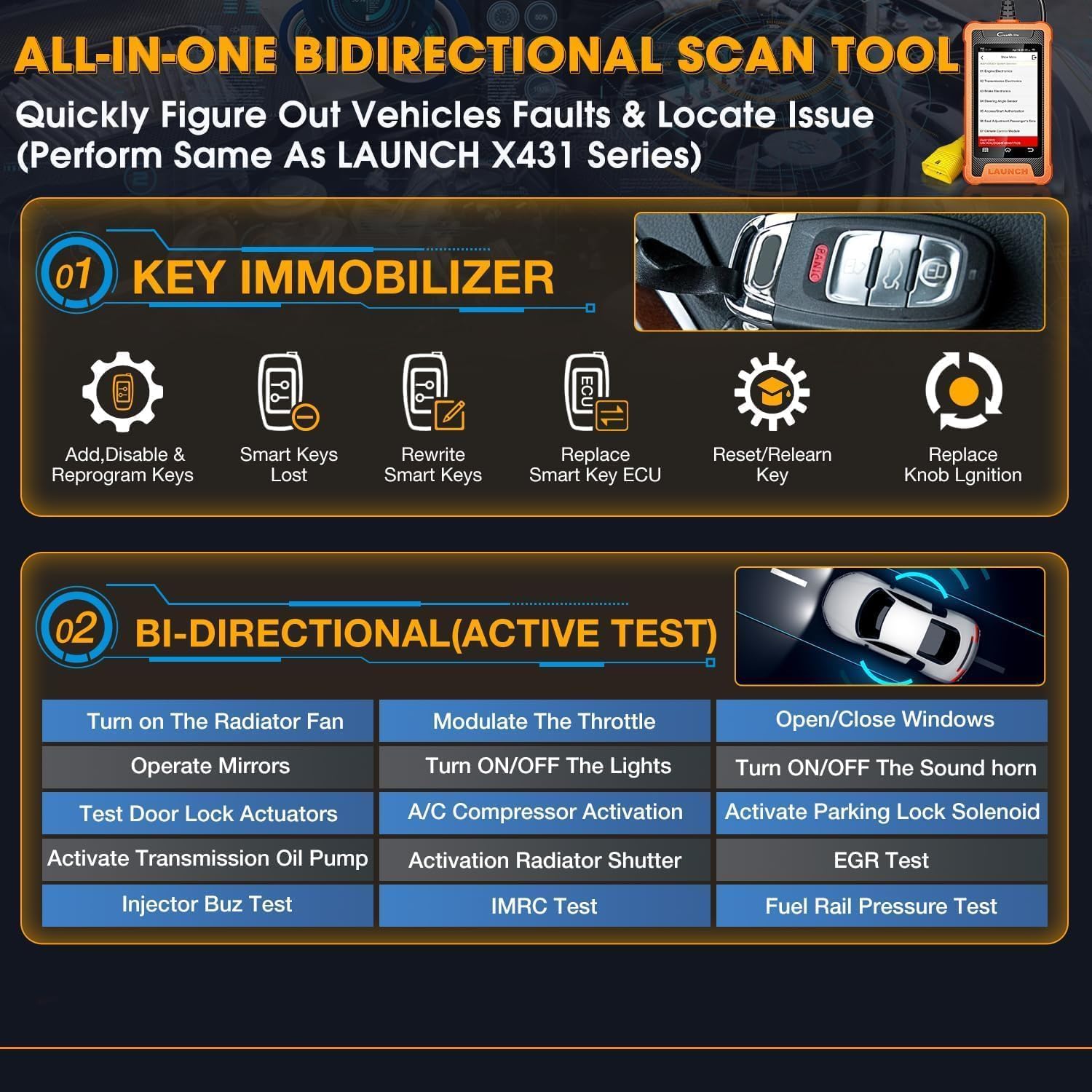
Image: The 'All-in-One Bidirectional Scan Tool' interface, detailing Key Immobilizer functions (Add/Disable & Reprogram Keys, Rewrite Smart Keys, Replace Smart Key ECU, Reset/Relearn Key, Replace Knob Ignition) and Bi-directional (Active Test) capabilities.
Video: This video demonstrates the 'Special Function' capabilities of the LAUNCH BMW Full Diagnostic Tool, showcasing various advanced diagnostic and control features.
4.3. Key Immobilizer
This function assists with key-related operations, including:
- Adding, disabling, and reprogramming keys.
- Rewriting smart keys.
- Replacing smart key ECUs.
- Resetting and relearning keys.
- Replacing knob ignition components.
5. Specificații
- Marca: LANSA
- Model: Creader Elite
- Sursa de alimentare: Alimentat cu baterie
- Dimensiuni produs: 3.46 cm L x 1 cm l x 6.3 cm Î
- Sistem de operare: Android
- Dimensiunea ecranului: 4 inchi
- Stocare internă: 16 GB
- Conectivitate: USB-C, Wi-Fi
- Limbi acceptate: 11 (including English, French, Spanish, German, Italian, Russian, Portuguese, Korean, Japanese, Polish, Chinese)
6. Întreținere
6.1. Actualizări software
Regular software updates are provided free for life. To ensure optimal performance and compatibility with the latest vehicle models, it is recommended to update the device regularly. Connect the device to a Wi-Fi network or a computer via the USB-C cable and navigate to the 'Upgrade' section in the main menu.
6.2. Managementul datelor
The device allows for recording and playback of live data streams, as well as generating and sharing diagnostic reports. These features are useful for tracking vehicle performance over time and for sharing information with technicians or other users.
7. Depanare
- Dispozitivul nu pornește: Ensure the device is securely connected to the vehicle's OBD2 port. Check the vehicle's battery voltage.
- Probleme de conectare: Verify the OBD2 cable is properly connected. For Wi-Fi issues, ensure the network is stable and the device is within range.
- VIN Auto-Detection Failure: If the device fails to automatically detect the VIN, manually enter the vehicle information for diagnosis.
- Fault Codes Persist After Clearing: If fault codes reappear immediately after clearing, it indicates an underlying issue that requires repair. Clearing codes only resets the warning light; it does not fix the problem.
- Probleme cu actualizarea software-ului: Ensure a stable internet connection during updates. If issues persist, try connecting the device to a computer for a wired update.
8. Garanție și asistență
For any service problems, suggestions, or inquiries regarding this product, please contact LAUNCH customer support. You can reach them via email at:
- Overseas Service: overseas.service@cnlaunch.com
- Cereri de vânzări: sales@cnlaunch.com
Please refer to your local dealer for specific warranty information and support procedures.