
1. Introducere
Mulțumesc pentru achizițieasing the Depusheng U6 Audio Mixer. This 6-channel DJ sound controller is designed for versatile audio mixing, recording, and live streaming applications. It features a built-in USB audio interface, Bluetooth connectivity, and U-Disk playback/recording capabilities. This manual provides essential information for safe operation, setup, and optimal performance of your device. Please read it thoroughly before use and retain it for future reference.
2. Informații de siguranță
- Sursa de alimentare: Use only the specified power adapter or a compatible USB power source. Ensure the voltage corespunde cerințelor dispozitivului.
- Apă și umiditate: Nu expuneți mixerul la apă, ploaie sau umiditate excesivă. Evitați așezarea obiectelor umplute cu lichid pe unitate.
- Ventilare: Asigurați o ventilație corespunzătoare. Nu blocați orificiile de ventilație.
- Căldură: Țineți unitatea departe de surse de căldură, cum ar fi calorifere, registre de căldură, sobe sau alte aparate producătoare de căldură.
- curatenie: Curățați numai cu o cârpă uscată. Nu utilizați detergenți lichidi sau aerosoli.
- Service: Nu încercați să reparați singur acest produs. Consultați toate lucrările de service către personalul calificat de service.
- Puterea fantomă: When using condenser microphones, ensure +48V phantom power is activated only when necessary and that the microphone is compatible.
3. Conținutul pachetului
Vă rugăm să verificați dacă toate următoarele articole sunt incluse în pachetul dumneavoastră:
- Depusheng U6 Audio Mixer
- Cablu de alimentare USB
- Manual de utilizare
4. Produs terminatview
The Depusheng U6 is a compact 6-channel mixer designed for various audio applications. It features multiple input and output options, integrated effects, and digital connectivity.
4.1 Controale și conexiuni pe panoul frontal
The front panel provides access to all mixing controls and primary input/output ports.

Descrierea imaginii: Un detaliat view of the Depusheng U6 Audio Mixer's front panel, showing all knobs, faders, buttons, and the digital display for USB/Bluetooth functions. Key controls include GAIN, HIGH, LOW, EFX, PEAK, VOL for each channel, along with DELAY, REPEAT, and MAIN volume controls. The USB port and Bluetooth indicator are also visible.
- Intrări MIC/LINE (Canalele 1-4): Combo jacks supporting both XLR and 1/4" (6.35mm) inputs for microphones or line-level instruments.
- +48V PHANTOM: Button to activate +48V phantom power for condenser microphones on channels 1-4.
- CÂŞTIG: Ajustează sensibilitatea de intrare pentru fiecare canal.
- ÎNALT/SCĂZUT: 2-band equalizer for adjusting treble and bass frequencies for each channel.
- Efecte vizuale: Sends signal to the built-in effects processor (DELAY/REPEAT).
- LED PEAK: Se aprinde când semnalul de intrare este prea puternic, indicând o posibilă saturare.
- VOL: Channel volume control.
- S/S (Stereo Input 5/6): 1/4" stereo inputs for connecting line-level devices.
- REC/MAIN OUT (RCA): Stereo RCA outputs for recording or connecting to external devices.
- MAIN OUT (1/4"): Stereo 1/4" outputs for connecting to power ampliificatoare sau difuzoare active.
- Port USB: For U-Disk playback/recording and connection to a computer as an audio interface.
- MODE/BT (Bluetooth): Button to switch between USB, Bluetooth, and other modes.
- PLAY/PAUSE, PREVIOUS, NEXT: Controls for U-Disk and Bluetooth playback.
- DELAY/REPEAT: Controls for adjusting the built-in delay effect.
- LED CLIP: Indicates output signal clipping.
- LED POWER: Indică faptul că unitatea este pornită.
- PRINCIPAL: Control principal al volumului pentru ieșirea principală.
- TELEFON: Controlul volumului căștilor.
- Jack pentru căști: 1/4" stereo output for monitoring.
4.2 Input Interface Types

Descrierea imaginii: A închide view of the input jacks on the Depusheng U6 Audio Mixer, illustrating both the 6.5mm (1/4 inch) and XLR connection types for microphones and line-level devices. This image highlights the versatility of the combo input jacks.
- 6.5mm (1/4") Interface: For connecting instruments or line-level audio sources.
- Interfață XLR: For connecting microphones, providing a balanced connection.
5. Configurare
5.1 Alimentarea mixerului
The Depusheng U6 mixer can be powered via its USB port.

Descrierea imaginii: This image demonstrates two methods of powering the Depusheng U6 Audio Mixer via USB: connecting it to a computer's USB port or to a portable power bank. This highlights the flexibility of its power options.
- Connect the provided USB cable to the mixer's USB power input.
- Connect the other end of the USB cable to a computer's USB port or a USB power adapter (not included) connected to a wall outlet, or a power bank.
- The POWER LED on the mixer will illuminate when power is supplied.
5.2 Conexiuni de bază
Refer to the diagram below for typical connection setups.

Descrierea imaginii: A comprehensive diagram illustrating various connection possibilities for the Depusheng U6 Audio Mixer. It shows connections for a computer, condenser microphone, dynamic microphone, wireless microphone receiver, power amplifier, passive speakers, and headphones, demonstrating a complete audio setup.
- Microfoane: Connect dynamic or condenser microphones to the MIC/LINE inputs (Channels 1-4) using XLR cables. Activate +48V phantom power for condenser microphones.
- Instruments/Line Devices: Connect instruments or other line-level devices to the MIC/LINE inputs (Channels 1-4) using 1/4" cables, or to the S/S (Stereo Input 5/6) using 1/4" stereo cables.
- Output to Speakers/Ampmai în viață: Connect the MAIN OUT (1/4") to your power ampliifier sau difuzoare active.
- Căști: Conectați căștile la mufa PHONE pentru monitorizare.
- Calculator: Connect the mixer's USB port to your computer for use as an audio interface.
6. Instrucțiuni de utilizare
6.1 Wireless Bluetooth Streaming
The U6 mixer supports wireless Bluetooth audio streaming from compatible devices.
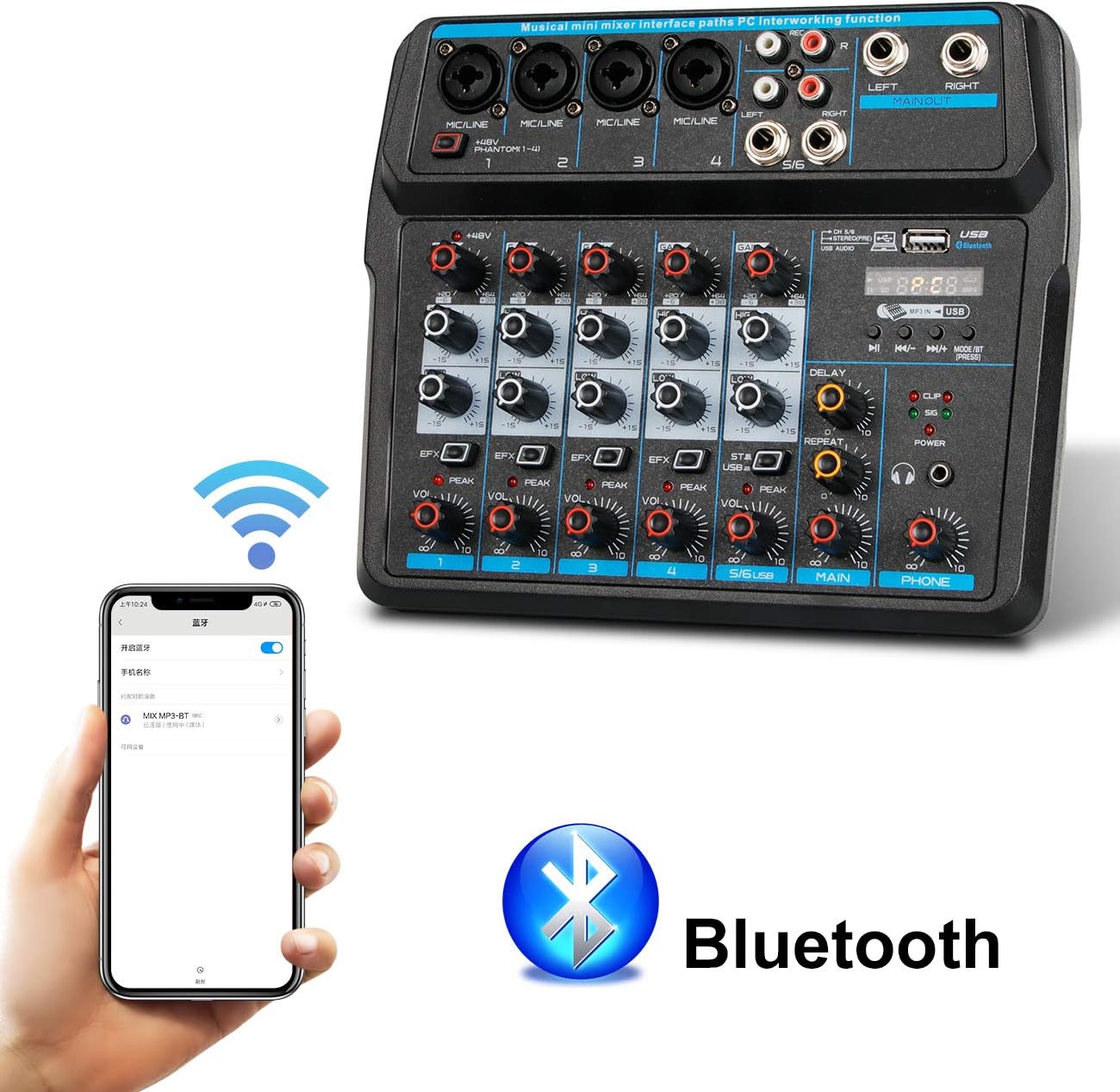
Descrierea imaginii: This image shows a smartphone displaying its Bluetooth settings, with the Depusheng U6 Audio Mixer (labeled 'U6 MP3-BT') available for connection. A large Bluetooth logo is also present, indicating the wireless connectivity feature.
- Apăsați tasta MODE/BT button on the mixer until the Bluetooth indicator lights up and the display shows 'BT'.
- Pe dispozitivul mobil (smartphone, tabletă etc.), activați Bluetooth și căutați dispozitivele disponibile.
- Select 'U6 MP3-BT' from the list to pair.
- Once paired, you can stream audio wirelessly from your device to the mixer. Bluetooth operates effectively within approximately 1.5 feet.
6.2 USB Audio Interface (PC Recording/Playback)
The U6 mixer can function as an external sound card for your computer.

Descrierea imaginii: This diagram illustrates how to connect the Depusheng U6 Audio Mixer to a laptop via USB for both playback and recording. It shows audio signals flowing from the computer to the mixer (background music) and from the mixer to the computer (for recording), with a close-up of the USB connection port on the mixer.
- Connect the mixer to your PC using a USB cable.
- The mixer will be recognized as a USB audio device by your computer.
- In your computer's sound settings or DAW (Digital Audio Workstation) software (e.g., Pro Tools, Logic Pro X, GarageBand, Audacity), select the U6 mixer as the input and output audio device.
- Acum puteți înregistra audio de la intrările mixerului pe computer sau puteți reda audio de pe computer prin intermediul mixerului.
6.3 U-Disk Playback and Recording
The mixer supports direct playback of audio files from a USB flash drive (U-Disk) and recording to it.

Descrierea imaginii: This image highlights the U-Disk functionality of the Depusheng U6 Audio Mixer. It shows a USB flash drive inserted into the mixer's USB port, with text indicating its capabilities: 1. Play MP3/WAV/WMA/FLAC files, and 2. Record audio. The mixer's digital display shows '88:88', likely indicating playback time or a menu option.
- Redare: Insert a U-Disk containing audio files (MP3/WAV/WMA/FLAC) into the USB port. The mixer will automatically switch to U-Disk mode or you may need to press MODE/BT. Use the PLAY/PAUSE, PREVIOUS, and NEXT buttons to control playback.
- Înregistrare: To record to a U-Disk, ensure it is inserted and the mixer is in U-Disk mode. Follow the specific recording instructions in the full manual (if available) or typically press and hold the PLAY/PAUSE button to initiate recording.
6.4 Using Effects (DELAY and REPEAT)
The U6 mixer includes built-in DELAY and REPEAT effects to enhance your audio.
- Utilizați EFX knob on each channel to send a portion of that channel's signal to the effects processor.
- Reglați ÎNTÂRZIERE knob to control the delay time of the effect.
- Reglați REPETA buton pentru a controla numărul de repetiții ale efectului de delay.
- The overall level of the effects return can be controlled via a dedicated EFX return knob (if present) or integrated into the main mix.
7. Întreținere
- curatenie: Use a soft, dry cloth to clean the surface of the mixer. Do not use abrasive cleaners, waxes, or solvents.
- Depozitare: Când nu este utilizat pentru perioade lungi de timp, depozitați mixerul într-un loc răcoros și uscat, ferit de lumina directă a soarelui și de temperaturi extreme.
- Îngrijirea cablului: Always grasp the connector, not the cable, when unplugging. Avoid bending or kinking cables excessively.
8. Depanare
If you encounter issues with your Depusheng U6 Audio Mixer, refer to the following common problems and solutions:
| Problemă | Cauza posibila | Soluţie |
|---|---|---|
| Fără ieșire de sunet |
|
|
| Microfonul nu funcționează |
|
|
| Bluetooth nu se conectează |
|
|
| Probleme de înregistrare/redare prin USB |
|
|
9. Specificații
| Caracteristică | Caietul de sarcini |
|---|---|
| Marca | Depusheng |
| Numărul de model | U6 |
| Numărul de canale | 6 |
| Tehnologia de conectivitate | Bluetooth, USB |
| Intrare audio | XLR, 1/4" (6.35mm) |
| Sursa de alimentare | Cablu USB |
| Greutatea articolului | 1.02 kilograme |
| Dimensiuni pachet | 29.3 x 24.3 x 9.2 cm |
| Interfață hardware | Bluetooth |
10. Garanție și asistență
Depusheng products are designed for reliability and performance. This product comes with a standard manufacturer's warranty. For specific warranty terms and conditions, please refer to the documentation provided at the time of purchase or contact your retailer.
If you require technical support or have questions not covered in this manual, please contact Depusheng customer service through the retailer where you purchased the product. Please have your model number (U6) and purchase information ready.