
FLEXISPOT EC5B-EU3+PR1206-Black
FLEXISPOT EC5 Standing Desk User Manual
Model: EC5B-EU3+PR1206-Black
Introducere
This manual provides comprehensive instructions for the assembly, operation, maintenance, and troubleshooting of your FLEXISPOT EC5 Standing Desk. Please read this manual thoroughly before use to ensure proper setup and safe operation.

Figure 1: FLEXISPOT EC5 Standing Desk with a black tabletop and black frame, set up in an office environment.
The FLEXISPOT EC5 is an electric height-adjustable desk designed to promote a healthier work environment by allowing seamless transitions between sitting and standing positions. It features a robust dual-motor system, a smart control panel with memory presets, and a durable construction.
Caracteristici cheie:
- Three-tier frame for height adjustment from 60.5cm to 125cm.
- Supports heavy loads up to 125kg (or 160kg with upgraded design).
- Smooth and quiet lifting speed of 38mm/second.
- Programmable digital memory with 3 preset options for customized heights.
- Collision protection system for enhanced safety.
- Durable MDF tabletop with scratch-resistant laminate.
Configurare și asamblare
The FLEXISPOT EC5 Standing Desk is designed for straightforward assembly. All necessary tools are included, and detailed instructions are provided to guide you through the process, typically taking 20-25 minutes.
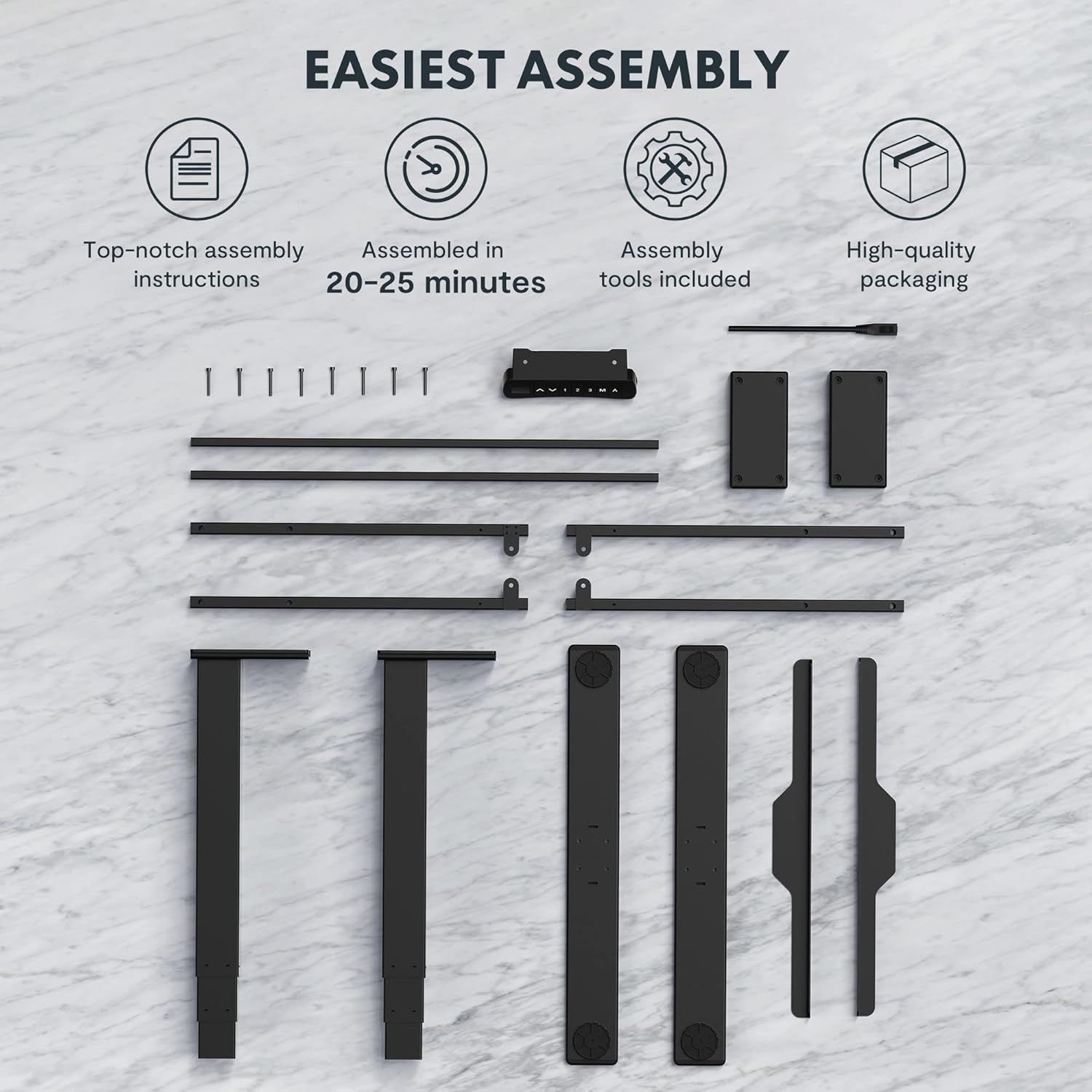
Figure 2: All components and tools required for assembling the FLEXISPOT EC5 Standing Desk.
Continutul pachetului:
- Desk Frame (legs, crossbars)
- Tabletop (if included in package)
- Control Panel with Cable
- Adaptor de alimentare și cablu
- Elemente de asamblare (șuruburi, bolțuri)
- Unelte de asamblare (de exemplu, cheie Allen)
- Manual de instructiuni
Pași de asamblare (general)view):
- Despachetați toate componentele și verificați-le în funcție de lista de piese.
- Assemble the desk legs to the crossbars, ensuring all connections are secure.
- Attach the assembled frame to the tabletop using the provided screws.
- Mount the control panel to the underside of the tabletop in an accessible location.
- Connect all cables (motor cables to control box, control panel cable to control box, power cable to control box).
- Ensure all cables are neatly managed and secured to prevent snagging.
- Place the desk in its desired location, ensuring it is on a level surface.
For detailed, step-by-step assembly instructions, please refer to the separate assembly guide included in your product packaging.
Instrucțiuni de operare
The FLEXISPOT EC5 Standing Desk features an intuitive control panel for easy height adjustment and memory functions.

Figure 3: The EC5 control panel, featuring height display, up/down buttons, and memory presets.
Operație de bază:
- Reglarea înălțimii: Utilizați ▲ şi ▼ arrows on the control panel to raise or lower the desk to your desired height. The current height will be displayed on the digital screen.
- Gama de inaltime: The desk can be adjusted from a minimum height of 60.5 cm (23.8 inches) to a maximum height of 125 cm (49.2 inches).
Presetari de memorie:
The EC5 desk allows you to save up to three preferred height settings for quick adjustments.
- Salvarea unei presetări:
- Reglați biroul la înălțimea dorită.
- Apăsați tasta „M.” button. The display will show "S-".
- Within 3 seconds, press the desired number button („1”, „2”, sau „3”) to save the current height to that preset. The display will show "S-1", "S-2", or "S-3" to confirm.
- Reapelarea unei presetări:
- Simply press the corresponding number button („1”, „2”, sau „3”Biroul se va muta automat la înălțimea salvată.
Funcție anti-coliziune:
The desk is equipped with an anti-collision system. If the desk encounters an obstacle while moving up or down, it will automatically stop and reverse slightly to prevent damage. Ensure the area around the desk is clear during operation.
Întreţinere
Regular maintenance ensures the longevity and optimal performance of your FLEXISPOT EC5 Standing Desk.
- curatenie: Ștergeți suprafața și cadrul biroului cu o lavetă moale șiamp Evitați produsele de curățare abrazive sau substanțele chimice dure care ar putea deteriora finisajul.
- Organizare de cabluri: Periodically check that all cables are securely connected and neatly organized to prevent tangling or damage.
- Elemente de fixare: Occasionally check all screws and bolts to ensure they are tight. Retighten if necessary, but do not overtighten.
- Capacitate de greutate: Do not exceed the maximum weight capacity of 125kg (or 160kg for upgraded models) to prevent damage to the motors and frame.
- Mediu: Use the desk in a dry indoor environment. Avoid exposure to extreme temperatures or high humidity.
Depanare
If you encounter issues with your FLEXISPOT EC5 Standing Desk, refer to the following common problems and solutions:
| Problemă | Cauza posibila | Soluţie |
|---|---|---|
| Biroul nu se mișcă. | Cablul de alimentare este deconectat, cablul motorului este slăbit, supraîncărcare. | Check all cable connections. Ensure power is supplied. Reduce weight on desk if overloaded. |
| Biroul se mișcă neuniform sau face zgomote neobișnuite. | Sarcină neuniformă, elemente de fixare slăbite, obstrucție. | Distribute weight evenly. Check and tighten all fasteners. Clear any obstructions. |
| Afișajul digital afișează un cod de eroare. | Defecțiune a sistemului, problemă cu senzorul. | Refer to the full troubleshooting guide in your product manual for specific error codes. Try unplugging the desk for 10 seconds and plugging it back in to reset. |
| Anti-collision feature is too sensitive or not working. | Sensor calibration needed, obstruction. | Ensure no constant obstructions. Consult the full manual for anti-collision sensitivity adjustment or reset procedures. |
If the problem persists after attempting these solutions, please contact FLEXISPOT customer support.
Specificațiile produsului
Detailed technical specifications for the FLEXISPOT EC5 Standing Desk:
| Caracteristică | Caietul de sarcini |
|---|---|
| Marca | FLEXISPOT |
| Numărul de model | EC5B-EU3+PR1206-Black |
| UPC | 810072812643 |
| Interval de reglare a înălțimii | 60.5 cm - 125 cm (23.8" - 49.2") |
| Viteza de ridicare | 38 mm/secundă |
| Capacitate maximă de greutate | 125 kg (275 lbs) - Upgraded models may support up to 160 kg |
| Număr de motoare | 2 |
| Cadrul Stages | 3 |
| Panoul de control | Afișaj digital cu 3 presetări de memorie |
| Tabletop Dimensions (H x W x D) | 2.5 x 140 x 70 cm (0.98"A x 55.12"L x 27.56"Î) |
| Material pentru masă | MDF with high pressure scratch resistant laminate |
| Material de bază | Engineered Wood (for tabletop), Metal (for frame) |
| Culoare | Negru |
| Asamblare necesară | Da |
| Tip de garanție | Limitat |

Figure 4: The EC5 desk frame is designed for stability and can support significant weight, with some models supporting up to 160KG.
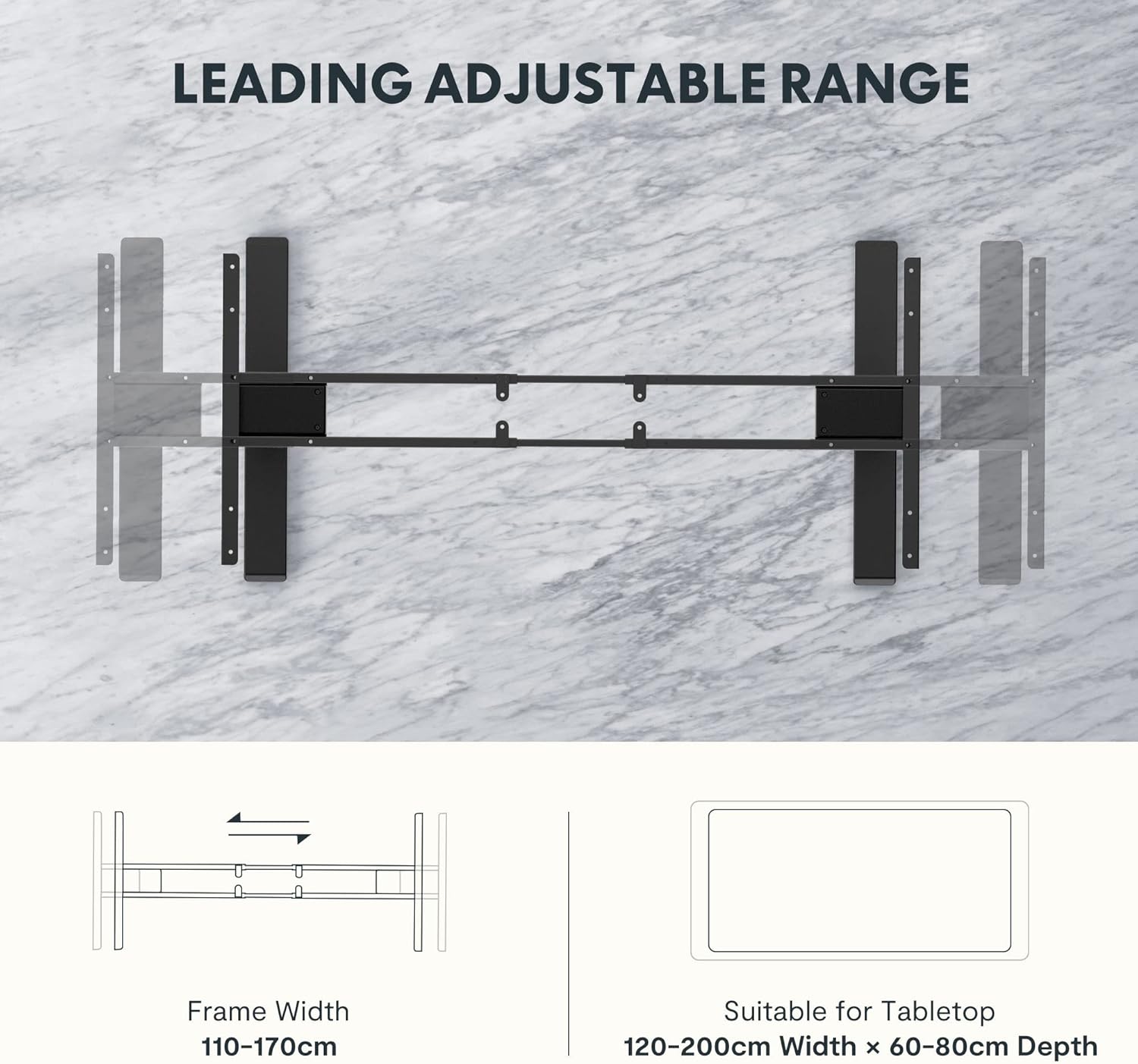
Figure 5: The adjustable frame accommodates various tabletop sizes, offering flexibility for different workspace needs.
Garanție și suport
Informații despre garanție:
The FLEXISPOT EC5 Standing Desk comes with a Garanție limitată. Please refer to the warranty card included with your product for specific terms, conditions, and duration of coverage. This warranty typically covers manufacturing defects in materials and workmanship under normal use.
Asistență clienți:
For technical assistance, warranty claims, or any questions regarding your FLEXISPOT EC5 Standing Desk, please contact FLEXISPOT customer support. You can typically find contact information on the FLEXISPOT official website sau pe ambalajul produsului dumneavoastră.
When contacting support, please have your model number (EC5B-EU3+PR1206-Black) and proof of purchase readily available.
Ask a question about this manual
Ask about setup, troubleshooting, compatibility, parts, safety, or missing instructions. Manuals+ will review the question and use this page’s manual context to help answer it.