
BluMill GM-001
Manual de utilizare pentru scaunul de gaming BluMill GM-001
Model: GM-001
1. Introducere
This manual provides essential instructions for the safe and efficient use of your BluMill Gaming Chair. Please read it thoroughly before using the product and retain it for future reference.
Informații de siguranță
- Nu depășiți capacitatea maximă de încărcare de 150 kg (330 lbs).
- Exercise caution when folding the chair to prevent injury.
- For maintenance, use only mild cleaning agents.
- This chair is designed for children and teenagers. Adults may find it less comfortable due to its size.
2. Componentele produsului
The BluMill Gaming Chair includes the following main components:
- Ergonomic seat cushion with breathable microfiber material.
- Integrated speakers located at head height.
- Control panel for volume and connectivity.
- Bluetooth module for wireless connection.
- Foldable frame for easy storage.
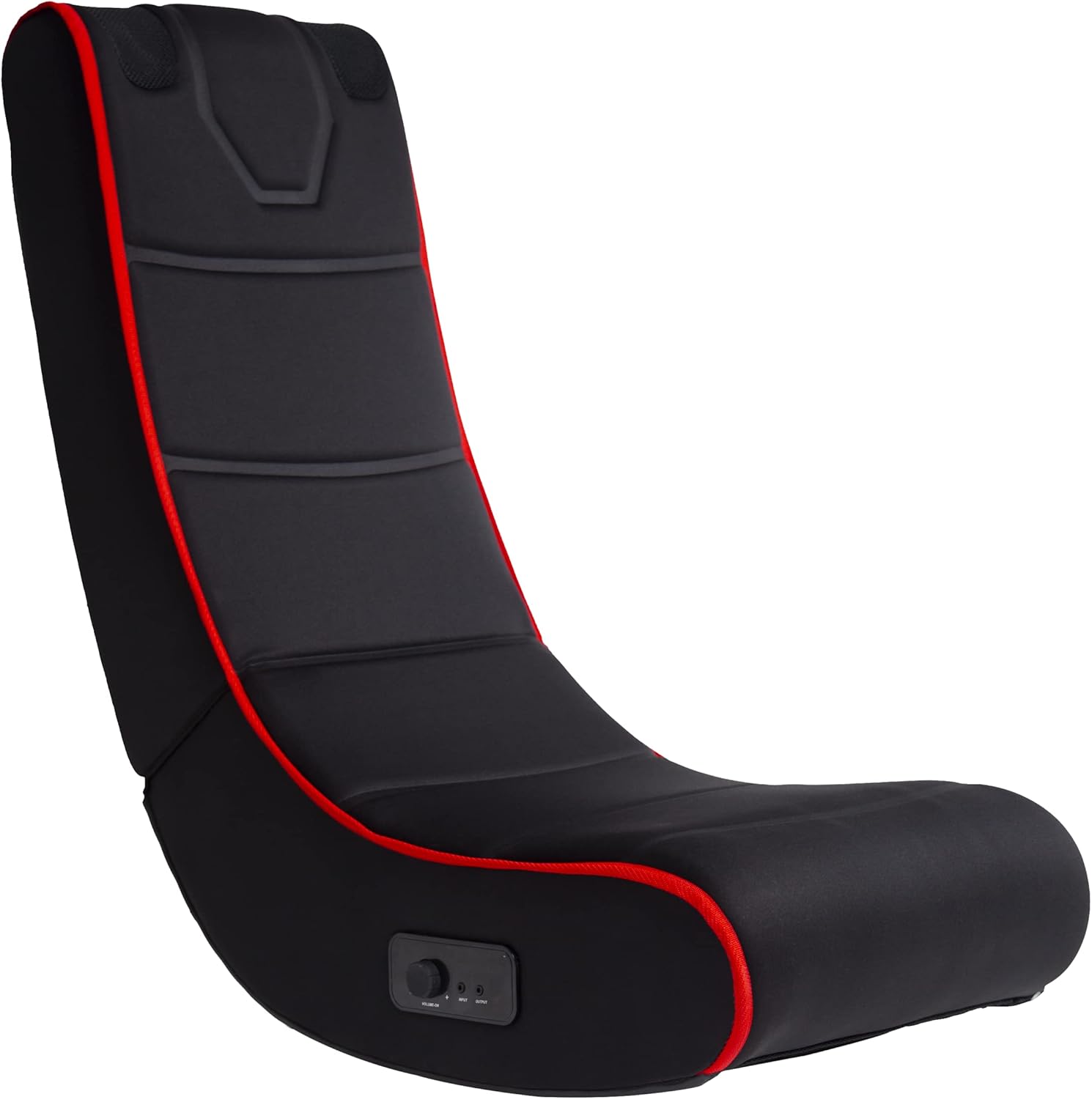
Figura 1: Față view of the BluMill Gaming Chair. This image shows the overall design and ergonomic shape of the chair.
3. Configurare
- Desfacerea scaunului: Carefully unfold the chair until it is fully extended and stable. Ensure the chair is securely locked in its open position.
- Plasare: Place the chair on a flat, stable surface. Ensure there is sufficient space around the chair for safe use and movement.
- Powering the Speakers: The speakers require 4 AA batteries (not included). Locate the battery compartment, typically on the underside or side of the chair near the control panel. Use a small screwdriver to open the compartment, insert the batteries with correct polarity, and securely close the cover.

Figure 2: The BluMill Gaming Chair positioned in a living space, ready for use.

Figure 3: The BluMill Gaming Chair in its folded position, demonstrating its space-saving design for storage.
4. Instrucțiuni de utilizare
4.1 Panoul de control pesteview

Figura 4: Detaliat view of the control panel, showing the volume knob, input/output jacks, and power indicator.
The control panel, located on the side of the chair, allows you to manage audio functions:
- Buton de volum/pornire: Turn clockwise to increase volume and power on. Turn counter-clockwise to decrease volume and power off. The red light indicates power is on.
- Mufă INPUT: For wired audio connection from devices without Bluetooth.
- Mufă IEȘIRE: To connect external headphones or another audio device.
4.2 Conexiune Bluetooth
- Pornire: Turn the Volume/Power knob clockwise to power on the chair's audio system. The red indicator light will illuminate.
- Activați Bluetooth: The chair will automatically enter Bluetooth pairing mode.
- Asociere: On your device (smartphone, tablet, game controller, TV), enable Bluetooth and search for available devices. Select "BluMill Gaming Chair" (or similar name) from the list.
- Confirmare: Once paired, your device will indicate a successful connection, and audio will play through the chair's integrated speakers.
- Reglați volumul: Use the Volume/Power knob on the chair or your connected device to adjust the audio level.

Figure 5: Visual representation of the chair's Bluetooth connectivity and integrated speaker function.
4.3 Conexiune audio cu fir
- Cablu de conectare: Insert a 3.5mm audio cable (not included) into the INPUT jack on the chair's control panel.
- Conectați-vă la dispozitiv: Connect the other end of the audio cable to the headphone jack or audio output of your device (e.g., TV, game console, MP3 player).
- Reglați volumul: Use the Volume/Power knob on the chair and your connected device to adjust the audio level.

Figure 6: A person seated in the BluMill Gaming Chair, engaged in a video game, demonstrating typical usage.
5. Întreținere
- curatenie: Ștergeți scaunul cu un material moale, damp cloth using only mild cleaning agents. Avoid abrasive cleaners or solvents that could damage the material.
- Depozitare: When not in use, the chair can be folded for compact storage. Ensure it is stored in a dry place away from direct sunlight and extreme temperatures.
- Înlocuire baterie: Replace batteries when audio quality degrades or the chair fails to power on. Ensure correct polarity when inserting new batteries.
6. Depanare
| Problemă | Cauza posibila | Soluţie |
|---|---|---|
| Niciun sunet de la difuzoare. | Chair not powered on; low/dead batteries; volume too low; device not connected or muted. | Ensure power knob is on and red light is lit. Replace batteries. Increase volume on chair and connected device. Re-establish Bluetooth connection or check wired connection. |
| Conexiunea Bluetooth eșuează. | Chair not in pairing mode; device Bluetooth off; too far from chair; interference. | Ensure chair is powered on. Turn Bluetooth off and on again on your device. Move device closer to the chair. Try pairing in an area with less interference. |
| Calitate slabă a sunetului. | Low batteries; poor connection; source audio quality. | Replace batteries. Ensure a stable Bluetooth or wired connection. Check the quality of the audio source. |
| Scaunul pare instabil. | Not fully unfolded; placed on uneven surface; exceeding weight limit. | Ensure chair is fully unfolded and stable. Place on a flat, level surface. Do not exceed the 150 kg weight limit. |
7. Specificații
| Marca | BluMill |
| Numărul de model | GM-001 |
| Culoare | Albastru (Note: Product images display a black chair with red accents.) |
| Material | Leather (Seating surface described as breathable microfiber.) |
| Dimensiunile produsului (desfășurat) | 80 cm (Adâncime) x 43 cm (Lățime) x 80 cm (Înălțime) |
| Dimensiuni produs (pliat) | 46 cm (Adâncime) x 67 cm (Lățime) x 43 cm (Înălțime) |
| Greutatea articolului | 4.68 kg (10.3 lbs) |
| Capacitate maximă de încărcare | 150 kg (330 lbs) |
| Conectivitate | Bluetooth, Wired (3.5mm audio input) |
| Power Source (Speakers) | 4 x baterii AA |

Figure 7: Dimensions of the BluMill Gaming Chair, illustrating its height, width, and depth when unfolded.
8. Informații despre garanție
Specific warranty details for the BluMill Gaming Chair GM-001 are not provided in the product information. Please refer to your purchase documentation or contact the retailer for warranty terms and conditions.
9. Asistență pentru clienți
For further assistance, technical support, or inquiries regarding your BluMill Gaming Chair, please contact your retailer or visit the official BluMill website. Have your model number (GM-001) and purchase details ready when contacting support.
Ask a question about this manual
Ask about setup, troubleshooting, compatibility, parts, safety, or missing instructions. Manuals+ will review the question and use this page’s manual context to help answer it.