
Fnatic BOLT
Fnatic BOLT Wireless Gaming Mouse User Manual
Introducere
This manual provides detailed instructions for the setup, operation, maintenance, and troubleshooting of your Fnatic BOLT Wireless Gaming Mouse. Please read this manual thoroughly before using the product to ensure optimal performance and longevity.
Produs terminatview
The Fnatic BOLT is a lightweight wireless gaming mouse designed for high performance. It features a durable construction and versatile connectivity options.
Componente
- Butoane de clic stânga și dreapta
- Rotiță de derulare
- DPI Cycle Button (typically located on the bottom or top)
- Butoane laterale (înainte/înapoi)
- Port de încărcare USB-C
- Wireless Receiver (dongle)

Figura 1: Sus view of the Fnatic BOLT Wireless Gaming Mouse, showing the main click buttons and scroll wheel.

Figura 2: Înclinat view of the Fnatic BOLT Wireless Gaming Mouse, highlighting the two programmable side buttons.

Figura 3: Față view of the Fnatic BOLT Wireless Gaming Mouse, displaying the USB-C charging port.
Înființat
1. Încărcarea inițială
Before first use, it is recommended to fully charge the Fnatic BOLT mouse.
- Connect the provided USB-C cable to the charging port on the front of the mouse.
- Connect the other end of the USB-C cable to a powered USB port on your computer or a USB wall adapter.
- The mouse's indicator light will show charging status (refer to product documentation for specific light patterns). A full charge typically takes a few hours.
2. Conectarea la computer
The Fnatic BOLT supports two wireless connection modes: 2.4 GHz wireless (via USB dongle) and Bluetooth.
2.1. Conexiune wireless de 2.4 GHz
- Locate the USB wireless receiver (dongle) that came with your mouse.
- Conectați receptorul USB la un port USB disponibil de pe computer.
- Porniți mouse-ul folosind comutatorul de alimentare situat în partea de jos a mouse-ului.
- The mouse should automatically connect to the receiver. The indicator light will confirm a successful connection.
2.2. Conexiune Bluetooth
- Asigurați-vă că Bluetooth-ul computerului este activat.
- Turn on the mouse and switch it to Bluetooth mode (refer to the mouse's bottom switch or button for mode selection).
- Pe computer, accesați setările Bluetooth și căutați dispozitive noi.
- Select "Fnatic BOLT" from the list of available devices to pair.
- The mouse's indicator light will confirm successful pairing.
Instrucțiuni de operare
Ajustare DPI
The Fnatic BOLT mouse allows you to adjust its Dots Per Inch (DPI) sensitivity. This mouse features 4 preset DPI levels.
- Locate the DPI cycle button, typically on the bottom of the mouse.
- Press the DPI button to cycle through the available sensitivity settings.
- An indicator light (often on the scroll wheel or top of the mouse) may change color or flash to indicate the current DPI level.
Funcțiile butoanelor
- Click stânga: Acțiune primară, selecție.
- Click dreapta: Meniu contextual, acțiune secundară.
- Clic cu rotița de derulare: Middle click, often used for opening links in new tabs or specific in-game functions.
- Derulare în sus/în jos: Navigating documents or web pagini.
- Butoane laterale: Default to Forward/Back in web browsers. These can often be customized via software (if available).
Managementul energiei
- To conserve battery life, turn off the mouse using the power switch when not in use for extended periods.
- The mouse may enter a sleep mode after a period of inactivity. Move the mouse or click a button to wake it up.
- Monitor the battery indicator (if available) to know when to recharge.
Întreţinere
Curatenie
- Regularly clean the mouse surface with a soft, dry, lint-free cloth.
- Pentru murdăria persistentă, dreaptă ușorampClătiți cârpa cu apă sau o soluție de curățare delicată. Evitați substanțele chimice dure.
- Clean the optical sensor on the bottom of the mouse with a cotton swab to ensure accurate tracking.
- Nu permiteți pătrunderea lichidelor în componentele interne ale mouse-ului.
Îngrijirea bateriei
- Evitați descărcarea completă frecventă a bateriei.
- Depozitați mouse-ul într-un loc răcoros și uscat atunci când nu îl utilizați pentru perioade lungi de timp.
- Nu expuneți mouse-ul la temperaturi extreme.
Depanare
Mouse-ul nu răspunde
- Verificați bateria: Ensure the mouse is charged. Connect it to the USB-C cable and allow it to charge for a period.
- Întrerupător: Verificați dacă întrerupătorul de alimentare al mouse-ului este în poziția „ON”.
- Wireless Connection (2.4 GHz):
- Asigurați-vă că receptorul USB este conectat corect la un port USB funcțional. Încercați un alt port USB.
- Ensure the mouse is within range of the receiver.
- Evitați sursele de interferență (de exemplu, alte dispozitive wireless, obiecte metalice mari).
- Conexiune Bluetooth:
- Asigurați-vă că Bluetooth-ul computerului este activat.
- Check if the mouse is in Bluetooth pairing mode or already paired. Re-pair if necessary.
- Remove and re-add the device in your computer's Bluetooth settings.
- Repornire: Reporniți computerul.
Urmărire inexactă
- Curățați senzorul: Curățați senzorul optic din partea inferioară a mouse-ului.
- Suprafaţă: Ensure you are using the mouse on a suitable surface. Highly reflective or uneven surfaces can affect tracking. A mouse pad is recommended.
- Setare DPI: Adjust the DPI setting to a level that suits your preference and task.
Durată scurtă de viață a bateriei
- Încărcare: Asigurați-vă că mouse-ul este complet încărcat.
- Oprire: Remember to turn off the mouse when not in use.
- Utilizare: High-intensity usage or certain settings might consume more power.
Specificații
| Caracteristică | Detaliu |
|---|---|
| Marca | Fnatic |
| Numele modelului | FnaticGear BOLT |
| Numărul de model al articolului | Șurub |
| Culoare | alb |
| Tehnologia de conectivitate | Bluetooth, Wi-Fi (2.4 GHz Wireless) |
| Tehnologia de detectare a mișcării | Optic |
| Numărul de butoane | 6 |
| Orientarea mâinii | Corect |
| Caracteristici speciale | Ușoare |
| Tipul sursei de alimentare | Wireless (Rechargeable Battery) |
| Baterii incluse | Yes (1 Lithium Metal battery) |
| Conținutul de energie al bateriei cu litiu | 470 Miliamp Ore (mAh) |
| Dimensiunile produsului | 12.5 x 6.5 x 0.1 cm; 69 g |
| Dispozitive compatibile | Laptop, computer personal |
| Sisteme de operare | Linux, Windows 7, Windows XP (and newer) |
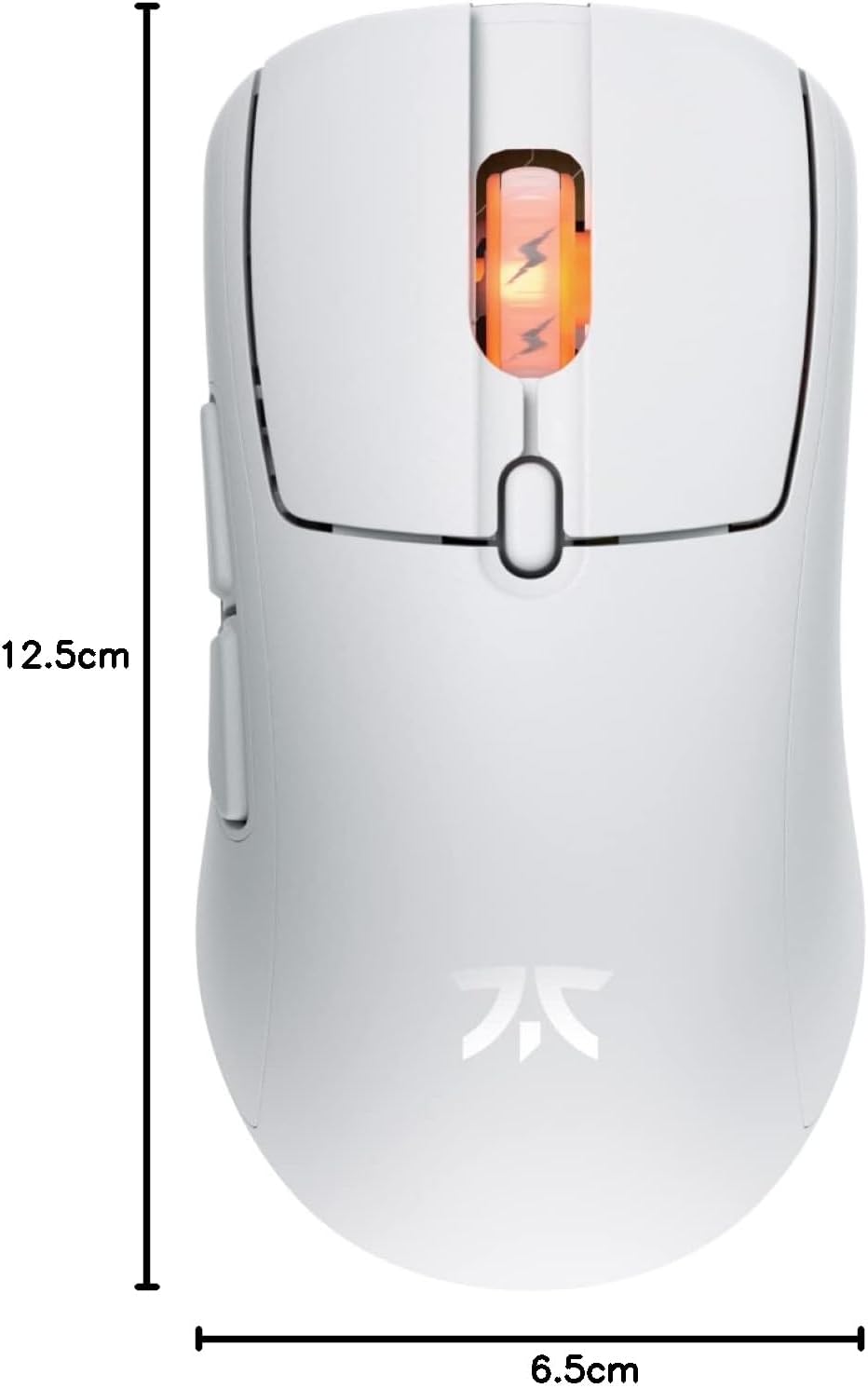
Figure 4: Diagram showing the dimensions of the Fnatic BOLT Wireless Gaming Mouse.
Garanție și suport
For information regarding warranty coverage and technical support, please refer to the official Fnatic website-ul sau cardul de garanție inclus împreună cu produsul.
You can typically find support resources, FAQs, and contact information on the manufacturer's official support pages.