
1. Introducere
Thank you for choosing the BLOW RA2 Portable Analog AM/FM Radio. This device combines classic analog radio functionality with modern features such as Bluetooth connectivity, USB and SD card playback, and an AUX input. It also includes a clock and alarm function for added convenience. This manual provides essential information for the safe and efficient operation of your radio.
2. Configurare
2.1 Despachetarea
Carefully remove the radio from its packaging. Ensure all components are present: the BLOW RA2 radio and the power cable.
2.2 Conexiune la alimentare
Connect the power cable to the AC 230V ~ 50Hz power input located at the rear of the radio. Plug the other end into a standard wall outlet. The radio is designed for AC power operation.
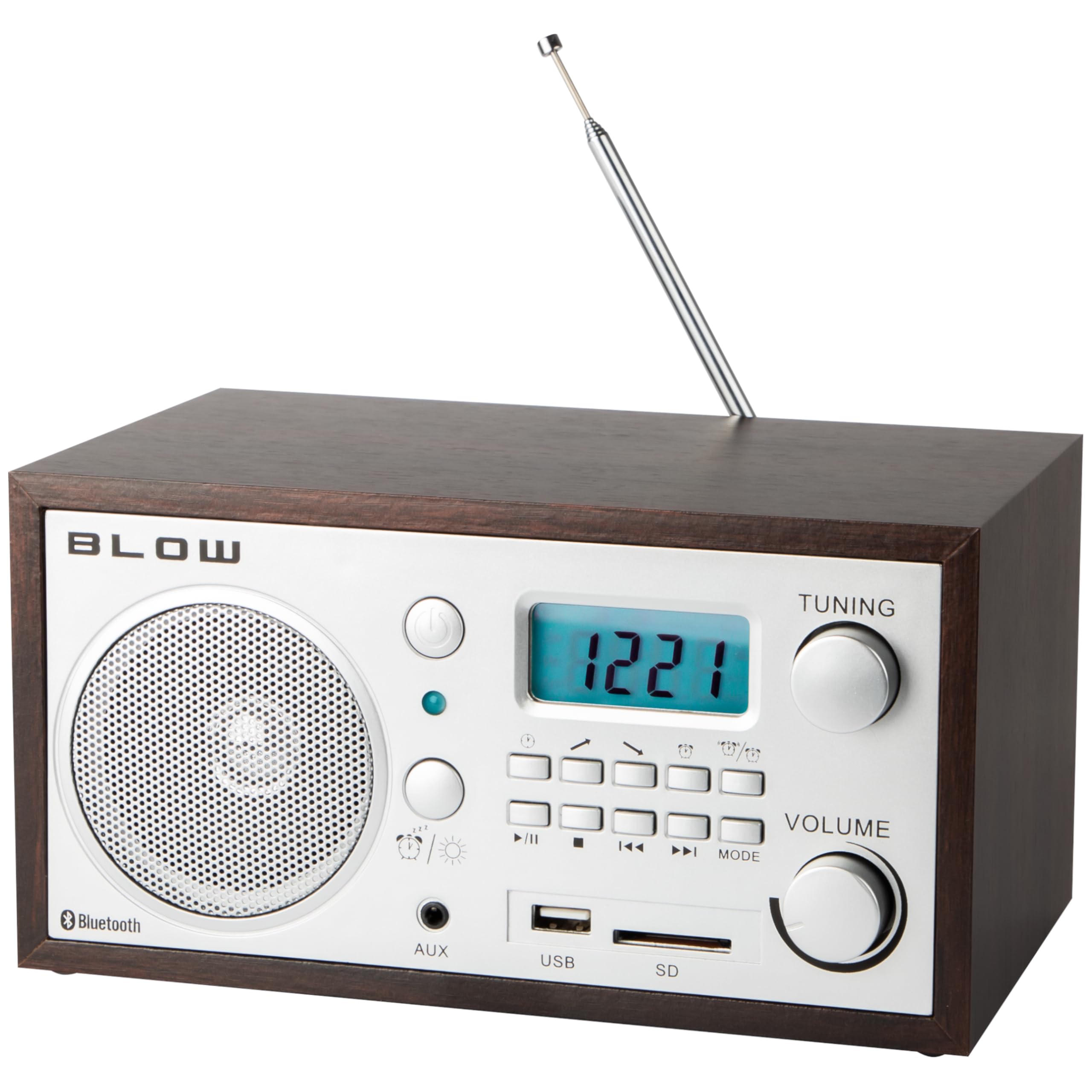
Figura 1: Spate view of the BLOW RA2 radio, illustrating the power input, main power switch, and the telescopic antenna.
2.3 Reglarea antenei
For optimal AM/FM radio reception, extend the telescopic antenna fully. Adjust its position for the clearest signal. For AM reception, rotating the unit itself may also improve signal quality.
3. Instrucțiuni de utilizare
3.1 Pornire/Oprire
Locate the main power switch, typically on the rear or side of the unit. Flip the switch to the 'ON' position to power on the radio. Flip to 'OFF' to power down.

Figura 2: Front panel of the BLOW RA2 radio, showing the LCD display, control knobs, and input ports.
3.2 Acordarea radioului (AM/FM)
- Press the 'MODE' button to select either AM or FM radio band. The selected band will be shown on the LCD display.
- Rotate the 'TUNING' knob to scan for radio stations. The frequency will be displayed on the LCD.
- Adjust the 'VOLUME' knob to your desired listening level.
3.3 Funcționare Bluetooth
- Press the 'MODE' button until 'Bluetooth' or 'BT' is displayed on the LCD. The radio will enter pairing mode.
- Pe dispozitivul mobil (smartphone, tabletă etc.), activați Bluetooth și căutați dispozitivele disponibile.
- Select 'BLOW RA2' from the list of devices to pair. A confirmation sound may indicate successful pairing.
- Play audio from your device, and it will stream through the radio's speaker.
3.4 Redare de pe USB și card SD
- Introduceți o unitate flash USB în portul USB sau un card SD în slotul pentru card SD.
- Press the 'MODE' button until 'USB' or 'SD' is displayed. The radio will automatically begin playing compatible audio files.
- Use the playback control buttons (Play/Pause, Next, Previous) to manage your audio.
3.5 Intrare AUX
- Connect an external audio device (e.g., MP3 player, laptop) to the 'AUX' input jack using a 3.5mm audio cable (not included).
- Apăsați butonul „MODE” până când se afișează „AUX”.
- Play audio from your external device. The sound will be output through the radio's speaker.
3.6 Funcția Ceas și Alarmă
The BLOW RA2 features an integrated clock and alarm. Refer to the specific instructions in the included owner's manual for detailed steps on setting the time and configuring the alarm, as these functions typically involve specific button combinations not detailed here.
4. Întreținere
4.1 Curățare
To clean the radio, use a soft, dry cloth. Do not use abrasive cleaners, waxes, or solvents, as these can damage the finish and internal components. Ensure the unit is unplugged before cleaning.
4.2 Îngrijirea antenei
Handle the telescopic antenna with care to prevent bending or breaking. When not in use, retract the antenna to protect it.
4.3 Depozitare
If the radio will not be used for an extended period, unplug it from the power outlet and store it in a cool, dry place away from direct sunlight and extreme temperatures.
5. Depanare
| Problemă | Cauza posibila | Soluţie |
|---|---|---|
| Fără putere | Power cable not connected; Main switch off | Ensure power cable is securely plugged in; Turn main power switch to 'ON' |
| Recepție radio slabă | Antena nu este extinsă/poziționată corect; Zonă cu semnal slab | Extend and adjust telescopic antenna; Try relocating the radio for better signal |
| Bluetooth nu se conectează | Radio not in Bluetooth mode; Device not in pairing mode; Already paired to another device | Ensure radio is in Bluetooth mode; Put your device in pairing mode; Disconnect from other devices |
| Nu se redă cardul USB/SD | Mod selectat incorect; Incompatibil file format; Corrupted media | Select 'USB' or 'SD' mode; Ensure files are compatible (e.g., MP3); Try another USB/SD card |
| Nici un sunet | Volum prea mic; Silențios activat; Sursă incorectă selectată | Increase volume; Check for mute function; Ensure correct input mode is selected |
6. Specificații
- Model: 77-531
- Tehnologia tunerului: AM/FM analogic
- Interval de frecvență AM: 522-1620 kHz
- Interval de frecvență FM: 88-108 MHz
- Vorbitor: 2.5 inch
- Antenă: Telescopic
- Conectivitate: Bluetooth, USB, SD Card Reader, AUX Input
- Afişa: LCD
- Caracteristici speciale: Built-in Clock, Alarm Clock, Portable
- Alimentare electrică: CA 230V ~ 50Hz (electric cu fir)
- Dimensiuni: 21 x 11 x 14 cm (L x l x înălțime)
- Greutate: 1.39 kg
- Material: Plastic
7. Garanție și asistență
For warranty information and technical support, please refer to the documentation included with your purchase or contact your retailer. The owner's manual is included as a component with the product.