
Dalton 10kVA
Dalton 10 kVA Uninterruptible Power Supply (UPS) Unit
Manual de instrucțiuni pentru utilizator
1. Introducere
Thank you for choosing the Dalton 10 kVA Uninterruptible Power Supply (UPS) unit. This manual provides essential information for the safe and efficient operation of your UPS. Please read this manual thoroughly before installation and operation, and keep it for future reference.
This UPS is designed to provide reliable power protection for critical equipment, safeguarding against power outages, surges, and fluctuations. Its advanced technology ensures stable and clean power delivery, extending the lifespan of your connected devices.
2. Informații de siguranță
Always observe the following safety precautions to prevent injury or damage to the UPS and connected equipment:
- Nu deschideți unitatea UPS.asing. În interior nu există piese care să poată fi reparate de utilizator. Apelați la personal de service calificat pentru orice operațiune de service.
- Asigurați-vă că sursa UPS este conectată la o priză de alimentare cu împământare.
- Do not block ventilation openings. Adequate airflow is crucial for proper cooling.
- Evitați instalarea sursei neîntreruptibile (UPS) în zone cu praf excesiv, umiditate sau temperaturi extreme.
- Disconnect the UPS from the AC power source before performing any maintenance or moving the unit.
- Bateriile pot prezenta risc de electrocutare și curent de scurtcircuit ridicat. Respectați precauțiile corespunzătoare atunci când lucrați cu baterii.
3. Conținutul pachetului
Carefully unpack the UPS and check if all items are present and undamaged. If any items are missing or damaged, contact your dealer immediately.
- Dalton 10 kVA UPS Unit
- Manual de utilizare (acest document)
- Cablu de alimentare de intrare
- Output Power Cables (quantity may vary)
- USB Communication Cable (for monitoring software)
- CD cu software (dacă este cazul)
4. Produs terminatview
The Dalton 10 kVA UPS is a robust power protection solution. Below is an overview of its typical components and features.
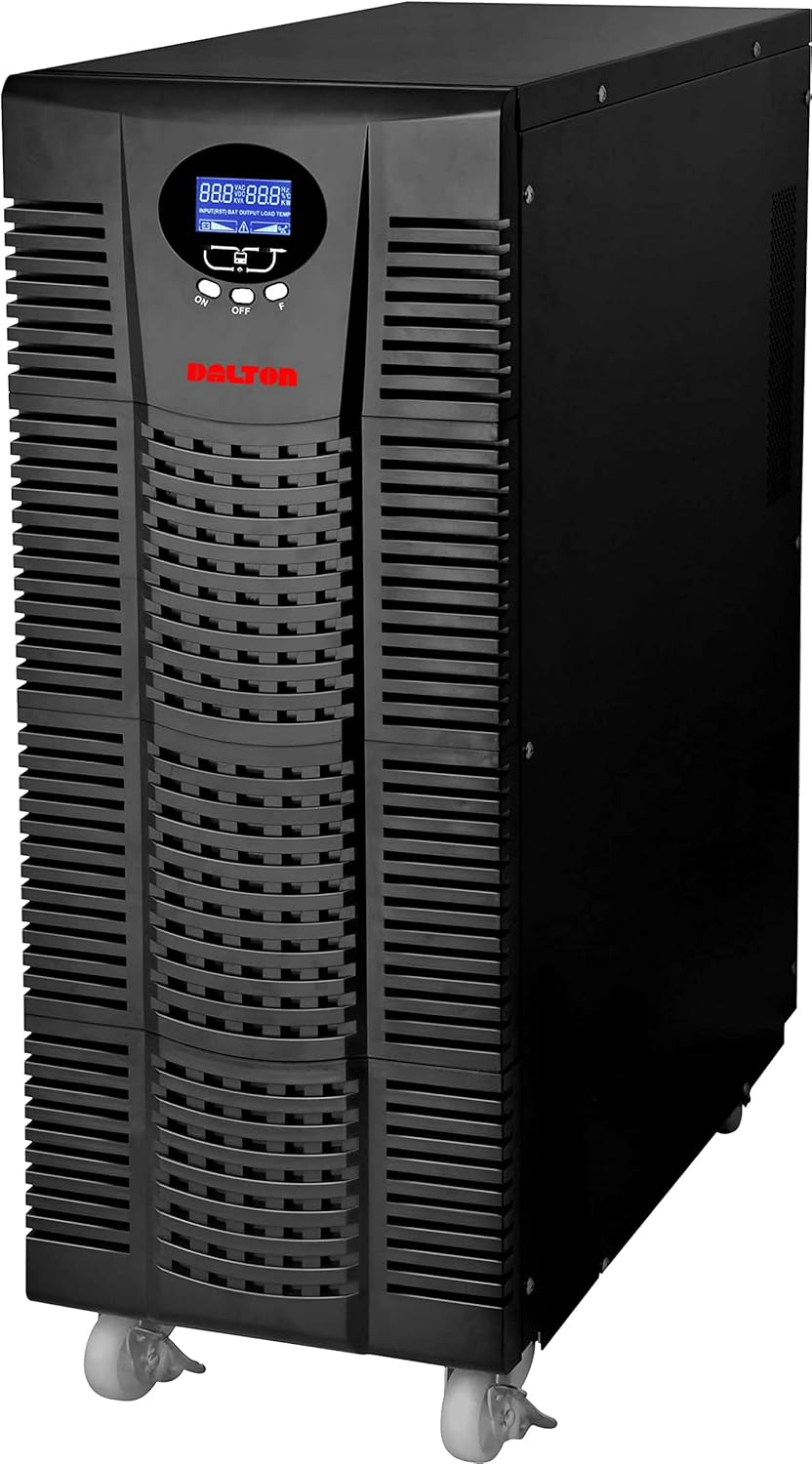
Figura 4.1: Față view of the Dalton 10 kVA UPS unit. This image displays the tall, black tower design of the UPS, featuring a prominent vented front panel for airflow and integrated wheels at the base for easy mobility. The control panel and display are visible towards the top of the unit.
4.1 Panoul frontal
- Display LCD: Shows real-time status, input/output voltage, nivelul bateriei, procentul de încărcaretage și coduri de eroare.
- Butoane de control: Used to navigate menus, acknowledge alarms, and perform system tests.
- Buton de alimentare: Pornește sau oprește UPS-ul.
4.2 Panoul din spate
- Conector de alimentare de intrare: For connecting the UPS to the main AC power source.
- Recipiente de ieșire: For connecting protected equipment.
- Communication Ports (USB/RS232): For connecting to a computer for monitoring and management.
- External Battery Connector (if applicable): For connecting optional external battery packs.
- Întrerupător de circuit: Provides overload protection.
5. Configurare și instalare
Follow these steps for proper installation of your UPS unit:
- Plasare:
- Place the UPS in a clean, dry, and well-ventilated area.
- Ensure sufficient clearance around the unit for proper airflow.
- Avoid direct sunlight, heat sources, and excessive moisture.
- Încărcare inițială a bateriei:
- Conectați UPS-ul la o priză de curent alternativ cu împământare.
- Allow the UPS to charge for at least 8 hours before connecting any equipment to ensure full battery capacity. The display will indicate charging status.
- Echipament de conectare:
- With the UPS turned off and fully charged, connect your critical equipment (computers, servers, networking devices) to the UPS output receptacles.
- Do not connect laser printers or other high-surge current devices to the battery-backed outlets, as this may overload the UPS.
- Pornire:
- Press and hold the power button on the front panel until you hear a beep and the display illuminates.
- The UPS will perform a self-test and then enter normal operating mode.
6. Instrucțiuni de utilizare
6.1 Funcționare normală
Once powered on, the UPS continuously monitors the incoming AC power. In normal mode, it provides clean and stable power to connected devices.
6.2 Modul baterie
If the utility power fails or fluctuates outside acceptable limits, the UPS will automatically switch to battery mode, providing power from its internal batteries. An audible alarm will sound, and the LCD display will indicate "Battery Mode".
- During battery mode, save your work and shut down connected equipment gracefully to prevent data loss.
- The duration of battery backup depends on the load connected and the battery charge level.
6.3 Oprirea sursei neîntreruptibile (UPS)
To turn off the UPS and disconnect power to connected devices:
- Shut down all connected equipment.
- Press and hold the power button on the UPS until it powers off.
- Disconnect the UPS from the AC power outlet.
7. Întreținere
7.1 Îngrijirea bateriei
- Regularly charge the batteries by keeping the UPS connected to AC power.
- Perform a battery self-test periodically (refer to your UPS display menu for this option) to check battery health.
- Batteries have a limited lifespan (typically 3-5 years). Contact service for battery replacement when performance degrades.
7.2 Curățare
- Clean the exterior of the UPS with a soft, dry cloth.
- Nu utilizați detergenți lichidi sau aerosoli.
- Asigurați-vă că orificiile de ventilație sunt lipsite de praf și resturi.
8. Depanare
This section provides solutions to common issues you might encounter with your UPS.
| Problemă | Cauza posibila | Soluţie |
|---|---|---|
| UPS-ul nu pornește. | No AC input power; Low battery; UPS fault. | Check power cord connection and wall outlet. Allow UPS to charge for several hours. Contact service if problem persists. |
| UPS-ul emite un semnal sonor continuu în modul normal. | Overload; Battery fault. | Reduce connected load. Perform battery self-test. |
| Timp scurt de backup. | Overload; Old battery; Insufficient charging. | Reduce load. Replace battery. Ensure UPS is fully charged. |
For issues not listed here, or if solutions do not resolve the problem, please contact Dalton customer support.
9. Specificații
| Caracteristică | Detaliu |
|---|---|
| Marca | Dalton |
| Model | UPS de 10 kVA |
| Putere maximă | 10,000 wați |
| Putere de ieșire | 10,000 wați |
| Gama de frecvente | 50/60 Hz (± 3 Hz) |
| Tip conector | IEC 320, Battery |
| Culoare | Negru |
| Material | Metal |
| ASIN | B09NC2FXNC |
| Prima dată disponibilă | 9 decembrie 2021 |
10. Garanție și asistență
Dalton provides comprehensive support for its products. As authorized distributors in the Arab Republic of Egypt, we maintain an authorized service center for all Dalton UPS units.
- For technical assistance, troubleshooting, or warranty claims, please contact our authorized service center.
- Ensure you have your product model and ASIN (B09NC2FXNC) ready when contacting support.
- Reparațiile sau modificările neautorizate vor anula garanția produsului.
For more information, please visit the official Dalton website-ul sau contactați distribuitorul local.
Ask a question about this manual
Ask about setup, troubleshooting, compatibility, parts, safety, or missing instructions. Manuals+ will review the question and use this page’s manual context to help answer it.