
Dalton 2000VA/5-100A UPS
Dalton 2000VA Uninterruptible Power Supply User Manual
Model: 2000VA/5-100A UPS
1. Introducere
Thank you for choosing the Dalton 2000VA Uninterruptible Power Supply (UPS). This device is designed to provide reliable power backup and protection for your electronic equipment against power outages, surges, and fluctuations. Please read this manual thoroughly before installation and operation to ensure optimal performance and safety.
2. Instrucțiuni importante de siguranță
Respectați întotdeauna aceste măsuri de siguranță de bază pentru a reduce riscul de incendiu, electrocutare și vătămare corporală:
- Nu deschideți unitatea UPS.asing. În interior nu există piese care să poată fi reparate de utilizator. Consultați personalul de service calificat.
- Do not use the UPS in environments with excessive dust, humidity, or extreme temperatures.
- Asigurați-vă că sursa UPS este conectată la o priză de alimentare cu împământare.
- Do not connect non-computer related items like medical equipment, life support equipment, or household appliances to the UPS.
- Amplasați sursa de alimentare neîntreruptibilă (UPS) într-o zonă bine ventilată, ferită de lumina directă a soarelui sau de surse de căldură.
- In case of emergency, press the power button to turn off the UPS and disconnect it from the AC power source.
3. Conținutul pachetului
Verificați dacă toate articolele sunt prezente în colet:
- Dalton 2000VA UPS Unit
- Cablu de alimentare
- USB Communication Cable (if applicable)
- Manual de utilizare (acest document)

Figura 3.1: Față view of the Dalton 2000VA UPS unit, showing the display screen and power button.
4. Configurare și instalare
Follow these steps to set up your UPS:
- Despachetarea: Scoateți cu grijă unitatea UPS din ambalaj. Verificați dacă există daune în urma transportului.
- Plasare: Place the UPS on a flat, stable surface in a cool, dry, and well-ventilated area. Ensure there is adequate space around the unit for airflow.
- Taxă inițială: Before connecting any devices, plug the UPS power cord into a grounded wall outlet. Allow the unit to charge for at least 8 hours to ensure the battery is fully charged. The display will indicate charging status.
- Dispozitive de conectare:
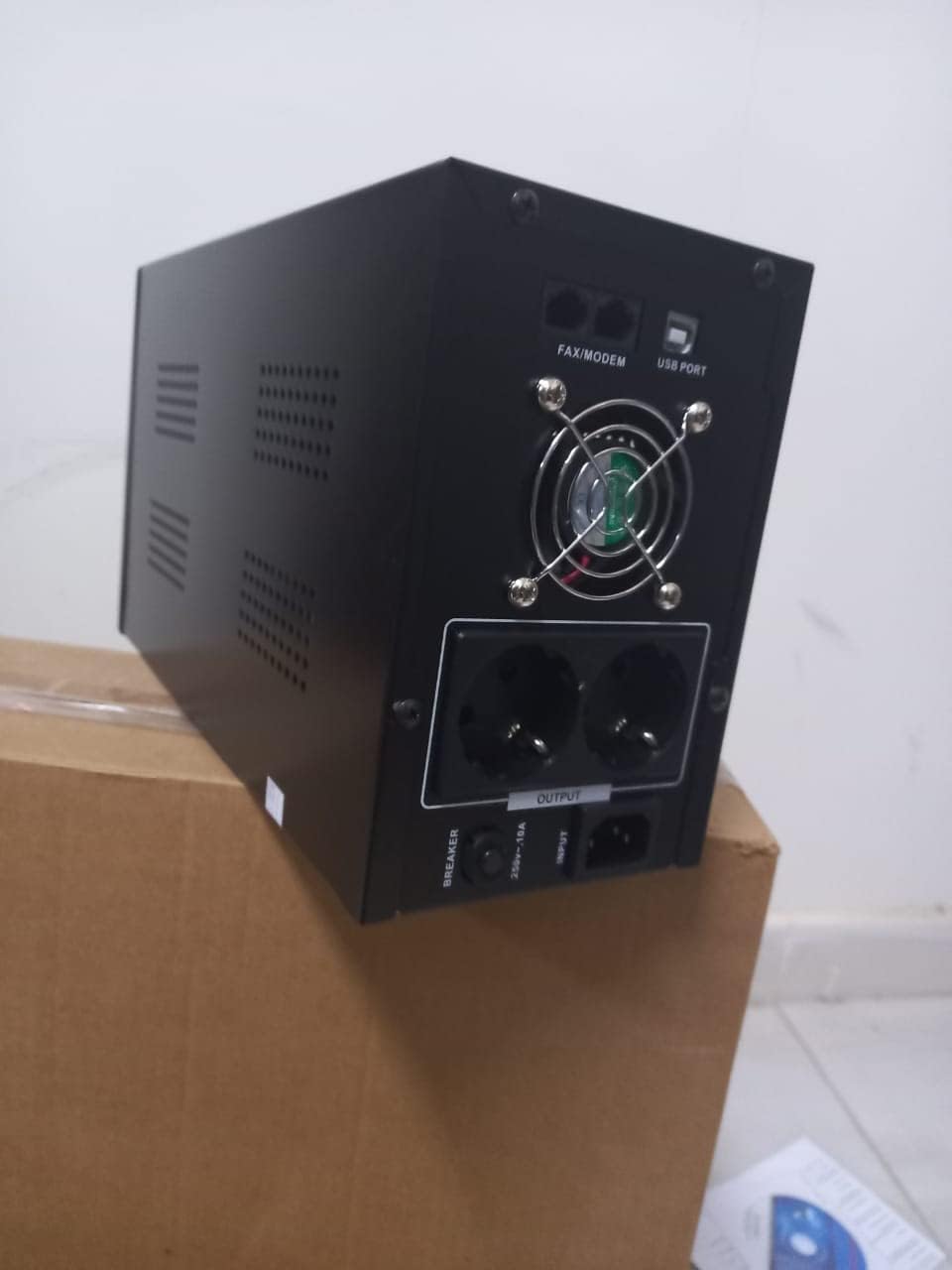
Figura 4.1: Spate view of the Dalton 2000VA UPS, highlighting the input power port, output sockets, and USB/Modem ports.
- Once the battery is charged, connect your computer, monitor, and other critical electronic devices to the UPS output sockets.
- Do not overload the UPS. Refer to the specifications section for maximum load capacity.
- If applicable, connect the USB communication cable from the UPS to your computer for monitoring software (software not included, check manufacturer's website-ul).
5. Operarea UPS-ului
5.1 Pornire/Oprire
- Pentru a porni: After connecting to AC power and charging, press and hold the power button on the front panel for approximately 3 seconds until you hear a beep and the display illuminates.
- Pentru a opri: Press and hold the power button for approximately 3 seconds until you hear a beep and the display turns off. If the UPS is running on battery, it will shut down immediately. If connected to AC, it will switch to bypass mode before shutting down.
5.2 Înțelegerea afișajului
The front panel LCD display provides real-time status information:
- ÎN: Afișează volumul de intraretage de la rețeaua electrică.
- OUT: Afișează volumul de ieșiretage provided by the UPS to connected devices.
- NORMAL: Indică faptul că UPS-ul funcționează cu alimentarea de la rețeaua electrică.
- Băţ: Afișează nivelul actual de încărcare a bateriei.
- Încărca: Indică procentultage din capacitatea UPS-ului utilizată de dispozitivele conectate.
- Battery Mode Icon: Appears when the UPS is running on battery power during an outage.

Figura 5.1: lateral view of the UPS, showing the illuminated display with power status indicators.
5.3 Funcția de rezervă a bateriei
În cazul unei alimentăritage, the UPS will automatically switch to battery power, providing continuous power to your connected devices. The duration of backup power depends on the load connected and the battery's charge level. The UPS will emit an audible alarm during battery operation.
When utility power returns, the UPS will automatically switch back to AC power and begin recharging its battery.
6. Întreținere
- Îngrijirea bateriei: To maximize battery life, ensure the UPS is always connected to an AC outlet to keep the battery charged. If the UPS is stored for an extended period, recharge it every three months for at least 8 hours.
- curatenie: Disconnect the UPS from all power sources before cleaning. Use a soft, dry cloth to wipe the exterior. Do not use liquid or aerosol cleaners.
- Ventilare: Regularly check that the ventilation openings are not blocked by dust or debris to prevent overheating.
7. Depanare
Consultați tabelul de mai jos pentru problemele comune și soluțiile acestora:
| Problemă | Cauza posibila | Soluţie |
|---|---|---|
| UPS-ul nu pornește. | Battery not charged or power cord disconnected. | Ensure power cord is securely plugged in and allow battery to charge for 8 hours. |
| UPS-ul emite un semnal sonor continuu în modul normal. | Stare de suprasarcină. | Disconnect non-essential equipment until the alarm stops. Check total load. |
| Timp scurt de backup. | Battery not fully charged or battery nearing end of life. | Allow UPS to charge for 8 hours. If issue persists, battery may need replacement (contact service center). |
| UPS-ul nu furnizează energie în timpul deconectarii.tage. | Battery discharged or internal fault. | Ensure UPS was fully charged. If problem persists, contact authorized service center. |
8. Specificatii tehnice
| Caracteristică | Detaliu |
|---|---|
| Dimensiunile produsului | 12.5 x 22.5 x 38 cm |
| Producător | Dalton |
| Nume de marcă | Generic |
| Culoare | Negru |
| Material | Metal |
| Actual | 5 Ampere |
| Factor de formă | Raft |
| Gama de frecvente | 50-60 Hz |
| Ieșire Voltage | 220 volți |
| Tip conector | AC |
9. Garanție și asistență
Dalton provides an authorized maintenance center for all Uninterruptible Power Supply units. For warranty claims, technical support, or service inquiries, please contact your local Dalton authorized distributor or service center. Keep your purchase receipt as proof of purchase for warranty validation.
For further assistance, please visit the official Dalton website-ul sau contactați asistența pentru clienți.
Ask a question about this manual
Ask about setup, troubleshooting, compatibility, parts, safety, or missing instructions. Manuals+ will review the question and use this page’s manual context to help answer it.