
1. Introducere
Thank you for choosing the FEELWORLD T7PLUS 7-inch On-Camera Field Monitor. This manual provides detailed instructions for the proper setup, operation, and maintenance of your device. Please read this manual thoroughly before using the monitor to ensure optimal performance and to prevent damage.
The FEELWORLD T7PLUS is an advanced 7-inch field monitor designed for professional videographers and photographers. It features a 1920x1200 resolution IPS display, 4K HDMI input/output, and a robust metal casing. Key functionalities include custom 3D LUT support, waveform, vector scope, and various professional video assist features to enhance your shooting workflow.

Image: The FEELWORLD T7PLUS monitor displaying a high-resolution image, highlighting its compact design and clear display.
2. Caracteristici cheie
- Ecran IPS Full HD de 7 inci: Features a 1920x1200 resolution, 450 cd/m² brightness, and 1200:1 contrast ratio for clear and accurate image monitoring.
- Professional Video Assist Functions: Includes 3D LUT, Waveform, Vector Scope, Histogram, Peaking Focus Assist, False Color, Zebra Exposure, Nine Grid, Zoom-in, Embedded Audio, Anamorphic Mode, Image Flip, and Check Field.
- Custom 3D LUT Support: Allows users to load up to 32 custom 3D LUTs via USB for real-time color calibration and workflow optimization.
- 4K HDMI Input and Output: Supports 4K@30Hz HDMI signals, enabling synchronous monitoring and output to other devices.
- C metalic durabilasing: Ultra-thin 18mm design with a robust metal shell for enhanced protection and portability (320g weight).
- Flexible Power System: Compatible with F970 battery plates (standard) and optional D28S/D54, LP-E6, U60 battery plates. Can also be powered by an optional DC 12V adapter.
- Butoane de comandă rapidă personalizabile: Four user-definable F1-F4 shortcut buttons for quick access to frequently used functions.
- Asistență în mai multe limbi: The T7PLUS supports 11 languages, including English, French, German, Spanish, Japanese, Chinese, Traditional Chinese, Portuguese, Korean, Russian, and Dutch.
3. Conținutul pachetului
Vă rugăm să verificați conținutul pachetului la despachetare pentru a vă asigura că sunt prezente toate articolele:
- 1 × FEELWORLD T7PLUS Monitor
- 1 × Cablu mini HDMI
- 1 × Parasolar
- 1 × Hot Shoe Mount
- 1 × Placă baterie F970 (preinstalată)
- 1 × Manual de utilizare
- 1 × USB Adapter Cable (for LUT loading)
- 1 × Storage Bag (optional, not always included)

Image: An illustration of the FEELWORLD T7PLUS package contents, including the monitor, mini HDMI cable, sunshade, hot shoe mount, F970 battery plate, and user manual.
4. Configurare
4.1 Montarea monitorului
- Attach the hot shoe mount to the bottom of the monitor using the screw thread.
- Secure the hot shoe mount to your camera's hot shoe or a compatible rig.
- Reglați unghiul monitorului pentru o vizualizare optimă viewing. The hot shoe mount typically allows for 360-degree rotation and 180-degree tilt.

Image: The FEELWORLD T7PLUS monitor mounted on a camera, illustrating its use in a typical shooting setup.
4.2 Alimentarea monitorului
The T7PLUS offers flexible power options:
- Baterie NP-F: The monitor comes with a standard F970 battery plate. Insert a compatible NP-F series battery (F970, F960, F950, F930, F770, F750, F730, F570, F550, F530 series) into the battery slot. Ensure the battery is fully charged.
- Adaptor CC 12V: Connect an optional DC 12V/1.5A power adapter to the DC IN port on the side of the monitor.
Nota: Batteries and DC power adapters are typically sold separately and are not included in the standard package.

Image: A diagram illustrating the flexible power options for the FEELWORLD T7PLUS, including the NP-F battery plate and the DC 12V input port.
4.3 Conectarea la o cameră (HDMI)
The T7PLUS supports 4K HDMI input and output.
- Connect one end of the provided Mini HDMI cable to the HDMI OUT port of your camera.
- Connect the other end of the Mini HDMI cable to the HDMI IN port on the side of the T7PLUS monitor.
- If you need to output the signal to another monitor, connect an HDMI cable from the HDMI OUT port of the T7PLUS to the input of the secondary monitor.
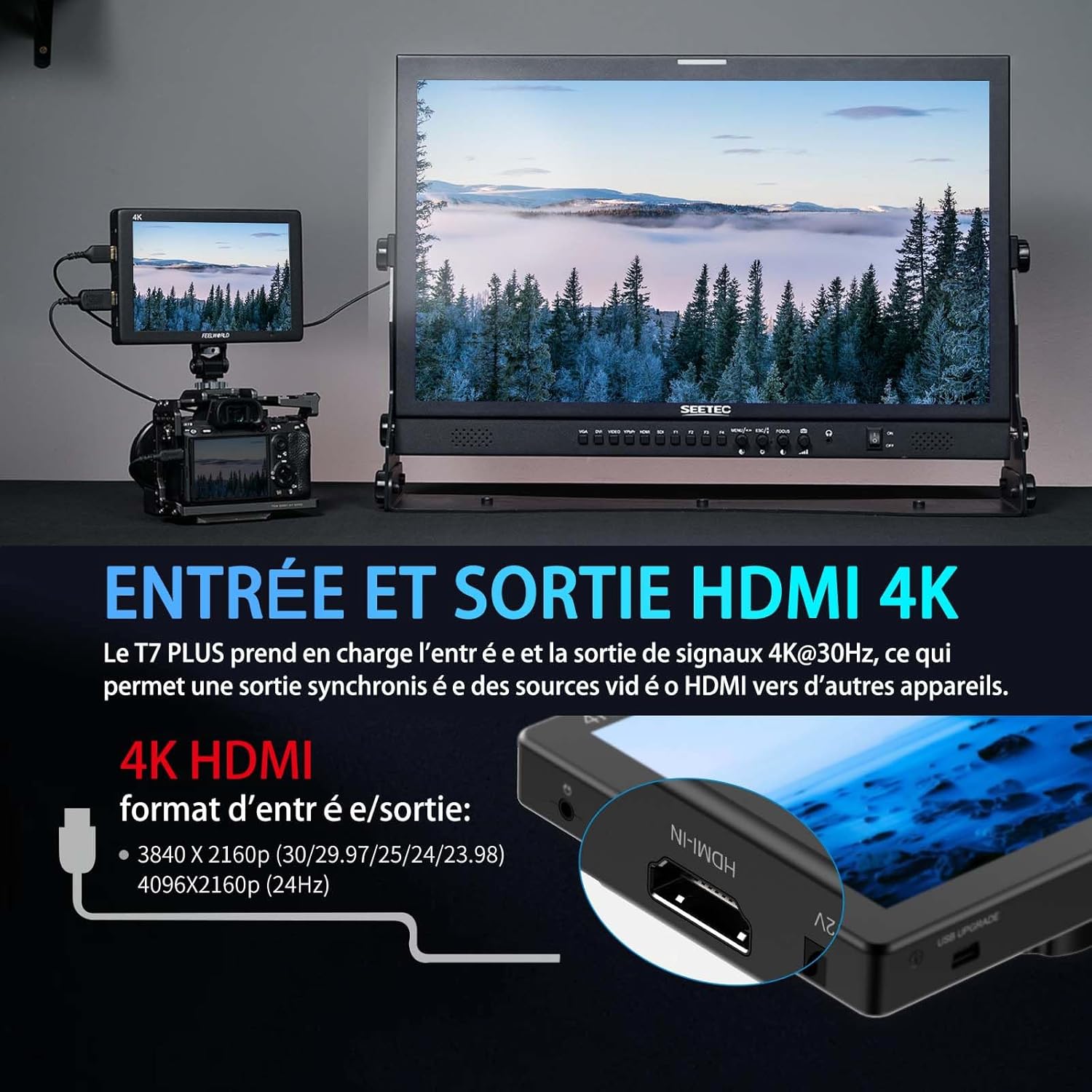
Image: A visual representation of the 4K HDMI input and output ports on the FEELWORLD T7PLUS, demonstrating connectivity to a camera and a larger display.
5. Operarea monitorului
5.1 Pornire/Oprire
Press and hold the power button located on the top or side of the monitor to turn it on or off.
5.2 Menu Navigation and Shortcut Buttons
The T7PLUS features an intuitive menu system accessible via buttons on the top of the monitor. It also includes four customizable shortcut buttons (F1-F4) for quick access to frequently used functions.
- Use the menu buttons to navigate through settings such as image adjustments, assist functions, and system settings.
- To customize F1-F4 buttons: Enter the main menu, navigate to "User Option" or "Function Settings," and assign desired functions (e.g., Peaking, False Color, LUTs) to each button.

Image: The user interface menu of the FEELWORLD T7PLUS, demonstrating the navigation options and the location of the F1-F4 shortcut buttons.
5.3 Using Professional Video Assist Functions
The T7PLUS integrates a suite of tools to aid in precise exposure, focus, and color management. These can be accessed via the main menu or assigned to shortcut buttons.
- LUT 3D: Load custom LUTs to preview foo-ul tăutage with desired color grades. Connect a USB drive with .cube LUT files to the monitor's USB port, then navigate to the LUT menu to import and apply them. Up to 32 user LUTs can be stored.
- Forma de undă: Monitor luminance and chrominance levels across the image. This helps in achieving correct exposure and color balance.
- Domeniul de aplicare al vectorului: Analyze the color saturation and hue of your video signal.
- Asistență la focalizarea maximă: Highlights sharp edges in red, green, or blue to help achieve precise focus.
- Culoare falsă: Displays different exposure levels as distinct color overlays, assisting in setting optimal exposure.
- Zebra Exposure: Indicates overexposed areas with zebra stripes.
- Histogramă: Provides a graphical representation of the tonal distribution of your image.
- Grilă nouă: Overlays a 3x3 grid for composition assistance.
- A mari: Mărește o porțiune a imaginii pentru verificarea focalizării critice.
- Mod anamorfic: De-strânge foo anamorfictage pentru cuvenit viewing.
- Flip de imagine: Flips the image horizontally or vertically, useful for various mounting configurations.
- Verificați câmpul: Displays only red, green, blue, or mono channels for color calibration.
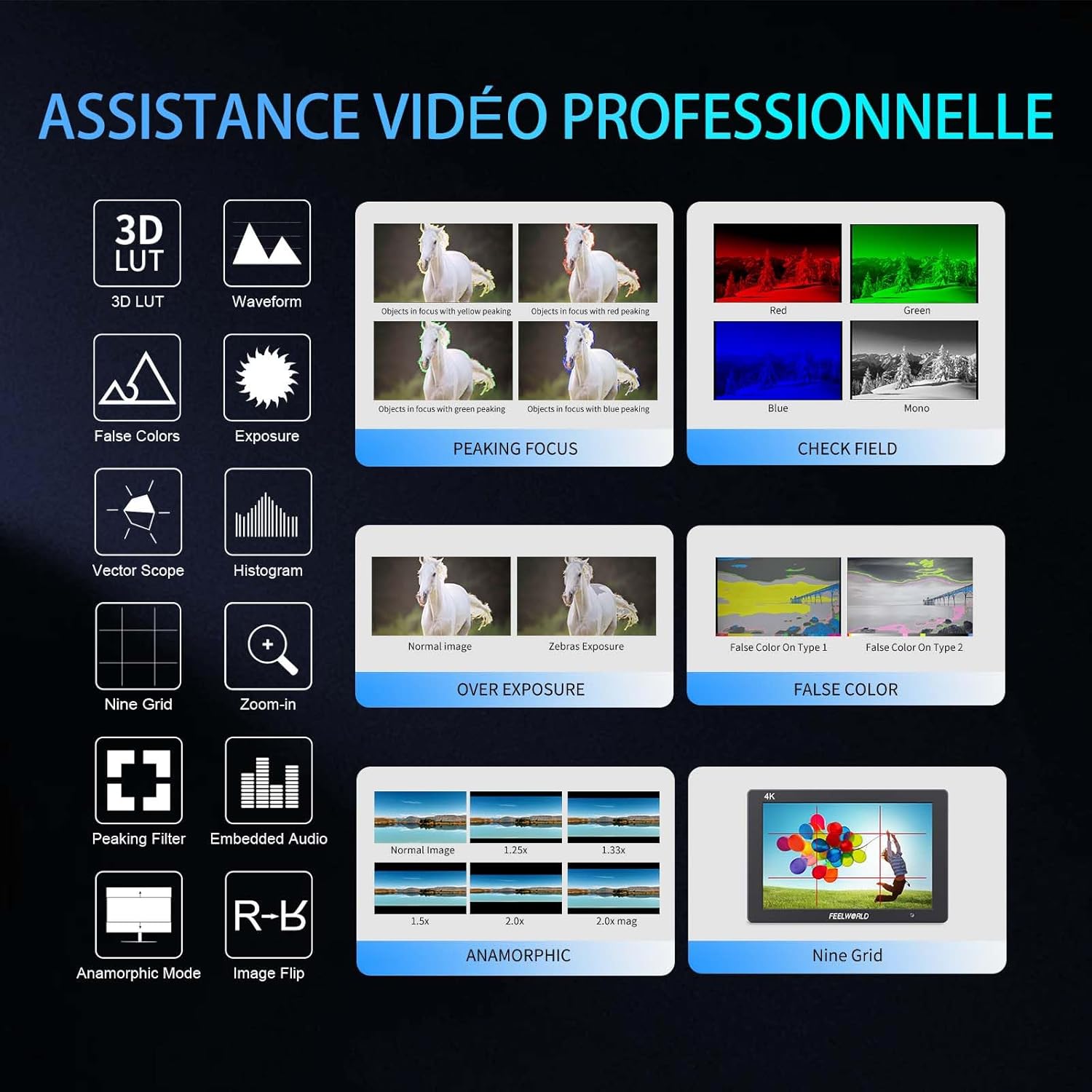
Imagine: O imagine pesteview of the professional video assistance features available on the FEELWORLD T7PLUS monitor, including 3D LUT, Waveform, Peaking Focus, and False Color.
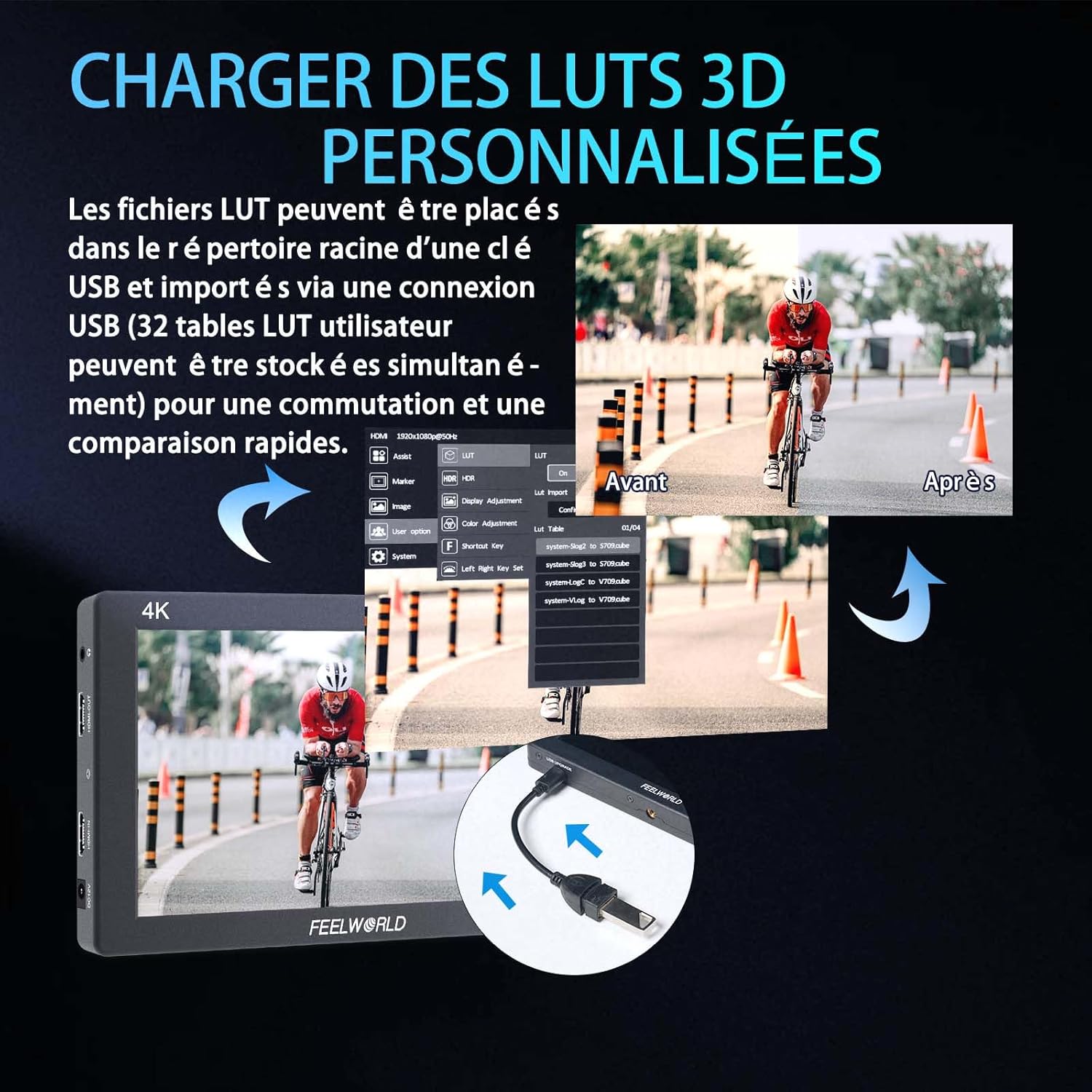
Image: The FEELWORLD T7PLUS demonstrating the process of loading custom 3D LUTs via USB, with a split screen showing the "Before" and "After" application of a LUT.

Image: The FEELWORLD T7PLUS displaying broadcast-level waveform monitoring functions, including Vectorscope, Brightness Histogram, YUV Parade, and Y Parade.
5.4 Setări de limbă
To change the display language, navigate to the "System" menu and select "Language." Choose your preferred language from the available options.
6. Întreținere
- curatenie: Use a soft, dry cloth to clean the monitor's screen and body. For stubborn smudges, a slightly damp cloth with a mild cleaning solution designed for electronics can be used, but avoid direct spraying.
- Depozitare: When not in use, store the monitor in a cool, dry place, away from direct sunlight and extreme temperatures. Use the provided storage bag for protection.
- Îngrijirea bateriei: If using batteries, ensure they are charged regularly and stored properly. Remove batteries if the monitor will not be used for an extended period.
- Actualizări firmware: Check the FEELWORLD official website periodically for any available firmware updates to ensure your monitor has the latest features and bug fixes.
7. Depanare
| Problemă | Cauza posibila | Soluţie |
|---|---|---|
| Monitorul nu pornește. | Low or dead battery; power adapter not connected or faulty. | Ensure battery is charged or replace it. Check power adapter connection and functionality. |
| No signal on screen. | Cablu HDMI slăbit sau defect; intrare selectată incorect; camera nu emite semnal. | Verificați conexiunile cablului HDMI. Asigurați-vă că este selectată sursa de intrare corectă pe monitor. Verificați setările de ieșire HDMI ale camerei. |
| Image is distorted or colors are off. | Incorrect color settings; faulty HDMI cable; monitor settings misconfigured. | Reset monitor to factory settings. Check HDMI cable. Adjust color settings in the menu. |
| Butoanele nu răspund. | Eroare temporară de software; daune fizice. | Power cycle the monitor. If the problem persists, contact customer support. |
8. Specificații
| Caracteristică | Detaliu |
|---|---|
| Marca | FEELWORLD |
| Model | T7PLUS-OF-EU |
| Dimensiunea ecranului | 7 inci |
| Rezoluţie | 1920x1200 |
| Luminozitate | 450 cd/m² |
| Raport de contrast | 1200:1 |
| Densitatea pixelilor | 323 PPI |
| Viewunghiul ing | 160° (IPS) |
| Intrare/ieșire HDMI | 4K@30Hz (3840x2160p, 4096x2160p) |
| Intrare de putere | DC 12V/1.5A or NP-F Battery Plate |
| Dimensiuni (L x l x H) | 22.5 x 16.2 x 8.1 cm (aprox. 8.86 x 6.38 x 3.19 inci) |
| Greutate | 930 de grame (aprox. 2.05 lbs) |
| CasinMaterialul g | Metal |
9. Garanție și asistență
The FEELWORLD T7PLUS monitor comes with a Garanție de 1 an de la producătorAceastă garanție acoperă defectele de materiale și de fabricație în condiții normale de utilizare. Vă rugăm să păstrați dovada achiziției pentru reclamațiile în garanție.
For technical support, troubleshooting assistance, or warranty service, please contact FEELWORLD customer support through their official website-ul sau comerciantul de unde ați achiziționat produsul.
Nota: Availability of spare parts and software updates may vary. Please refer to the manufacturer's official channels for the most current information.