
Introducere
Thank you for choosing the Krisons Sound Blaster Tower Speaker. This manual provides essential information for the safe and efficient operation of your speaker system. Please read it thoroughly before use and retain it for future reference.
Produs terminatview
The Krisons Sound Blaster Tower Speaker is designed to deliver clear and balanced audio with an 8-inch woofer. It features multiple connectivity options including Bluetooth, USB, AUX, and FM radio, along with an LCD display for mode information. The speaker includes controls for volume, bass, and mode selection.

Figura 1: Față și laterală view of the Krisons Sound Blaster Tower Speaker, highlighting the display, USB port, mode button, play/pause, previous/next controls, bass, treble, volume knobs, 4-inch speakers, and 8-inch woofer.
Înființat
1. Despachetarea
Scoateți cu grijă toate componentele din ambalaj. Asigurați-vă că sunt prezente următoarele articole:
- 1 x Krisons Sound Blaster Tower Speaker
- 1 x telecomandă
- 1 x Manual de utilizare (acest document)
- 1 x card de garanție
2. Plasare
Position the tower speaker on a flat, stable surface. For optimal sound performance, place the speaker in a location that allows for clear sound dispersion. The compact design allows for flexible placement in various room sizes.
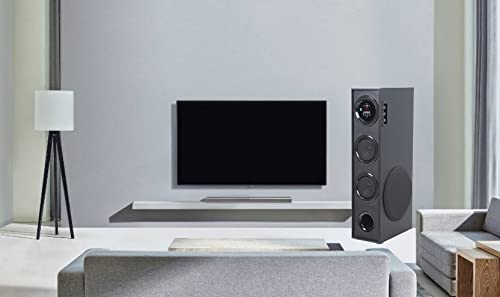
Figura 2: Example of speaker placement in a home environment.

Figure 3: Speaker dimensions for placement planning.
3. Conexiune la alimentare
Connect the speaker's power cable to a standard AC power outlet. Ensure the power switch on the speaker is in the OFF position before connecting to power.
4. Conexiuni audio
Difuzorul acceptă mai multe metode de intrare audio:
- Bluetooth: Pentru conexiune wireless la smartphone-uri, tablete și alte dispozitive compatibile Bluetooth.
- USB: Pentru redarea audio fileeste direct de pe o unitate USB.
- Intrare AUX: For wired connection to devices using a 3.5mm audio cable.
- Radio FM: Built-in FM tuner for radio broadcasts.

Figure 4: Available connectivity options.

Figure 5: Connecting to an external device via AUX cable.
Instrucțiuni de operare
1. Pornire/Oprire
Locate the power switch on the rear panel of the speaker. Flip the switch to the "ON" position to power on the speaker. The LCD display will illuminate. Flip to "OFF" to power down.
2. Metode de control
The speaker can be controlled using the physical buttons and knobs on the side panel or via the included remote control.
- Comenzi panou lateral: Includes buttons for mode change, play/pause, previous/next track, and knobs for volume and bass adjustment.
- Telecomanda: Provides full functionality for convenient operation from a distance.
3. Selectarea modului
Press the "MODE" button on the speaker's control panel or the remote control to cycle through available input modes: Bluetooth, USB, AUX, and FM Radio. The selected mode will be indicated on the LCD display.
4. Operare Bluetooth
- Switch the speaker to Bluetooth mode. The LCD display will show "BT" or a similar indicator, and the speaker will enter pairing mode.
- Pe dispozitivul dvs. (smartphone, tabletă), activați Bluetooth și căutați dispozitivele disponibile.
- Select "Krisons Sound Blaster" (or similar name) from the list of devices.
- Once paired, the speaker will confirm the connection, and you can play audio from your device.
5. Redare USB
- Introduceți o unitate USB care conține fișiere MP3 fileîn portul USB al difuzorului.
- Switch the speaker to USB mode. The speaker will automatically detect and begin playing audio files de pe unitatea USB.
- Use the previous/next buttons to navigate tracks and the play/pause button to control playback.
6. Conexiune AUX-in
- Connect one end of a 3.5mm audio cable to the AUX-in port on the speaker.
- Connect the other end of the 3.5mm audio cable to the audio output jack of your external device (e.g., TV, computer, MP3 player).
- Switch the speaker to AUX mode. Audio from your connected device will now play through the speaker.
7. Radio FM
- Comutați difuzorul în modul Radio FM.
- The speaker will automatically scan and store available FM stations.
- Use the previous/next buttons to cycle through the stored stations.
8. Volume and Tone Adjustment
Use the "Volume" knob to adjust the overall sound level. Use the "Bass" knob to increase or decrease the low-frequency output. The speaker is designed to provide a balanced sound across treble, midrange, and bass frequencies.
Întreţinere
To ensure the longevity and optimal performance of your Krisons Sound Blaster Tower Speaker, follow these maintenance guidelines:
- curatenie: Use a soft, dry cloth to wipe the exterior surfaces of the speaker. Do not use abrasive cleaners, waxes, or solvents, as these can damage the finish.
- Praf: Regularly dust the speaker grilles and vents to prevent accumulation, which can affect sound quality and internal components.
- Expunerea la lichid: Keep the speaker away from water and other liquids. Do not place liquid-filled containers on or near the speaker.
- Depozitare: If storing the speaker for an extended period, disconnect it from power and store it in a cool, dry place, away from direct sunlight and extreme temperatures.
Depanare
Dacă întâmpinați probleme cu difuzorul, consultați următoarele probleme și soluții frecvente:
| Problemă | Soluție posibilă |
|---|---|
| Fără putere |
|
| Nici un sunet |
|
| Bluetooth nu se conectează |
|
| Telecomanda nu funcționează |
|
| Sound during power on/off | A brief sound or pop during power on/off is normal for this type of audio equipment and does not indicate a malfunction. |
Specificații
| Caracteristică | Detaliu |
|---|---|
| Marca | Krisons |
| Numele modelului | Sound Blaster |
| Putere maximă de ieșire difuzor | 80 wați |
| Tehnologia de conectivitate | Auxiliar, Bluetooth, USB, Wireless |
| Mod ieșire audio | Surround |
| Tip de montare | Etaj permanent |
| Material carcasă | Cristal |
| Tip difuzor | Subwoofer/Bookshelf/Woofer/Tower |
| Culoare | Negru |
| Metoda de control | Atingere, telecomandă |
| Woofer Driver Diameter | 8 inchi |
| Tweeter Driver Diameter | 1 inchi |
| Total USB 2.0 Ports | 1 |
| Numărul de canale audio | 2.1 |
| Dimensiuni articol (D x L x H) | 39A x 24L x 57Î centimetri |
| Greutatea articolului | 8900 grame |
| Dispozitive compatibile | Smartphone, Tabletă |
| Sursa de alimentare | AC |
Informații despre garanție
This Krisons Sound Blaster Tower Speaker comes with a 6 luni garantie on manufacturing defects. Please refer to the included Warranty Card for detailed terms and conditions. Retain your purchase receipt as proof of purchase for warranty claims.
Asistență pentru clienți
For any questions, assistance, or support regarding your Krisons Sound Blaster Tower Speaker, please contact Krisons Customer Care:

Figure 6: Krisons Customer Support contact details.
- E-mail: service@krisons.com
- Telefon: +91-8287124581 / +91-9910016757
- Ore de funcționare: 10:6 până la XNUMX:XNUMX
- Producător: Krisons Electronic Systems Limited, ZYTEL ENTERPRISES PVT


