
1. Introducere
Mulțumesc pentru achizițieasing the TURBOX Giantpeak Mechanical Feel RGB Gaming Keyboard. This manual provides essential information for setting up, operating, and maintaining your new keyboard. Please read this manual carefully before use to ensure optimal performance and longevity of your device.
2. Informații de siguranță
- Keep the keyboard away from excessive heat, direct sunlight, and moisture.
- Although the keyboard is spill-resistant, avoid intentionally exposing it to large amounts of liquid. In case of spills, disconnect the keyboard immediately and allow it to dry completely before reconnecting.
- Do not attempt to disassemble or modify the keyboard. This will void the warranty and may cause damage.
- Utilizați numai cu dispozitive compatibile și surse de alimentare specificate.
- A nu se lăsa la îndemâna copiilor.
3. Conținutul pachetului
Vă rugăm să verificați pachetul pentru următoarele articole:
- TURBOX Giantpeak Mechanical Feel RGB Gaming Keyboard
- Manual de utilizare (acest document)
4. Produs terminatview
The TURBOX Giantpeak keyboard is designed for gaming, featuring a mechanical feel, customizable RGB lighting, and macro capabilities. It also includes a convenient mobile device holder.
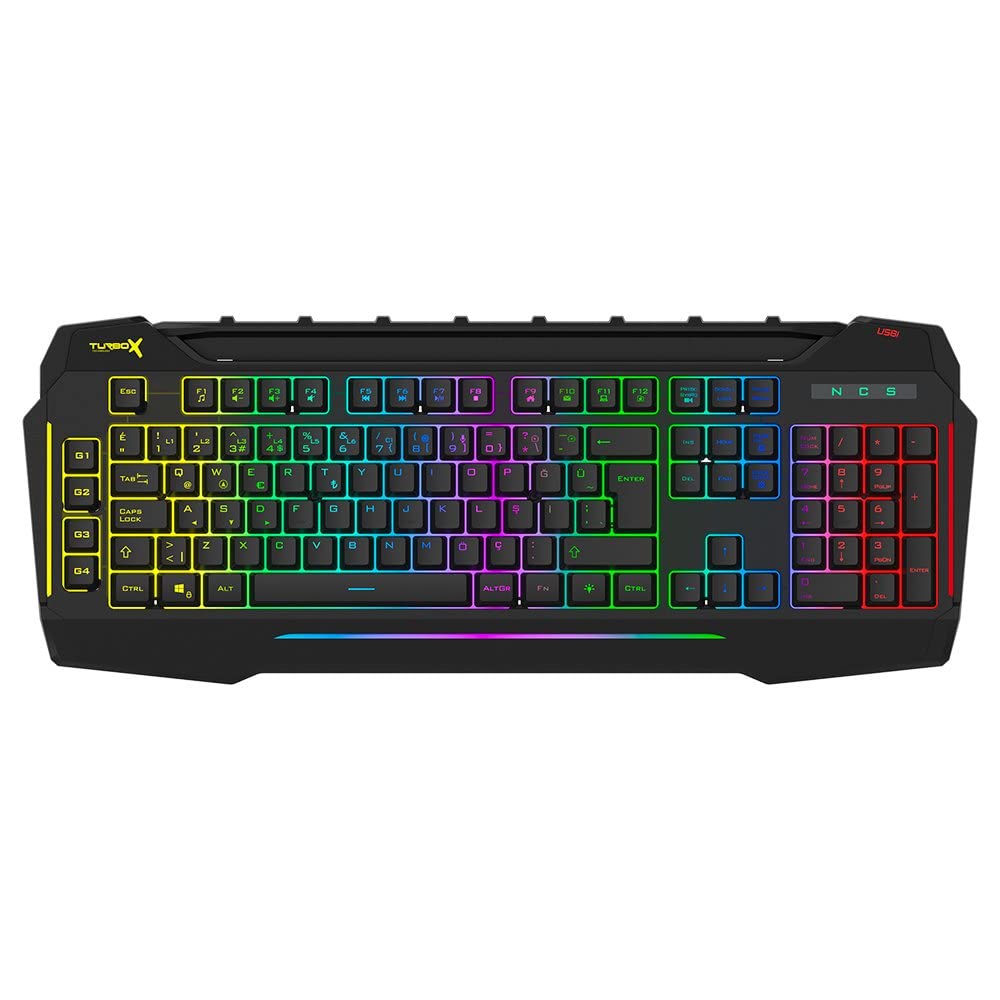
Figure 4.1: TURBOX Giantpeak keyboard with integrated mobile device stand.
This full-size keyboard offers a standard Q layout, providing a comfortable and responsive typing experience for both gaming and general use.

Figura 4.2: Sus view of the TURBOX Giantpeak keyboard.
The keyboard features vibrant RGB backlighting that can be customized to various effects, including sound-sensitive modes. Its spill-resistant design provides added durability.

Figura 4.3: Înclinat view showing RGB lighting.
Dedicated macro keys (G1-G4) are located on the left side, allowing for quick execution of complex commands or sequences.

Figure 4.4: Close-up of programmable G-keys.
The keyboard also includes a full numeric keypad for data entry and additional functions.

Figure 4.5: Numeric keypad detail.
Connectivity is provided via a durable USB cable, ensuring a stable and responsive connection to your computer.

Figura 4.6: lateral view cu cablu USB.
5. Configurare
Follow these steps to set up your TURBOX Giantpeak keyboard:
- Despachetați tastatura: Scoateți cu grijă tastatura și toate materialele de ambalare din cutie.
- Conectare la computer: Plug the USB connector of the keyboard into an available USB port on your desktop or laptop computer.
- Instalare driver: Your operating system (Windows, macOS, etc.) should automatically detect and install the necessary drivers. This process may take a few moments.
- Verificați funcționalitatea: Once drivers are installed, test the keyboard by typing in a text editor or browser to ensure all keys are functioning correctly. The RGB lighting should also illuminate.
6. Instrucțiuni de utilizare
6.1 Funcții de bază ale tastaturii
The TURBOX Giantpeak keyboard operates like a standard Q-layout keyboard. All standard keys (alphanumeric, function keys, numeric keypad, navigation keys) function as expected.
6.2 Controlul iluminării RGB
The keyboard features customizable RGB backlighting with 7 different color options and sound-sensitive modes. Specific key combinations are used to cycle through lighting effects and adjust brightness:
- Schimbați modul de iluminare: Utilizați Fn + Blocare derulare keys to cycle through various lighting effects.
- Reglați luminozitatea: Utilizați Fn + Pagina în sus (creștere) sau Fn + Pagina în jos (decrease) keys to adjust the brightness level of the backlighting.
- Sound-Sensitive Mode: The keyboard supports sound-sensitive lighting. Refer to specific software or key combinations (if available) for activation. (Note: Specific key combinations for sound-sensitive mode may vary or require software.)
6.3 Macro Programming (G1-G4 Keys)
The TURBOX Giantpeak keyboard includes 4 programmable macro keys (G1, G2, G3, G4) for executing custom commands or sequences. Follow these general steps for macro recording:
- Enter Macro Recording Mode: Apăsați tasta MR key (Macro Record, usually near the G-keys). The keyboard's indicator light may flash to indicate recording mode.
- Selectați tasta macro: Press one of the G-keys (G1, G2, G3, or G4) where you want to save the macro.
- Record Sequence: Type the sequence of keys you wish to record. This can include multiple keystrokes, delays, and modifier keys.
- Exit Macro Recording Mode: Apăsați tasta MR key again to save the macro and exit recording mode. The indicator light should stop flashing.
- Execute Macro: To use the recorded macro, simply press the assigned G-key.
Note: For advanced macro settings or specific software-based macro management, please check the manufacturer's website for any available utility software.
6.4 Mobile Device Holder
The integrated slot at the top of the keyboard is designed to hold smartphones or small tablets, providing a convenient viewing angle while gaming or working.
7. Întreținere
Pentru a asigura longevitatea și performanța tastaturii, urmați aceste instrucțiuni de întreținere:
- curatenie: Folosiți o lavetă moale și uscată pentru a șterge suprafața tastaturii. Pentru murdăria persistentă, ștergeți ușorampClătiți laveta cu apă sau o soluție de curățare delicată. Evitați substanțele chimice dure sau materialele abrazive.
- Îndepărtarea prafului: Folosește aer comprimat pentru a îndepărta praful și resturile dintre capacele tastelor.
- Gestionarea scurgerilor: In case of liquid spills, immediately disconnect the keyboard from your computer. Turn it upside down to drain any liquid and allow it to air dry completely for at least 24-48 hours before reconnecting.
- Depozitare: Când nu este utilizată pentru perioade lungi de timp, depozitați tastatura într-un mediu curat și uscat.
8. Depanare
If you encounter issues with your TURBOX Giantpeak keyboard, refer to the following common problems and solutions:
| Problemă | Soluție posibilă |
|---|---|
| Tastatura nu răspunde. |
|
| RGB lighting is not working or is stuck. |
|
| Macro keys (G1-G4) are not working. |
|
| Tastele sunt lipicioase sau nu răspund. |
|
9. Specificații
| Caracteristică | Detaliu |
|---|---|
| Numele modelului | Giantpeak |
| Numărul piesei | ID9923266 |
| Marca | TURBOX |
| Tehnologia de conectivitate | USB cu fir |
| Dispozitive compatibile | Laptop, PC |
| Tip cheie | Mechanical Feel (Membrane) |
| Caracteristici speciale | RGB Lighting, Macro Keys (4), Sound-Sensitive Lighting, Spill-Resistant, Mobile Device Holder |
| Numărul de chei | 87 (Note: Visuals suggest a full-size layout, this number may refer to a specific key group or variant.) |
| Interfață hardware | USB |
| Dimensiuni pachet | 51.2 x 22.2 x 5.2 cm |
| Greutatea articolului | 1 kilogram |
10. Garanție și asistență
For warranty information and technical support, please refer to the warranty card included with your product or visit the official TURBOX webPăstrați dovada achiziției pentru orice reclamații în garanție.
If you require further assistance, please contact TURBOX customer support through their official channels.