
Introducere
This manual provides detailed instructions for the installation, operation, and maintenance of your DieseRC Wireless Kinetic Light Switch and Receiver. This innovative system allows you to control lighting or other electrical devices wirelessly, without the need for batteries or additional wiring for the switch itself. The kinetic switch generates its own power from the press, offering a convenient and eco-friendly solution for your home or office.
The package includes the Receiver Controller, a Self-Generating Wireless Switch, double-sided tape for mounting, screws for installation, and this product manual.
Configurare și instalare
Cablarea receptorului
The receiver is designed for easy installation between your power supply and the device you wish to control. Ensure all power is disconnected before proceeding with wiring.

Image: Diagram illustrating the correct wiring of the receiver. The input end connects to the power source (AC 110V-220V) and the output end connects to the light bulb or appliance.
Connect the input wires of the receiver to your AC 85V~250V power source. Connect the output wires of the receiver to the electrical device (e.g., a lamp) you intend to control. The receiver can be easily fixed to a surface using the provided screws.
Pairing the Wireless Switch with the Receiver
The product is typically pre-paired at the factory. If re-pairing is necessary or if you are adding new switches, follow these steps:
- Press and hold the learning button on the receiver for approximately 3-5 seconds. The LED indicator light on the receiver will illuminate.
- While the LED is lit, press the button on the Self-Generating Wireless Switch one time. The LED on the receiver will flash, indicating successful pairing.
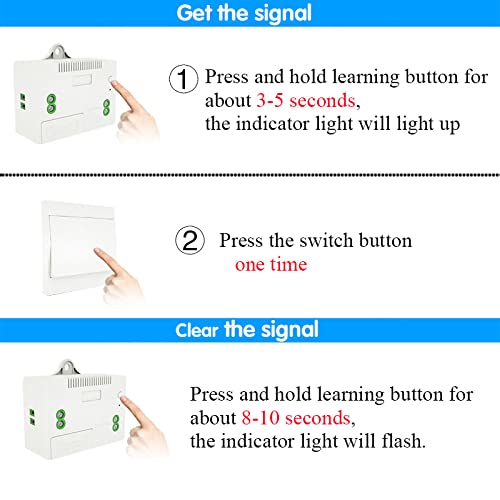
Image: Visual guide showing how to press and hold the learning button on the receiver and then press the wireless switch to pair them.
Resetarea receptorului
To clear all paired wireless switches from the receiver's memory:
- Press and hold the learning button on the receiver for approximately 8-10 seconds. The LED indicator will flash 3 times, confirming the reset.
Note: After resetting, all previously paired wireless switches will no longer control this receiver. You will need to re-pair them if desired.
Instrucțiuni de operare
Operare de bază
Once paired, simply press the kinetic wireless switch to toggle the connected device (e.g., light) on or off. The switch generates its own power with each press, requiring no batteries.
Multi-Control Functionality
The system supports flexible control configurations:
- One Switch Controls Multiple Receivers: A single wireless switch can be paired with multiple receivers to control several devices simultaneously.
- Multiple Switches Control One Receiver: Up to 5 wireless switches can be paired with a single receiver, allowing control of one device from various locations.

Image: Illustration of multiple control combinations, including one switch controlling multiple receivers and multiple switches controlling one receiver.
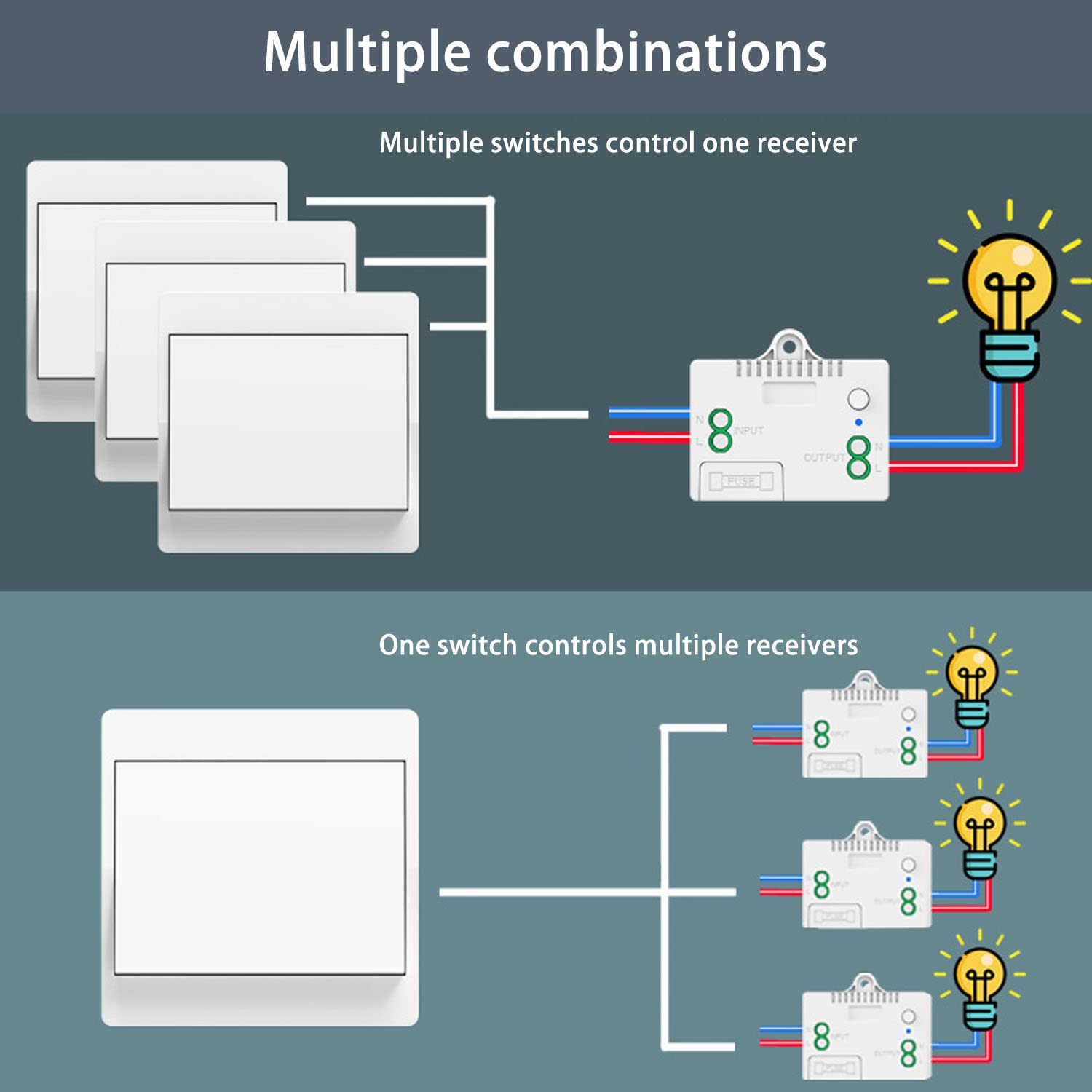
Image: A more detailed diagram showing wiring for one switch controlling multiple receivers and multiple switches controlling one receiver.
Interval de operare
The RF 433MHz signal provides stable and reliable performance. The strong signal can pass through walls, floors, doors, and other obstacles, allowing control within approximately 50 meters indoors.
Întreţinere
Wireless Switch Durability
The self-generating wireless switch is designed for long-term use, with a lifespan of over 200,000 clicks. Its waterproof design allows for safe installation in environments like bathrooms and kitchens, without concerns about electric shock or battery corrosion.
Receiver Fuse Protection
The receiver includes a 10A fuse for self-protection against overloads. In the event of an overload, the fuse will blow to protect the receiver and connected devices. The fuse is easily replaceable if needed.
Depanare
- Comutatorul nu răspunde: Ensure the receiver is powered on and correctly wired. If the switch was recently reset, it needs to be re-paired with the receiver. Follow the pairing instructions in the Setup section.
- Control intermitent: While the signal is strong, extreme distances or multiple thick obstacles might affect performance. Try repositioning the receiver or switch if experiencing consistent issues.
- Dispozitivul nu se pornește/nu se oprește: Check the wiring connections to ensure they are secure. Verify that the connected device is functional and not overloaded. If the receiver is unresponsive, check the internal fuse and replace if blown.
Specificații
Parametrii receptorului
| Voltage | 85V~250V AC |
| Curent de repaus | <5mA |
| Sarcina maxima | 1000W |
| Frecvența RF | 433MHz |
| Temperatura de operare | -30°C până la +80°C |
| Sensibilitate de recepție | > 97 dbm |
| Capacitate de memorie | Up to 5 wireless switches |
| RF Operating Mode | Superheterodyne ASK wireless reception |
| Gama de recepție | Approximately 50 meters indoors |
| Dimensiuni (L x l x H) | 60 mm x 43 mm x 27 mm |
| Clasa de protectie | IP40 |
Self-Generating Wireless Switch Parameters
| Dimensiunea de bază | 86 mm x 86 mm x 13 mm |
| Tip | Rocker switch ON/OFF |
| Durată de viaţă | de 200,000 ori |
| Frecvența RF | 433MHz |
| Tip de putere | Self-generating (kinetic) |
| Clasa de protectie | IP40 |

Image: Diagram showing the dimensions of both the wireless self-powered switch (86x86x15mm) and the receiver (60x43x27mm).
Informații despre garanție
DieseRC products are manufactured to high-quality standards. For specific warranty details, please refer to the product packaging or contact DieseRC customer support. Keep your purchase receipt as proof of purchase.
Asistență pentru clienți
If you encounter any issues or have questions regarding your DieseRC Wireless Kinetic Light Switch and Receiver, please contact our customer support team. We are committed to providing convenient, safe, efficient, and economical remote control devices and solutions.
For assistance, please visit the DieseRC brand store on Amazon or refer to the contact information provided with your product packaging.