
1. Introducere
The AOPUTTRIVER AP-5800M is a high-precision air quality monitor designed to detect fine particulate matter, specifically PM2.5, PM1.0, and PM10. Utilizing a laser PM2.5 sensor and single-chip microcomputer technology, this device provides accurate readings displayed on a 2.8-inch TFT color LCD. It is suitable for monitoring air quality in various environments, including indoor spaces, outdoor areas, bedrooms, factories, construction sites, and during travel.
This manual provides essential information for the safe and effective use of your AP-5800M air quality monitor. Please read it thoroughly before operation.
2. Informații de siguranță
- Do not attempt to disassemble or modify the device. Unauthorized modifications can lead to malfunction or injury.
- Keep the device away from water and high humidity to prevent electrical shock or damage.
- Evitați expunerea dispozitivului la temperaturi extreme, lumina directă a soarelui sau substanțe corozive.
- Use only the provided USB cable for charging. Ensure the charging voltage compatibil cu dispozitivul.
- A nu se lăsa la îndemâna copiilor.
- Aruncați dispozitivul și bateria acestuia în conformitate cu reglementările locale de mediu.
3. Conținutul pachetului
La deschiderea coletului, vă rugăm să verificați dacă toate articolele enumerate mai jos sunt prezente și în stare bună:
- 1 x AOPUTTRIVER AP-5800M Air Quality Monitor
- 1 x cablu de încărcare USB
- 1 x Husă de transport
- 1 x Manual de utilizare

This image displays the items included in the product package: the AP-5800M air quality monitor, a USB cable, a carrying case, and the user manual.
4. Produs terminatview
4.1 Aspectul dispozitivului și butoanele
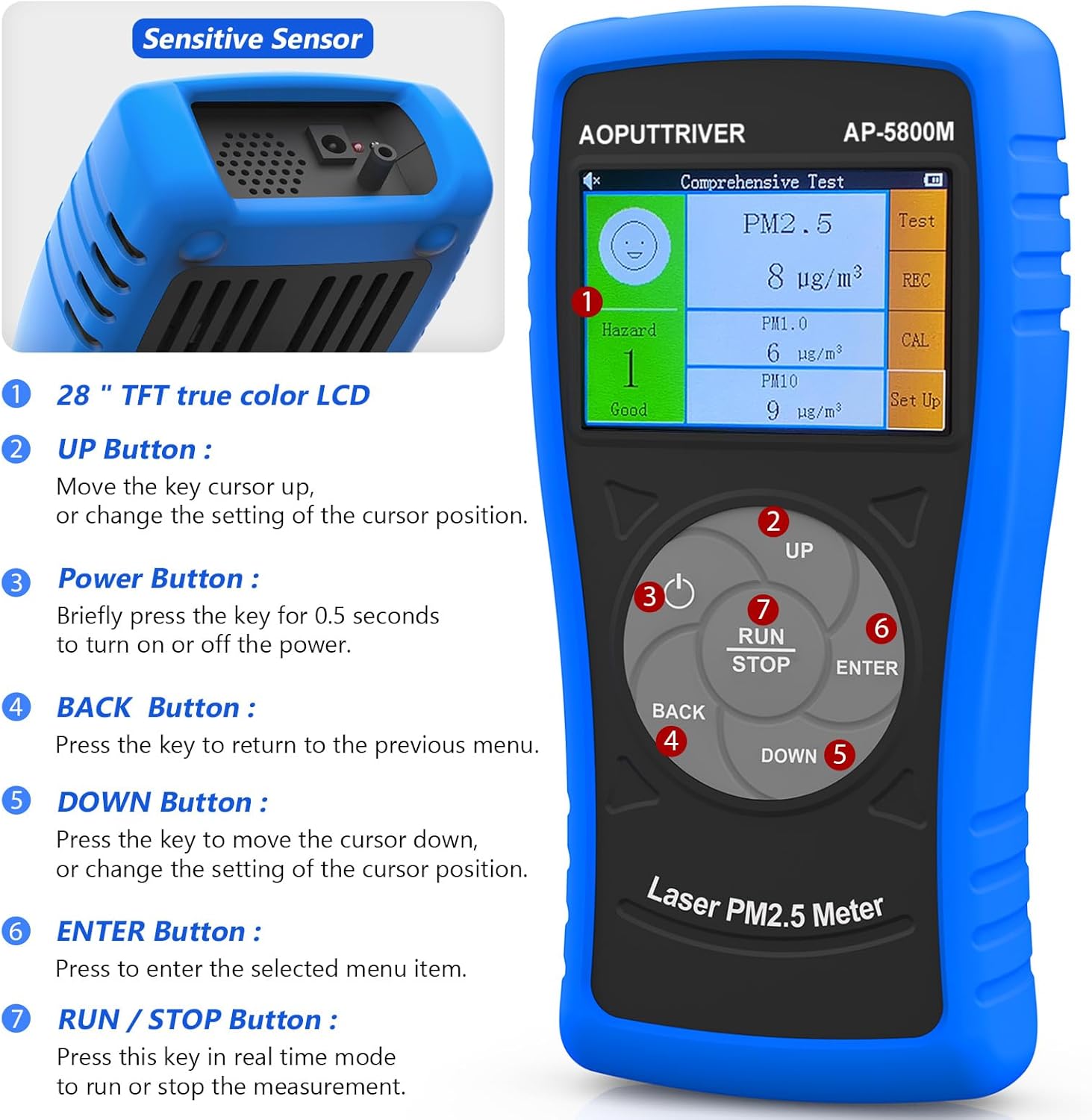
Această imagine prezintă partea din față view of the AOPUTTRIVER AP-5800M Air Quality Monitor, highlighting the 2.8-inch TFT true color LCD, the sensitive sensor area, and the functions of the UP, Power, BACK, DOWN, ENTER, and RUN/STOP buttons.
- Sensitive Sensor: Located at the top, responsible for detecting particulate matter.
- Buton SUS: Moves the cursor up or changes the setting of the cursor position.
- Buton de alimentare: Briefly press for 0.5 seconds to turn the device on or off.
- Buton ÎNAPOI: Apăsați pentru a reveni la meniul anterior.
- Buton JOS: Moves the cursor down or changes the setting of the cursor position.
- Buton ENTER: Press to select the highlighted menu item.
- RUN/STOP Button: Press this key in real-time mode to start or stop the measurement.
4.2 Afișaj și indicatori
The device features a 2.8-inch TFT true color LCD, providing clear visibility even in low-light conditions. The display shows real-time readings for PM2.5, PM1.0, and PM10, along with a hazard index and battery indicator.

Această imagine oferă un prim-plan view of the AP-5800M's colorful LCD display, showing the comprehensive test results for PM2.5, PM1.0, and PM10, along with the hazard index.
4.3 Componente interne

This diagram shows the internal components of the AP-5800M, emphasizing the high-precision laser PM2.5 sensor and the 3rd generation particle sensor responsible for detecting PM2.5 and PM10 in air samples.

Această imagine oferă un prim-plan view of the air outlet and inlet on the device, illustrating how air samples are drawn in and expelled for particle detection.
5. Configurare
5.1 Încărcarea dispozitivului
The AP-5800M is equipped with a rechargeable battery. Before first use, or when the battery indicator shows low power, charge the device using the provided USB cable.
- Connect the USB cable to the device's charging port and to a standard USB power source (e.g., computer, USB wall adapter).
- Un indicator luminos roșu se va aprinde în timpul încărcării.
- The indicator light will turn green once the battery is fully charged.

This image depicts the charging process of the AP-5800M's 2000mAh rechargeable battery via a USB cable, with an indicator showing the battery level.
5.2 Pornirea inițială
After charging, press the Power Button briefly (for approximately 0.5 seconds) to turn on the device. The display will light up, and the device will begin its startup sequence.
6. Instrucțiuni de utilizare
6.1 Pornire/Oprire
- Pentru a porni: Apăsați tasta Buton de alimentare (labeled '3' in the diagram) for approximately 0.5 seconds.
- Pentru a opri: Apăsați tasta Buton de alimentare for approximately 0.5 seconds. The device also features an automatic power-off mode to conserve battery.
6.2 Navigarea prin meniuri
Use the following buttons for menu navigation:
- Buton SUS: Move cursor up or increase values.
- Buton JOS: Move cursor down or decrease values.
- Buton ENTER: Confirmați selecția sau accesați un submeniu.
- Buton ÎNAPOI: Return to the previous menu or cancel an action.
6.3 Starting and Stopping Measurements
In real-time measurement mode, press the Butonul RUN/STOP to initiate or pause the air quality measurement process.
6.4 Înțelegerea afișajului
The 2.8-inch TFT color LCD displays various parameters:
- PM2.5, PM1.0, PM10 Values: Real-time concentration in µg/m³.
- Hazard Index: A calculated risk value based on PM2.5, PM1.0, and PM10 levels. The formula used is: Hazard Value = PM2.5/6 + PM1.0/20 + PM10/20.
- Indicator baterie: Afișează nivelul actual al bateriei.

This image illustrates the AP-5800M monitor on its stand, alongside a color-coded chart explaining PM2.5 and PM10 health concern levels, ranging from Good to Hazardous.

Această imagine prezintă o imagine mărită view of the hazard index chart displayed on the AP-5800M, detailing the color-coded levels of air quality from Good to Hazardous for PM2.5 and PM10.
6.5 Setting Parameters and Alarms
The AP-5800M allows for various settings adjustments, including:
- Setarea orei: Adjust the device's internal clock.
- Înregistrare date: Enable or disable the recording of measurement data.
- Păstrarea datelor: Freeze the current display readings.
- Hazard Index Alarm: Set thresholds for an audible alarm to activate when air quality levels exceed predefined limits. The device features an audible alarm.

This image highlights the audible alarm function of the AP-5800M, showing an alarm icon on the display and indicating that the device can emit sound alerts for high particle levels.
6.6 Medii de utilizare
The AP-5800M is versatile and can be used in a variety of settings to monitor air quality:
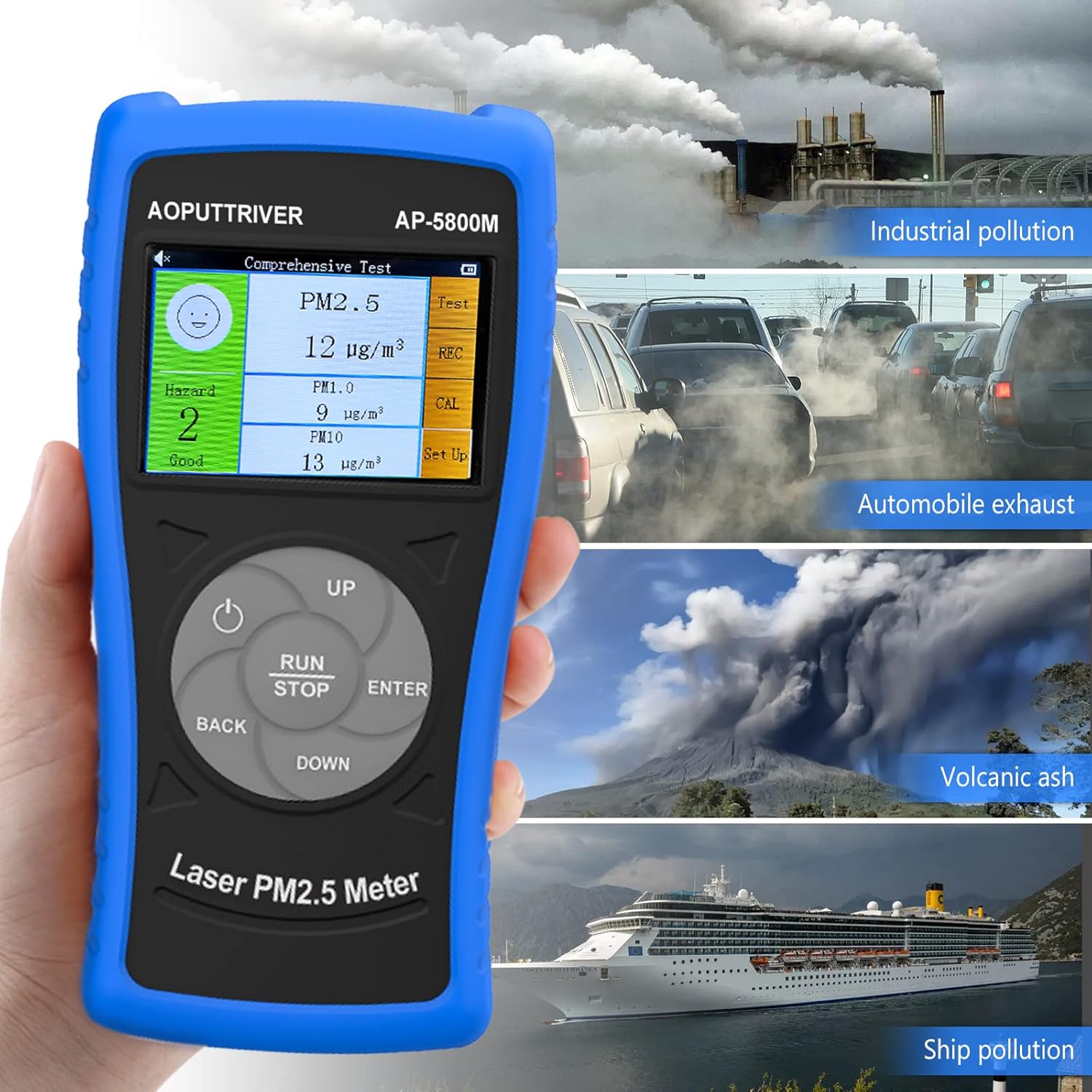
This image demonstrates the versatility of the AP-5800M, showing it in different scenarios such as industrial pollution, automobile exhaust, volcanic ash, and ship pollution, indicating its suitability for diverse testing environments.

This image combines a PM2.5/PM10 air quality level guide with illustrations of various suitable usage environments, including home, school, car, and office, demonstrating the monitor's versatility.
7. Întreținere
7.1 Curăţarea dispozitivului
- Ștergeți exteriorul dispozitivului cu o lavetă moale și uscată.
- Nu utilizați produse de curățare abrazive, solvenți sau substanțe chimice dure, deoarece acestea pot deteriora casing sau afișaj.
- Ensure the air inlet and outlet are free from dust and obstructions for accurate readings.
7.2 Îngrijirea bateriei
- Pentru a prelungi durata de viață a bateriei, evitați descărcarea completă frecventă a acesteia.
- Dacă depozitați dispozitivul pentru o perioadă lungă de timp, încărcați-l la aproximativ 50% și reîncărcați-l la fiecare câteva luni.
7.3 Depozitare
Depozitați dispozitivul în husa sa de transport, într-un loc răcoros și uscat, ferit de lumina directă a soarelui și de temperaturi extreme.
8. Depanare
If you encounter issues with your AP-5800M, refer to the following common problems and solutions:
| Problemă | Cauza posibila | Soluţie |
|---|---|---|
| Dispozitivul nu pornește. | Problemă cu bateria descărcată sau cu alimentarea. | Charge the device using the provided USB cable. Ensure the charging indicator lights up. If the issue persists, contact customer support. |
| Citiri inexacte sau inconsistente. | Blocked air inlet/outlet, sensor contamination, or environmental interference. | Ensure the air inlet/outlet is clear. Clean the device exterior. Move the device away from strong air currents, dust sources, or chemical fumes. |
| Afișajul este gol sau înghețat. | Defecțiune software sau baterie descărcată. | Try restarting the device by holding the Power Button. If unresponsive, charge the device. |
| Alarma sună pe neașteptate. | High particulate levels detected or alarm threshold set too low. | Check the displayed PM values. If levels are high, ventilate the area. Adjust the alarm threshold in the settings if necessary. |
9. Specificații
| Parametru | Valoare |
|---|---|
| Numărul de model | UK-AP-5800M |
| Gama de detectare PM2.5 | 0 ~ 999.9 µg/m³ |
| PM2.5 Resolution | 0.1 µg/m³ |
| Gama de detectare PM10 | 0 ~ 999.9 µg/m³ |
| PM10 Resolution | 0.1 µg/m³ |
| Afişa | LCD color TFT de 2.8 inchi |
| Sursa de alimentare | Rechargeable Battery (2000mAh), USB Powered |
| Alarma | Perceptibil |
| Dimensiunile produsului | 196 mm (7.71 inchi) x 95 mm (3.74 inchi) x 46 mm (1.81 inchi) |
| Greutatea articolului | 500 grame |

Această imagine oferă o imagine detaliată view of the AP-5800M, showing its dimensions (196mm height, 95mm width, 46mm depth), the 90-degree support stand, the double protective shell, and the tripod hole for mounting.
10. Garanție și asistență
AOPUTTRIVER offers a 2-year warranty for the AP-5800M Air Quality Monitor and provides lifetime customer service. If you encounter any issues with this product or require assistance, please do not hesitate to contact our customer support team. We are committed to ensuring your satisfaction.