
1. Produs terminatview
The USX MOUNT Soundbar Mount (Model XAS009) is designed to securely attach your soundbar either above or below your television. This versatile bracket supports soundbars weighing up to 16 lbs (7.26 kg) and is compatible with various TV wall mounts, including fixed, tilt, and full-motion types. It accommodates TVs with VESA patterns up to 600x400 mm. The design features detachable extension plates that swivel up to 180 degrees, allowing for flexible soundbar positioning.
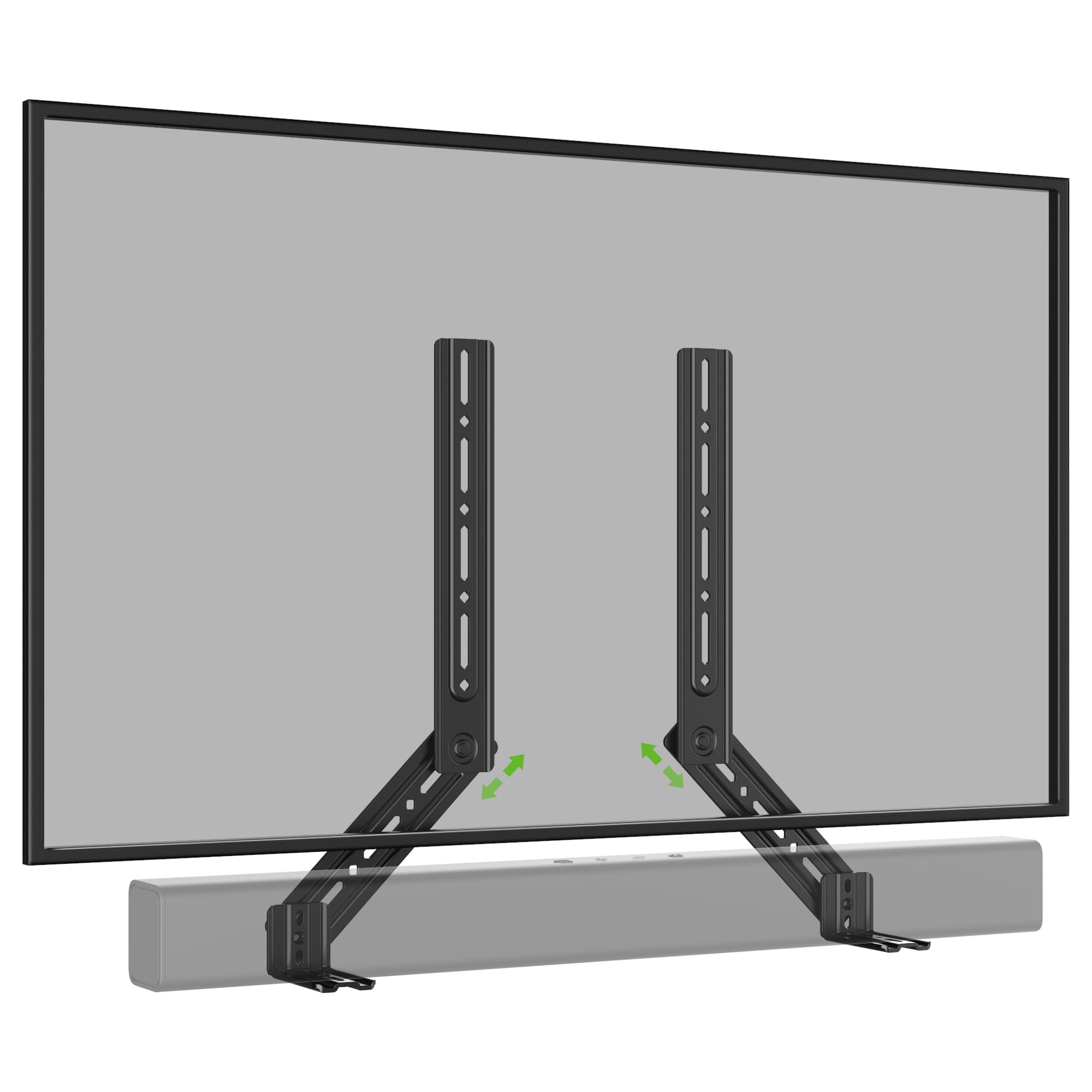
Imaginea 1: Pesteview of the USX MOUNT Soundbar Mount XAS009.
2. Informații de siguranță
Please read and understand all instructions before installation and use. Failure to follow these instructions may result in property damage, serious injury, or death. If you have any questions, contact customer service.
- Capacitate de greutate: Nu depășiți capacitatea maximă de greutate de 7.26 kg.
- Dimensiunea televizorului: This mount may not fit TVs larger than 83 inches.
- Compatibilitate VESA: Ensure your TV's VESA pattern is within 600x400 mm.
- Soundbar Mounting Holes: Verify your soundbar's mounting hole specifications match the bracket.
- Suprafata de instalare: Ensure the wall or TV mount can safely support the combined weight of the TV, soundbar, and mount.
- Instrumente: Utilizați instrumente adecvate pentru instalare.
3. Conținutul pachetului
Despachetați cu grijă cutia și asigurați-vă că toate piesele sunt prezente și nedeteriorate. Dacă lipsesc sau sunt deteriorate piese, nu încercați să le instalați. Contactați serviciul de asistență pentru clienți pentru asistență.
- Soundbar Mount Brackets (2 pieces)
- Detachable Extension Plates (L-shaped brackets)
- Assorted Screws, Washers, and Spacers for various VESA sizes and soundbar types
- Manual de instructiuni

Image 2: Illustration of universal compatibility, maximum load, and VESA size support.
4. Specificații
| Caracteristică | Caietul de sarcini |
|---|---|
| Numărul de model | XAS009 |
| Capacitate maximă de încărcare | 16 lbs (7.26 kg) |
| Compatible TV VESA Patterns | Up to 600x400 mm |
| Reglare rotativă | Până la 180 de grade |
| Tip de montare | Above or Under TV (compatible with TV wall mounts) |
| Material | Steel (implied by "sturdy") |
| Culoare | Gri |
5. Instalare
The USX MOUNT Soundbar Mount offers flexible installation options, allowing you to attach your soundbar above or below your TV. The interlocking teeth on the arm connections ensure a secure fit.
5.1. Determine Mounting Position
Decide whether you want to mount the soundbar above or below your television. The brackets are designed to accommodate both configurations.

Image 3: Visual guide for installing the soundbar mount above or below the TV.
5.2. Attach Brackets to TV Mount
The soundbar mount brackets attach directly to your existing TV wall mount. They are compatible with full-motion, fixed, and tilting TV mounts. The brackets are designed to slide into place with the TV's VESA mounting arms.
Video 1: Demonstration of attaching the soundbar brackets to a TV mount, showing how they integrate with the TV's mounting arms.
5.3. Attach Soundbar to Brackets
Depending on your soundbar's design, you can attach it to the brackets using various methods:
- Back Hole Mounting: Use the provided screws and washers to secure the soundbar through its back mounting holes to the brackets.
- Key Hole Mounting: For soundbars with keyhole slots, align them with the bracket's keyhole screws and slide to lock.
- Bottom Hole Mounting (with L-shaped brackets): If your soundbar requires mounting from the bottom, use the included L-shaped brackets. Attach the L-shaped brackets to the main soundbar brackets, then secure your soundbar to the L-shaped brackets.

Imaginea 4: Detaliată view of different soundbar attachment methods: back hole, keyhole, and bottom hole using L-shaped brackets.
Image 5: Dimensions and design of the practical L-shaped hooks for bottom-mounted soundbars.

Image 6: Visual guide for connecting various soundbars using back, key, or bottom holes.
5.4. Ajustări finale
Once the soundbar is attached, you can make final adjustments to its position. The detachable extension plates allow for up to 180 degrees of swivel, ensuring optimal placement and sound projection.

Image 7: Diagram illustrating the 360-degree swivel capability of the soundbar mount for precise positioning.

Image 8: The soundbar mount allows the soundbar to move in conjunction with a full-motion TV mount, maintaining alignment.
6. Instrucțiuni de utilizare
The USX MOUNT Soundbar Mount is designed for a set-and-forget installation. Once installed, the primary operation involves adjusting the soundbar's angle or position if your TV mount allows for movement.
- Ajustare pivotare: The extension plates can swivel up to 180 degrees. Loosen the locking mechanism, adjust the angle, and then re-tighten to secure the soundbar in your desired position.
- TV Mount Movement: If your TV is on a full-motion mount, the soundbar will move in conjunction with the TV, maintaining its relative position.
7. Întreținere
The soundbar mount requires minimal maintenance to ensure its longevity and continued performance.
- curatenie: Ștergeți suportul cu o cârpă moale și uscată pentru a îndepărta praful. Evitați substanțele de curățare abrazive sau solvenții.
- Verificări periodice: Verificați periodic toate șuruburile și conexiunile pentru a vă asigura că rămân strânse și fixate. Strângeți-le din nou dacă este necesar.
- Limită de greutate: Do not place additional weight on the soundbar or mount beyond the specified capacity.
8. Depanare
Dacă întâmpinați probleme în timpul sau după instalare, consultați următoarele soluții comune:
- Soundbar not fitting: Double-check your soundbar's weight and mounting hole pattern against the specifications. Ensure you are using the correct screws and spacers.
- Montura pare instabilă: Verify that all screws are securely tightened, especially those connecting the mount to the TV and the soundbar to the mount. Ensure the TV mount itself is properly installed on the wall.
- Difficulty with swivel adjustment: Loosen the adjustment knobs or bolts slightly before attempting to swivel. Do not force the movement.
- Părți lipsă: Refer to the "Package Contents" section. If parts are missing, contact USX MOUNT customer support.
9. Garanție și asistență
USX MOUNT products are manufactured with quality and durability in mind. For warranty information or technical support, please refer to the official USX MOUNT website-ul lor web sau contactați direct serviciul lor de asistență pentru clienți. Păstrați bonul fiscal pentru reclamații în garanție.
Informații de contact: Vă rugăm să vizitați Magazinul USX MOUNT de pe Amazon for further details and support resources.