ESR Wallet Stand

ESR Magnetic Wallet with Adjustable Stand Instruction Manual

Model: Wallet Stand

1. Introducere

The ESR Magnetic Wallet with Adjustable Stand is designed to securely attach to your compatible iPhone, providing convenient card storage and a versatile viewing stand. This manual provides instructions for its proper use and care.

2. Conținutul pachetului

  • 1 x ESR Magnetic Wallet with Adjustable Stand

3. Compatibilitate

This product is designed for use with specific iPhone models and cases:

3.1 Compatible Devices and Cases

  • iPhone 17e/17 Pro Max/17 Pro/17 Air/17
  • iPhone 16 Pro Max/16 Pro/16 Plus/16
  • iPhone 15 Pro Max/15 Pro/15 Plus/15
  • iPhone 14 Pro Max/14 Pro/14 Plus/14
  • iPhone 13 Pro Max/13 Pro/13
  • iPhone 12 Pro Max/12 Pro/12
  • Official magnetic cases
  • ESR HaloLock cases

3.2 Incompatible Devices and Cases

  • iPhone 13 mini / iPhone 12 mini
  • Non-magnetic cases
  • Cases with metal attachments
Compatibility chart showing compatible iPhone models and cases, and incompatible mini models and non-magnetic cases.
Image: Compatibility chart for ESR Magnetic Wallet. Shows checkmarks for iPhones with MagSafe (12 series or later), Official MagSafe cases, and ESR HaloLock cases. Shows crosses for iPhone 12/13 mini and non-magnetic cases.

4. Caracteristici

  • Stronger Magnetic Lock: The wallet features a magnetic lock with 3,000g of holding force, providing a secure attachment to your compatible iPhone or MagSafe case. This is designed to be significantly stronger than standard magnetic wallets.
  • Diagram illustrating the strong magnetic lock of the ESR wallet compared to others.
    Image: Diagram showing the magnetic strength comparison. ESR with ESR magnetic case has 3,000 gf holding force, while others have 800 gf.
  • Stand reglabil: The wallet opens out to form a stable stand, allowing for both portrait and landscape viewing. The adjustable hinge supports angles between 15° and 160°, suitable for various activities such as watching videos or video calls.
  • Image showing the wallet stand in both portrait and landscape orientations with an adjustable angle range.
    Image: The wallet stand is shown supporting an iPhone in both portrait and landscape modes, highlighting its adjustable angle from 15° to 160°.
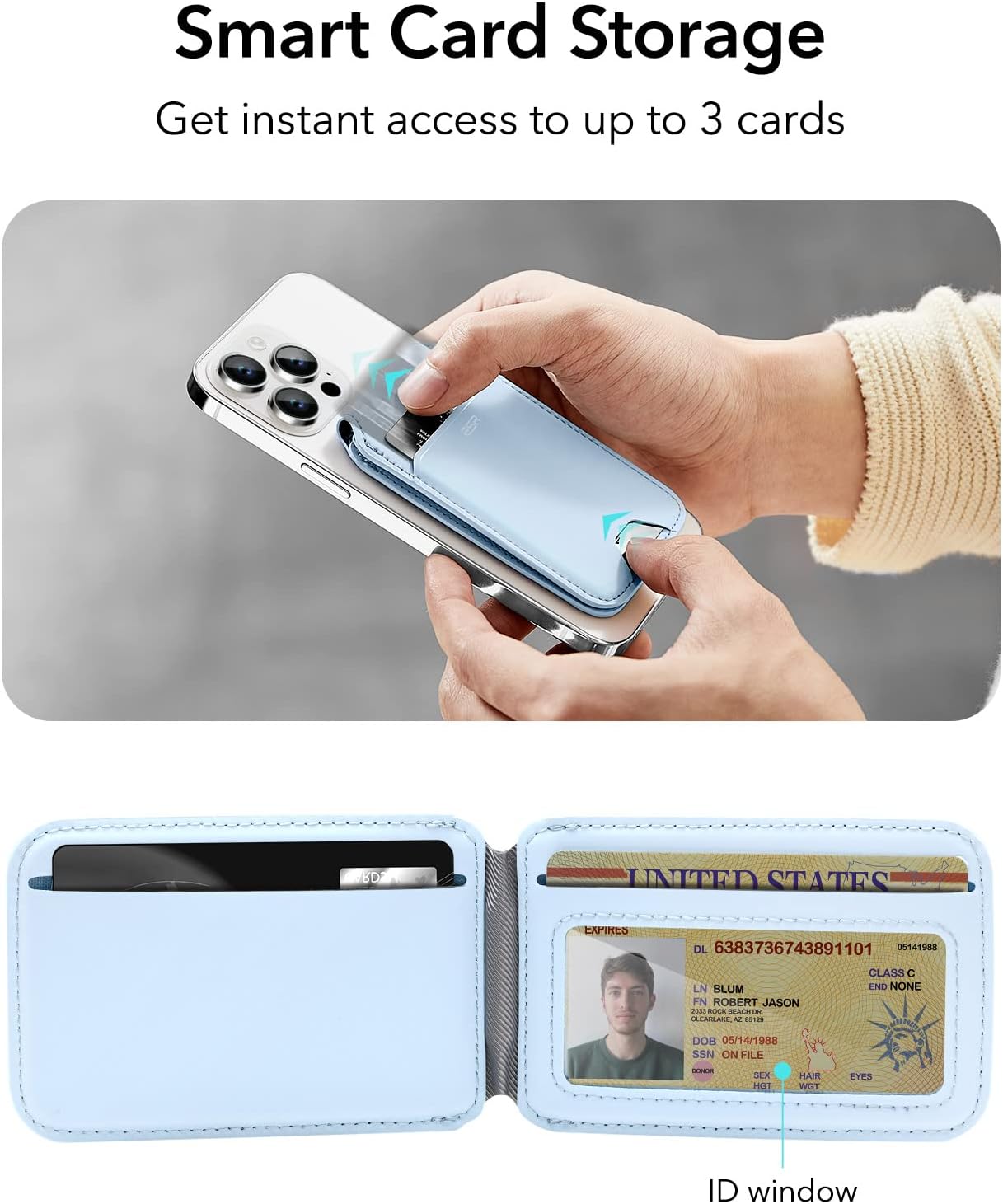
  • Smart Card Storage: Features three individual card slots for quick access. A clear window is included for easy display of identification cards.
  • Image demonstrating the smart card storage with three slots and an ID window.
    Image: A hand is shown inserting cards into the wallet, which has three card slots and a clear ID window.
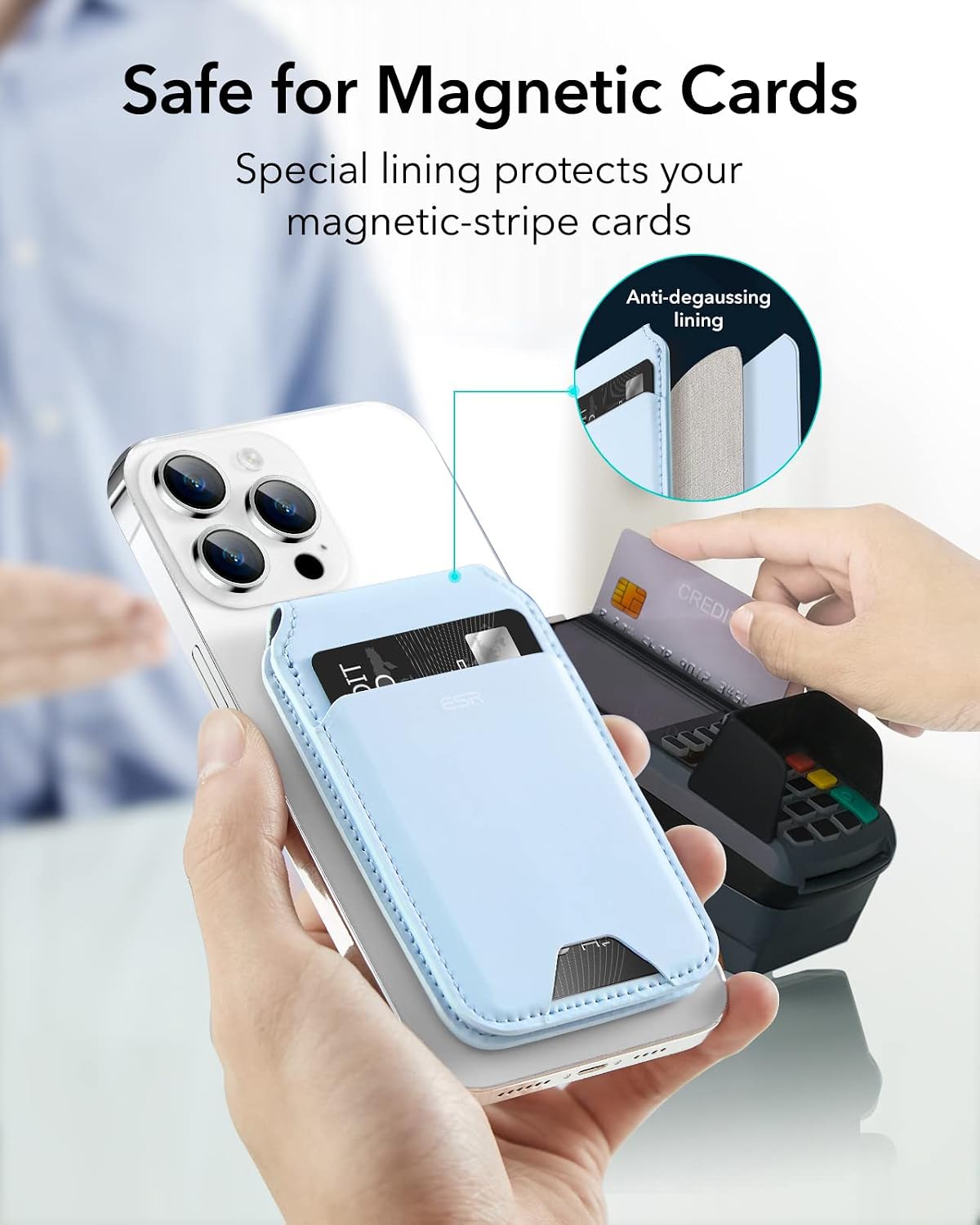
  • Safe for Magnetic Cards: Equipped with a metallic mesh lining that provides degaussing protection, preventing demagnetization of your magnetic-stripe cards.
  • Image illustrating the anti-degaussing lining protecting magnetic cards.
    Image: The wallet is shown near a card reader, with an inset diagram highlighting the anti-degaussing lining that protects cards.
  • Pocket Friendly: Designed to be slim and compact, allowing for comfortable storage in pockets.
  • Imagine care prezintă modelul Slim Profile of the wallet and its ease of fitting into a pocket.
    Image: The wallet is shown attached to an iPhone, being comfortably placed into a pant pocket, demonstrating its slim design.
  • Premium Look: Constructed from high-quality vegan leather, offering a classic aesthetic and tactile feel.
  • Prezentare de imagineasing the vegan leather material and various color options.
    Image: Three ESR wallets in different colors (black, tan, pastel blue) are displayed, highlighting the vegan leather material and premium finish.

5. Configurare

  1. Asigurați compatibilitatea: Verify that your iPhone model and case are listed as compatible in Section 3.
  2. Attach the Wallet: Align the ESR Magnetic Wallet with the MagSafe area on the back of your iPhone or compatible MagSafe case. The magnets will automatically snap the wallet into place.
  3. Image showing the magnetic attachment of the wallet to an iPhone.
    Image: A hand is shown attaching the magnetic wallet to the back of an iPhone, demonstrating the secure MagSafe connection.

6. Instrucțiuni de utilizare

6.1 Utilizarea suportului reglabil

  1. Deschideți suportul: Gently pull the front flap of the wallet away from the phone. The hinge will allow it to open and form a triangular stand.
  2. Regla Viewunghi: Position the stand to your desired angle between 15° and 160°. The sturdy hinge will hold the phone in place.
  3. Orientare: The stand supports both portrait and landscape orientations for versatile viewing.
Image demonstrating the wallet stand in use for both portrait and landscape viewing.
Image: The wallet is shown functioning as a stand for an iPhone in both vertical and horizontal positions, illustrating its adjustable nature.

6.2 Accessing Cards

  1. Retrieve Cards: Use the designated thumb slot at the bottom of the wallet to push cards upwards for easy retrieval.
  2. ID Window: Your identification card can be placed in the clear window slot for quick visibility without removal.
Image showing how to easily access cards from the wallet.
Image: A hand is shown pushing cards out of the wallet using the thumb slot, demonstrating easy card access.

6.3 Video Demonstrations

Video: Official ESR demonstration of the HaloLock Vegan Leather Wallet Stand, showcasing its magnetic attachment, card storage, and adjustable stand features.
Video: ESR's official overview of the Magnetic Wallet (HaloLock), highlighting its design and functionality.
Video: An official ESR video demonstrating the MagSafe Wallet with Adjustable Stand, showing its various uses and features.

7. Întreținere

  • curatenie: Wipe the vegan leather surface with a soft, damp Evitați substanțele chimice dure sau materialele abrazive.
  • Depozitare: Store the wallet in a cool, dry place when not in use.
  • Evitați supraîncărcarea: Do not overfill the card slots, as this may stretch the material and affect the magnetic closure or stand functionality.

8. Depanare

  • Wallet not attaching securely:
    • Ensure your iPhone model is compatible (refer to Section 3).
    • Verify that your phone case is a MagSafe-compatible case or an ESR HaloLock case. Non-magnetic cases or cases with metal attachments will prevent proper magnetic adhesion.
    • Check for any debris or obstructions between the wallet and your phone/case.
  • Stand not holding position:
    • Ensure the wallet is fully opened to form a stable triangular stand.
    • Avoid placing excessive weight or pressure on the phone while it is in stand mode.
  • Difficulty accessing cards:
    • Use the thumb slot at the bottom to push cards up.
    • Avoid overfilling the card slots (maximum 3 cards).

9. Specificații

MarcaESR
Numele modeluluiStand pentru portofel
MaterialVegan Leather, Silicone
CuloareAlbastru
Number of Card Slots3
Magnetic Holding Force3,000g (with ESR magnetic case)
Adjustable Stand Angle15° până la 160°
Dimensiuni articol (D x L x H)0.31" D x 2.6" L x 4.13" H
Greutatea articolului92 grame
Caracteristici specialeAdjustable, Anti-degaussing lining

10. Garanție și asistență

ESR provides a comprehensive Plan de protecție pe 12 de luni pentru acest produs. În plus, clienții au dreptul la suport pe viață and personalized assistance for any inquiries or issues. For support, please visit the official ESR website sau contactați serviciul clienți prin intermediul platformei dvs. de achiziții.

© 2026 ESR. Toate drepturile rezervate.

Documente conexe - Stand pentru portofel

Preview ESR HaloLock Magnetic Car Phone Mount - Product Overview și informații de siguranță
Comprehensive details on the ESR HaloLock Magnetic Car Phone Mount, including product specifications, material codes, usage instructions, multilingual safety warnings, and compliance declarations. Designed for MagSafe-compatible iPhones.
Preview ESR MagSafe Ring Universal Conversion Kit Installation Guide
Step-by-step instructions for installing the ESR MagSafe Ring Universal Conversion Kit (Model 2Z515) on your phone case to enable magnetic wireless charging for iPhone and Galaxy devices.
Preview ESR 2K614 Classic Geo Card Holder User Manual with Find My Integration
User manual for the ESR 2K614 Classic Geo Card Holder, detailing setup, pairing with Apple's Find My network, locating your device, safety warnings, and charging instructions. Features anti-lost functionality.
Preview ESR HaloLock Wireless Power Bank (2G505B) User Manual
User manual and safety guide for the ESR HaloLock Wireless Power Bank (2G505B), covering magnetic charging, kickstand usage, and regulatory compliance.
Preview ESR HaloLock Geo Wallet Stand User Manual
User manual for the ESR HaloLock Geo Wallet Stand, detailing setup, features, and safety information. Includes instructions for changing wallet name and usage guidelines.
Preview ESR Geo Wallet with Find My User Manual
This user manual provides comprehensive instructions for setting up, pairing, locating, and maintaining the ESR Geo Wallet with Apple's Find My network. It covers iPhone setup requirements, device operation, safety warnings, and charging.

Ask a question about this manual

Ask about setup, troubleshooting, compatibility, parts, safety, or missing instructions. Manuals+ will review the question and use this page’s manual context to help answer it.