
1. Introducere
The VEDINDUST HDMI Audio Embedder (Model CHD801) is designed to integrate external audio into an HDMI video signal. This device allows you to replace the original HDMI audio with digital optical (TOSLINK/SPDIF) or analog (3.5mm line) audio sources. It supports high-resolution video up to 4K@60Hz with 18Gbps bandwidth, HDR, CEC, and HDCP2.2/1.4 pass-through. This manual provides detailed instructions for setup, operation, and troubleshooting to ensure optimal performance.
2. Caracteristici
- Digital/Analog Audio to HDMI Embedding: Replaces the original HDMI audio with external digital optical (TOSLINK/SPDIF) or analog (3.5mm line) audio.
- Suport de înaltă rezoluție: Supports video resolutions up to 4K@60Hz 4:4:4 with 18Gbps bandwidth. Also compatible with 1080p and 720p.
- Funcții video avansate: Supports HDMI2.0, 10-bit High Dynamic Range (HDR), HDCP 2.2/1.4, and CEC pass-through.
- Audio Format Compatibility: HDMI port passes through all digital/analog audio formats including PCM, LPCM. Optical audio input supports various digital formats. 3.5mm audio input supports 2-channel stereo PCM audio.
- DVI to HDMI Conversion: Supports combining DVI signals with audio signals into HDMI signals using DVI to HDMI cables.
- Plug and Play: No software installation required for operation.
3. Conținutul pachetului
Vă rugăm să verificați dacă toate articolele enumerate mai jos sunt incluse în pachetul dumneavoastră:
- VEDINDUST HDMI Audio Embedder Unit (Model CHD801)
- Cablu de alimentare micro USB
- Manual de utilizare
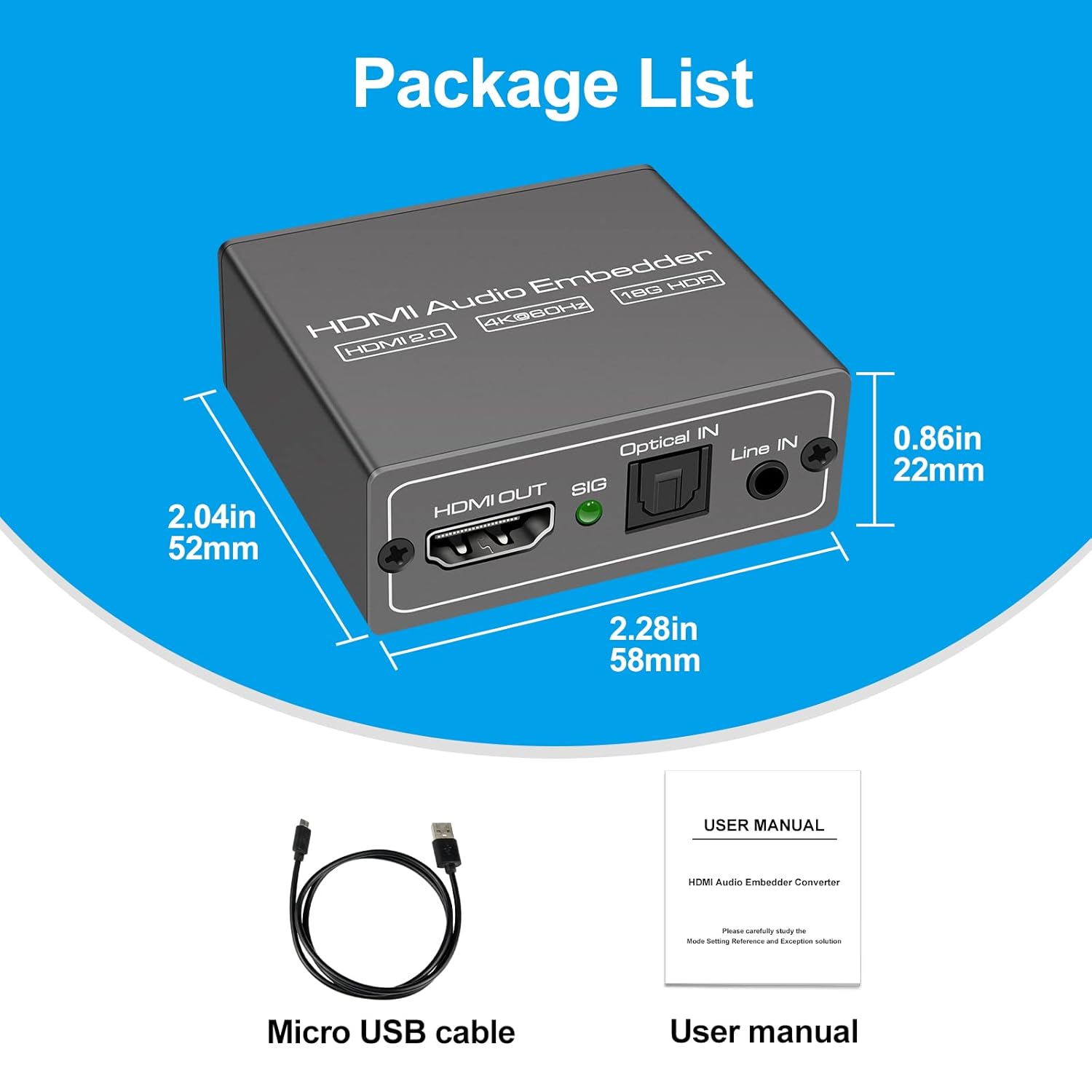
This image displays the items included in the product package: the VEDINDUST HDMI Audio Embedder unit, a Micro USB power cable, and the user manual.
4. Produs terminatview și Porturi
Familiarizați-vă cu porturile și comenzile dispozitivului:

This close-up shows the mode switch on the device, allowing selection between 'Optical' audio input, 'Line' (3.5mm) audio input, or 'Pass' through mode for original HDMI audio.

This image details the audio output and input ports: HDMI OUT, Optical IN (TOSLINK), and 3.5mm Line IN, along with the signal indicator light.
- INTRARE HDMI: Connect your HDMI video source (e.g., laptop, TV box, game console).
- IEȘIRE HDMI: Connect to your display device (e.g., TV, projector).
- Optical IN: Connect your digital optical audio source (TOSLINK/SPDIF).
- Line IN: Connect your analog 3.5mm audio source.
- USB 5V (PW): Connect the Micro USB power cable to a 5V power adapter (not included) or a USB port on your display device.
- Comutator de mod: Selects the desired audio input mode (Pass, Optical, or Line).
- SIG Indicator: Lights up when a signal is detected.
5. Configurare
Follow these steps to set up your HDMI Audio Embedder:
- Connect your HDMI video source (e.g., laptop, TV box, PS4, Blu-Ray DVD player) to the HDMI-IN port on the embedder using an HDMI cable.
- Connect your display device (e.g., HD TV, projector) to the IEȘIRE HDMI port on the embedder using an HDMI cable.
- Connect your external audio source to either the IN optic port (for digital audio) or the Linie IN (3.5mm) port (for analog audio), depending on your desired audio input.
- Connect the provided Micro USB power cable to the USB 5V (PW) port on the embedder and then to a 5V power source.
- Select the appropriate audio input mode using the Comutator mod on the device (refer to Section 6: Operating Modes).
- Ensure all connections are secure and power on all connected devices.

This diagram shows how to connect various devices to the HDMI Audio Embedder. HDMI sources (laptop, TV box, PS4, Blu-Ray DVD) connect to the HDMI IN. External audio sources (3.5mm or optical) connect to their respective inputs. The HDMI OUT connects to a display device like a projector or HD TV.
6. Moduri de operare
The HDMI Audio Embedder features a mode switch to select how audio is handled:
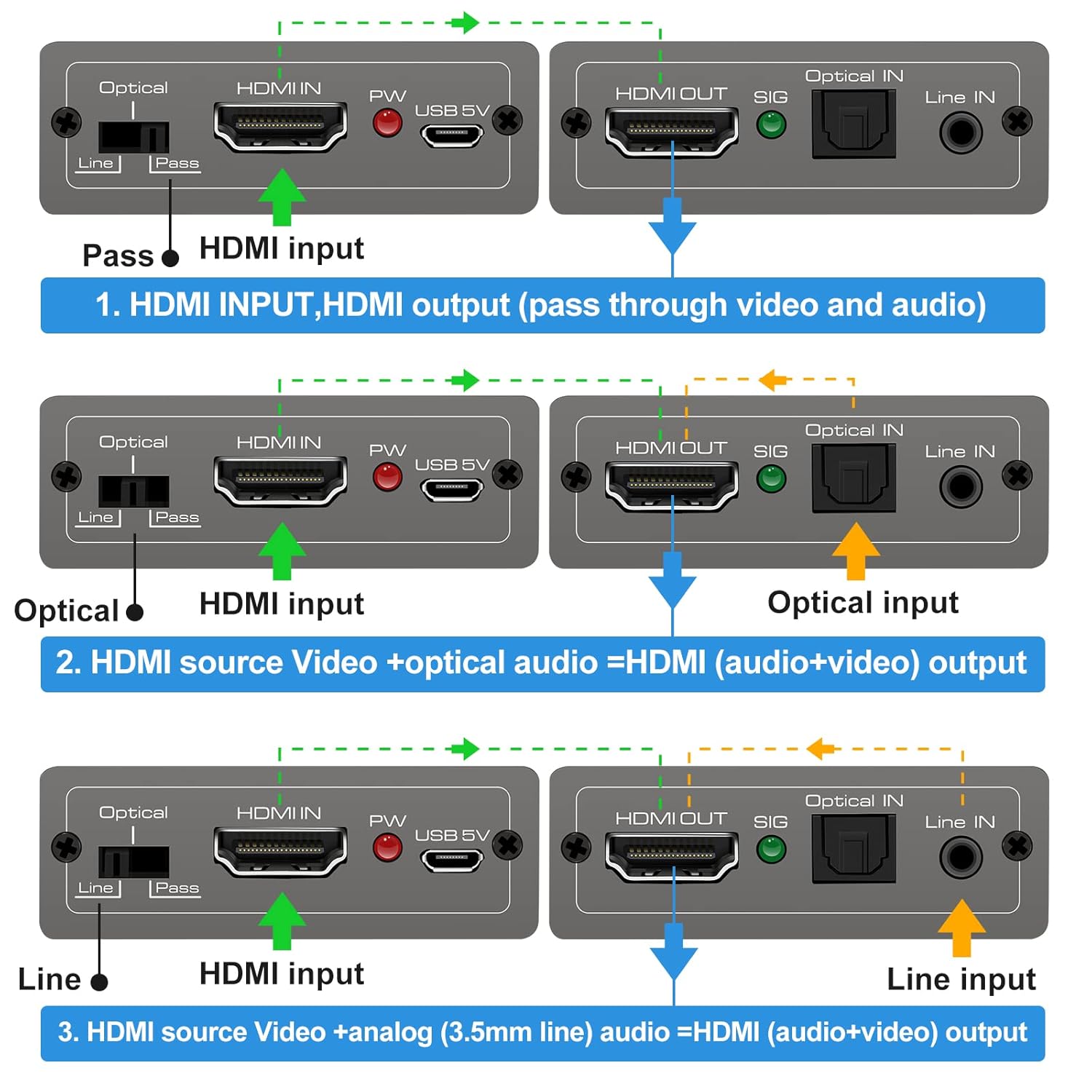
This diagram illustrates the three operational modes: 1. Pass Mode: HDMI input video and audio pass directly to HDMI output. 2. Optical Mode: HDMI input video combines with optical audio input for HDMI output. 3. Line Mode: HDMI input video combines with 3.5mm line audio input for HDMI output.
- Mod de trecere: In this mode, the original HDMI audio from your source device is passed through directly to the HDMI output, along with the video signal. No external audio is embedded.
- Modul optic: When selected, the HDMI video signal from your source is combined with the audio signal received from the IN optic port. The embedded audio is then sent to the HDMI output.
- Mod de linie: When selected, the HDMI video signal from your source is combined with the audio signal received from the Linie IN (3.5mm) port. The embedded audio is then sent to the HDMI output.
To change modes, simply slide the switch to the desired position. The device will automatically adjust the audio routing.
7. Specificații
Technical specifications for the VEDINDUST HDMI Audio Embedder:
- Model: CHD801
- Versiunea HDMI: HDMI 2.0
- Versiune HDCP: HDCP 2.2 / 1.4
- Rezoluție video: Up to 4K@60Hz (YUV 4:4:4)
- Lățime de bandă: 18 Gbps
- Suport HDR: 10-bit HDR
- Suport CEC: Pass-through
- Audio Input (Digital): Optical (TOSLINK/SPDIF)
- Audio Input (Analog): 3.5mm Line In (2-channel stereo PCM)
- Ieșire audio: HDMI (embedded audio)
- Alimentare electrică: DC 5V (via Micro USB)
- Dimensiuni: 10.16 x 5.18 x 2.18 cm (4.0 x 2.04 x 0.86 țoli)
- Greutate: 110 g (3.88 oz)
- Producător: VEDINDUST
- UPC: 798610311141

This image highlights the device's capability to support high-resolution video, up to 4K at 60Hz, ensuring clear and detailed visuals.
8. Depanare
If you encounter issues with your HDMI Audio Embedder, please refer to the following common troubleshooting steps:
- Fără ieșire video:
- Asigurați-vă că toate cablurile HDMI sunt conectate corect.
- Verify the power adapter is connected and the device is receiving power.
- Try connecting the HDMI source directly to the display to confirm the source and display are working correctly.
- Check if the display's input source is correctly selected.
- No Audio Output / Incorrect Audio:
- Ensure the correct audio input mode (Pass, Optical, or Line) is selected on the embedder's switch.
- Verify that the external audio source is properly connected and producing sound.
- Check the volume levels on both your audio source and display device.
- If using Optical or 3.5mm input, ensure the cables are fully inserted and not damaged.
- Some audio formats may not be supported by all devices. Try adjusting the audio output format on your source device.
- Semnal intermitent:
- Folosește cabluri HDMI de înaltă calitate, în special pentru rezoluții 4K.
- Ensure the power supply is stable and sufficient (5V).
- Avoid excessive cable lengths.
Dacă problema persistă după ce ați încercat acești pași, vă rugăm să contactați serviciul de asistență pentru clienți.
9. Întreținere
To ensure the longevity and optimal performance of your HDMI Audio Embedder, follow these maintenance guidelines:
- curatenie: Folosiți o lavetă moale și uscată pentru a curăța dispozitivul. Nu utilizați agenți de curățare lichizi sau aerosoli.
- Mediu: Keep the device in a cool, dry place, away from direct sunlight, heat sources, and moisture.
- Manipulare: Evitați scăderea sau supunerea dispozitivului la impacturi puternice.
- Ventilare: Ensure proper airflow around the device to prevent overheating.
- Putere: Disconnect the power supply when the device is not in use for extended periods.
10. Garanție și asistență
VEDINDUST products are designed for reliability and performance. For information regarding warranty coverage, technical support, or service, please refer to the warranty card included with your product or visit the official VEDINDUST website. Please have your model number (CHD801) and purchase information ready when contacting support.