
1. Instrucțiuni de siguranță
Please read these safety instructions carefully before using the product. Keep this manual for future reference.
- Acest produs este conceput doar pentru utilizare în interior. Nu expuneți la umiditate sau temperaturi extreme.
- Nu încercați să deschideți sau să modificați dispozitivul. Acest lucru poate anula garanția și poate reprezenta un risc pentru siguranță.
- Țineți aparatul departe de copii.
- Use only the provided micro-USB cable for charging.
- Nu priviți direct în sursa de lumină LED.
2. Conținutul pachetului
Asigurați-vă că toate articolele sunt prezente în colet:
- ANSMANN Under-Cabinet Light M
- Cablu de incarcare micro-USB
- Manual de instructiuni
3. Produs terminatview
The ANSMANN Under-Cabinet Light M is a versatile, rechargeable LED lamp designed for various indoor applications. It features a motion sensor, adjustable color temperatures, and a slim design for discreet placement.

Image 1: The ANSMANN Under-Cabinet Light M, showcasing its sleek, white design and integrated motion sensor.
Caracteristici cheie:
- Senzor de mișcare PIR: Automatically activates the light when motion is detected in low-light conditions.
- Senzor de amurg: Ensures the light only activates in dark environments, conserving battery life.
- Temperatura de culoare reglabila: Choose between 3 color temperatures (cool white, neutral white, warm white) or activate all LEDs for maximum brightness.
- Dimmerare continuă: Adjust brightness by holding down the control button.
- Baterie reîncărcabilă: Integrated battery for cordless operation, charged via micro-USB.
- Montare magnetica: Easy installation and removal with a magnetic strip.

Image 2: Diagram illustrating the Micro-USB Port, On/Off button, and PIR motion sensor on the device.
4. Configurare și instalare
The Under-Cabinet Light M offers flexible installation options using its integrated magnetic strip.
Montare magnetica:
- Identify a suitable, clean, and dry surface for installation (e.g., inside a cabinet, under a shelf).
- The light comes with a fixed magnetic strip on its back. For non-metallic surfaces, use the included adhesive strip.
- Peel off the protective film from the adhesive strip and firmly press it onto the desired surface.
- Attach the Under-Cabinet Light M to the adhesive strip. The magnetic connection will hold it in place.
Imaginea 3: Prim-plan view of the magnetic strip and the removable adhesive strip, demonstrating the mounting mechanism.

Imaginea 4: Example of the under-cabinet light installed in a modern kitchen setting, providing illumination over a countertop.
5. Funcționare
The Under-Cabinet Light M offers intuitive control for its lighting functions.
Pornire/Oprire:
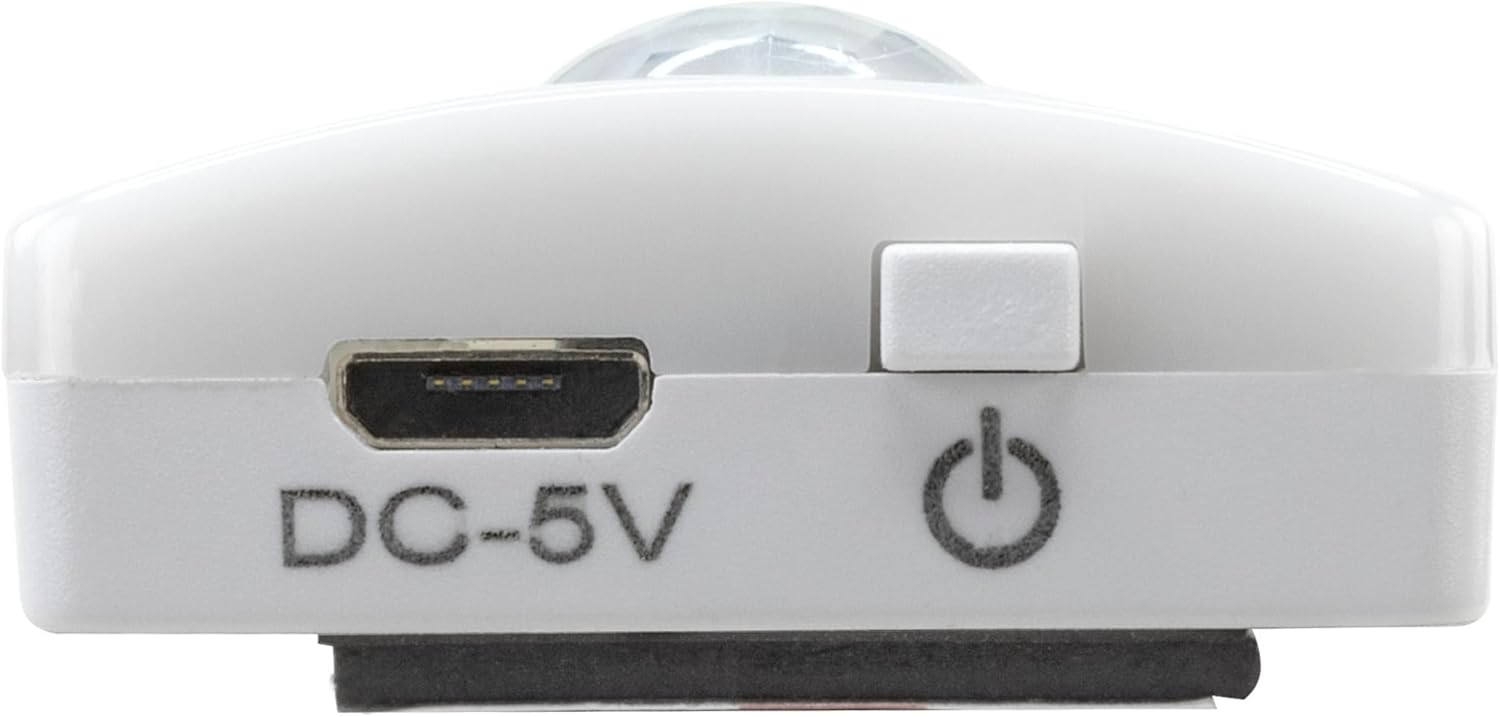
- Locate the On/Off button (refer to Image 2).
- Press the button once to turn the light on or off.
Reglarea temperaturii culorii:
- With the light on, short press the control button repeatedly to cycle through the 3 available color temperatures: cool white, neutral white, and warm white.
- A fourth press will activate all LEDs for maximum brightness.
Funcția de reglare a luminii:
- To adjust the brightness, press and hold the control button. The light will gradually dim or brighten. Release the button when the desired brightness level is reached.
Motion and Twilight Sensor:
- When the light is in motion sensor mode, it will automatically turn on when movement is detected within its range.
- The integrated twilight sensor ensures that the motion sensor only activates the light in dark environments, preventing unnecessary illumination during daylight hours.
6. Încărcare
The Under-Cabinet Light M is equipped with a rechargeable battery for convenient cordless use.
- When the battery is low, the light output may decrease or the light may not turn on.
- Gently detach the light from its magnetic mounting surface.
- Connect the provided micro-USB cable to the micro-USB port on the light (refer to Image 2).
- Connect the other end of the micro-USB cable to a suitable USB power source (e.g., USB wall adapter, computer USB port).
- An indicator light will show the charging status (e.g., red for charging, green for fully charged).
- Once fully charged, disconnect the cable and reattach the light to its mounting surface.

Imaginea 5: Detaliată view of the Micro-USB charging port and the On/Off button, essential for charging and operation.
7. Întreținere
To ensure the longevity and optimal performance of your Under-Cabinet Light M, follow these simple maintenance guidelines:
- Curățați lampa în mod regulat cu o cârpă moale și uscată. Nu utilizați substanțe de curățare abrazive sau solvenți.
- Ensure the motion sensor lens is kept clean and free from obstructions for proper function.
- Store the light in a cool, dry place if not in use for extended periods.
8. Depanare
If you encounter issues with your Under-Cabinet Light M, refer to the following common problems and solutions:
| Problemă | Cauza posibila | Soluţie |
|---|---|---|
| Lumina nu se aprinde. | Bateria este epuizată. | Charge the light using the micro-USB cable. |
| Senzorul de mișcare nu detectează mișcarea. | Ensure the sensor is clean and unobstructed. Check if the environment is dark enough for the twilight sensor to activate. | |
| Lumina nu se încarcă. | Cablu sau sursă de alimentare defectă. | Try a different micro-USB cable or USB power adapter. |
| Portul de încărcare este murdar. | Gently clean the micro-USB port with a dry, soft brush. | |
| Lumina pâlpâie sau este slabă. | Baterie descărcată. | Reîncărcați dispozitivul. |
Dacă problema persistă după ce încercați aceste soluții, vă rugăm să contactați serviciul de asistență pentru clienți.
9. Specificații
| Caracteristică | Detaliu |
|---|---|
| Numărul de model | 1600-0438 |
| Dimensiunile produsului | 25L x 3.5l x 1.3Î cm (9.84L x 1.38l x 0.51Î inci) |
| Greutatea articolului | 112 de grame (0.25 lbs) |
| Sursa de alimentare | Alimentat cu baterie |
| Port de încărcare | Micro-USB (DC-5V) |
| Material | Plastic |
| Culoare | Alb |
| Tip de instalare | Suport de perete (magnetic) |
| Tip de cameră | Dining Room, Kitchen, Wardrobe, Hallway, etc. |
10. Garanție și asistență
ANSMANN products are manufactured with high-quality standards. For information regarding warranty terms and conditions, please refer to the documentation provided with your purchase or visit the official ANSMANN website-ul.
For technical support or inquiries, please contact ANSMANN customer service through their official channels.