
Introducere
Thank you for choosing the Audizio SB85 Soundbar with Subwoofer. This manual provides essential information for the safe and correct operation of your new audio system. Please read it thoroughly before use and retain it for future reference. The SB85 is designed to enhance your television's audio, providing a rich, immersive sound experience for movies, games, and music, complete with a dedicated subwoofer for powerful bass.
Instrucțiuni de siguranță
- Citiți cu atenție toate instrucțiunile înainte de a utiliza dispozitivul.
- Keep the unit away from water, moisture, and heat sources.
- Nu blocați orificiile de ventilație.
- Utilizați numai atașamente/accesorii specificate de producător.
- Deconectați aparatul în timpul furtunilor cu fulgere sau atunci când nu este utilizat pentru perioade lungi de timp.
- Pentru toate lucrările de întreținere, adresați personalului de service calificat.
- Do not expose the battery (if applicable) to excessive heat such as sunshine, fire, or the like.
Conținutul pachetului
Asigurați-vă că toate articolele sunt prezente în cutie:
- Audizio SB85 Soundbar
- Subwoofer cu fir
- Telecomanda
- Optical Cable (Toslink)
- Cablu AUX
- Adaptor de alimentare
- Manual de utilizare
Produs terminatview
The Audizio SB85 system consists of a soundbar and a separate wired subwoofer, designed to deliver a powerful and clear audio experience.
Caracteristici Soundbar
- Integrated 150W speaker system with 4 speakers (2x 2cm range, 2x 2cm tweeter).
- Front LED display for status indication.
- Control buttons on the side panel.
- Multiple input options: HDMI (ARC), USB, Line In (AUX), Coaxial, Optical.
- Bluetooth 5.0 pentru streaming audio wireless.

Image: Close-up of the Audizio SB85 Soundbar's control panel and its remote control, highlighting Bluetooth 5.0 and ease of use.

Imagine: Internă view of the Audizio SB85 Soundbar's full-range speaker, emphasizing its 150W speaker system for an immersive audio experience.
Caracteristici subwoofer
- 5.25-inch wired subwoofer for enhanced bass response.

Image: Close-up of the Audizio SB85 wired subwoofer, designed to amplify bass frequencies.
Înființat
1. Plasare
Place the soundbar centrally below your television. The subwoofer can be placed on the floor near the soundbar, ideally in a corner for optimal bass reflection, but ensure it is not obstructed.

Image: Audizio SB85 Soundbar and Subwoofer setup in a living room, demonstrating room-filling sound and clean design.

Image: Audizio SB85 Soundbar placed below a television, illustrating its universal compatibility with any TV.
2. Conectarea la putere
Connect the power adapter to the DC IN port on the soundbar and then plug it into a wall outlet (230 Vac/50 Hz).
3. Conectarea subwooferului
Connect the wired subwoofer to the dedicated subwoofer output port on the soundbar.
4. Conectarea la surse audio
The SB85 offers several connection options:
- HDMI (ARC): For the best audio quality and control, connect an HDMI cable from the HDMI (ARC) port on the soundbar to the HDMI ARC port on your TV. This allows the TV to send audio to the soundbar and often enables TV remote control of the soundbar's volume.
- Optică (Toslink): Connect the included optical cable from the OPTICAL port on the soundbar to the Optical Digital Audio Out port on your TV or other audio source.
- Line In (AUX): Use the included AUX cable to connect the LINE IN port on the soundbar to the headphone jack or audio output of your device (e.g., smartphone, MP3 player).
- coaxial: Connect a coaxial cable (not included) from the COAXIAL port on the soundbar to the Coaxial Digital Audio Out port on your TV or other audio source.
- USB: Introduceți o unitate flash USB în portul USB pentru redarea fișierelor MP3.
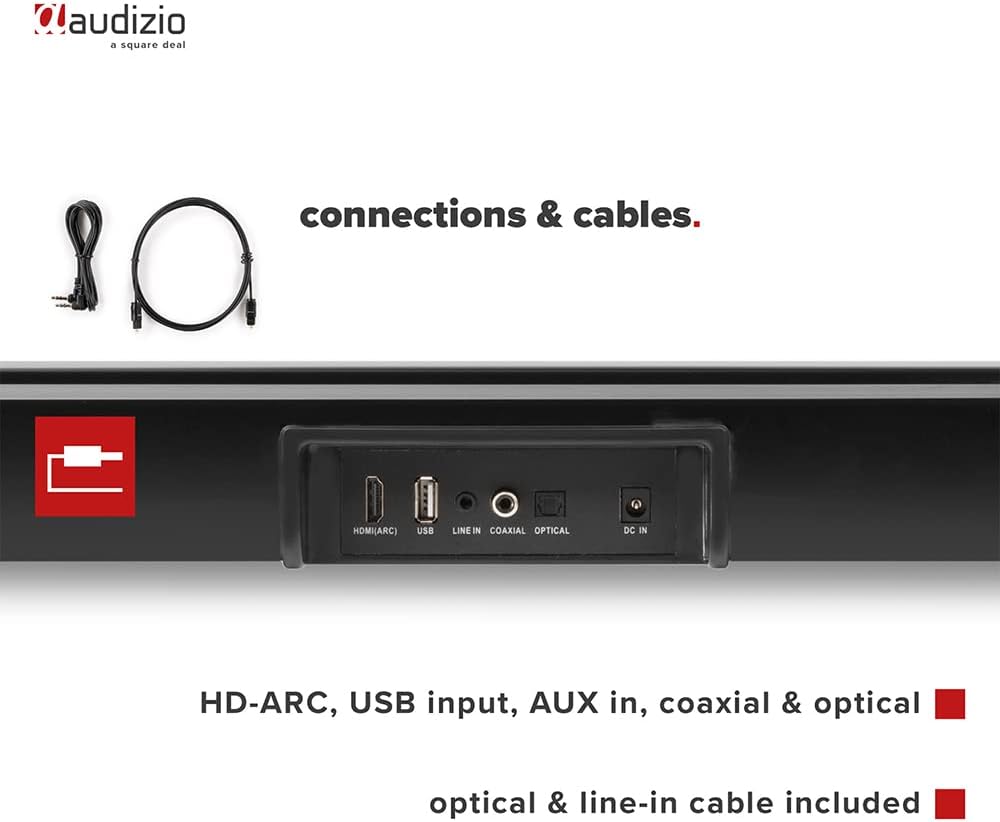
Imagine: Spate view of the Audizio SB85 Soundbar showing various connection ports: HDMI (ARC), USB, Line In, Coaxial, and Optical. Includes optical and line-in cables.
Instrucțiuni de operare
1. Pornire/Oprire
Apăsați butonul de pornire/oprire de pe soundbar sau de pe telecomandă pentru a porni sau a opri unitatea.
2. Selectarea sursei de intrare
Press the 'MODE' button on the soundbar or the remote control repeatedly to cycle through the available input sources: HDMI (ARC), Optical, Coaxial, AUX, USB, and Bluetooth. The selected input will be shown on the front LED display.
3. Controlul volumului
Use the 'VOL+' and 'VOL-' buttons on the soundbar or the remote control to adjust the volume. The 'MUTE' button on the remote control will temporarily silence the audio.
4. Asociere Bluetooth
- Switch the soundbar to Bluetooth mode using the 'MODE' button. The LED display will show 'BT'.
- Pe smartphone sau tabletă, activați Bluetooth și căutați dispozitivele disponibile.
- Select 'Audizio SB85' from the list of devices.
- Once paired, the soundbar will indicate a successful connection, and you can stream audio wirelessly.
5. Redare USB
Introduceți o unitate flash USB care conține fișiere MP3 files into the USB port. The soundbar will automatically switch to USB mode and begin playing the music. Use the remote control to navigate tracks (play/pause, next/previous).
6. Funcții de control de la distanță
The remote control provides full functionality for the soundbar, including power, mode selection, volume, mute, and playback controls for USB and Bluetooth modes.
Întreţinere
Curatenie
Wipe the soundbar and subwoofer surfaces with a soft, dry cloth. Do not use abrasive cleaners, waxes, or solvents as they may damage the finish. Ensure the device is unplugged before cleaning.
Depozitare
Dacă depozitați unitatea pentru o perioadă lungă de timp, scoateți-o din priză și depozitați-o într-un loc răcoros și uscat, ferit de lumina directă a soarelui și de temperaturi extreme.
Depanare
| Problemă | Cauza posibila | Soluţie |
|---|---|---|
| Fără putere | Cablul de alimentare nu este conectat; Priză defectă | Verificați conexiunea cablului de alimentare; Încercați o altă priză. |
| Nici un sunet | Incorrect input selected; Volume too low; Mute activated; Cable connection loose | Selectați sursa de intrare corectă; Măriți volumul; Dezactivați dezactivarea sunetului; Verificați toate conexiunile cablurilor audio. |
| Bluetooth nu se conectează | Soundbar not in Bluetooth mode; Device too far; Device already connected to another unit | Switch soundbar to BT mode; Move device closer; Disconnect from other devices and try again. |
| Telecomanda nu funcționează | Baterii descărcate; Obstrucție între telecomandă și soundbar | Înlocuiți bateriile; Îndepărtați orice obstacole. |
Specificații
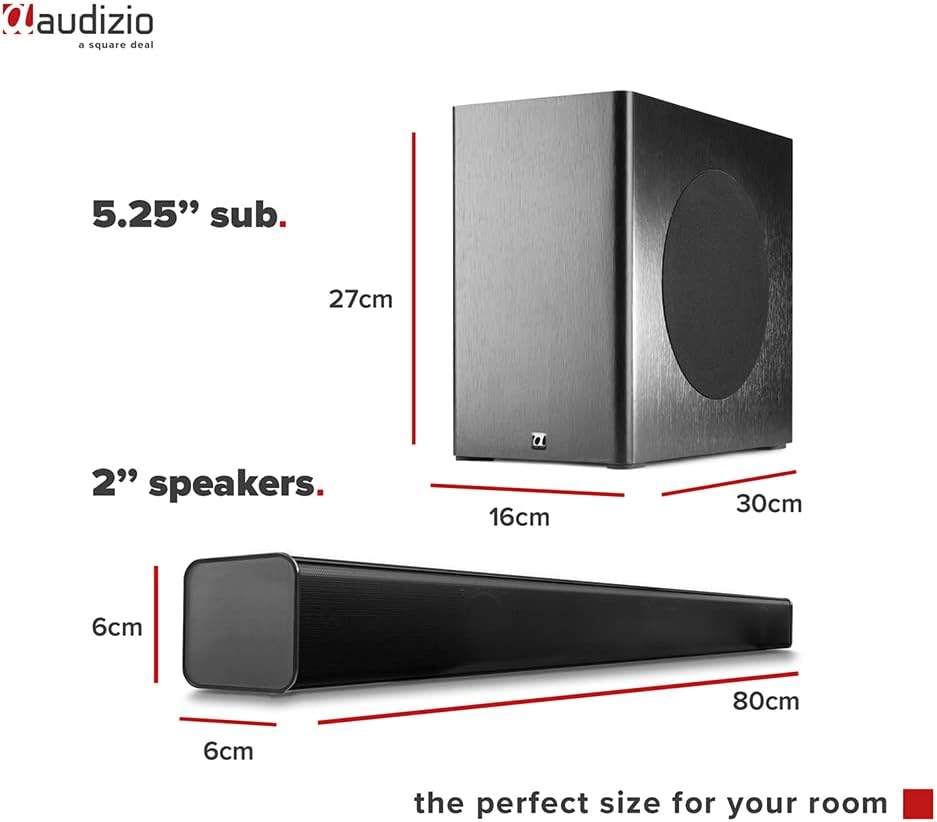
Image: Diagram showing the dimensions of the Audizio SB85 Soundbar and its subwoofer.
- Putere de ieșire: 150 W (maximum)
- Configurație difuzor: 4 speakers (2x 2cm range, 2x 2cm tweeter)
- Dimensiunea subwooferului: 5.25 inci
- Gama de frecvente: 50 Hz - 16,000 Hz
- SPL maxim: 125 dB
- Conectivitate: Bluetooth 5.0, HDMI (ARC), USB, Line In (AUX), Coaxial, Optical
- Mod de ieșire audio: Stereo
- Dispozitive compatibile: MP3 Player, Smartphone, TV
- Sursa de alimentare: 230 Vac/50 Hz (via electric cable)
- Dimensiuni soundbar (L x l x Î): 80 x 6 x 6 cm
- Dimensiuni subwoofer (L x l x Î): 16 x 30 x 27 cm
- Greutate totala: 3.9 kg
- Număr de model: 100.292
Garanție și suport
Pentru informații despre garanție sau asistență tehnică, vă rugăm să consultați documentația furnizată în momentul achiziției sau să contactați distribuitorul. Păstrați dovada achiziției pentru orice reclamații în garanție.