
1. Informații de siguranță
Please read all instructions carefully before assembly and use. Failure to follow these instructions may result in injury or product damage. Keep this manual for future reference.
- This desk requires assembly. Ensure all components are correctly installed before use.
- The maximum weight capacity for this desk is 220 pounds (100 kg). Do not exceed this limit.
- When adjusting the desk height, ensure there are no obstructions above or below the desk that could interfere with its movement.
- Țineți copiii și animalele de companie departe de birou în timpul funcționării.
- Do not attempt to manually force the desk up or down. Use only the electric control panel.
- Ensure the power cord is properly connected and routed to prevent tripping hazards or damage.
- For optimal stability, ensure the desk is placed on a level surface.
Important Note: When using the LED control panel to adjust height, the three height keys must be pressed and held continuously until the desired height is reached.
2. Conținutul pachetului
Verificați dacă toate componentele sunt prezente înainte de a începe asamblarea. Dacă lipsesc sau sunt deteriorate piese, vă rugăm să contactați serviciul de asistență pentru clienți.
- Desktop (71"x32" Black Top)
- Desk Frame (Black Frame)
- 4 Picioare
- Panoul de control
- Adaptor de alimentare și cablu
- Elemente de asamblare (șuruburi, bolțuri etc.)
- Manual de instructiuni
3. Instructiuni de asamblare
Assembly typically requires two people. Please follow these steps carefully. A power drill may be helpful for some steps, but is not strictly required.
- Despachetați componente: Scoateți cu grijă toate piesele din ambalaj și așezați-le pe o suprafață curată și moale pentru a preveni zgârieturile.
- Atașați picioarele la cadru: Securely attach the four legs to the desk frame using the provided hardware. Ensure all connections are tight.
- Instalare desktop: Place the desktop upside down on a soft surface. Carefully align the assembled frame with the pre-drilled holes on the underside of the desktop. Secure the frame to the desktop using the appropriate screws.
- Panou de control al montării: Attach the LED control panel to the underside of the desktop, typically on the front edge, using the provided screws.
- Cabluri de conectare: Connect the motor cables from the legs to the control box. Connect the control panel cable to the control box. Finally, connect the power adapter to the control box and plug it into a power outlet. Ensure all cables are neatly managed to avoid interference with desk movement.
- Configurare inițială: Once assembled, carefully flip the desk upright. Perform an initial height calibration by pressing and holding the 'Down' button until the desk reaches its lowest point, then release. The desk is now ready for operation.

Figure 3.1: Fully assembled FLEXISPOT 4 Leg Standing Desk.
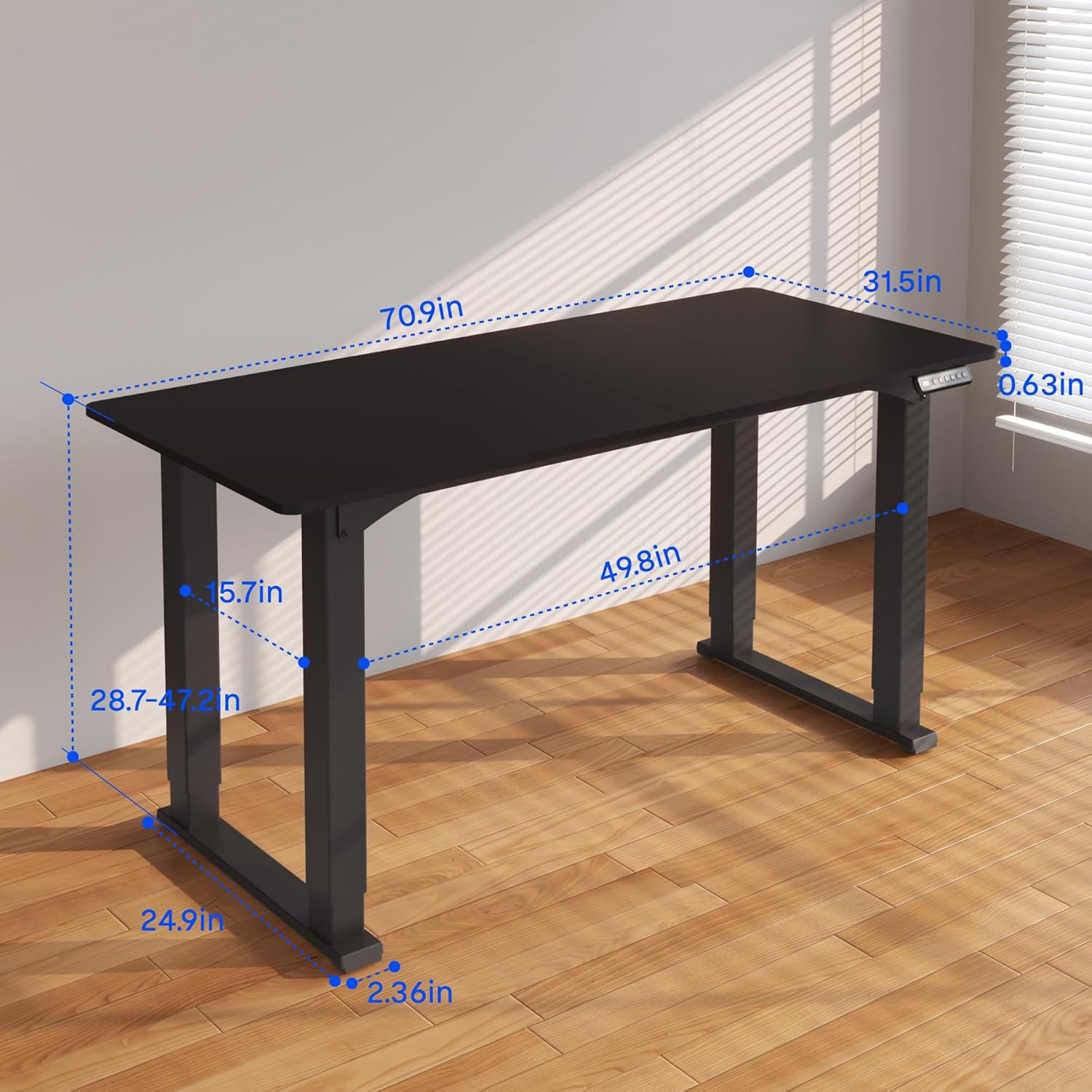
Figure 3.2: Detailed dimensions of the desk, including height range and desktop size.
4. Instrucțiuni de utilizare
The FLEXISPOT 4 Leg Standing Desk features an intuitive LED control panel for easy height adjustments and memory settings.
4.1. Panoul de control pesteview

Figure 4.1: Digital Keypad with memory functions and up/down controls.
- Săgeți sus/jos (▲ / ▼): Press and hold to adjust the desk height upwards or downwards. The current height is displayed on the LED screen.
- Butoane de memorie (1, 2, 3): These buttons allow you to save and recall preferred height settings.
- Memory Set Button (M): Used to program a height into a memory slot.
4.2. Reglarea înălțimii
To adjust the desk height, press and hold the ▲ (Up) or ▼ (Down) arrow button until the desk reaches your desired position. The desk will move smoothly between 28.7 inches and 47.2 inches.
4.3. Saving Memory Presets
You can save up to three preferred height settings for quick recall:
- Reglați biroul la înălțimea dorită folosind săgețile sus/jos.
- Press the 'M' button. The LED display will show 'S-'.
- Within 3 seconds, press one of the memory buttons (1, 2, or 3). The LED display will show 'S-1', 'S-2', or 'S-3' to confirm the setting has been saved.
4.4. Reapelarea presetărilor din memorie
To move the desk to a saved height, press and tine the corresponding memory button (1, 2, or 3) until the desk reaches the programmed height.
4.5. Anti-Collision System
The desk is equipped with an anti-collision system to prevent damage. If the desk encounters an obstruction during movement, it will stop and reverse slightly. Remove the obstruction before resuming operation.

Figure 4.2: Anti-collision system in action, preventing damage from obstructions.
5. Întreținere
Regular maintenance ensures the longevity and smooth operation of your standing desk.
- curatenie: Ștergeți suprafața de lucru și rama cu o lavetă moale șiamp Evitați substanțele chimice dure sau produsele de curățare abrazive.
- Organizare de cabluri: Periodically check and organize cables to prevent tangles and ensure they do not interfere with the desk's movement.
- Verificarea elementelor de fixare: Verificați ocazional toate șuruburile și bolțurile pentru a vă asigura că rămân strânse. Strângeți-le din nou dacă este necesar.
- Îngrijirea motorului: The electric motors are maintenance-free. Do not attempt to lubricate or disassemble them.
6. Depanare
Dacă întâmpinați probleme cu biroul dvs., consultați următoarele probleme și soluții frecvente:
- Biroul nu se mișcă:
- Verificați dacă cablul de alimentare este conectat corect atât la birou, cât și la priza de perete.
- Ensure all motor cables are properly connected to the control box.
- Perform a reset: Press and hold the 'Down' button until the desk reaches its lowest point and slightly retracts, then release.
- Mișcare inegală sau clătinare:
- Ensure the desk is on a level surface. Adjust the leveling feet if necessary.
- Check that all assembly screws and bolts are tightened securely.
- Verify that the weight on the desk does not exceed the maximum capacity of 220 lbs and is evenly distributed.
- Coduri de eroare pe afișaj:
- If an error code appears, try performing a reset as described above.
- If the error persists, disconnect power for 10 minutes, then reconnect and try again.
- Consult the manufacturer's website or contact customer support with the specific error code.
- Presetările memoriei nu funcționează:
- Asigurați-vă că apăsați și deţinere the memory button until the desk reaches the saved height.
- Re-program the memory presets if they are not recalling correctly.
If these steps do not resolve the issue, please contact FLEXISPOT customer support for further assistance.
7. Specificații
| Caracteristică | Caietul de sarcini |
|---|---|
| Marca | FLEXISPOT |
| Numărul de model | QS2B-1880-AU |
| Dimensiune desktop | 71"D x 32"W (approx. 180.3cm x 81.3cm) |
| Gama de inaltime reglabila | 28.7" to 47.2" (approx. 72.9cm to 119.9cm) |
| Capacitate maximă de greutate | 220 lbs (100 kg) |
| Material cadru | Metal |
| Material de sus | Lemn |
| Culoare | Black Frame & Black Top |
| Tip control | LED Digital Keypad with Memory Presets |
| Caracteristici speciale | 4-Leg Design, Anti-Collision System, Corded Operation |
| Asamblare necesară | Da |
8. Garanție și asistență
FLEXISPOT provides comprehensive warranty coverage for your peace of mind:
- 5 an garanție: Covers the desk frame and motor components.
- 2 an garanție: Covers the control panel and other electronic parts.
For warranty claims, technical support, or any questions regarding your FLEXISPOT product, please visit the official FLEXISPOT website or contact their customer service department. Please have your model number (QS2B-1880-AU) and proof of purchase available when contacting support.