
1. Introducere
This manual provides detailed instructions for the setup, operation, maintenance, and troubleshooting of your uRage Exodus 700 Semi-Mechanical Gaming Keyboard. Please read this manual thoroughly before using the product to ensure optimal performance and longevity.
2. Conținutul pachetului
Verificați dacă toate articolele sunt prezente în colet:
- uRage Exodus 700 Semi-Mechanical Gaming Keyboard
- Ghidul utilizatorului (acest document)
- Card de garanție
3. Configurare
3.1 Conectarea tastaturii
The uRage Exodus 700 keyboard connects via a wired USB-A connection. Follow these steps to connect your keyboard:
- Găsiți un port USB-A disponibil pe computer.
- Plug the USB-A connector of the keyboard cable into the USB-A port on your computer.
- The operating system (Windows 11/10/8/7) will automatically detect and install the necessary drivers.
3.2 Instalare software (opțional)
For advanced customization, including macro programming and lighting effects, dedicated gaming software is available. Refer to the official uRage website for the latest software download and installation instructions.

Image 1: uRage Exodus 700 Semi-Mechanical Gaming Keyboard connected and ready for use.
4. Utilizarea tastaturii
4.1 Caracteristici cheie
- Semi-Mechanical Keys: Provides a tactile typing experience with fast response times (1 ms) and a key travel of 2.5 mm.
- Anti-fantomă: Ensures that multiple key presses are registered simultaneously, crucial for gaming. Up to 24 keys can be registered at once.
- Iluminare RGB: Customizable backlighting with various effects and colors.
- WIN Lock-Function: Disables the Windows key to prevent accidental interruptions during gameplay.
- Suport integrat pentru încheietura mâinii: Designed for enhanced comfort during extended use.
4.2 Controlul iluminării RGB
The keyboard features integrated RGB lighting. Specific key combinations (often involving the 'Fn' key) or the dedicated gaming software can be used to:
- Turn the lighting on or off.
- Cycle through different lighting modes and effects.
- Reglați nivelurile de luminozitate.
Refer to the keyboard's function key legends for specific lighting control shortcuts.

Image 2: Keyboard in use, demonstrating RGB lighting.
4.3 Macro and Multimedia Functions
The keyboard includes 4 dedicated macro buttons (G1-G4) and additional multimedia functions. These can be programmed and controlled:
- Programare macro: Use the dedicated gaming software to record and assign complex key sequences to the macro buttons.
- Comenzi multimedia: Access functions like volume control, play/pause, and track skipping via function key combinations.
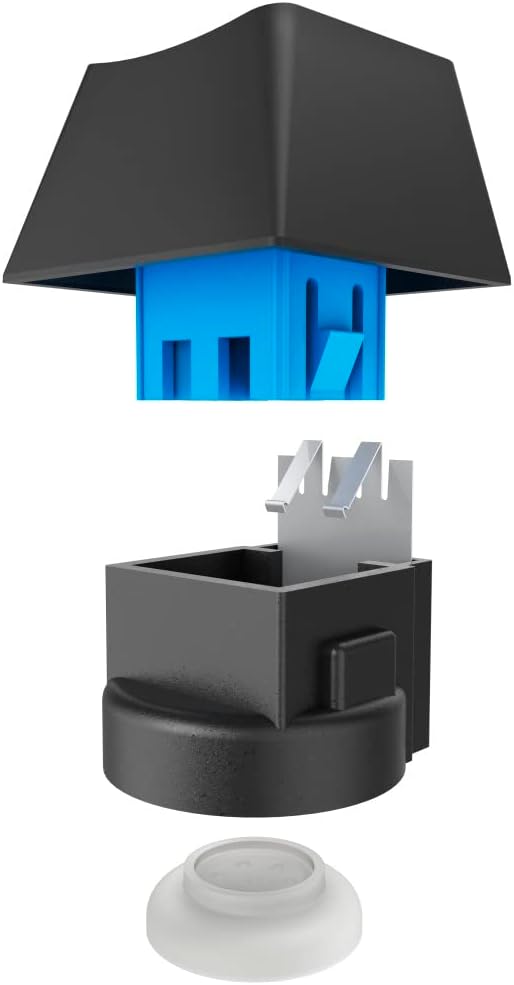
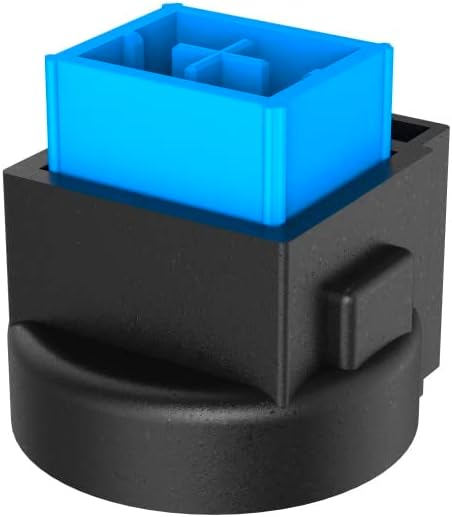
Image 3: Exploded and assembled views of the semi-mechanical key structure.
5. Întreținere
Întreținerea corectă asigură longevitatea și performanța tastaturii tale.
5.1 Curățare
- Deconectați tastatura de la computer înainte de curățare.
- Folosiți o lavetă moale și uscată pentru a șterge suprafața tastaturii.
- Pentru praf și resturi între taste, folosiți aer comprimat.
- Evitați utilizarea substanțelor chimice dure, a produselor de curățare abrazive sau a umidității excesive.
5.2 Depozitare
Când nu este utilizată, depozitați tastatura într-un mediu curat și uscat, ferit de lumina directă a soarelui și de temperaturi extreme.
6. Depanare
If you encounter issues with your uRage Exodus 700 keyboard, refer to the following common solutions:
- Tastatura nu răspunde:
- Asigurați-vă că cablul USB este conectat corect atât la tastatură, cât și la computer.
- Încearcă să conectezi tastatura la un alt port USB.
- Reporniți computerul.
- Cheile nu se înregistrează:
- Verificați dacă există obstacole fizice sub capacele tastelor.
- Ensure the keyboard drivers are correctly installed (check Device Manager on Windows).
- Iluminarea RGB nu funcționează:
- Verify that the lighting is not turned off via keyboard shortcuts.
- Check the gaming software settings if installed.
- Macro functions not working:
- Ensure the gaming software is running and macros are correctly configured.
- Update the gaming software to the latest version.
If problems persist, contact uRage customer support for further assistance.
7. Specificații
| Caracteristică | Caietul de sarcini |
|---|---|
| Numele modelului | Exodul 700 |
| Numărul de model | ham_n8_U8186011 |
| Aspectul tastaturii | QWERTY (Engleză) |
| Tehnologia cheie | Semi-Mechanical |
| Numărul de chei | 114 |
| Rollover Buttons | Până la 24 |
| Timp de răspuns | 1 ms |
| Durata de viață a cheii | 10 Million Attacks |
| Work Travel | 2.5 mm |
| Conectivitate | USB-A cu fir |
| Iluminat | Culori RGB |
| Sistem de operare compatibil | Windows 11/10/8/7 |
| Number of Macro Buttons | 4 |
| Culoare | Negru |
| Material | Plastic |
| Lungimea cablului | 180 cm |
| Dimensiuni (L x A x A) | 47 cm x 3.5 cm x 19 cm |
| Greutate | 885 g |
8. Garanție și asistență
8.1 Garanția producătorului
The uRage Exodus 700 Semi-Mechanical Gaming Keyboard comes with a 5 ani garanție producătorVă rugăm să păstrați dovada achiziției pentru reclamațiile în garanție. Garanția acoperă defectele de materiale și de fabricație în condiții normale de utilizare.
8.2 Asistență pentru clienți
For technical support, warranty claims, or further inquiries, please visit the official uRage website or contact their customer service department. Contact information can typically be found on the warranty card included in your package or on the brand's official website-ul.