
FLEXISPOT E4 Classic
FLEXISPOT E4 Classic Electric Standing Desk User Manual
Model: E4 Classic | Brand: FLEXISPOT
Introducere
This manual provides detailed instructions for the assembly, operation, and maintenance of your FLEXISPOT E4 Classic Electric Standing Desk. Please read this manual thoroughly before use to ensure proper function and longevity of your product.

Figure 1: The FLEXISPOT E4 Classic Electric Standing Desk, featuring a bamboo contour desktop and silver frame, set up with dual monitors in an office environment.
Informații de siguranță
- Asigurați-vă că toate componentele sunt bine fixate înainte de utilizare.
- Țineți copiii și animalele de companie departe de birou în timpul funcționării.
- Do not overload the desk beyond its specified weight capacity (220 lbs).
- Avoid placing liquids directly on the control panel or motor components.
- Deconectați alimentarea înainte de curățare sau întreținere.
- Utilizați numai adaptorul de alimentare furnizat.
Conținutul pachetului
Vă rugăm să verificați dacă toate piesele sunt prezente înainte de a începe asamblarea. Dacă lipsesc sau sunt deteriorate piese, contactați serviciul de asistență pentru clienți.
- Bamboo Contour Whole-Piece Desktop (55"x28")
- Silver Frame Legs (Dual Motor)
- Panoul de control
- Adaptor de alimentare și cablu
- Elemente de asamblare (șuruburi, unelte etc.)
- Manual de instrucțiuni (acest document)
Configurare și asamblare
Acest produs necesită asamblare. Vă rugăm să urmați cu atenție acești pași.
- Despachetați componente: Scoateți cu grijă toate piesele din ambalaj și așezați-le pe o suprafață curată și moale pentru a preveni zgârieturile.
- Atașați picioarele la birou: Position the desktop upside down. Align the leg frames with the pre-drilled holes on the underside of the desktop. Secure them using the provided screws and tools.
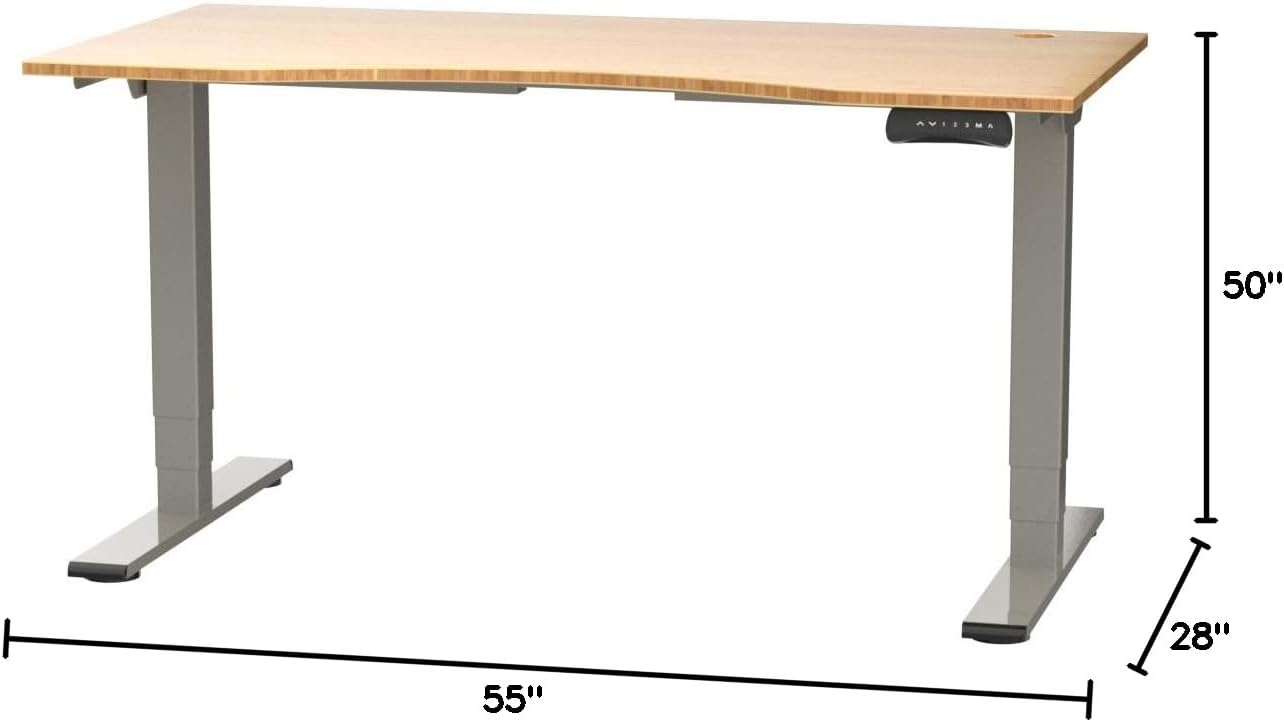
Figure 2: Desk dimensions indicating 55 inches width, 28 inches depth, and adjustable height up to 50 inches.
- Instalați Panoul de control: Mount the control panel to the desired location on the underside of the desktop, typically on the front edge for easy access. Connect the control panel cable to the motor control box.

Figure 3: The programmable control panel with LED display, up/down buttons, and memory presets (1, 2, 3, M, A).
- Conectare alimentare: Plug the power adapter into the control box, and then plug the power cable into a standard electrical outlet.
- Organizare de cabluri: Utilize the two cable management holes on the desktop to route and organize your cables, preventing clutter.

Figure 4: Detail showing the integrated cable management holes and the water-resistant surface of the bamboo desktop.
- Calibrare inițială: After assembly and power connection, the desk may require an initial calibration. Refer to the "Operating Instructions" section for details on resetting or calibrating the desk.
Instrucțiuni de operare
Reglarea înălțimii
The FLEXISPOT E4 Classic desk features a dual-motor lift system for smooth and quiet height adjustments.
- Ridicați biroul: Țineți apăsat butonul Săgeată sus button (▲) on the control panel. The desk will move upwards.
- Biroul inferior: Țineți apăsat butonul Săgeată în jos button (▼) on the control panel. The desk will move downwards.
- Release the button at your desired height. The desk can adjust from 24.4 inches to 50 inches.
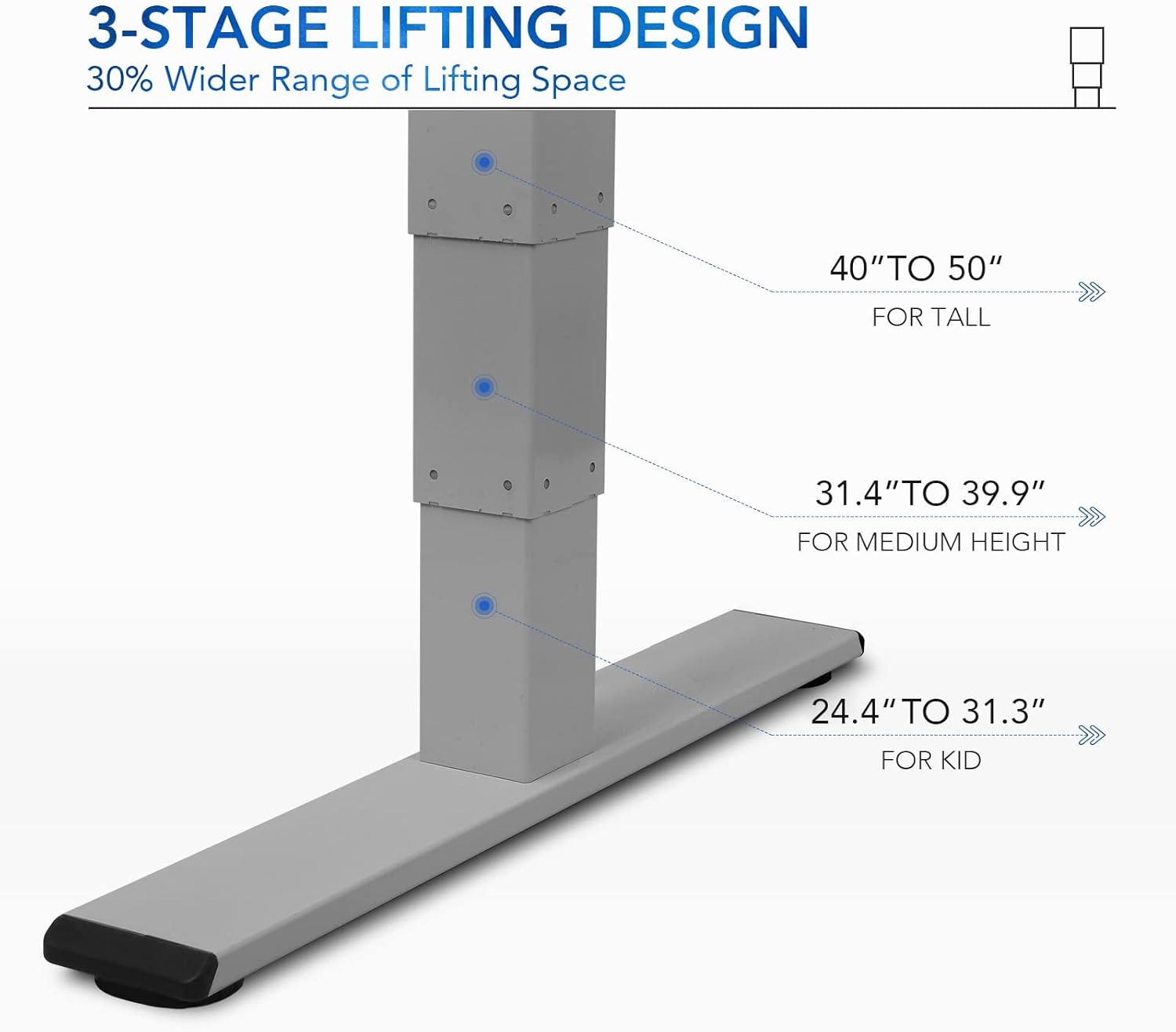
Figura 5: Cele 3-uritage lifting design provides a wide range of height adjustments, suitable for various user heights, from 24.4" (kid) to 50" (tall).
Programmable Memory Presets
Panoul de control vă permite să salvați până la trei setări de înălțime preferate pentru ajustări rapide.
- Setați o poziție de memorie:
- Reglați biroul la înălțimea dorită folosind butoanele Sus/Jos.
- Apăsați tasta „M.” butonul. Afișajul LED va afișa „S-”.
- În decurs de 3 secunde, apăsați unul dintre butoanele numerice („1”, „2”, sau „3”) to save the current height to that preset. The display will show "S-1", "S-2", or "S-3" to confirm.
- Reapelarea unei poziții de memorie: Simply press the corresponding number button („1”, „2”, sau „3”Biroul se va muta automat la înălțimea salvată.
Sit/Stand Reminder
The "A" button can be used to set a reminder to switch between sitting and standing positions.
- Consult the full manual for detailed instructions on setting and customizing the sit/stand reminder function.
Ergonomic Curved Design
The 55"x28" desktop features an ergonomic curved design for enhanced comfort and efficiency during work or study.

Figure 6: The ergonomic curved edge of the desktop, designed to provide a more comfortable and natural working posture.
Întreţinere
- curatenie: Ștergeți suprafața și cadrul biroului cu o lavetă moale șiamp cloth. Avoid abrasive cleaners or harsh chemicals. The bamboo surface is designed to be water-resistant, making it easy to clean.
- Îngrijirea motorului: The dual-motor system is designed for low noise and durability. No specific user maintenance is required for the motors.
- Organizare de cabluri: Periodically check that all cables are neatly routed through the cable management holes and are not pinched or tangled.
- Verificarea elementelor de fixare: Verificați ocazional toate șuruburile și elementele de fixare pentru a vă asigura că rămân strânse. Strângeți-le din nou dacă este necesar.
Depanare
| Problemă | Cauza posibila | Soluţie |
|---|---|---|
| Biroul nu se mișcă. | Power cable disconnected; overload protection activated; motor error. | Check power connections. Reduce weight on desk. Unplug and replug power after 10 minutes. Perform a reset (see below). |
| Biroul se mișcă neuniform sau face zgomote neobișnuite. | Loose fasteners; obstruction; motor synchronization issue. | Check and tighten all assembly screws. Ensure no obstructions under the desk. Perform a reset. |
| LED display shows an error code (e.g., "E01", "RST"). | System error; need for reset. | Procedura de resetare: Press and hold the Down Arrow button until the desk reaches its lowest position and then slightly rises. Release the button. If the error persists, unplug the desk for 10 minutes and try again. |
| Presetările de memorie nu funcționează. | Presetările nu au fost salvate corect. | Re-save your desired memory positions following the "Programmable Memory Presets" instructions. |
If the issue persists after attempting these solutions, please contact FLEXISPOT customer support.
Specificații
| Caracteristică | Detaliu |
|---|---|
| Model | E4 Classic |
| Marca | FLEXISPOT |
| Material pentru desktop | Bamboo Contour Whole-Piece Board |
| Material cadru | Alloy Steel (Silver Frame) |
| Dimensiuni produs (D x L x H) | 28 cm lățime x 55 cm înălțime x 50 cm înălțime (înălțime maximă) |
| Interval de reglare a înălțimii | 24.4" până la 50" |
| Sistem de ridicare | Dual Motor, 3-Stage Lifting |
| Capacitate de greutate | Până la 220 lbs |
| Caracteristici speciale | Electric Height Adjustment, Programmable Memory Presets, Sit/Stand Reminder, Curved Ergonomic Design, Cable Management Holes, Waterproof Surface |
| Asamblare necesară | Da |
Garanție și suport
FLEXISPOT products are designed for durability and performance. For specific warranty details regarding your E4 Classic Electric Standing Desk, please refer to the warranty card included with your purchase or visit the official FLEXISPOT website-ul.
For technical support, troubleshooting assistance, or to inquire about replacement parts, please contact FLEXISPOT customer service:
- Website: www.flexispot.com
- E-mail: support@flexispot.com
- Telefon: Consultați oficialul website-ul pentru numerele de contact regionale.
When contacting support, please have your product model (E4 Classic) and purchase information ready.
Ask a question about this manual
Ask about setup, troubleshooting, compatibility, parts, safety, or missing instructions. Manuals+ will review the question and use this page’s manual context to help answer it.