
Introducere
Thank you for choosing the DORTALA Floor Gaming Chair. This manual provides essential information for the safe and effective use of your new chair. Please read it thoroughly before use and retain it for future reference.
The DORTALA Floor Gaming Chair is designed for comfort and versatility, featuring a 14-position adjustable backrest and a foldable design for easy storage. It is suitable for various activities such as gaming, reading, meditating, or relaxing.

Image: The DORTALA Floor Gaming Chair in black, showcasindesignul său.
Informații de siguranță
Vă rugăm să respectați următoarele instrucțiuni de siguranță pentru a preveni vătămările corporale sau deteriorarea produsului:
- Always ensure the chair is fully unfolded and locked into your desired position before use.
- Do not exceed the maximum weight limit of 220 lbs (approximately 100 kg).
- Keep fingers and other body parts clear of the folding and adjustment mechanisms to avoid pinching.
- Always follow the instructions for adjusting the chair's position to prevent injury.
- Nu sta pe scaun.
- Keep the chair away from open flames or excessive heat sources.
- Ensure the chair is placed on a stable, flat surface.
Înființat
The DORTALA Floor Gaming Chair requires no assembly. It arrives ready for use. To set up your chair:
- Scoateți scaunul din ambalaj.
- Așezați scaunul pe o suprafață plană și stabilă.
- Gently unfold the chair to its upright position. The backrest mechanism will click into place as you adjust it.
- Adjust the backrest to your desired angle (refer to the "Operating Instructions" section for details on adjustment).

Image: A woman comfortably seated on the DORTALA Floor Gaming Chair, using a laptop, demonstrating a typical use case.
Instrucțiuni de operare
Reglarea spătarului (14 poziții)
The DORTALA Floor Gaming Chair features a 14-position adjustable backrest, allowing you to find the most comfortable angle for various activities, from 90 degrees upright to 180 degrees flat.
- To recline the backrest: Gently push the backrest forward until you hear a click. Then, slowly push it backward to the desired angle. The mechanism will lock into each of the 14 positions.
- To bring the backrest upright: Push the backrest fully forward until it clicks into the most upright position. Then, you can adjust it backward to your preferred angle.
- To lay the chair completely flat: Push the backrest fully forward past the upright position until it releases, then lay it flat.
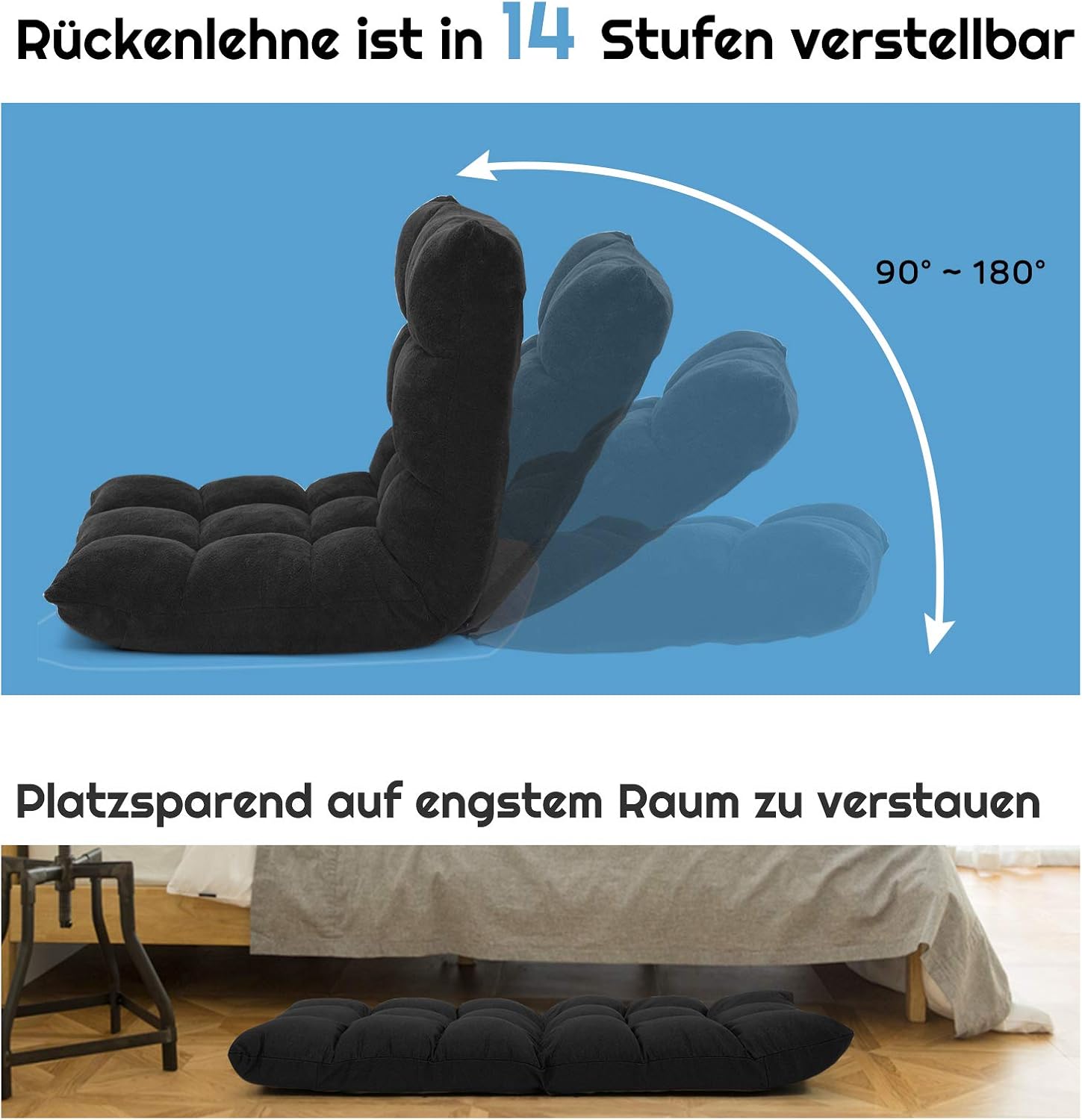
Image: A diagram illustrating the 14-step backrest adjustment, ranging from 90 to 180 degrees, with an arrow indicating the adjustment motion.
Pliabil pentru depozitare
The chair can be fully folded for compact storage, making it ideal for small spaces or transport.
- Ensure the backrest is in the fully flat position (180 degrees).
- Fold the backrest forward onto the seat portion. The chair will become a compact, flat unit.
- For storage under a bed or tall couch, ensure it is completely flat.

Image: A diagram showing the dimensions of the DORTALA Floor Gaming Chair when upright and when folded flat, indicating its compact storage capability.
Întreţinere
To ensure the longevity and appearance of your DORTALA Floor Gaming Chair, follow these maintenance guidelines:
- curatenie: Ștergeți cu reclamăamp Pentru petele mai dificile, folosiți o soluție delicată de săpun și apoi ștergeți cu o cârpă curată și uscată.amp Evitați substanțele chimice dure sau produsele de curățare abrazive.
- Inspecție regulată: Periodically check the adjustment mechanism and frame for any signs of wear or damage.
- Depozitare: When not in use for extended periods, store the chair in a clean, dry place, preferably folded to protect the fabric and mechanism.
- Evitați lumina directă a soarelui: Expunerea prelungită la lumina directă a soarelui poate cauza decolorarea țesăturii.

Image: Close-up details of the chair's features, including the elastic feel of the fabric, its breathability, softness, anti-pilling properties, and the non-slip bottom.
Depanare
If you encounter any issues with your DORTALA Floor Gaming Chair, refer to the following common problems and solutions:
| Problemă | Cauza posibila | Soluţie |
|---|---|---|
| Spătarul nu se reglează și nu se blochează în poziție. | Mechanism might be stuck or not fully engaged. | Push the backrest fully forward until it clicks, then slowly recline it to engage the locking positions. Ensure no obstructions are present. |
| Scaunul pare instabil. | Not placed on a flat surface or backrest not fully locked. | Ensure the chair is on a level floor. Verify the backrest is securely locked in an adjustment position. |
| Difficulty folding the chair flat. | Backrest not pushed fully forward to release the mechanism. | Push the backrest completely forward until it passes the upright position and releases, then lay it flat. |
Specificații
| Caracteristică | Detaliu |
|---|---|
| Numărul de model | AU-HW57991 |
| Marca | DORTALA |
| Culoare | Negru |
| Material | Iron, Foam, Coral Velvet |
| Material cadru | Oțel aliat |
| Material de umplere | Spuma de memorie |
| Dimensiuni produs (D x L x H) | 21.5" x 22" x 21.5" (54.6 cm x 55.9 cm x 54.6 cm) |
| Greutatea articolului | 10 de lire sterline (4.5 kg) |
| Greutate maximă recomandată | 220 de lire sterline (100 kg) |
| Număr de poziții înclinate | 14 |
| Asamblare necesară | Nu |
| Instrucțiuni de îngrijire | Ștergeți curățați |

Image: An illustration detailing the comfort and safety aspects of the chair, including its stable metal tube structure, high-density sponge filling, and anti-static coral fleece cover.
Garanție și suport
For warranty information or product support, please contact DORTALA customer service. Details can typically be found on the DORTALA official website sau prin intermediul platformei dvs. de achiziții.
When contacting support, please have your model number (AU-HW57991) and proof of purchase readily available.
DORTALA Official Website: Visit DORTALA Store on Amazon