
1. Introducere și Pesteview
The OMTech XF-180 Fume Extractor is an industrial-strength air purification system designed to effectively remove harmful fumes and particulates generated during various industrial processes such as laser cutting, engraving, soldering, CNC machining, and welding. Equipped with an 80W DC motor, it provides a powerful 106 CFM (Cubic Feet per Minute) airflow, ensuring a cleaner and safer working environment.
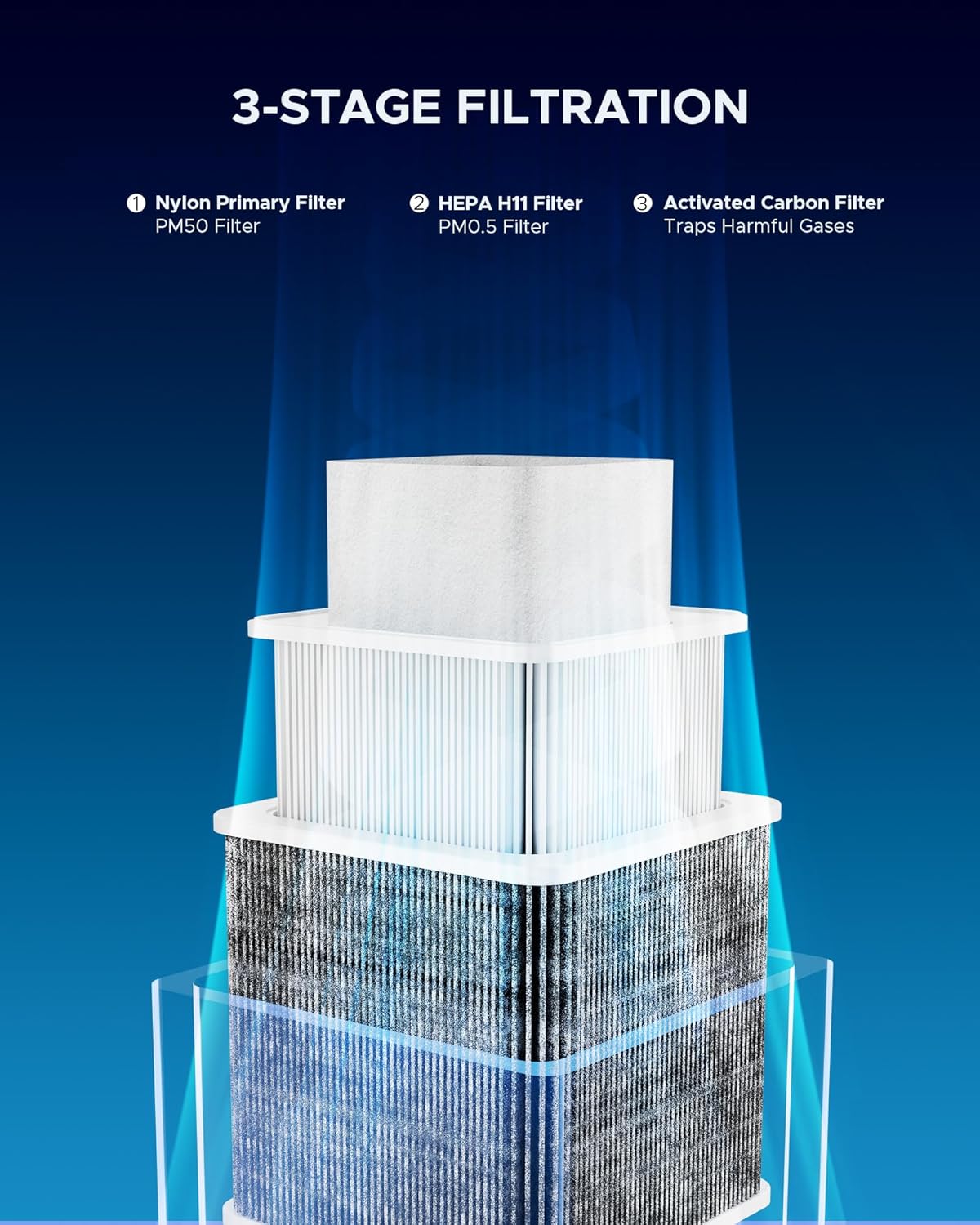
This unit features a highly efficient 3-stage filtration system that captures a wide range of airborne contaminants, from large dust particles to microscopic fumes and unpleasant odors. Its compact design, coupled with four quality caster wheels, allows for easy mobility and flexible placement within your workspace.

2. Instrucțiuni de siguranță
Please read and understand all safety warnings and instructions before operating the OMTech XF-180 Fume Extractor. Failure to follow these instructions may result in electric shock, fire, or serious injury.
- Siguranta electrica: Asigurați-vă că unitatea este conectată la o priză de alimentare cu împământare și cu voltajul corect.tage. Do not operate with a damaged power cord or plug.
- Ventilare: While the fume extractor significantly reduces airborne contaminants, ensure adequate general ventilation in the workspace.
- Întreținerea filtrului: Always turn off and unplug the unit before performing any maintenance, especially filter replacement. Wear appropriate personal protective equipment (PPE) such as gloves and a mask when handling used filters.
- Materiale inflamabile: Do not use the fume extractor near highly flammable liquids, gases, or explosive dust.
- Utilizare prevăzută: Use the unit only for its intended purpose of fume and particulate extraction. Do not block the intake or exhaust vents.
- Copii și animale de companie: Țineți copiii și animalele de companie departe de unitatea de operare.
3. Componentele produsului
The OMTech XF-180 Fume Extractor comes with the following main components:
- Main Fume Extractor Unit with Caster Wheels
- Flexible Extraction Tube (Gooseneck Arm)
- Extraction Hood/Nozzle
- Adaptor de 2.6" la 4"
- 3-Stage Filter Set:
- Nylon Primary Filter (PM50 Filter)
- HEPA H11 Filter (PM0.5 Filter)
- Filtru de cărbune activat
- Cablu de alimentare
4. Instrucțiuni de configurare
Follow these steps to set up your OMTech XF-180 Fume Extractor:
- Despachetarea: Scoateți cu grijă toate componentele din ambalaj. Verificați dacă există deteriorări în timpul transportului.
- Instalarea filtrului: Cele 3-stage filters are typically pre-installed. If not, open the top cover by unlatching the side clips. Insert the filters in the correct order: Nylon Primary Filter at the top, followed by the HEPA H11 Filter, and finally the Activated Carbon Filter at the bottom. Ensure they are seated properly. Close and latch the cover securely.
- Attach Exhaust Port: Remove the four screws from the top exhaust port. Place the exhaust port adapter over the opening and secure it with the screws.
- Connect Flexible Tube: Attach one end of the flexible extraction tube to the exhaust port adapter on the fume extractor. Secure it with the provided clamp, tightening with a screwdriver.
- Conectare la mașină: Attach the other end of the flexible tube to your laser engraver, cutter, or other machine's exhaust port. Use the 2.6" to 4" adapter if necessary for compatibility. Secure this connection with another clamp.
- Pozitionare: Utilize the caster wheels to easily move the fume extractor to your desired location. Lock the wheels in place once positioned.
- Conexiune de alimentare: Plug the power cable into the unit's power input, then plug the other end into a grounded electrical outlet.
Video demonstrativ de configurare
This video demonstrates the assembly and connection process for the OMTech XF-180 Fume Extractor, including filter installation and connecting to a laser machine.

5. Instrucțiuni de utilizare
The OMTech XF-180 Fume Extractor is designed for intuitive operation.
- Pornire/Oprire: Press the power button on the front panel to turn the unit on or off. The indicator light will illuminate when the unit is active.
- Reglați fluxul de aer: The unit features three adjustable airflow modes. Press the power button repeatedly to cycle through the modes:
- Blând: Indicated by a green light. Suitable for light fume generation.
- Moderat: Indicated by a blue light. For average fume levels.
- Puternic: Indicated by a red light. For heavy fume generation or when maximum extraction is required.
- Positioning the Extraction Arm: Adjust the flexible gooseneck arm and hood to optimally capture fumes at their source. Ensure the hood is positioned as close as possible to the work area without obstructing your work.


6. Întreținere
Regular maintenance ensures the optimal performance and longevity of your fume extractor.
Înlocuirea filtrului
The OMTech XF-180 uses a 3-stage filtration system, and each filter has a recommended replacement cycle:
- Nylon Primary Filter (PM50 Filter): Recommended replacement every 7-30 days, depending on usage and material.
- HEPA H11 Filter (PM0.5 Filter): Recommended replacement every 3-6 months.
- Filtru de cărbune activat: Recommended replacement every 6-12 months.
To Replace Filters:
- Turn off the fume extractor and unplug it from the power source.
- Unlatch the side clips and carefully open the top cover of the unit.
- Remove the old filters, starting from the top (Nylon, then HEPA, then Activated Carbon). Dispose of used filters according to local regulations, as they may contain hazardous materials.
- Insert new filters in the correct order: Activated Carbon Filter at the bottom, followed by the HEPA H11 Filter, and finally the Nylon Primary Filter at the top. Ensure they fit snugly.
- Close the top cover and secure the side latches.
- Plug the unit back in and test its operation.
Curatenie generala
Ștergeți periodic exteriorul unității cu o lavetă moale șiamp cloth. Do not use abrasive cleaners or solvents. Ensure the intake and exhaust vents are free from obstructions.
7. Depanare
If you encounter issues with your OMTech XF-180 Fume Extractor, refer to the following common troubleshooting steps:
- Unitatea nu pornește:
- Check if the power cable is securely plugged into both the unit and the electrical outlet.
- Verificați dacă priza electrică funcționează testând-o cu un alt dispozitiv.
- Ensure the power button on the unit is pressed.
- Low Airflow/Poor Fume Extraction:
- Check if the filters are clogged. Replace them if necessary, especially the primary filter.
- Ensure the flexible extraction tube is not kinked or obstructed.
- Verify that the extraction arm and hood are positioned correctly and close to the fume source.
- Confirm the unit is set to an appropriate speed level (Moderate or Strong for higher fume generation).
- Zgomot neobișnuit în timpul funcționării:
- Check for any loose components or foreign objects inside the unit or the flexible tube.
- Asigurați-vă că unitatea este așezată pe o suprafață stabilă și plană.
- If the noise persists and is excessive, contact customer support.
For issues not covered here, please contact OMTech customer service for assistance.
8. Specificații
| Caracteristică | Caietul de sarcini |
|---|---|
| Model | XF-180 |
| Straturi de filtrare | 3 (Nylon, HEPA H11, Activated Carbon) |
| Consumul de energie | 80W |
| Max. Flux de aer | 106 CFM (180 m³ / h) |
| Max. Nivel de zgomot | 55 dB |
| Dimensiuni (L x l x H) | 11 x 11 x 17 inchi (28 x 28 x 43 cm) |
| Greutatea articolului | 19.8 lire (9 kg) |

9. Garanție și asistență
OMTech stands behind the quality of the XF-180 Fume Extractor with a strong warranty. For specific warranty terms and conditions, please refer to the warranty card included with your product or visit the official OMTech website-ul.
Our dedicated customer service team is available 24/7 to assist you with any questions, concerns, or technical support needs. We are committed to ensuring your satisfaction and providing prompt assistance for years to come.
Pentru asistență suplimentară, vizitați OMTech Store.


