
1. Introducere
The LEAP Chess Clock 9921 is an advanced digital timer designed for various two-player board games, including International Chess, Chinese Chess, and I-GO. This updated model features a large screen and an enhanced program with up to 37 preset time controls, offering versatility for both professional tournaments and casual play. It incorporates multiple functions such as countdown, bonus, delay (Fischer), alarm on/off, Byo-yomi, move counts, and setting memory. Its user-friendly design allows for quick editing of game times and easy operation.

Figure 1: LEAP Chess Clock 9921, showcasing its large display and compact design.
2. Caracteristici
- Multifuncții: Includes countdown, bonus, delay (Fischer), alarm on/off, Byo-yomi, move counts, and setting memory.
- Programe presetate: Up to 37 preset programs available for various time controls.
- Ușor de setat: Upgraded 2021 model with a simple program design and large screen for quick time editing and game start.
- Compatibilitate joc: Suitable for International Chess, Chinese Chess, I-GO, and other 2-player board games. Allows setting different base times for each side.
- Design durabil: Made of electronic components and ABS shell, ensuring environmental friendliness, durability, light weight, and portability.
- Byo-yomi Function: Special function supporting pre-set Byo-yomi rules or custom modification.
- Nota: This professional clock does NOT feature a counting-up function.
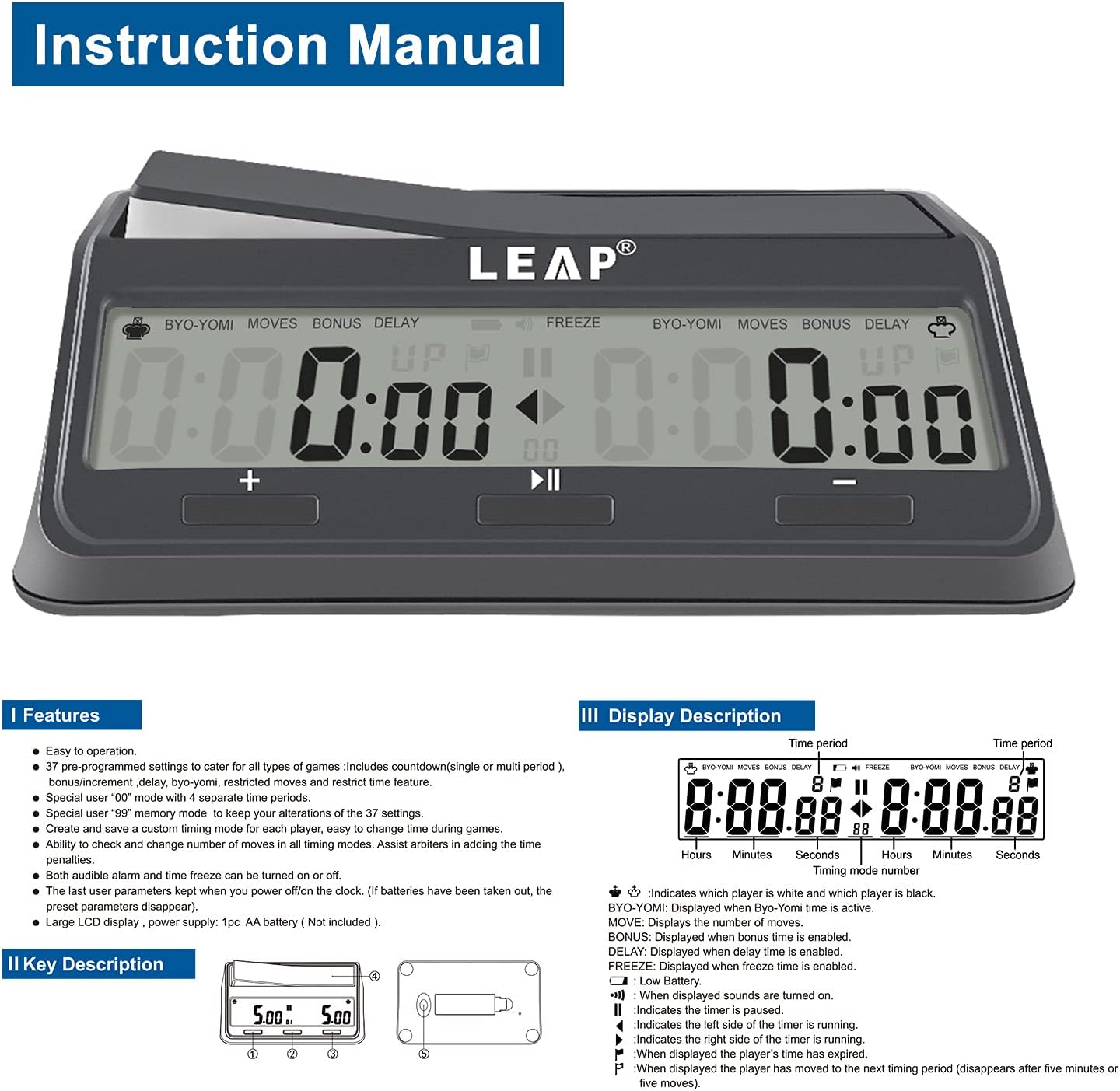
Figura 2: Pesteview of key features and display indicators.
3. Configurare
- Instalare baterie: The clock requires one AA battery (not included). Locate the battery compartment on the underside of the clock. Insert the battery, ensuring correct polarity.
- Pornire: Slide the ON/OFF switch, located on the bottom of the clock, to the 'ON' position to power on the device.
- Verificare inițială: Upon powering on, the display should illuminate, showing default or previously saved time settings.

Figure 3: Underside of the clock, showing the ON/OFF switch and battery compartment.
4. Instrucțiuni de utilizare
4.1. Indicatori de afișare
The large LCD display provides clear information for both players. Key indicators include:
- Crown Icon: Indicates which player's turn it is (white or black).
- BYO-YOMI: Displays when Byo-yomi mode is active.
- MIȘCĂRI: Displays the number of moves.
- BONUS: Displayed when bonus time is enabled.
- ÎNTÂRZIERE: Displayed when delay time is enabled.
- ÎNGHEŢA: Displayed when freeze time is enabled.
- Pictogramă baterie descărcată: Indică baterie descărcată.
- Pictogramă difuzor: Displayed if sound is turned on.
- Pause/Play Icon: Indicates the timer is paused or running.
- Arrow Icon: Indicates the side of the timer that is currently running.
4.2. Setting Time Controls
The LEAP Chess Clock 9921 offers 37 preset time controls and a user-programmable option. Refer to the program list on the bottom of the clock (Figure 3) for specific settings.
- Selectați programul: Use the buttons to navigate and select a desired program number (01-37) or '00' for user-set.
- Adjust Digits:
- Apăsați și mențineți apăsat +/- timp de 3 secunde pentru a view/adjust the move number.
- Presa + or - to increase/decrease the value of the flashing digit.
- Apăsați și mențineți apăsat + or - for 3 seconds to enter/exit freeze on/off.
- Start / Pauză: Apăsați tasta Run/Pause/Set button (center button) to start or pause the timer. Hold for 3 seconds to enter/exit settings.
- Alarma: Presa + şi - simultaneously to turn the alarm on or off.
For detailed instructions on specific program modifications (e.g., Byo-yomi, Bonus, Delay), please refer to the comprehensive guide printed on the underside of the clock (Figure 3).
5. Întreținere
- curatenie: Wipe the clock with a soft, dry cloth. Avoid using abrasive cleaners or solvents.
- Depozitare: Store the clock in a cool, dry place away from direct sunlight and extreme temperatures.
- Înlocuire baterie: Replace the AA battery when the low battery indicator appears on the display. Ensure the clock is turned off before replacing the battery.
- Manipulare: While durable, avoid dropping the clock or subjecting it to strong impacts to prevent damage to internal components or the display.
6. Depanare
| Problemă | Cauza posibila | Soluţie |
|---|---|---|
| Ceasul nu pornește. | Bateria este descărcată sau instalată incorect. | Check battery polarity or replace with a new AA battery. Ensure ON/OFF switch is in 'ON' position. |
| Afișajul este întunecat sau pâlpâie. | Baterie descărcată. | Înlocuiți bateria AA. |
| Butoanele nu răspund. | Temporary software glitch or clock is in a locked mode. | Try turning the clock off and on again. Ensure you are not holding down multiple buttons simultaneously. |
| Time settings are incorrect after power cycle. | Settings were not saved or battery was removed for too long. | Re-enter desired time settings. The clock has setting memory, but prolonged power loss may reset it. |
7. Specificații
- Model: LEAP 9921
- Culoare: Gri
- Material: Electronic components + ABS shell (Plastic)
- Dimensiuni produs: 3.3"A x 5.9"L x 1.97"Î (aproximativ 8.4 cmA x 15 cmL x 5 cmÎ)
- Greutatea articolului: 7.2 uncii (aproximativ 204 de grame)
- Sursa de alimentare: 1 x baterii AA (nu sunt incluse)
- Număr de setări: 37 preset programs + 1 user-programmable
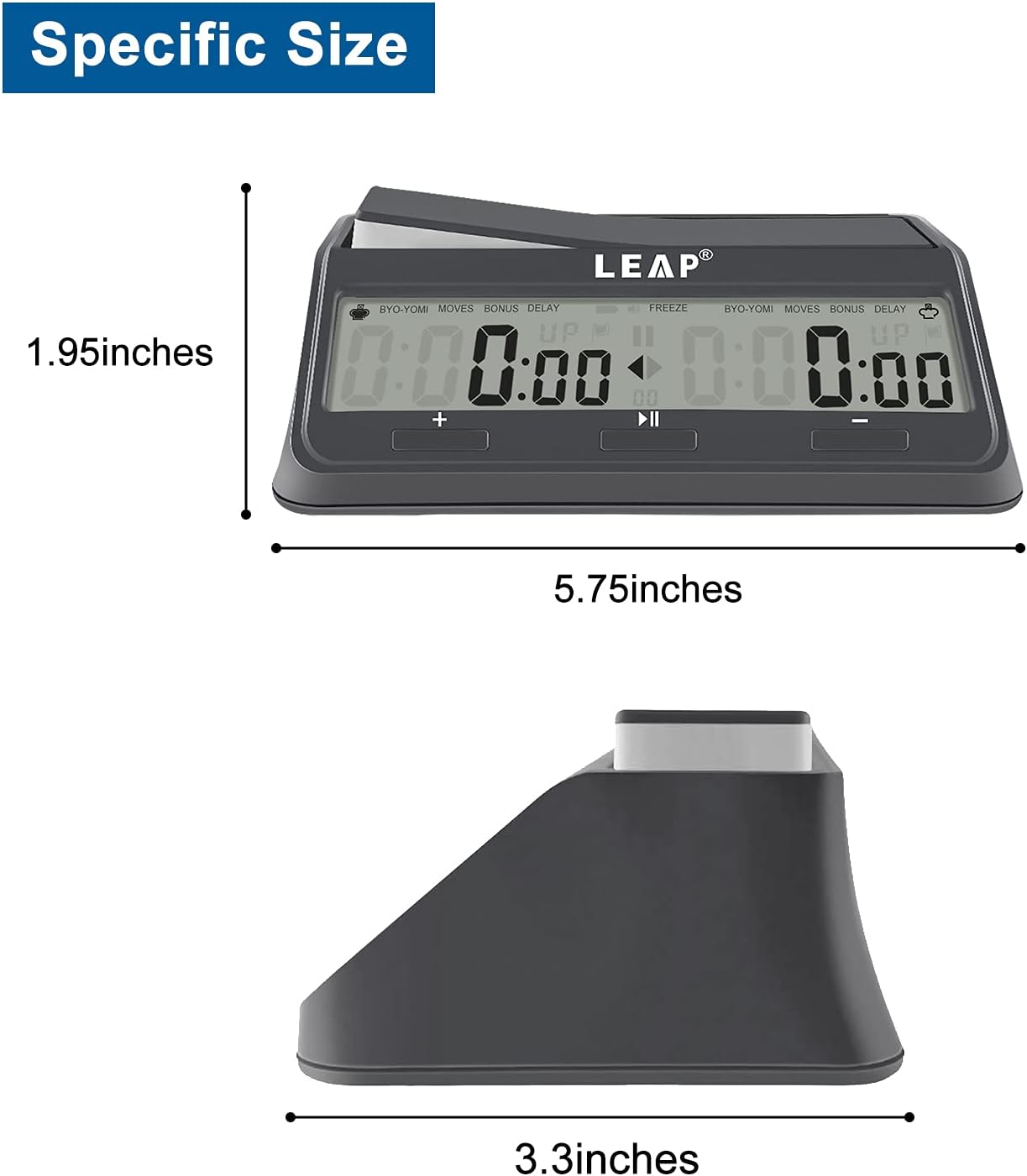
Figure 4: Product dimensions for the LEAP Chess Clock 9921.
8. Suport
For any questions, concerns, or assistance with your LEAP Chess Clock 9921, please do not hesitate to contact LEAP customer service. We are committed to providing excellent support and will respond to your inquiries promptly.
Serviciu clienți: Available 24/7 for immediate assistance.
Visit the official LEAP Store for more information and products: LEAP Store on Amazon