
Introducere
This manual provides detailed instructions for the setup, operation, and maintenance of your Depusheng MX8 Professional 8-Channel Audio Mixer. Please read this manual thoroughly before using the device to ensure proper function and to prevent damage. Keep this manual for future reference.
Informații de siguranță
- Alimentare electrică: Folosiți doar adaptorul de alimentare specificat. Asigurați-vă că voltajultage se potrivește cu sursa de alimentare locală.
- Apă și umiditate: Nu expuneți mixerul la apă, ploaie sau umiditate excesivă. Evitați așezarea obiectelor umplute cu lichid pe unitate.
- Ventilare: Asigurați o ventilație adecvată în jurul unității. Nu blocați orificiile de ventilație.
- Căldură: Țineți unitatea departe de surse de căldură, cum ar fi calorifere, registre de căldură, sobe sau alte aparate producătoare de căldură.
- Service: Nu încercați să reparați singur această unitate. Apelați la personal de service calificat pentru toate lucrările de service.
- Puterea fantomă: When using condenser microphones, ensure +48V phantom power is activated. Turn off phantom power before connecting or disconnecting microphones to prevent damage.
Conținutul pachetului
La deschiderea coletului, verificați dacă toate articolele sunt prezente și în stare bună:
- Depusheng MX8 Audio Mixer Unit
- Adaptor de alimentare
- Manual de utilizare
Produs terminatview și Controale
Familiarize yourself with the layout and functions of the Depusheng MX8 mixer.
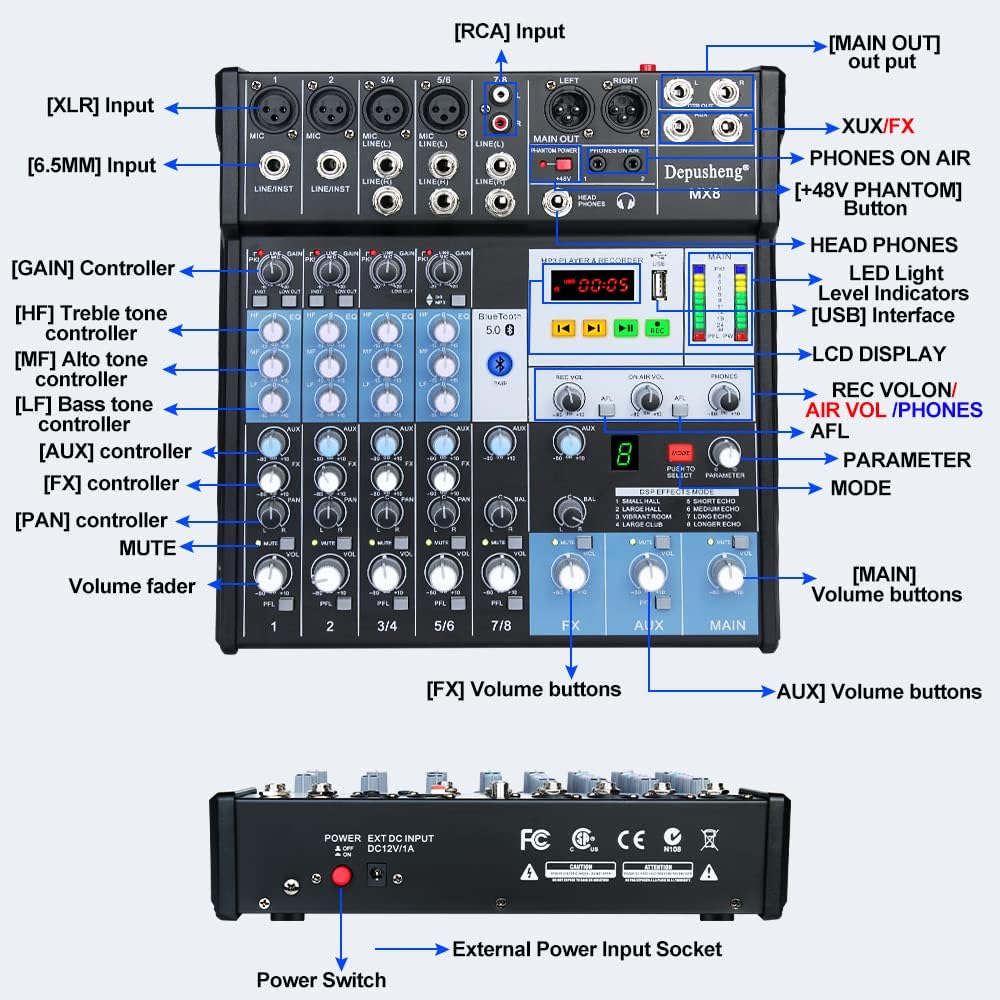
Figura 1: Panoul frontal pesteview of the Depusheng MX8 mixer, showing various input/output jacks, control knobs, faders, and the MP3 player/recorder section.
The mixer features multiple input channels, equalization controls, DSP effects, Bluetooth connectivity, and USB playback/recording capabilities. Key components include:
- Interfețe de intrare: XLR, 6.5mm (1/4 inch) Line/Instrument, RCA.
- Interfețe de ieșire: Main Out (XLR, 6.5mm), Control Room Out, Aux Out, FX Send, Headphone Out.
- Comenzi de canal: GAIN, High (HF), Mid (MF), Low (LF) tone controllers, AUX, FX, PAN, MUTE, Volume fader.
- MP3 Player & Recorder: USB interface, LCD display, control buttons, LED indicator lights.
- Efecte DSP: Mode selection and parameter adjustment for 8 built-in effects.
- Puterea fantomă: +48V button for condenser microphones.
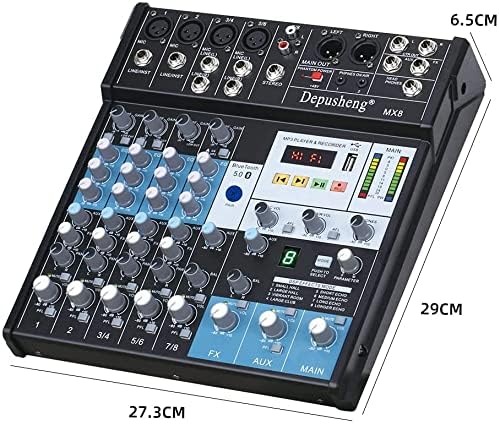
Figura 2: Dimensions of the Depusheng MX8 Audio Mixer.
Înființat
Follow these steps to set up your Depusheng MX8 mixer.
1. Conexiune la alimentare
Connect the provided power adapter to the 'DC12V/1A' input socket on the rear of the mixer. Plug the adapter into a suitable power outlet. Use the power switch located next to the power input to turn the unit on or off.
2. Microphone Connections
- Microfoane dinamice: Connect dynamic microphones using XLR cables to the MIC inputs or 6.5mm (1/4 inch) TS/TRS cables to the LINE/INST inputs.
- Microfoane cu condensator: Connect condenser microphones using XLR cables to the MIC inputs. Press the +48V PHANTOM button to supply power to the microphone. Ensure the button is off before connecting or disconnecting.
3. Conexiune căști
Connect your monitor headphones to the CĂȘTI output jack using a 6.5mm (1/4 inch) TRS connector. Adjust the headphone volume using the dedicated TELEFONURI butonul.
4. Amplifier or Mobile Speaker Connection
Conectați PRINCIPAL IEȘIRE (XLR or 6.5mm) of the mixer to the input of your amplifier or powered speakers. Adjust the main output volume using the PRINCIPAL volume fader.
5. Computer Connection
Connect the mixer to your computer using a USB cable. The mixer functions as a USB soundcard, allowing for audio input and output with your computer.

Figura 3: Connection diagram illustrating various devices connected to the Depusheng MX8 mixer.
Operațiunea
1. Equalization (EQ) Adjustment
Each channel features a 3-band equalizer to shape the tone of your audio source. Adjust the knobs for High (HF), Mid (MF), and Low (LF) frequencies to achieve your desired sound.

Figura 4: Trei stage equalization controls for adjusting high, mid, and low frequencies.
2. Efecte DSP
The mixer includes 8 Digital Signal Processing (DSP) reverb effects. Use the MOD button to cycle through the effects (Small Hall, Large Hall, Vibrant Room, Large Club, Short Echo, Medium Echo, Long Echo, Longer Echo). Adjust the PARAMETRU butonul pentru a regla fin efectul selectat.

Figura 5: DSP effects section with 8 reverb options.
3. Conexiune Bluetooth
Pentru a conecta un dispozitiv Bluetooth:
- Asigurați-vă că mixerul este pornit.
- Activați Bluetooth pe dispozitivul dvs. mobil.
- Caută available devices and select "Depusheng-MX8" to pair.
- Once connected, you can stream audio wirelessly from your device to the mixer.
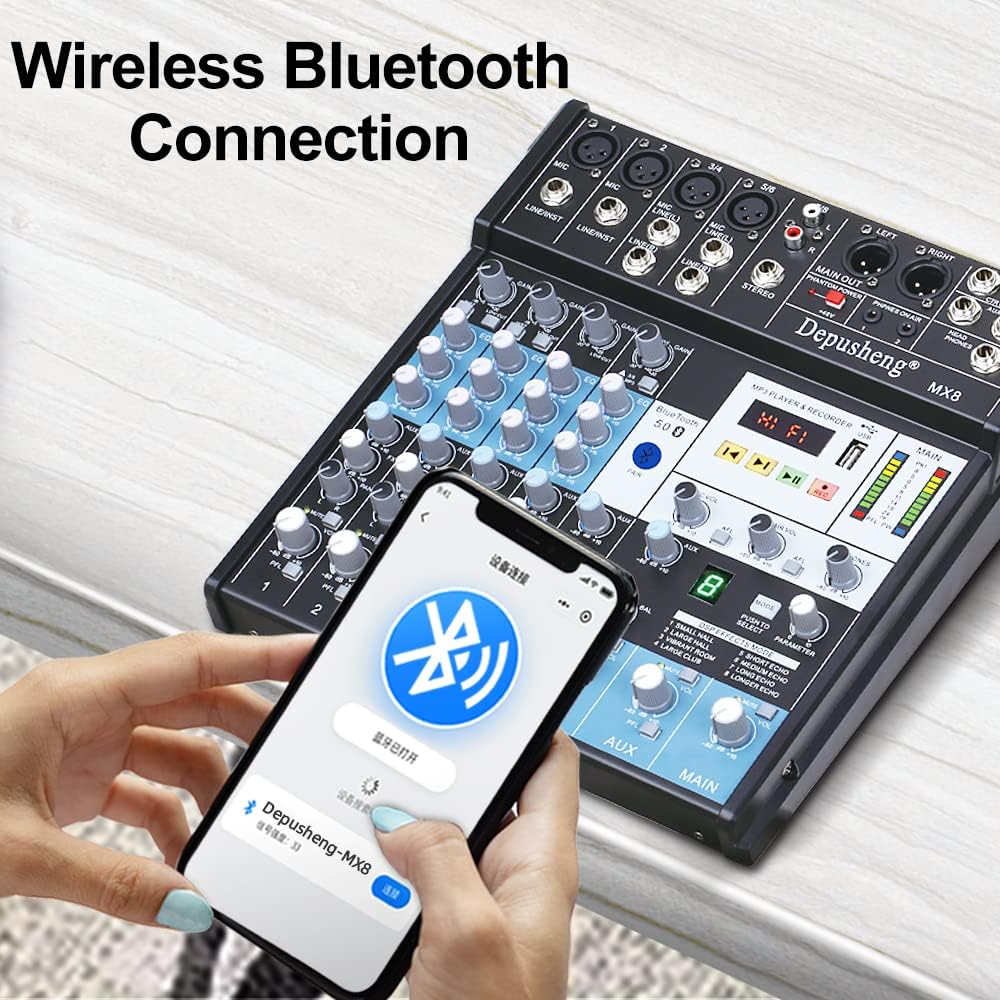
Figura 6: Establishing a wireless Bluetooth connection with the mixer.
4. Redare și înregistrare prin USB
The mixer supports USB playback and recording functions:
- Redare USB: Introduceți o unitate flash USB care conține sunet files into the USB port. Use the MP3 player controls (play, pause, skip) to navigate and play music.
- Înregistrare USB: Apăsați tasta REC button on the MP3 player/recorder section to start recording audio directly to a connected USB flash drive.
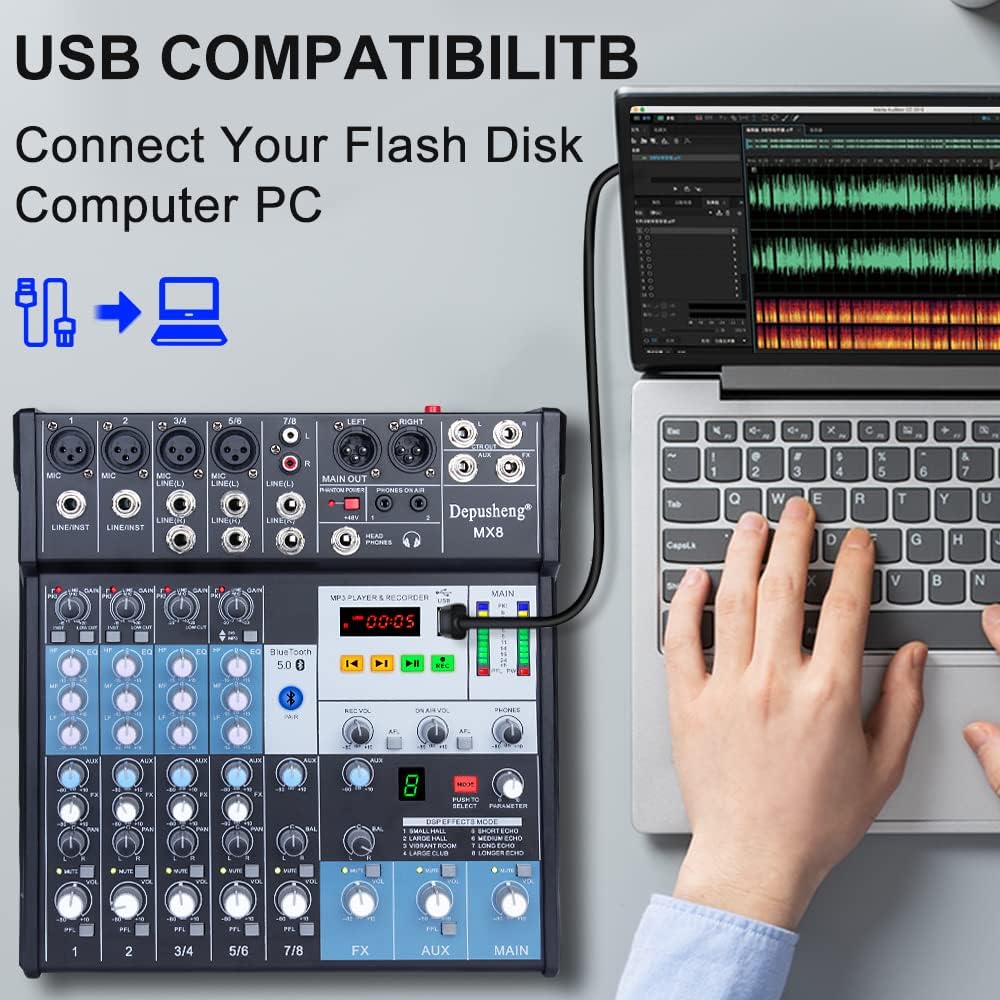
Figura 7: Connecting a USB flash drive to the mixer for playback or recording.
5. Computer Recording
To record audio to your computer:
- Connect the mixer to your computer via USB.
- Open your preferred Digital Audio Workstation (DAW) or recording software on your computer.
- Select the mixer as your audio input device within the software settings.
- Adjust input levels on the mixer and in your software, then begin recording.
Video 1: Demonstrates various setup and operation aspects of the Depusheng MX8 mixer, including connecting microphones (0:08-0:22), adjusting EQ (0:23-0:26), connecting headphones (0:31-0:38), connecting to an amplifier/speakers (0:39-0:46), selecting DSP effects (0:47-0:53), Bluetooth pairing (0:54-1:06), USB playback (1:08-1:16), and computer recording (1:27-1:31).
Întreţinere
To ensure the longevity and optimal performance of your Depusheng MX8 mixer, follow these maintenance guidelines:
- curatenie: Folosiți o lavetă moale și uscată pentru a curăța exteriorul unității. Nu utilizați produse de curățare abrazive, solvenți sau ceară.
- Depozitare: Când nu este utilizat, depozitați mixerul într-un loc răcoros și uscat, ferit de lumina directă a soarelui și de temperaturi extreme.
- Protecție împotriva prafului: Cover the mixer with a dust cover when not in use to prevent dust accumulation in faders and knobs.
Depanare
If you encounter issues with your Depusheng MX8 mixer, refer to the following common problems and solutions:
| Problemă | Cauza posibila | Soluţie |
|---|---|---|
| Fără putere | Adaptorul de alimentare nu este conectat sau este defect; întrerupătorul este oprit. | Check power connections; ensure power switch is on; try a different outlet. |
| Fără ieșire de sunet | Incorrect cable connections; main volume fader down; ampdifuzoarele/amplificatorul sunt oprite sau dezactivate. | Verify all audio cable connections; increase main volume; check ampstatutul de vorbitor/exprimator. |
| Microfonul nu funcționează | Microphone not connected properly; GAIN knob too low; +48V phantom power off for condenser mics. | Check microphone connection; increase GAIN; activate +48V for condenser mics. |
| Probleme de conexiune Bluetooth | Dispozitivul nu este în modul de asociere; mixerul nu poate fi detectat; interferențe. | Ensure mixer is in Bluetooth mode; restart both devices; move closer to the mixer. |
| Redarea USB nu funcționează | Unitatea USB nu este formatată corect; neacceptată file format; faulty USB drive. | Ensure USB is FAT32 formatted; use supported audio formats (e.g., MP3); try another USB drive. |
Specificații
- Număr de canale: 8
- Tehnologie de conectivitate: Bluetooth, USB
- Sursa de alimentare: Electric cu fir
- Greutatea articolului: 5.41 lire sterline (2.46 kilograme)
- Dimensiuni pachet: 15.08 x 12.28 x 3.82 inci
- Efecte DSP: 8 built-in reverb effects
- Puterea fantomă: +48V
Garanție și suport
For warranty information or technical support, please refer to the documentation included with your purchase or contact Depusheng customer service. Keep your proof of purchase for any warranty claims.