
Introducere
This manual provides detailed instructions for the installation, operation, and maintenance of your Xigmatek Aquarius Plus Black ATX PC Case. Please read this manual thoroughly before beginning installation to ensure proper setup and safe use of your new PC case.
The Xigmatek Aquarius Plus Black is a mid-tower gaming PC case designed to accommodate ATX, Micro-ATX, and Mini-ITX motherboards. It features excellent cooling potential with support for up to 10 x 120mm fans, including 7 pre-installed ARGB 120mm AY120 fans. The case also offers ample space for a 360mm graphics card, a 158mm CPU cooler, and includes 4 drive bays (2 x 3.5" and 2 x 2.5"/3.5"). Its aesthetic design includes two seamless tempered glass panels and three dust filters for protection.
Informații de siguranță
- Deconectați întotdeauna sursa de alimentare de la priza de perete înainte de a instala sau demonta orice componente.
- Manipulați toate componentele cu grijă pentru a preveni deteriorarea cauzată de descărcările electrostatice (ESD). Luați în considerare utilizarea unei curele antistatice pentru încheietura mâinii.
- Avoid placing the PC case in direct sunlight, near heat sources, or in areas with high humidity.
- Asigurați o ventilație adecvată în jurul carcasei pentru a preveni supraîncălzirea.
- A nu se lăsa la îndemâna copiilor piesele mici și materialele de ambalare.
- Do not attempt to modify the case structure. Unauthorized modifications may void your warranty and pose safety risks.
Conținutul pachetului
Verificați dacă toate articolele sunt prezente în colet:
- Xigmatek Aquarius Plus Black ATX PC Case
- 7 x 120mm ARGB AY120 Fans (pre-installed)
- Kit accesorii (șuruburi, distanțiere, coliere de cablu)
- Manual de utilizare (acest document)
Caracteristici
- Design turn mediu: Suportă plăci de bază ATX, Micro-ATX și Mini-ITX.
- Răcire avansată: Pre-installed with 7 x 120mm ARGB AY120 fans; supports up to 10 x 120mm fans.
- Panouri din sticlă securizată: Two seamless tempered glass panels for a clear view a componentelor interne.
- AmpDepozitare: 4 drive bays (2 x 3.5" HDD, 2 x 2.5"/3.5" SSD/HDD).
- Distanță componente: Supports graphics cards up to 360mm and CPU coolers up to 158mm.
- Filtrarea prafului: Three dust filters included to protect internal components.
- I / O frontală: 1 x USB 2.0, 3 x USB 3.0 ports.
Configurare și instalare
Follow these steps to install your PC components into the Xigmatek Aquarius Plus case.
1. Pregătiți cazul
Carefully remove the tempered glass side panels by unscrewing the thumb screws at the rear of the case. Place the panels on a soft, flat surface to prevent scratches.

Image: The bare chassis of the Xigmatek Aquarius Plus, showing its internal structure before component installation.
2. Instalați placa de bază
- Identify the correct standoff positions for your ATX, Micro-ATX, or Mini-ITX motherboard. The case may have pre-installed standoffs or require you to install them using the provided accessory kit.
- Place the motherboard I/O shield into the rear opening of the case.
- Carefully align your motherboard with the standoffs and I/O shield, then gently lower it into place.
- Secure the motherboard with the appropriate screws from the accessory kit. Do not overtighten.

Imagine: O imagine internă view of the Xigmatek Aquarius Plus case, illustrating the motherboard tray and fan placement.
3. Instalați unitățile de stocare
The case supports 2 x 3.5" HDDs and 2 x 2.5"/3.5" SSDs/HDDs.
- Locate the drive bays. Typically, 3.5" bays are found in a cage near the power supply shroud, and 2.5" mounts are on the back of the motherboard tray.
- For 3.5" drives, slide the drive into the bay and secure it with screws.
- For 2.5" drives, mount them to the designated trays or screw points on the motherboard tray.
4. Instalați unitatea de alimentare (PSU)
The Xigmatek Aquarius Plus supports bottom-mounted PSUs.
- Introduceți sursa de alimentare în compartimentul său special, în partea din spate a carcasei.
- Secure the PSU to the case with screws from the rear.
- Traseați cablurile de alimentare necesare prin orificiile de gestionare a cablurilor către placa de bază și alte componente.
5. Install Expansion Cards (e.g., Graphics Card)
The case has 4 expansion slots.
- Scoateți capacele sloturilor de expansiune necesare din spatele carcasei.
- Insert your graphics card or other expansion card into the appropriate PCIe slot on your motherboard.
- Fixați cardul pe carcasă cu un șurub.
6. Conectați cablurile I/O frontale
Connect the front panel cables (USB 2.0, USB 3.0, HD Audio, Power Switch, Reset Switch, Power LED, HDD LED) to their corresponding headers on your motherboard. Refer to your motherboard manual for exact header locations.
7. Gestionarea cablurilor
Folosește decupajele pentru gestionarea cablurilor și punctele de fixare din spatele tăvii plăcii de bază pentru a direcționa și fixa cablurile. Acest lucru îmbunătățește circulația aerului și aspectul estetic.
8. Reattach Panels
Once all components are installed and cables are managed, carefully reattach the tempered glass side panels and secure them with the thumb screws.
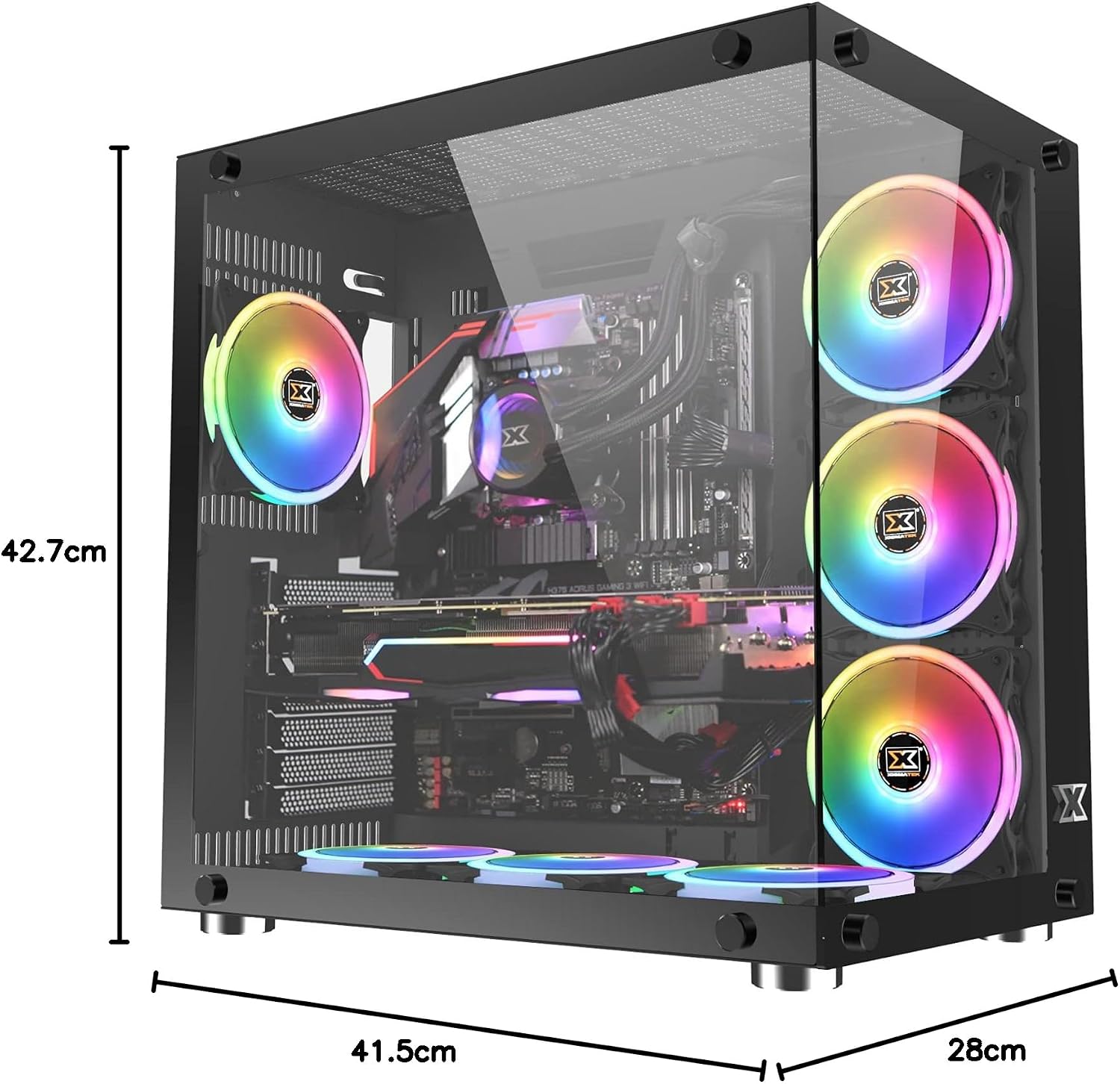
Image: The Xigmatek Aquarius Plus case fully assembled with internal components, showcasing its dimensions (41.5cm D x 28cm W x 42.7cm H).
Instrucțiuni de operare
After successful installation, connect your peripherals (monitor, keyboard, mouse) and power cable to the PSU. Press the power button on the front panel to start your system.
Controlul ventilatorului ARGB
The pre-installed ARGB fans are typically connected to a fan controller or directly to an ARGB header on your motherboard. Refer to your motherboard's manual or the fan controller's instructions for details on how to customize the lighting effects and fan speeds.
Întreţinere
Întreținerea regulată ajută la asigurarea performanței optime și a longevității componentelor PC-ului.
- Filtre de praf: The Xigmatek Aquarius Plus includes three dust filters. Regularly remove and clean these filters to prevent dust buildup inside the case. Use compressed air or a soft brush.
- Curatenie interioara: Periodically open the case and use compressed air to remove dust from fans, heatsinks, and other components. Ensure the system is powered off and unplugged before cleaning.
- Panouri din sticlă securizată: Clean the tempered glass panels with a soft, lint-free cloth and a glass cleaner designed for electronics. Avoid abrasive materials.
Depanare
Dacă întâmpinați probleme, luați în considerare următorii pași comuni de depanare:
- Sistemul nu pornește:
- Verificați dacă cablul de alimentare este conectat corect la sursa de alimentare și la priza de perete.
- Asigurați-vă că comutatorul sursei de alimentare este în poziția „ON”.
- Verificați dacă cablul comutatorului de alimentare de pe panoul frontal este conectat corect la conectorul plăcii de bază.
- Confirm all internal power cables (24-pin ATX, CPU, GPU) are properly seated.
- Ventilatoarele nu se învârt/ARGB nu se aprinde:
- Verificați conexiunile de alimentare ale ventilatorului la placa de bază sau la controlerul ventilatorului.
- Verify ARGB connections to the motherboard or controller.
- Ensure fan controller is powered (if applicable).
- Porturile USB nu funcționează:
- Confirm the front panel USB cables are correctly connected to the motherboard's USB headers.
For more complex issues, consult the manuals for your individual PC components (motherboard, GPU, PSU) or contact Xigmatek customer support.
Specificații
| Numele modelului | Aquarius Plus Black |
| Numărul de model | EN46423 |
| Tipul cazului | Turnul Mijlociu |
| Compatibilitate cu placa de baza | ATX, Micro ATX, Mini ITX |
| Dimensiuni (D x W x H) | 41.5 cm x 28 cm x 42.7 cm |
| Greutate | 7 kg |
| Material | Sticlă securizată, Oțel |
| Sloturi de expansiune | 4 |
| Drive Bays | 2 x 3.5" HDD, 2 x 2.5"/3.5" SSD/HDD |
| Ventilatoare preinstalate | 7 x 120mm ARGB AY120 Fans |
| Suport maxim pentru ventilatoare | Pana la 10 ventilatoare x 120 mm |
| Lungimea maximă a GPU | 360 mm |
| Înălțimea maximă a răcitorului CPU | 158 mm |
| Montarea sursei de alimentare | Fund |
| Porturi I / O frontale | 1x USB 2.0, 3x USB 3.0 |
| Metoda de răcire | Aer |
| Iluminat | RGB (on fans) |
Garanție și suport
Pentru informații despre garanție și asistență tehnică, vă rugăm să consultați site-ul oficial Xigmatek. website-ul web sau contactați distribuitorul local. Păstrați dovada achiziției pentru a putea solicita garanție.

