
1. Introducere
1.1 Produs terminatview
The Retevis RB21 is a versatile 4G LTE network radio designed for extensive communication. It combines the functionality of a walkie-talkie with essential smartphone features, offering unlimited communication range across 2G/3G/4G networks. This device is suitable for various professional and outdoor activities, ensuring reliable connectivity.
1.2 Caracteristici cheie
- Unlimited Range Communication: Utilizes 2G/3G/4G networks for nationwide coverage.
- Suport card SIM: Compatible with major network operators (Vodafone, T-Mobile, Telefonica, O2, e-Plus).
- Conectivitate Wi-Fi și Bluetooth: Allows communication via Wi-Fi without a SIM card, and supports Bluetooth accessories.
- Poziționare GPS: Integrated GPS function for location tracking and navigation.
- Zello Application Support: Facilitates communication with companions using Zello and similar PTT applications.
- Memorie și stocare: Equipped with 1GB RAM and 8GB internal storage.
- Afişa: Features a 2.4-inch touchscreen for easy navigation.
- Durabilitate: IP54 water and dust resistance for robust performance in various environments.
- Baterie de lunga durata: Powered by a 2800mAh rechargeable Li-ion battery with USB charging.
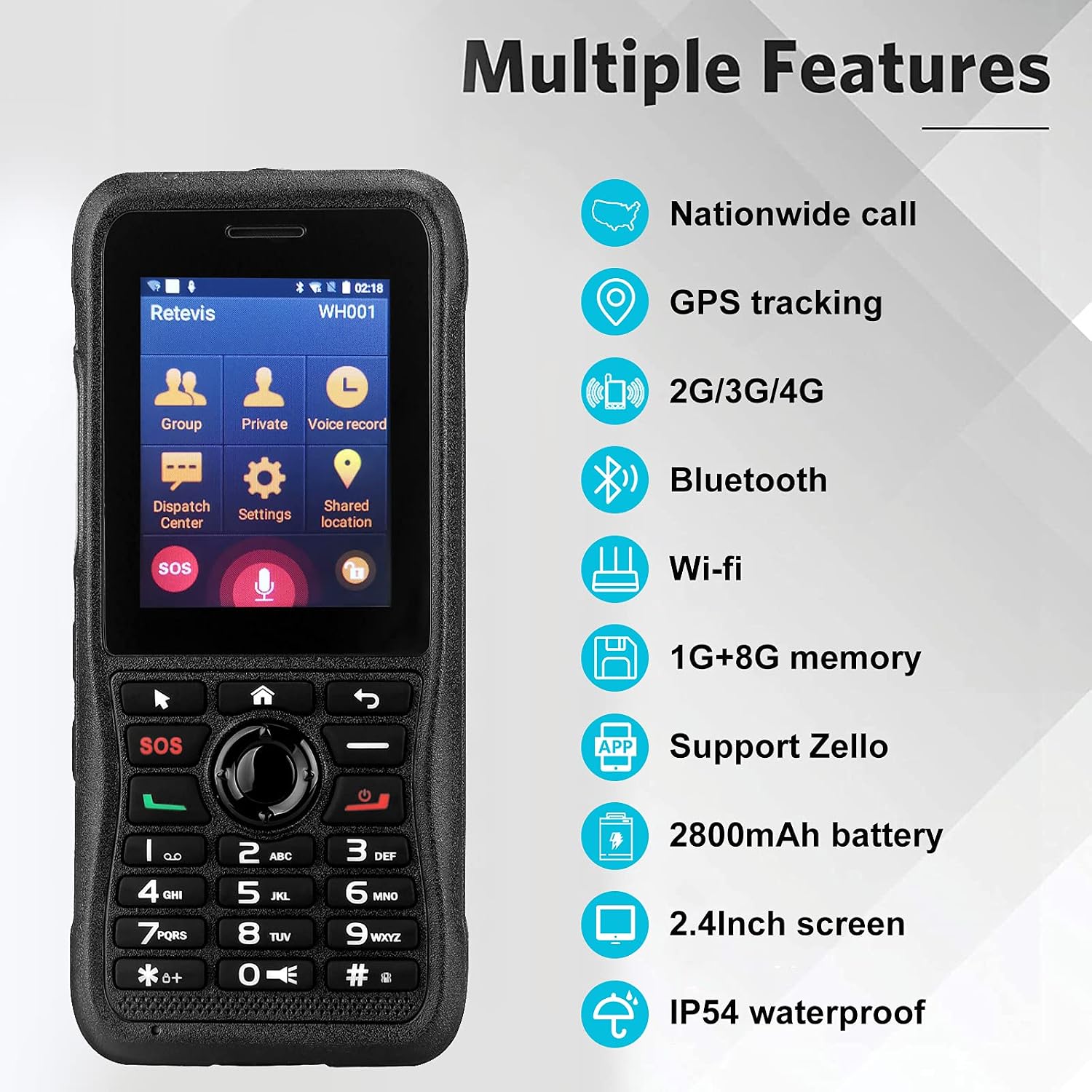
This image highlights the comprehensive features of the Retevis RB21, such as its ability for nationwide calls, GPS tracking, multi-network support (2G/3G/4G), wireless connectivity (Bluetooth, Wi-Fi), ample memory (1GB RAM + 8GB storage), Zello application compatibility, a powerful 2800mAh battery, a clear 2.4-inch screen, and IP54 water resistance.
2. Conținutul pachetului
Vă rugăm să bifați căsuța pentru următoarele elemente:
- Retevis RB21 Network Radio Unit
- Baterie reîncărcabilă Li-ion (2800mAh)
- Cablu de încărcare USB
- Adaptor de alimentare (dacă este inclus)
- Clip de curea
- Manual de utilizare

This image provides a detailed look at the Retevis RB21 device from various angles, illustrating its physical components including the screen, keypad, side buttons, charging port, and the detachable belt clip, which are typically included in the package.
3. Ghid de instalare
3.1 Instalarea cartelei SIM și a bateriei
- Scoateți capacul din spate: Gently pry open the back cover of the device.
- Introduceți cartela SIM: Locate the SIM card slot. Insert your single SIM card into the designated slot with the gold contacts facing down, ensuring it is properly seated.
- Introduceți bateria: Place the 2800mAh Li-ion battery into the battery compartment, aligning the contacts.
- Înlocuiți capacul din spate: Fixați în siguranță capacul din spate până când se fixează în poziție cu un clic.
3.2 Încărcarea dispozitivului
- Conectați cablul de încărcare USB la portul de încărcare al dispozitivului.
- Connect the other end of the USB cable to a power adapter or a computer's USB port.
- The charging indicator will illuminate. Allow the device to charge fully before first use.

This image shows the Retevis RB21 powered on, displaying its user interface. This is relevant for the setup section as it indicates the device is ready for initial configuration after battery and SIM installation.
4. Instrucțiuni de utilizare
4.1 Pornire/Oprire
To power on the device, press and hold the Power button until the screen illuminates. To power off, press and hold the Power button, then select 'Power Off' from the options.
4.2 Comunicare de bază (PTT)
The Retevis RB21 functions as a Push-To-Talk (PTT) device. Once configured with a network or Wi-Fi connection and a compatible application like Zello:
- Select your desired contact or group from the main menu.
- Press and hold the dedicated PTT button on the side of the device to transmit your voice.
- Release the PTT button to listen for incoming messages.
4.3 Using Zello and GPS Features
The device supports the Zello application for instant communication. The integrated GPS function allows for location tracking and sharing, which can be utilized within compatible applications for enhanced coordination.

This image demonstrates the Retevis RB21's utility for communication in mobile environments, such as logistics or transportation, highlighting its GPS and 4G capabilities for maintaining contact with teams anytime, anywhere.
5. Întreținere
5.1 Curățare
Regularly clean the device with a soft, dry cloth. Avoid using harsh chemicals or abrasive cleaners. For stubborn dirt, a slightly damp cloth can be used, ensuring no moisture enters ports or openings.
5.2 Rezistență la apă și praf
The Retevis RB21 has an IP54 rating, meaning it is protected against dust ingress and splashing water from any direction. While it offers good protection, it is not fully waterproof. Avoid submerging the device in water or exposing it to heavy rain.

This image visually represents the IP54 rating of the Retevis RB21, showing its resilience against dust and water splashes, which is important for understanding its maintenance and usage in challenging environments.
6. Depanare
6.1 Probleme comune și soluții
- Dispozitivul nu pornește:
- Ensure the battery is correctly installed and fully charged. Connect the device to a charger to confirm if it's a battery issue.
- Fără semnal de rețea:
- Check if the SIM card is properly inserted and activated. Verify that you are within a 2G/3G/4G network coverage area. If using Wi-Fi, ensure the Wi-Fi network is active and you have the correct password.
- Cannot transmit or receive messages:
- Confirm that your device is connected to the internet (via SIM data or Wi-Fi). Ensure the Zello or other PTT application is running and you are logged in. Check your selected contact or group for communication.
- GPS-ul nu funcționează:
- Ensure GPS is enabled in the device settings. Move to an open area with a clear view a cerului pentru o mai bună recepție prin satelit.
7. Specificatii tehnice
| Caracteristică | Caietul de sarcini |
|---|---|
| Numărul de model | RB21 |
| Sistem de operare | Android 7.1 |
| RAM | 1 GB |
| Capacitate de stocare | 8 GB |
| Dimensiunea ecranului | 2.4 inchi |
| Rezoluția afișajului | 320 x 240 |
| Tehnologia celulară | 4G (2G, 3G, 4G, LTE) |
| Tehnologia fără fir | GSM, LTE, UMTS |
| Asistență pentru operatorii de telefonie mobilă | O2, T-Mobile, Vodafone |
| Funcționalitate GPS | Da |
| Evaluare de rezistență la apă | IP54 (Nu este impermeabil) |
| Capacitatea bateriei | 2800 mAh Litiu-ion |
| Greutatea articolului | 60 grame |
| Dimensiuni | 6 x 2.1 x 13.5 cm |
| Dispozitive compatibile | Retevis RB21 devices, PoC devices on the same network, Bluetooth devices, Wi-Fi networks |
8. Garanție și asistență
8.1 Informații despre garanție
Retevis offers a 2-year warranty for the radio body and a 1-year warranty for accessories. Additionally, a 30-day no-reason return policy is provided. Beyond the warranty period, maintenance services are available, with buyers responsible for associated costs.
8.2 Asistență pentru clienți
For any inquiries or support needs, please contact Retevis customer service via Amazon. Responses are typically provided within 12 hours.