1. Introducere
The Elitech MTC-5060 is a digital temperature controller designed for precise temperature management in cold storage environments such as cold rooms and refrigerators. It features dual screens for simultaneous display of current and set temperatures, along with indicator lights for operational status. The controller supports both cooling and defrosting functions, offering comprehensive temperature control capabilities.
This manual provides detailed instructions for the installation, operation, and maintenance of your MTC-5060 temperature controller. Please read this manual thoroughly before installation and use to ensure proper function and safety.
2. Informații de siguranță
- Ensure the power supply matches the controller's specifications (110VAC±10%, 50Hz/60Hz).
- All wiring should be performed by a qualified electrician to prevent electric shock or damage to the unit.
- Do not operate the controller in environments with excessive humidity or corrosive gases.
- Deconectați alimentarea cu energie electrică înainte de a efectua orice operațiune de întreținere sau cablare.
- Controlerul este proiectat numai pentru utilizare în interior.
3. Caracteristicile produsului
- Afișaj dublu: Shows current room temperature and set temperature simultaneously.
- Cooling and Defrosting Control: Manages both refrigeration and defrosting cycles.
- Precizie ridicată: Utilizes a high-precision sensor and chip for stable performance and minimal drift.
- Interfață ușor de utilizat: Multi-functional button panel for easy parameter setting and operation.
- Funcții de alarmă: Includes high/low temperature alarm and sensor error alarm.
- EMC Standard Compliance: Passed industrial four-level tests for stable and reliable operation in harsh environments.

Figura 3.1: Față view of the Elitech MTC-5060 controller, illustrating the dual temperature display and control buttons.
4. Conținutul pachetului
Vă rugăm să verificați conținutul coletului la primire. Dacă lipsesc sau sunt deteriorate articolele, contactați imediat furnizorul.
- Elitech MTC-5060 Digital Temperature Controller (1 unit)
- NTC Sensor Probe (1 unit)
- Manual de utilizare (1 copie)
5. Instalare și cablare
5.1 Montare
The MTC-5060 controller is designed for panel mounting. Ensure adequate space for ventilation and access to wiring terminals.
- Dimensiunea panoului frontal: 10.2 cm (L) x 5.1 cm (L)
- Dimensiunea produsului: 10.2 cm (L) x 5.1 cm (L) x 8.3 cm (A)
- Installing Hole Size: 9.2 cm (L) x 4.4 cm (L)

Figure 5.1: Physical dimensions of the MTC-5060 controller.

Figure 5.2: Required mounting hole dimensions for installation.
5.2 Schema electrică
Refer to the wiring diagram below for correct electrical connections. Ensure all connections are secure and comply with local electrical codes. The controller operates on 110VAC.

Figure 5.3: Wiring diagram for the MTC-5060 controller. Terminals 1-2 for power, 3-5 for sensors, 6-9 for output loads (cooling and defrosting).
- Alimentare electrică: Connect 110VAC to terminals 1 and 2.
- Conexiuni senzori: Connect the NTC sensor(s) to the designated terminals (e.g., 3, 4, 5). The MTC-5060 supports two sensors for storage temperature and defrosting temperature.
- Sarcini de ieșire: Connect cooling and defrosting loads to the respective relay output terminals (e.g., 7-8 for cooling, 8-9 for defrosting). The relay output contact capacity is 3A/110VAC.
6. Instrucțiuni de utilizare
The MTC-5060 features a user-friendly interface with dedicated buttons for common functions and parameter settings.
6.1 Afișaj și indicatori
The controller has two digital displays:
- Afișaj superior: Arată temperatura curentă a camerei.
- Afișaj inferior: Afișează temperatura setată.
Indicator lights provide visual feedback on the operating mode (e.g., cooling, defrosting).
6.2 Setarea temperaturii
- Apăsați tasta Set butonul pentru a view temperatura actuală setată.
- While the set temperature is displayed, use the Up şi Jos butoanele săgeată pentru a regla valoarea dorită a temperaturii.
- Apăsați tasta Set din nou butonul pentru a confirma și a salva noua setare.
6.3 Defrosting Control
The MTC-5060 supports automatic and manual defrosting.
- Dezghețare automată: Configured through parameters (defrost cycle, defrost time). Refer to the detailed parameter settings section (if available in full manual) for adjustment.
- Decongelare manuală: Apăsați tasta Forced Def. button to initiate a manual defrost cycle.
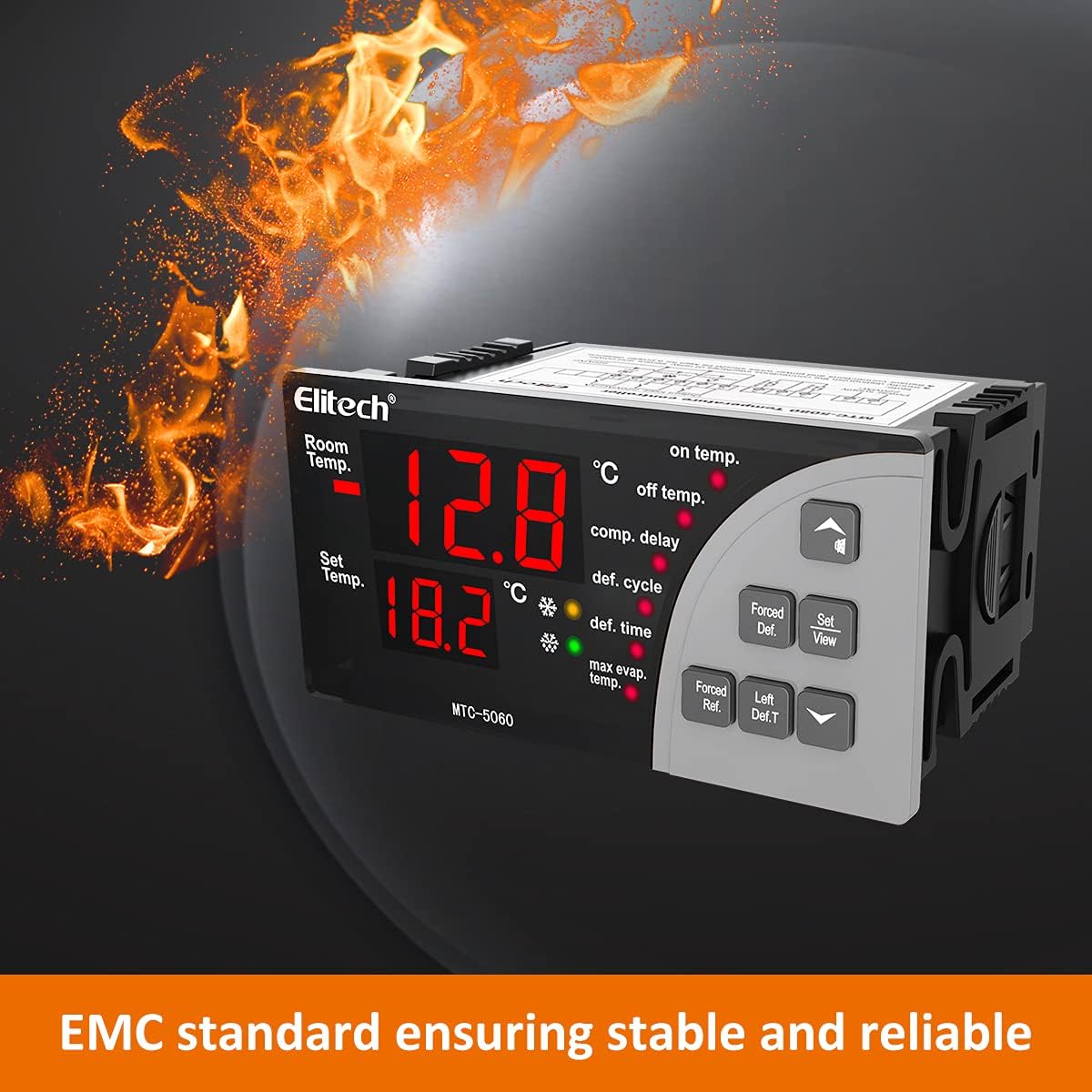
Figure 6.1: Illustrates the "Forced Def." button for manual defrost initiation.
6.4 Setări parametri
Advanced parameters such as compressor delay, defrost cycle, defrost time, and temperature calibration can be accessed and adjusted. Consult the full product manual for a complete list of parameters and their functions.
Note: Incorrect parameter settings can affect the performance and safety of your refrigeration system. Proceed with caution when adjusting advanced settings.
7. Specificații
| Parametru | Valoare |
|---|---|
| Alimentare electrică | 110VAC±10%, 50Hz/60Hz |
| Gama de măsurare a temperaturii | -50°C până la 50°C |
| Temperature Controlling Range | -50°C până la 50°C |
| Precizie | ±1°C |
| Rezoluţie | 0.1°C |
| Relay Output Contact Capacity | 3A/110VAC |
| Temperatura de operare | 0°C până la 60°C |
| Umiditatea relativă | 20%-85% (fără condens) |
| Tip senzor | NTC (10KΩ/25°C, B value = 3435K) |
| Lungimea sondei senzorului | 2 metri (7.87 inchi) |
| Dimensiunea panoului frontal | 10.2 cm (L) x 5.1 cm (L) |
| Dimensiunile produsului | 10.2 cm (L) x 5.1 cm (L) x 8.3 cm (A) |
| Installing Hole Size | 9.2 cm (L) x 4.4 cm (L) |
| Numărul de model | MTC-5060 |
| Producător | Elitech |
8. Întreținere
To ensure the longevity and optimal performance of your Elitech MTC-5060 controller, follow these maintenance guidelines:
- curatenie: Regularly wipe the front panel with a soft, dry cloth. Do not use abrasive cleaners or solvents.
- Inspecţie: Verificați periodic toate conexiunile cablurilor pentru strângerea și prezentarea unor semne de uzură sau deteriorare.
- Verificare senzor: Ensure the temperature sensor is clean and properly positioned for accurate readings.
- Mediu: Maintain the operating environment within the specified temperature and humidity ranges to prevent condensation and ensure reliable operation.
9. Depanare
This section provides solutions to common issues you might encounter with your MTC-5060 controller.
| Problemă | Cauza posibila | Soluţie |
|---|---|---|
| Controlerul nu pornește. | Fără alimentare sau cablaj incorect. | Check power connections (terminals 1 & 2) and ensure 110VAC supply. Verify wiring against diagram. |
| Temperature display is inaccurate or shows "EE". | Sensor error or faulty sensor. | Check sensor connections. Ensure the sensor is not damaged. Replace sensor if necessary. Perform temperature calibration if readings are consistently off. |
| Cooling/Defrosting not activating. | Incorrect set temperature, parameter settings, or faulty output relay. | Verify set temperature and differential. Check relevant parameters (e.g., compressor delay, defrost cycle). Inspect wiring to the cooling/defrosting load. |
| High/Low temperature alarm triggers frequently. | Alarm limits set too close to operating temperature or actual temperature fluctuation. | Adjust high/low temperature alarm limits. Investigate the cause of temperature fluctuations in the controlled environment. |
If the problem persists after attempting these solutions, please contact Elitech customer support for further assistance.
10. Garanție și asistență
Elitech Technology, Inc. warrants this product to be free from defects in materials and workmanship for a period specified by your regional distributor from the date of purchase. This warranty does not cover damage caused by improper installation, misuse, unauthorized modification, or natural disasters.
For technical support, warranty claims, or service inquiries, please contact your local Elitech distributor or visit the official Elitech website pentru informații de contact.
Producător: Elitech
Model: MTC-5060