
Introducere
This manual provides essential instructions for the proper use and maintenance of your Easytry123 replacement remote control. This remote is designed to be compatible with various Hisense Smart 4K UHD LED TV models. Please read this manual thoroughly before operating the remote control.
Produs terminatview
The Easytry123 replacement remote control is an ergonomic, button-controlled device utilizing infrared technology for seamless interaction with compatible Hisense televisions. It features dedicated buttons for power, volume, channel control, navigation, and quick access to popular streaming services.



Înființat
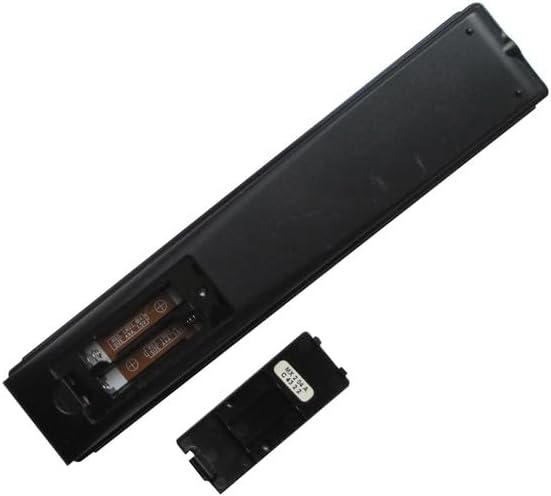
Instalarea bateriei
- Localizați compartimentul bateriei de pe spatele telecomenzii.
- Slide the battery cover downwards or press the latch and lift to open. (Refer to Figure 3 and Figure 4)
- Introduceți două (2) baterii AAA, asigurându-vă că bornele pozitive (+) și negative (-) se aliniază corect cu marcajele din interiorul compartimentului.
- Replace the battery cover by sliding it back into position until it clicks securely. (Refer to Figure 5)
No additional setup or coding is required for this replacement remote control. It is designed to work directly with compatible Hisense TV models once batteries are installed.
Instrucțiuni de operare
This remote control operates using infrared (IR) signals. Ensure there is a clear line of sight between the remote's IR emitter (located at the top front) and your television's IR receiver.
- Buton de alimentare: Apăsați tasta Putere button (usually red, top right) to turn the TV on or off.
- Controlul volumului: Utilizați VOL+ şi VOLUM - butoane pentru a regla volumul audio.
- Control canal: Utilizați CH ^ şi CH v. buttons to change TV channels.
- Bloc de navigare: The central circular pad with directional arrows (Sus jos stanga dreapta) and a central OK/Enter button is used to navigate menus and select options.
- Butonul Înapoi: Apăsați tasta Spate button (left arrow) to return to the previous screen or menu.
- Buton Acasă: Apăsați tasta Acasă button (house icon or circle) to access the TV's main smart interface.
- Butoane de comandă rapidă pentru aplicații: Dedicated buttons for services like Praştie, Google Play, Fandango Acum, și Tikilive provide quick access to these applications.
- Butonul Asistent Google: The button with the Google Assistant logo (colored dots) activates voice commands if your TV supports this feature.
- Input/123 Button: This button (often labeled '123' or with an input icon) allows you to switch between different input sources (HDMI, AV, etc.).
- Buton mut: The button with a crossed-out speaker icon mutes or unmutes the TV audio.
- Comenzi de redare: Butoane ca Redare/Pauză, Derulează înapoi, și Înainte rapid are used for media playback.
- CC (Closed Captioning): Activează sau dezactivează subtitrările.
- NRT (No Remote Timer): Functionality may vary by TV model.
- MTS (Sunet de televiziune multicanal): Allows selection of audio tracks (e.g., stereo, SAP).
Întreţinere
- curatenie: Ștergeți telecomanda cu o lavetă moale și uscată. Nu folosiți substanțe de curățare lichide sau materiale abrazive.
- Îngrijirea bateriei: Replace batteries when the remote's response becomes sluggish or stops working. Remove batteries if the remote will not be used for an extended period to prevent leakage.
- Depozitare: Depozitați telecomanda într-un loc răcoros și uscat, ferit de lumina directă a soarelui și de temperaturi extreme.
Depanare
- Telecomanda nu răspunde:
- Ensure new AAA batteries are correctly installed with proper polarity.
- Verificați dacă există obstrucții între telecomandă și receptorul IR al televizorului.
- Îndreptați telecomanda direct spre televizor.
- Try replacing the batteries with a fresh set.
- Anumite funcții nu funcționează:
- This is a replacement remote and may not support all advanced functions of your original TV remote.
- Verify that your TV model is listed as compatible with this remote.
- Interferență: Strong light sources or other infrared devices can sometimes interfere with the remote's signal.
Specificații
| Marca | Easytry123 |
| Dispozitive compatibile | Television (Various Hisense Smart 4K UHD LED TV Models) |
| Tehnologia de conectivitate | Infraroşu |
| Tip controler | Buton de control |
| Caracteristica specială | Ergonomic |
| Bateriile necesare | 2 baterii AAA |
Note importante
- This is a replacement remote control and is not a universal remote control.
- The replacement item may not work with all functions as the original remote. Some advanced or specific features of your original remote might not be supported.
- Este usor de folosit and does not require a manual or batteries to be included in the package.
- Există no need for setup or code programming; it works directly with compatible models.
- Întotdeauna ensure our remote matches the model number of your unit pentru o compatibilitate optimă.
Garanție și suport
Specific warranty information for this product is not provided in this manual. For any issues or support inquiries, please refer to the seller or retailer from whom the product was purchased. Ensure you retain your proof of purchase for any potential warranty claims.