
Produs terminatview
The Poly Sync 60 USB/Bluetooth smart speakerphone is designed to provide clear audio for small to medium conference rooms. It features powerful twin speakers and a six-microphone array that focuses on voices while reducing background noise. This allows for natural conversations, even when multiple participants speak simultaneously. The device offers versatile connectivity options, including USB-A, USB-C, and Bluetooth, enabling connection to PCs, Macs, and smartphones. It is powered by an AC adapter, eliminating the need for battery charging during use. For larger spaces, two units can be wirelessly paired to expand voice pickup coverage.
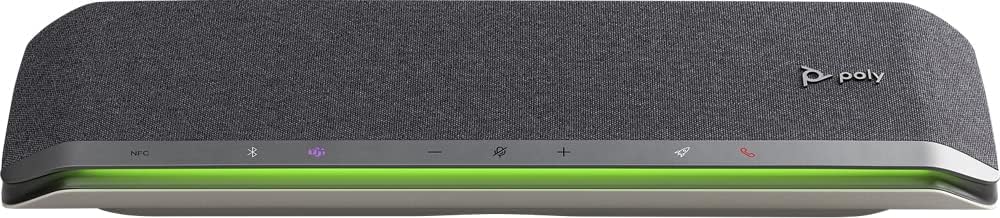
Imagine: față view of the Poly Sync 60 Smart Speakerphone, showing the speaker grille, control buttons, and an illuminated LED light bar.
Conținutul pachetului
- Poly Sync 60 Speakerphone
- Main power supply with global pin adapters
- USB cable with USB-A and USB-C connectors
Caracteristici cheie
- Audio avansat: Six-microphone steerable array for echo and noise reduction, ensuring clear voice pickup.
- Difuzoare duble: High-performance speakers deliver rich, clear audio for all participants.
- Alimentare AC: Operates continuously via AC power, eliminating battery concerns.
- Capacitate Daisy Chain: Wirelessly pair two units for extended coverage in larger meeting spaces.
- Conectivitate flexibilă: Connects to computers via combined USB-A/USB-C cable and to smartphones via Bluetooth.
- USB Video Camera Support: Connect a USB video camera to the speakerphone for combined audio and video with a single cable to the computer.
- Încărcarea dispozitivului mobil: Two USB ports allow charging of up to two mobile phones simultaneously.
- Certificat Microsoft Teams: Includes a dedicated Teams button for instant access to the Teams application.
Ghid de instalare
1. Conexiune la alimentare
Connect the provided main power supply to the Poly Sync 60 and plug it into a wall outlet. The device requires AC power for operation.
2. Connecting to a Computer (PC/Mac)
Use the integrated USB cable to connect the Poly Sync 60 to your computer. The cable supports both USB-A and USB-C ports. Once connected, the device should be recognized automatically by your operating system.
3. Connecting to a Smartphone (Bluetooth)
- Țineți apăsat butonul butonul Bluetooth on the Poly Sync 60 until the LED indicator flashes blue.
- On your smartphone, navigate to the Bluetooth settings and select "Poly Sync 60" from the list of available devices.
- Odată asociat, indicatorul LED va deveni albastru continuu.
4. Daisy Chain Two Units (Optional)
For expanded audio coverage, two Poly Sync 60 units can be wirelessly paired. Refer to the official Poly support documentation for detailed instructions on how to enable this feature.
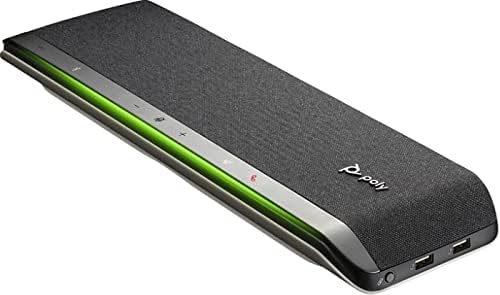
Imagine: Laterală view of the Poly Sync 60 Smart Speakerphone, highlighting the USB ports for charging mobile devices and connecting a video camera.
Instrucțiuni de operare
Controale de bază
- Volum sus/jos: Utilizați + şi - buttons to adjust the speaker volume.
- Dezactivați/Activați sunetul: Apăsați tasta microphone icon button to mute or unmute the microphone. The LED indicator will change color to show mute status.
- Răspuns/Încheiere apel: Apăsați tasta phone icon button pentru a răspunde sau a termina un apel.
- Buton Microsoft Teams: Apăsați tasta Teams icon button to launch or interact with the Microsoft Teams application (if certified version).
Încărcarea dispozitivelor mobile
Connect your mobile phone or other USB-powered device to one of the two USB ports on the Poly Sync 60 to charge it during a meeting.
Întreținere și îngrijire
- Clean the Poly Sync 60 with a soft, dry, lint-free cloth.
- Nu utilizați produse de curățare abrazive, solvenți sau substanțe chimice puternice, deoarece acestea pot deteriora dispozitivul.
- Evitați expunerea dispozitivului la temperaturi extreme, umiditate sau lumina directă a soarelui.
- Depozitați difuzorul într-un loc răcoros și uscat atunci când nu îl utilizați.
Depanare
- Fără sunet/Microfonul nu funcționează:
- Ensure the device is powered on and the AC adapter is securely connected.
- Verify that the speakerphone is not muted (check the mute button LED).
- Check the volume levels on both the Poly Sync 60 and your connected computer/smartphone.
- Confirm that the Poly Sync 60 is selected as the audio input/output device in your computer's sound settings or conferencing application.
- Probleme de conectare (USB):
- Încercați să conectați cablul USB la un alt port de pe computer.
- Reporniți computerul.
- Probleme de conexiune (Bluetooth):
- Ensure Bluetooth is enabled on your smartphone and the Poly Sync 60 is in pairing mode.
- Unpair and then re-pair the device from your smartphone's Bluetooth settings.
- Asigurați-vă că nicio altă dispozitivă Bluetooth nu cauzează interferențe.
- Echo or Background Noise:
- Place the speakerphone centrally in the room, away from walls or highly reflective surfaces.
- Asigurați-vă că încăperea este liniștită și lipsită de zgomot de fundal excesiv.
Specificatii tehnice
| Caracteristică | Caietul de sarcini |
|---|---|
| Numele modelului | Sincronizare 60 |
| Numărul de model al articolului | 216873-01 |
| Tip difuzor | Multimedia |
| Tehnologia de conectivitate | Bluetooth, USB |
| Tehnologia comunicațiilor fără fir | Bluetooth |
| Gama Bluetooth | 3 metri |
| Sursa de alimentare | Electric cu fir |
| Putere maximă de ieșire difuzor | 60 wați |
| Mod ieșire audio | Stereo |
| Configurare canal de sunet surround | 2.0 |
| Metoda de control | Buton de apăsare |
| Dimensiunile produsului | 1.5" D x 15.5" L x 4.8" H |
| Greutatea articolului | 2.2 lire sterline (1000 grame) |
| Utilizări recomandate | Office work, remote work, conference calls, personal entertainment, charging mobile devices |
| Tip de montare | Suport de masă |
| Producător | Poli |
| UPC | 017229172517, 197029590572 |
Informații despre garanție
The Poly Sync 60 Smart Speakerphone comes with a full manufacturer's warranty. For detailed information regarding warranty terms, duration, and claim procedures, please refer to the official Poly website-ul sau documentația de garanție inclusă la achiziție.
Sprijin
For further assistance, product updates, software downloads, or detailed guides, please visit the official Poly support website. You can also contact Poly customer service for technical support or service inquiries.
Official Poly Website: www.poly.com