
1. Introducere
This manual provides essential information for the proper installation, operation, and maintenance of the Simplex 4100-9610 Remote Annunciator. The 4100-9610 is designed to provide remote indication and control capabilities for compatible Simplex fire alarm control panels. Please read this manual thoroughly before attempting any installation or operation.
2. Informații de siguranță
Respectați întotdeauna următoarele măsuri de siguranță pentru a preveni vătămările corporale și deteriorarea echipamentului:
- Instalarea și întreținerea trebuie efectuate numai de către personal calificat.
- Disconnect all power sources before installing or servicing the annunciator.
- Respectați toate codurile și reglementările electrice locale și naționale.
- Do not operate the annunciator if it appears damaged.
- Asigurați-vă împământarea corespunzătoare pentru a preveni șocurile electrice.
- Keep the annunciator away from moisture and extreme temperatures.
This device is part of a fire safety system. Proper functioning is critical for life safety. Regular testing and maintenance are required.
3. Conținutul pachetului
Upon opening the package, verify that all components are present and undamaged. The standard package for the Simplex 4100-9610 Remote Annunciator typically includes:
- Simplex 4100-9610 Remote Annunciator Unit
- Mounting Hardware (screws, anchors, etc. - may vary)
- Installation Guide / Quick Start Guide (this manual provides detailed instructions)
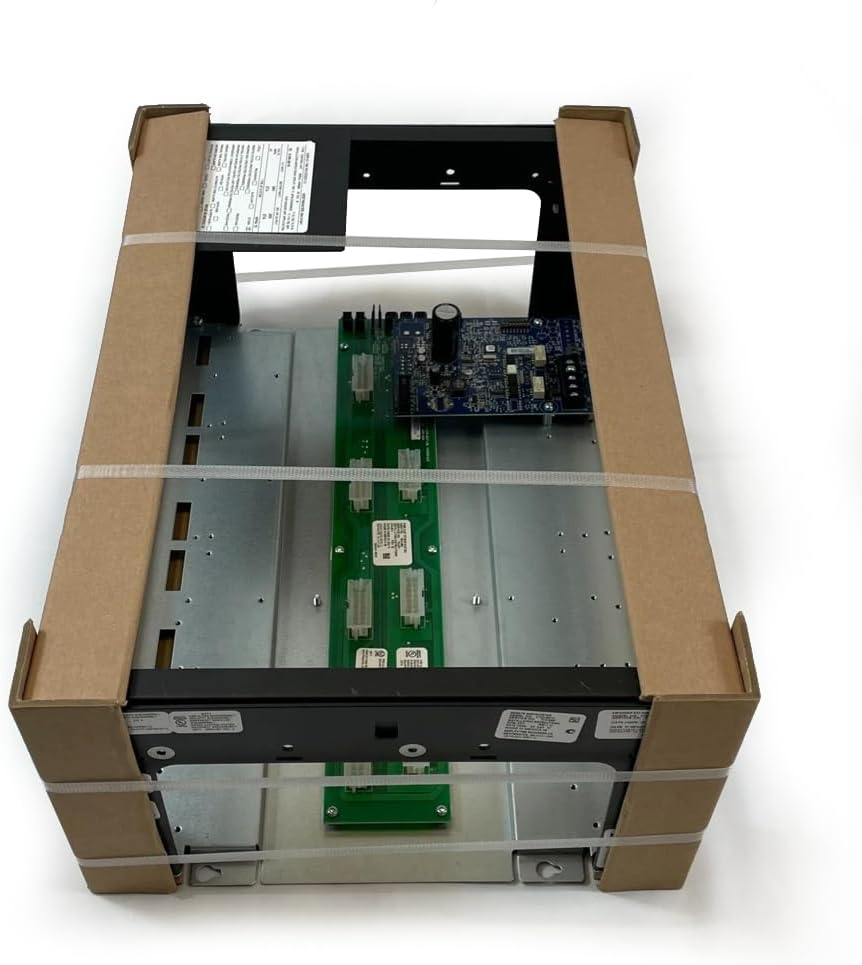
Figure 3.1: Simplex 4100-9610 Remote Annunciator as typically packaged. The image shows the annunciator unit, which consists of a metal enclosure housing circuit boards and connectors, secured within cardboard protective corners and plastic strapping.
Dacă lipsesc sau sunt deteriorate articolele, contactați imediat furnizorul.
4. Configurare și instalare
The 4100-9610 Remote Annunciator requires careful installation to ensure proper operation and compliance with safety standards. Refer to the specific wiring diagrams provided with your fire alarm control panel for detailed connection instructions.
4.1 Montare
- Choose a suitable location for the annunciator, typically near an entrance or a manned station, ensuring visibility and accessibility.
- Ensure the mounting surface is flat and capable of supporting the annunciator's weight.
- Mark the mounting holes on the wall using the annunciator's enclosure as a template.
- Drill pilot holes and install appropriate wall anchors if necessary.
- Secure the annunciator to the wall using the provided mounting hardware.
4.2 Cablare
All wiring must comply with NFPA 70 (National Electrical Code) and NFPA 72 (National Fire Alarm and Signaling Code), as well as local codes.
- Conexiune de alimentare: Connect the annunciator to the designated power source from the fire alarm control panel. Ensure correct polarity. The annunciator is battery powered, likely drawing power from the main panel's battery backup system.
- Communication Bus: Connect the annunciator to the fire alarm control panel's communication bus (e.g., IDNet, MAPNET II) using shielded twisted-pair cable as specified by Simplex.
- Împământare: Ensure the annunciator enclosure is properly grounded to the building's protective earth ground.
Nota: Refer to the specific installation instructions for your Simplex Fire Alarm Control Panel for detailed wiring diagrams and compatibility information.
5. Instrucțiuni de utilizare
The Simplex 4100-9610 Remote Annunciator provides visual and audible indications of system status and allows for basic control functions. Specific functions may vary based on the configuration of the connected fire alarm control panel.
5.1 Indicatori de stare
The annunciator typically features various LED indicators to display system status:
- Alarma: Illuminates when a fire alarm condition is detected.
- Problemă: Illuminates when a system fault or trouble condition occurs.
- Supraveghere: Illuminates for supervisory conditions (e.g., sprinkler valve tamper).
- Putere: Indicates that primary power is supplied to the system.
5.2 Funcții de control
Common control buttons on a remote annunciator may include:
- Recunoașteți: Silences the annunciator's local audible signal and acknowledges new events at the control panel.
- Tăcere: Silences audible notification appliances (horns, strobes) throughout the system.
- Resetați: Resets the fire alarm system after an alarm or trouble condition has been cleared.
- Lamp Test: Illuminates all LEDs to verify their functionality.
Important: Always follow your facility's emergency procedures when responding to alarm conditions.
6. Întreținere
Regular maintenance ensures the continued reliable operation of your Simplex 4100-9610 Remote Annunciator and the overall fire alarm system.
- Inspecție vizuală: Periodically inspect the annunciator for any signs of physical damage, loose connections, or excessive dust accumulation.
- curatenie: Clean the exterior of the annunciator with a soft, dry cloth. Do not use abrasive cleaners or solvents.
- Testare funcțională: Perform regular functional tests as part of your overall fire alarm system testing schedule, typically monthly or annually, as required by local codes and NFPA 72. This includes verifying LED illumination and button functionality.
- Service profesional: All internal servicing and complex troubleshooting should be performed by certified fire alarm technicians.
7. Depanare
Această secțiune oferă pașii de bază pentru depanarea problemelor comune. Pentru probleme mai complexe, contactați un tehnician de service calificat.
| Problemă | Cauza posibila | Soluţie |
|---|---|---|
| Annunciator is not powered on. | No power from control panel; loose wiring; internal fault. | Verify power supply from the control panel. Check wiring connections. If problem persists, contact service. |
| LEDs not illuminating during lamp test. | Faulty LEDs; internal circuit issue. | Contactați un tehnician de service calificat pentru diagnosticare și reparații. |
| Audible alarm not silencing. | Acknowledge button not pressed; new alarm condition; system fault. | Press the Acknowledge button. Check for new alarm events. If problem persists, contact service. |
| Annunciator displays "Trouble" light. | System fault detected by the main control panel. | Check the main fire alarm control panel for specific trouble codes. Contact service if unable to resolve. |
8. Specificații
The following specifications apply to the Simplex 4100-9610 Remote Annunciator:
- Model: 4100-9610
- Marca: SIMPLEX
- Număr piesa: S41009610
- UPC: 742779297952
- Sursa de alimentare: Battery Powered (typically from main FACP)
- Tip alarma: Audible (local annunciator sounder)
- Stil: Siguranţă
- Număr de articole: 1 (per unitate)
- Producător: SIMPLEX
Note: Specifications are subject to change without notice. Refer to the latest product data sheets for the most current information.
9. Informații despre garanție
Simplex products are typically covered by a limited warranty against defects in materials and workmanship. The specific terms and duration of the warranty may vary based on the region and purchase agreement. Please retain your proof of purchase. For detailed warranty information, contact your authorized Simplex distributor or refer to the warranty statement provided at the time of purchase.
This warranty does not cover damage resulting from improper installation, misuse, unauthorized modification, or acts of nature.
10. Asistență pentru clienți
For technical assistance, troubleshooting beyond the scope of this manual, or to inquire about replacement parts, please contact your authorized Simplex service provider or the vendor from whom the product was purchased. Ensure you have the model number (4100-9610) and serial number (if applicable) of your annunciator ready when contacting support.
For general inquiries about Simplex products, visit the official Simplex website-ul sau contactați departamentul de servicii pentru clienți.