
1. Introducere
The TELEVES Avant X Basic is a programmable multi-input headend designed for terrestrial TV installations, suitable for single or multi-dwelling units. It features 32 programmable digital filters across 4 VHF+UHF (DTT) inputs. The unit has 5 inputs, configurable for two distribution modes: FM-4xVHF/UHF or FM-DAB-3xUHF. It allows for precise adjustment of amplification and equalization for various RF inputs. Programming is simplified via the ASuite application (Android or Windows). The device includes automatic LTE filtering, detecting and cutting frequencies from channel 48 (LTE700). It is RED compliant.
2. Informații de siguranță
- Citiți cu atenție toate instrucțiunile înainte de instalare și utilizare.
- Nu expuneți dispozitivul la ploaie, umezeală sau temperaturi extreme.
- Asigurați o ventilație adecvată pentru a preveni supraîncălzirea.
- Only use the provided power supply or a compatible alternative specified by TELEVES.
- Deconectați alimentarea înainte de a efectua orice conexiune sau de a efectua lucrări de întreținere.
- Installation should be performed by qualified personnel to ensure safety and optimal performance.
3. Conținutul pachetului
Verificați dacă toate articolele sunt prezente în colet:
- TELEVES Avant X Basic Programmable Headend Unit (Model 532103)
- Cablu de alimentare
- Manual de instrucțiuni (acest document)
- Accesorii de montare (dacă este cazul)
4. Produs terminatview
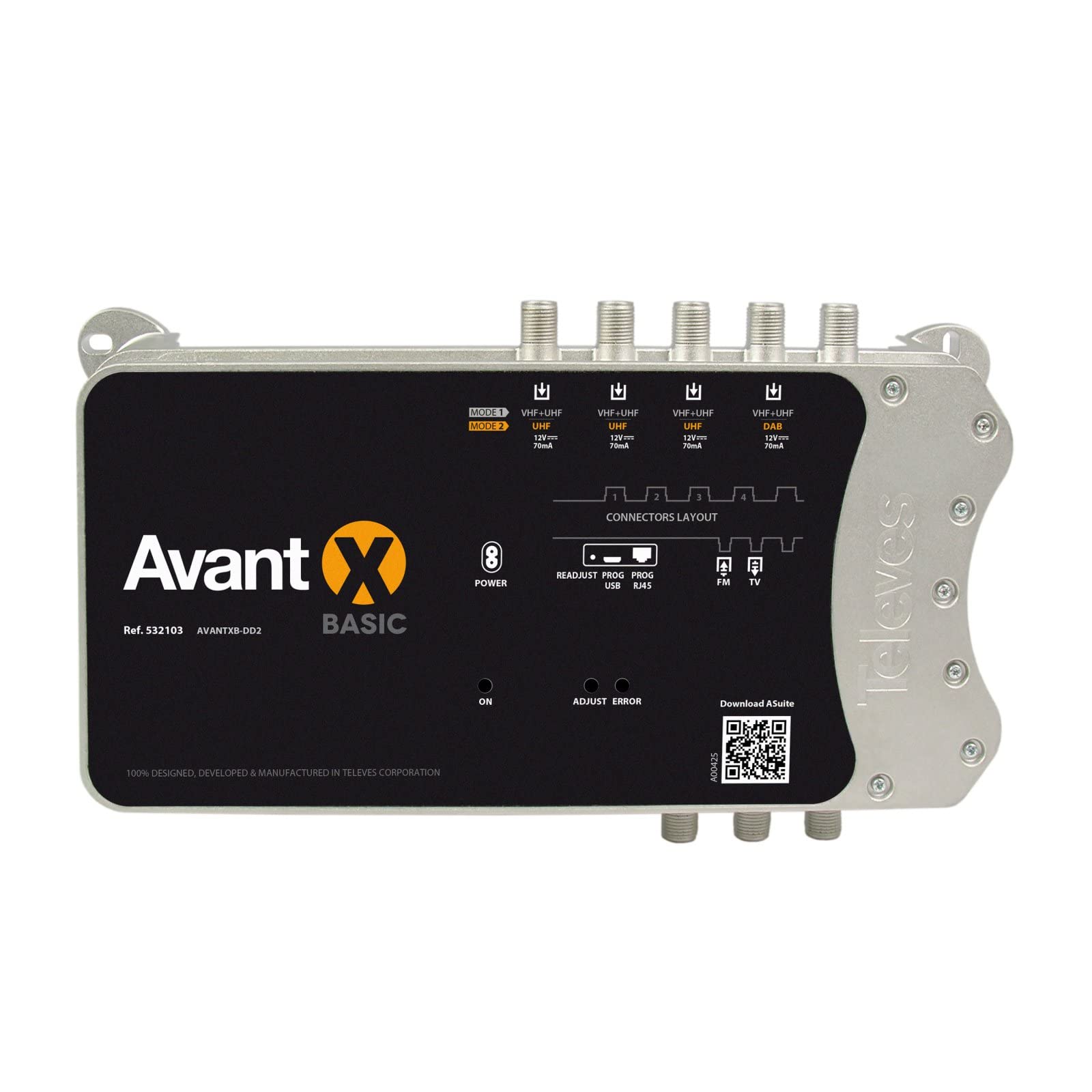
Figura 1: Faţă view of the TELEVES Avant X Basic Programmable Headend. This image displays the unit's casing, indicating the various input and output connectors for signal management.
Caracteristici cheie:
- 5 Inputs: Configurable for FM-4xVHF/UHF or FM-DAB-3xUHF distribution modes.
- 32 Digital Filters: Programmable for precise signal selection and amplificare.
- Automatic Gain Control (AGC): Ensures stable output levels.
- LTE Filtering: Automatic detection and suppression of LTE700 (Channel 48) interference.
- ASuite Compatibility: Easy programming via Android or Windows application.
- RED Compliant: Meets European regulatory standards.
Porturi de intrare/ieșire:
- Intrări: 5 (e.g., 1x FM, 4x VHF/UHF or 1x FM, 1x DAB, 3x UHF)
- Ieșiri: 1 (Main RF Output)
- Port de programare: For connection with ASuite application.
5. Configurare și instalare
5.1 Montarea unității
- Alegeți un loc uscat, bine ventilat, ferit de lumina directă a soarelui și de surse de căldură.
- Mount the unit securely to a wall or suitable surface using appropriate fasteners. Ensure sufficient space around the unit for cable connections and heat dissipation.
5.2 Connecting Antennas and Cables
- Connect your terrestrial antennas (FM, DAB, VHF, UHF) to the corresponding input ports on the Avant X Basic unit.
- Connect the main RF output of the Avant X Basic to your distribution network or directly to the first amplifier/splitter in your system.
- Ensure all F-connectors are securely tightened to prevent signal loss.
5.3 Conexiune la alimentare
- Connect the power cable to the unit's power input.
- Plug the power cable into a suitable electrical outlet (220-230 Vac).
- The unit will power on, and indicators will illuminate.
6. Instrucțiuni de utilizare
6.1 Configurare și programare inițială
The TELEVES Avant X Basic is programmed using the ASuite application, available for Android devices and Windows computers.
- Download and install the ASuite application from the official TELEVES website-ul sau magazinul de aplicații al dispozitivului dvs.
- Connect your programming device (smartphone/tablet via Bluetooth or PC via USB) to the Avant X Basic unit.
- Launch the ASuite application. The application will guide you through the process of scanning available terrestrial signals and configuring the digital filters.
- Filter Programming: Program up to 32 digital filters to select and amplify specific channels from your VHF+UHF inputs.
- Configurație de intrare: Select the desired distribution mode (FM-4xVHF/UHF or FM-DAB-3xUHF) based on your antenna setup.
- Gain and Equalization: Reglați amplification and equalization levels for each input to optimize signal quality and balance output levels. The unit features Automatic Gain Control (AGC) for stable output. Manual adjustments can be made within a specified range.
- LTE Filtering: The unit automatically detects and filters LTE700 signals (Channel 48 and above) to prevent interference with DTT signals. No manual configuration is typically required for this feature.
- Save your configuration to the device once programming is complete.
6.2 Operațiunea de monitorizare
After programming, the unit will continuously process and amplify the selected signals. You can use the ASuite application to monitor signal levels and device status if needed.
7. Întreținere
- curatenie: Disconnect power before cleaning. Use a soft, dry cloth to wipe the exterior of the unit. Do not use liquid cleaners or abrasive materials.
- Ventilare: Asigurați-vă că orificiile de ventilație nu sunt blocate pentru a preveni supraîncălzirea.
- Actualizări firmware: Periodically check the TELEVES website for firmware updates for the Avant X Basic unit and the ASuite application to ensure optimal performance and access to new features.
8. Depanare
| Problemă | Cauza posibila | Soluţie |
|---|---|---|
| Fără semnal sau calitate slabă a semnalului |
|
|
| Unitatea nu pornește |
|
|
| Interference from mobile signals (LTE) |
|
|
9. Specificatii tehnice
| General | |
|---|---|
| Marca | TELEVES |
| Numărul de model | 532103 |
| Numărul de intrări | 5 |
| Numărul de ieșiri | 1 |
| Programmable Digital Filters | Până la 32 |
| Channels per Filter | 1 până la 4 |
| Filtrare LTE | Automatic (LTE700 / Channel 48) |
| Alimentare Voltage | 220 - 230 V c.a. |
| Consum maxim de curent | 130 mA |
| Consum maxim de energie | 14 W |
| Indice de protecție | IP20 |
| Temperatura de operare | -5 până la 45 °C |
| Greutatea articolului | 800 g |
| Parametru | FM (87-108 MHz) | DAB (174-230 MHz) | UHF (470-694 MHz) |
|---|---|---|---|
| Câştig | 29 dB | 75 dB | 75 dB |
| Interval de ajustare a câștigului | 0 - 25 dB | AGC | AGC |
| Manual Adjustment (after AGC) | -5 la 5 dB | -5 la 5 dB | -3 la 3 dB |
| Ajustarea pantei | N / A | N / A | 0 până la 5 dB |
| Nivel de intrare | 76 - 101 dBµV | 40 - 100 dBµV | 40 - 100 dBµV |
| Output Level (DIN45004B) | 122 dBµV | 122 dBµV | 122 dBµV |
| Output Level (EN50083) | 126 dBµV | 126 dBµV | 126 dBµV |
| Programmable Output Levels | 80 - 105 dBµV | 87 - 112 dBµV | 90 - 115 dBµV |
| Figura de zgomot | 7 dB | 7 dB | 6 dB |
| Selectivitate | > 20 dB | > 65 dB | > 65 dB |
| Input Power (12Vdc) | N / A | 12 Vdc | 12 Vdc |
| Max Input Current (12Vdc) | N / A | 70 mA | 70 mA |
10. Garanție și asistență
For warranty information, please refer to the documentation provided with your purchase or visit the official TELEVES website-ul.
For technical support, product inquiries, or service, please contact TELEVES customer support through their official channels.
- Oficial Website: www.televes.com
- Informații de contact: Refer to the "Contact Us" section on the TELEVES website pentru detalii despre asistența regională.


