
Introducere
Thank you for choosing the Mahli Smart Robotic 3-in-1 Vacuum Cleaner. This manual provides important information on the safe use, operation, and maintenance of your device. Please read it thoroughly before first use and keep it for future reference.

Figure 1: Mahli Smart Robotic 3-in-1 Vacuum Cleaner and Remote Control
This image displays the Mahli Smart Robotic 3-in-1 Vacuum Cleaner in white, accompanied by its remote control. The vacuum cleaner is round with a power button on top, and the remote control is rectangular with navigation and function buttons.
Instrucțiuni de siguranță
- Citiți toate instrucțiunile înainte de a utiliza aparatul.
- Do not operate the vacuum cleaner in wet environments or near water.
- Țineți părul, hainele largi, degetele și toate părțile corpului departe de deschideri și părți în mișcare.
- Utilizați numai conform descrierii din acest manual. Folosiți doar accesoriile recomandate de producător.
- Nu utilizați aparatul cu un cablu sau un ștecher deteriorat. Dacă aparatul nu funcționează așa cum ar trebui, a fost scăpat, deteriorat, lăsat afară sau scăpat în apă, returnați-l la un centru de service.
- Nu trageți sau transportați cu cablul, nu folosiți cablul ca mâner, nu închideți o ușă pe cablu și nu trageți cablul în jurul marginilor sau colțurilor ascuțite. Nu treceți aparatul peste cablu. Țineți cablul departe de suprafețele încălzite.
- Nu deconectați trăgând de cablu. Pentru a deconecta priza, apucați de ștecher, nu de cablu.
- Nu manipulați ștecherul sau aparatul cu mâinile ude.
- Nu introduceți niciun obiect în deschideri. Nu utilizați cu orice deschidere blocată; feriți-vă de praf, scame, păr și orice ar putea reduce fluxul de aer.
- Opriți toate comenzile înainte de a deconecta.
- Aveți grijă suplimentară când curățați pe scări.
- Nu utilizați pentru a ridica lichide inflamabile sau combustibile, cum ar fi benzina, și nu utilizați în zone în care acestea pot fi prezente.
- Nu ridicați nimic care arde sau care fumează, cum ar fi țigări, chibrituri sau cenușă fierbinte.
- Nu utilizați fără sac de praf și/sau filtre la locul lor.
- Preveniți pornirea neintenționată. Asigurați-vă că întrerupătorul este în poziția oprit înainte de a conecta la acumulator, de a ridica sau de a transporta aparatul.
- Reîncărcați numai cu încărcătorul specificat de producător.
- Nu modificați și nu încercați să reparați aparatul sau acumulatorul.
Componentele produsului
The Mahli Smart Robotic 3-in-1 Vacuum Cleaner comes with the following components:
- Main Robotic Vacuum Unit
- Telecomanda
- Cablu de încărcare USB
- Perii laterale (2x)
- Pânză de mop (1x)
- Cleaning Brush (1x)
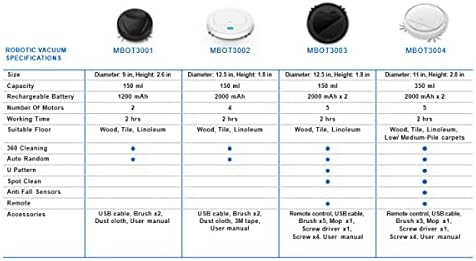
Figura 2: Componentele incluse
This image shows the Mahli Smart Robotic 3-in-1 Vacuum Cleaner along with its accessories: two side brushes, a mop cloth, a USB charging cable, and a small cleaning brush.
Înființat
1. Încărcarea aspiratorului
- Connect the USB charging cable to the charging port on the vacuum cleaner.
- Conectați celălalt capăt al cablului USB la un adaptor de alimentare USB compatibil (nu este inclus) sau la un port USB al computerului.
- Indicatorul luminos de încărcare se va aprinde. O încărcare completă durează aproximativ 3 ore.
- Once fully charged, the indicator light may change or turn off. Disconnect the vacuum cleaner from the power source.
2. Attaching Side Brushes
Gently press the side brushes onto the designated posts on the underside of the vacuum cleaner until they click into place.
3. Attaching the Mop Cloth (Optional)
If using the mopping function, attach the mop cloth to the designated area on the bottom of the vacuum cleaner. Ensure it is securely fastened.
Instrucțiuni de operare
1. Pornire/Oprire
- To power on, press the power switch on the side or bottom of the vacuum cleaner. Alternatively, for some models, simply touch the power button on the top surface after ensuring the main power switch is on.
- To power off, press the power switch again or hold the power button on the top surface.
2. Moduri de curățare
The vacuum cleaner features intelligent omni-directional and auto-route technology for efficient cleaning.
- Curățare automată: Once powered on, the vacuum cleaner will automatically begin cleaning, navigating around obstacles and covering the floor area.
- Operarea telecomenzii: Use the provided remote control for manual direction changes or to start/stop cleaning.
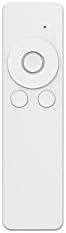
Figura 3: Telecomandă
This image shows the white remote control for the Mahli Smart Robotic 3-in-1 Vacuum Cleaner. It features a circular directional pad at the top, with two smaller circular buttons below it.
3. Funcția de ștergere
If the mop cloth is attached, the vacuum cleaner will perform mopping simultaneously with sweeping and vacuuming. Ensure the mop cloth is clean and slightly damp pentru cele mai bune rezultate.
Întreţinere
1. Golirea coșului de gunoi
Regularly empty the dustbin to maintain optimal cleaning performance. Locate the dustbin compartment, open it, and dispose of collected debris. Clean the dustbin with the provided cleaning brush or a soft cloth.
2. Curățarea periilor laterale
Check the side brushes for tangled hair or debris. Remove any obstructions carefully. If brushes are worn, they may need replacement.
3. Cleaning the Mop Cloth
After each use, remove the mop cloth and wash it thoroughly. Allow it to air dry completely before reattaching.
4. Curățarea senzorilor
Wipe the anti-fall sensors and other optical sensors on the bottom and front of the vacuum cleaner with a clean, dry cloth to ensure proper navigation.
Depanare
| Problemă | Cauza posibila | Soluţie |
|---|---|---|
| Aspiratorul nu pornește. | Battery is low or depleted. Main power switch is off. | Charge the vacuum cleaner. Ensure the main power switch is in the ON position. |
| Vacuum cleaner stops unexpectedly. | Dustbin is full. Obstruction detected. Battery is low. | Empty the dustbin. Remove any obstructions. Recharge the vacuum cleaner. |
| Performanță slabă de curățare. | Dustbin is full. Side brushes are tangled or worn. Sensors are dirty. | Empty the dustbin. Clean or replace side brushes. Clean all sensors. |
| Vacuum cleaner gets stuck frequently. | Too many obstacles in the cleaning area. Sensors are dirty. | Clear the cleaning area of excessive clutter. Clean all sensors. |
Specificații
| Caracteristică | Detaliu |
|---|---|
| Model | MBOT3002 |
| Funcţie | Sweeping, Vacuuming, Mopping (3-in-1) |
| Capacitatea bateriei | 2000mAh |
| Timp de încărcare | Aproximativ. 3 ore |
| Timp de lucru | Aproximativ. 2 ore |
| Vol. Evaluattage | 3.7V |
| Zgomot de lucru | 55 dB |
| Dimensiuni | Diametru: 12.5 cm, Înălțime: 1.8 cm |
| Suitable Floor Types | Wood, Tile, Linoleum |
| Caracteristici speciale | Intelligent Omni-Directional, Auto Route Technology, Smart Navigation, 360 Motion, Advanced Sensors, Anti-Fall Sensors |
| Componente incluse | Sweeper, 2x Brush, 1x Mop, 1x USB Charging Cable, 1x Cleaning Brush, Remote Control |
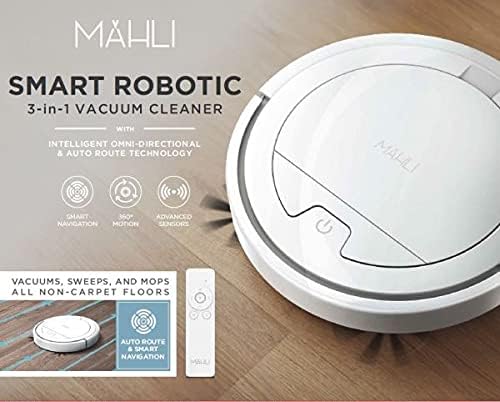
Figure 4: Robotic Vacuum Specifications Overview
This image displays a table comparing specifications for various Mahli robotic vacuum models (MBOT3001, MBOT3002, MBOT3003, MBOT3004). Key specifications include size, capacity, battery, motors, working time, suitable floor, cleaning patterns, sensors, remote, and accessories.
Garanție și suport
For warranty information and customer support, please refer to the contact details provided on the product packaging or the official Mahli webPăstrați bonul fiscal ca dovadă a achiziției.
For technical assistance or troubleshooting beyond this manual, please contact Mahli customer service.