
1. Introducere
The Avidsen HomeCam Battery is a 100% wireless outdoor surveillance camera designed for easy installation and robust home protection. Featuring 1080P Full HD resolution, a solar panel for continuous power, night vision, and two-way audio, this camera allows you to monitor your property remotely via a smartphone application without any subscription fees. This manual provides detailed instructions for setting up, operating, and maintaining your camera.
2. Ce se află în cutie
Vă rugăm să verificați dacă toate componentele sunt prezente în pachet:
- 1 x Avidsen HomeCam Battery IP WiFi Camera
- 1 x Solar Panel (PV module)
- 2 x 18650 baterii
- 1 x Camera Sealing Gasket
- Șuruburi de montare și dibluri de perete

Image: The Avidsen HomeCam Battery camera and its accompanying solar panel, unmounted, showing the main components included in the box.
3. Ghid de instalare
3.1. Instalarea bateriei
- Localizați compartimentul bateriei de pe cameră.
- Insert the two 18650 batteries, ensuring correct polarity (+/-).
- Închideți bine compartimentul bateriei.
3.2. Montarea camerei și a panoului solar
The camera and solar panel are designed for outdoor use and can be mounted separately or together. Choose a location that provides optimal sunlight exposure for the solar panel and a clear view pentru cameră.
- Montarea camerei: The camera features an innovative magnetic mount for precise orientation. Secure the base of the mount to a wall using the provided screws and wall plugs. Attach the camera to the magnetic base and adjust its angle.
- Montare panou solar: Mount the solar panel in a location that receives direct sunlight for several hours a day. Connect the solar panel cable to the camera's charging port.
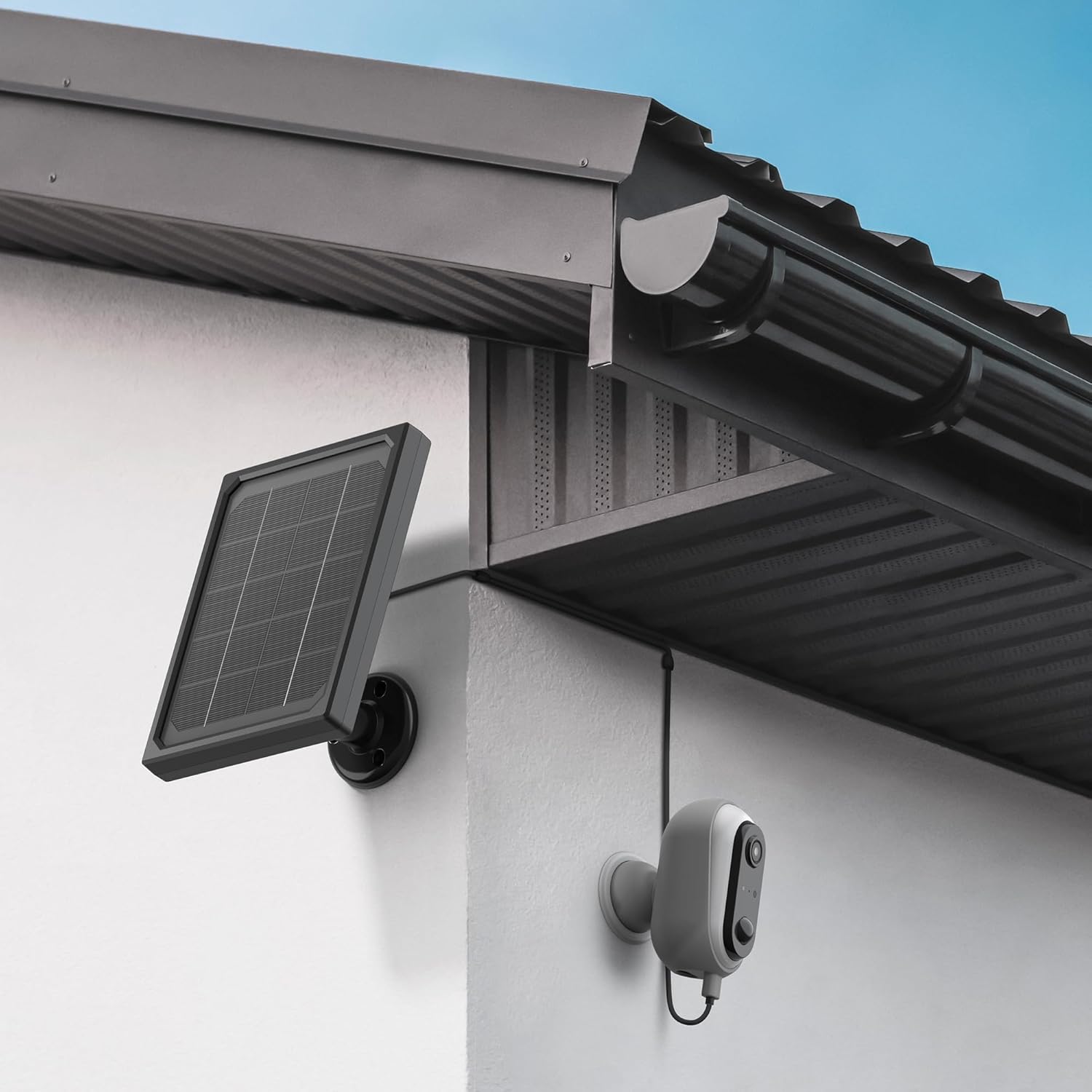
Image: The Avidsen HomeCam Battery camera and its solar panel are shown securely mounted on an exterior wall, positioned to capture sunlight and monitor the area.

Imagine: Un prim-plan view of the Avidsen HomeCam Battery camera, highlighting its adjustable magnetic mount which allows for flexible positioning and angle adjustments.
3.3. App Download and Initial Pairing
- Download the "Avidsen Home" application from your smartphone's app store (available on Google Play and Apple App Store).
- Deschideți aplicația și creați un cont sau conectați-vă dacă aveți deja unul.
- Follow the in-app instructions to add a new device. This typically involves scanning a QR code on the camera or manually selecting the device type.
- Asigurați-vă că smartphone-ul este conectat la o rețea Wi-Fi de 2.4 GHz în timpul procesului de asociere.
3.4. Conexiune Wi-Fi
During the app pairing process, you will be prompted to connect the camera to your home Wi-Fi network.
- Enter your Wi-Fi network name (SSID) and password when requested by the app.
- The camera supports 2.4GHz Wi-Fi networks only. Ensure your router is configured accordingly.
- Once connected, the camera's indicator light will change, and the app will confirm successful pairing.
4. Operarea camerei
4.1. în direct View și Controale
Once connected, open the Avidsen Home app to access the live feed from your camera.
- Video live: Atingeți camera din aplicație pentru a view fluxul video în timp real.
- Audio bidirecțional: Use the microphone icon in the app to speak through the camera's speaker and the speaker icon to listen to audio from the camera's microphone.
- Înregistrare: Manually record video or capture screenshots directly from the live view interfata.
- Redare: Acces înregistrat footage stored on the MicroSD card (not included) via the app's playback feature.

Image: A smartphone screen showing the Avidsen Home app, with options for live view, screenshot, two-way talk, recording, playback, and photo album.
4.2. Detectarea mișcării și notificări
The camera features motion detection to alert you to activity.
- Activare/Dezactivare: In the app settings for your camera, you can enable or disable motion detection.
- Sensibilitate: Reglați sensibilitatea detectării mișcării pentru a minimiza alarmele false.
- Notificări: When motion is detected, you will receive a notification on your smartphone.
- Înregistrare: Motion-triggered events are automatically recorded to the MicroSD card (if installed).
4.3. Vedere de noapte
The integrated infrared LEDs provide clear visibility up to 8 meters in total darkness.
- Vederea nocturnă se activează automat în condiții de lumină slabă.
- The camera provides a clear black and white image in night vision mode.
4.4. Stocare locală (card MicroSD)
The camera supports local storage via a MicroSD card (up to 128GB, not included).
- Insert the MicroSD card into the designated slot on the camera.
- Ensure the card is formatted correctly (FAT32 recommended).
- All recordings, including motion-triggered events, will be saved to this card.
4.5. Integrare Smart Home
The Avidsen HomeCam Battery is compatible with Amazon Alexa and Google Assistant.
- Link your Avidsen Home account with your Alexa or Google Assistant app.
- Utilizați comenzi vocale pentru a view fluxul camerei tale pe ecranele inteligente compatibile.
5. Întreținere
5.1. Curatenie
- Curățați regulat lentila camerei și suprafața panoului solar cu o lavetă moale și delicată.amp pânză pentru a asigura performanțe optime.
- Avoid using harsh chemicals or abrasive materials that could damage the surfaces.
5.2. Îngrijirea bateriei
- The solar panel is designed to keep the batteries charged. Ensure the panel is free from obstructions and receives adequate sunlight.
- If the camera's battery level drops significantly, consider repositioning the solar panel or manually charging the batteries if possible (refer to specific battery charging instructions if applicable).
5.3. Connection Check
- Periodically check the physical connection between the solar panel and the camera to ensure it is secure and free from corrosion.
- Verify the camera's Wi-Fi connection status in the Avidsen Home app.
6. Depanare
6.1. Fără alimentare / Camera nu pornește
- Ensure the 18650 batteries are correctly inserted with the right polarity.
- Check if the batteries are charged. If not, ensure the solar panel is connected and receiving sunlight, or try charging the batteries externally if possible.
- Verify the power button (if any) is pressed.
6.2. Nu mă pot conecta la Wi-Fi
- Confirmați că rețeaua Wi-Fi este de 2.4 GHz. Camera nu acceptă rețele de 5 GHz.
- Asigurați-vă că parola Wi-Fi introdusă în aplicație este corectă.
- Mută camera mai aproape de routerul Wi-Fi pentru a îmbunătăți puterea semnalului.
- Reporniți routerul și camera.
- If issues persist, try resetting the camera to factory settings (refer to the reset procedure in the app or device manual) and re-pairing.
6.3. Calitate slabă a imaginii
- Curățați obiectivul camerei pentru a îndepărta murdăria sau petele.
- Asigurați-vă că nu există obstacole în fața lentilei.
- Verificați puterea semnalului Wi-Fi; un semnal slab poate afecta calitatea streamingului video.
6.4. Detecția de mișcare nu funcționează sau prea multe alarme false
- Verify motion detection is enabled in the Avidsen Home app.
- Adjust the motion detection sensitivity settings in the app. Lower sensitivity for fewer false alarms, higher for more sensitive detection.
- Asigurați câmpul de lumină al camerei view is clear and not obstructed by moving objects like tree branches.
7. Specificații
| Numele modelului | HOME CAM BATTERY (127070) |
| Rezoluţie | Full HD 1080p |
| Conectivitate | Fără fir (Wi-Fi 2.4 GHz) |
| Sursa de alimentare | Solar Panel (5V 3W), 2x 18650 Batteries |
| Gama de vedere nocturnă | Până la 8 metri |
| Câmpul de View | 130° |
| Evaluare IP | IP65 (Outdoor use) |
| Depozitare | Card MicroSD (până la 128 GB, nu este inclus) |
| Caracteristici speciale | Motion Detection, Two-Way Audio, Smart Home Compatibility (Alexa, Google Assistant) |
| Dimensiuni | 31.5 x 21 x 8.5 cm |
| Greutate | 1100 grame |
8. Garanție și asistență
8.1. Garanția producătorului
This Avidsen product is covered by a Garanție de 2 an de la producător de la data achiziției. Vă rugăm să păstrați dovada achiziției pentru reclamațiile în garanție. Garanția acoperă defectele de materiale și de fabricație în condiții normale de utilizare.
8.2. Suport tehnic
For technical assistance, troubleshooting, or further inquiries, please visit the official Avidsen website or contact their customer support. You can find contact information and FAQs on their website: