
Introducere
This manual provides instructions for the setup, operation, and maintenance of your Sharper Image Foldable Gaming Chair with Onboard Speakers. Please read this guide thoroughly before use and retain it for future reference to ensure safe and optimal performance.
Informații de siguranță
- Capacitate maximă de greutate: This chair supports a maximum weight of 300 pounds (136 kg). Do not exceed this limit to prevent damage or injury.
- Rocking Feature: Use caution when utilizing the rocking feature. Avoid excessive or aggressive rocking to prevent tipping or injury.
- Mecanisme de pliere: Exercise care when folding and unfolding the chair. Keep hands and fingers clear of moving parts to avoid pinching.
- Plasare: Ensure the chair is placed on a stable, flat, and level surface, such as a hard floor, during use.
- Copii: Adult supervision is recommended for children using the chair.
Conținutul pachetului
Verificați dacă toate articolele sunt prezente în colet:
- Sharper Image Foldable Gaming Chair with Onboard Speakers
- RCA to 3.5 mm mini adapter
- 3.5 mm mini cable
- Note: 6 AA 1.5V batteries are required for speaker operation (not included).
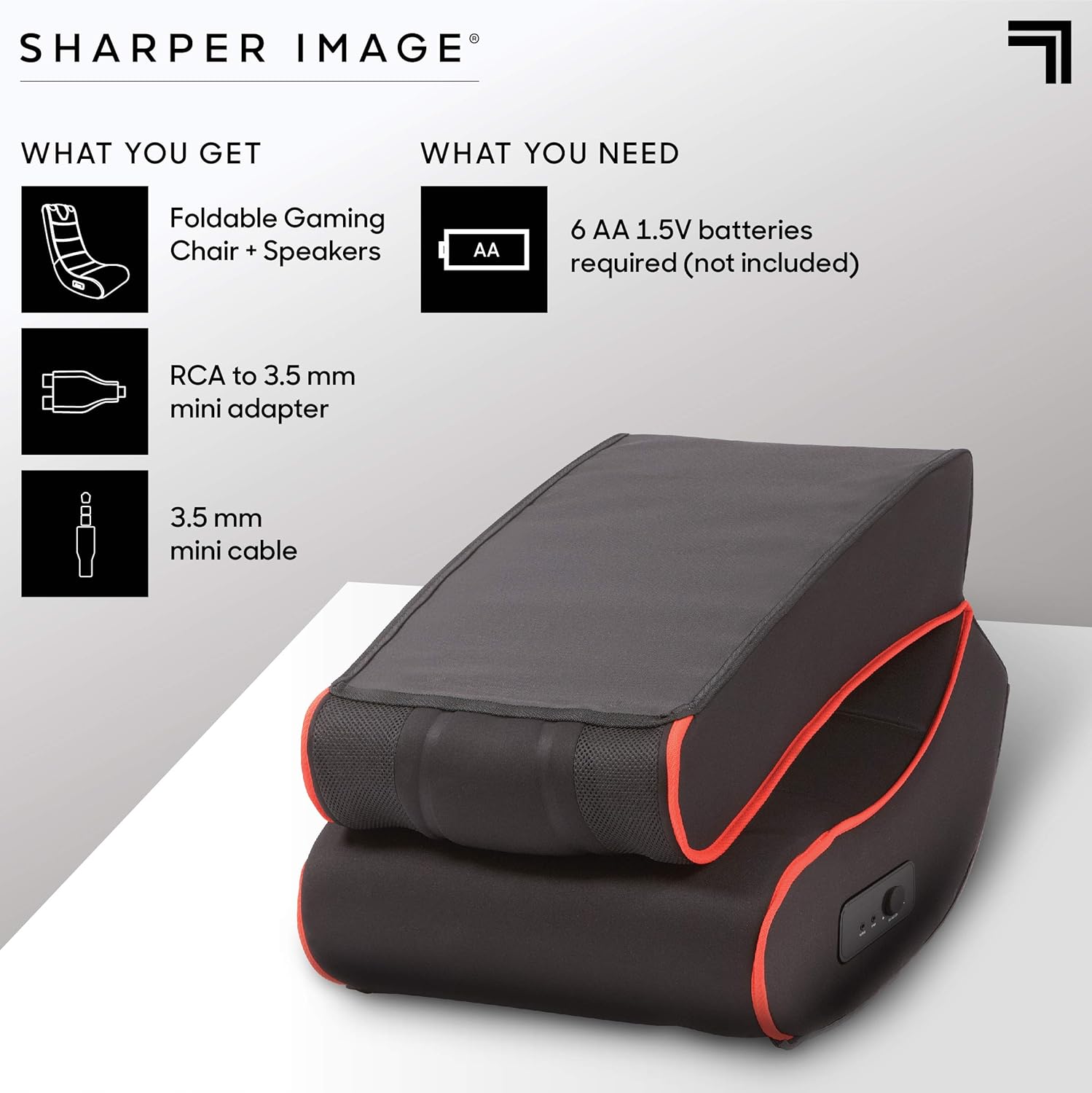
This image illustrates the items included in the package: the foldable gaming chair with speakers, an RCA to 3.5mm mini adapter, and a 3.5mm mini cable. It also indicates that 6 AA 1.5V batteries are required but not included.
Înființat
Desfacerea Scaunului
- Scoateți cu grijă scaunul din ambalaj.
- Așezați scaunul pe o suprafață plană și stabilă.
- Unfold the chair by gently extending the backrest until it locks into an upright position. Ensure the folding mechanism is securely engaged before use.
Conectarea boxelor
- Locate the battery compartment, typically on the side or bottom of the chair. Insert 6 AA 1.5V batteries (not included), ensuring correct polarity.
- Identify the audio input and output ports on the side control panel of the chair.
- Connect the 3.5 mm mini cable from your audio source (e.g., gaming console, TV, smartphone) to the "INPUT" port on the chair.
- If your audio source uses RCA outputs, use the provided RCA to 3.5 mm mini adapter to connect to the chair's "INPUT" port.
- (Optional) To connect external headphones or another audio device, use the "OUTPUT" port.

This image highlights the dual speakers located at the top of the chair and a close-up of the side control panel, which includes a volume/power knob, an audio input port, and an audio output port.
Instrucțiuni de operare
Pornirea și reglarea volumului
- Once connected to an audio source and batteries are installed, turn the "VOLUME-ON" knob on the side control panel clockwise to power on the speakers and increase the volume.
- Reglați volumul la nivelul dorit.
- To power off the speakers, turn the "VOLUME-ON" knob counter-clockwise until it clicks off.
Using the Rocking Feature
The chair is designed to rock gently. Lean back or forward to engage the rocking motion. Ensure you maintain balance and do not rock excessively to prevent tipping.

This image shows a person comfortably seated in the gaming chair, engaged in playing a video game, illustrating the chair's intended use.
Întreţinere
Curatenie
To clean the chair, wipe it with a clean, damp cloth. Do not use harsh chemicals or abrasive cleaners, as these may damage the microfiber material. For stubborn stains, a mild soap solution can be used, followed by wiping with a clean, damp cloth. Always allow the chair to air dry completely.
Depozitare
When not in use, the chair can be folded for compact storage. To fold, gently push the backrest forward until the locking mechanism disengages, then fold the backrest down onto the seat. Store in a dry place away from direct sunlight and extreme temperatures.

This image displays the gaming chair in its folded position, demonstrating its compact design for easy storage.
Depanare
| Problemă | Cauza posibila | Soluţie |
|---|---|---|
| Fără sunet din difuzoare | Bateriile sunt descărcate sau introduse incorect. Volume knob is off or too low. Audio cable is not connected properly. Audio source volume is too low or muted. | Înlocuiți bateriile sau asigurați-vă că polaritatea este corectă. Turn the "VOLUME-ON" knob clockwise. Verificați toate conexiunile cablurilor audio. Măriți volumul sursei audio. |
| Sunetul este distorsionat sau trosnește | Bateriile slabe. Conexiune audio slăbită. Volume too high on chair or audio source. | Înlocuiți bateriile. Re-seat audio cables. Reduce volume on chair or audio source. |
| Chair does not rock smoothly | Suprafață neuniformă. Obstrucție sub scaun. | Move chair to a flat, even surface. Check for and remove any objects beneath the chair. |
Specificații
| Caracteristică | Detaliu |
|---|---|
| Numele modelului | Charles |
| Marca | Imagine mai clară |
| Culoare | Negru |
| Material | Microfiber (Seat), Metal (Frame), Polyester (Fill) |
| Dimensiuni produs (D x L x H) | 71.1 cm adâncime x 41.9 cm lățime x 76.2 cm înălțime |
| Greutate maximă recomandată | 300 de lire sterline (136 kg) |
| Asamblare necesară | Nu |
| Caracteristici audio | Dual Onboard Speakers, Side Controls (Volume-On, Input, Output) |
| Power Source for Speakers | 6 AA 1.5V batteries (not included) |
| Factor de formă | Pliabil |
| Circulaţie | Legănat |

This image provides a visual representation of the chair's dimensions: 30 inches in height, 28 inches in depth, and 16.5 inches in width.
Garanție și suport
Pentru informații despre garanție și asistență pentru clienți, vă rugăm să consultați documentația inclusă odată cu achiziția sau să vizitați site-ul oficial Sharper Image. website. Keep your proof of purchase for any warranty claims or service inquiries.
