
NEXT 8000
Manual de utilizare pentru receptorul de satelit NEXT 8000 Full HD
Model: 8000
Introducere
Thank you for choosing the NEXT 8000 Full HD Satellite Receiver. This manual provides detailed instructions for the proper installation, operation, and maintenance of your device. Please read this manual thoroughly before using the receiver to ensure optimal performance and safety.
The NEXT 8000 is designed to deliver a high-quality viewing experience with its Full HD capabilities, multi-satellite search, and media playback features. It supports various languages and offers convenient software upgrades via USB.
Conținutul pachetului
Vă rugăm să verificați dacă toate articolele sunt prezente în colet:
- NEXT 8000 Satellite Receiver Unit
- Telecomanda
- Cablu HDMI
- Cablu USB
- Adaptor de alimentare

Image: The NEXT 8000 Full HD Satellite Receiver unit shown alongside its remote control.
Ghid de instalare
1. Conectarea receptorului
Follow these steps to connect your satellite receiver to your television and satellite dish:
- Satelit IN: Connect the coaxial cable from your satellite dish to the 'LNB IN' port on the back of the receiver.
- Conexiune HDMI: Use the provided HDMI cable to connect the 'HD OUT' port on the receiver to an available HDMI input on your television. Note the HDMI input number on your TV (e.g., HDMI 1, HDMI 2).
- Conexiune AV (opțională): If your TV does not have an HDMI input, use an AV cable (not included) to connect the 'AV' port on the receiver to the corresponding AV inputs on your television.
- Conexiune de alimentare: Connect the power adapter to the 'DC 12V' input on the receiver, then plug the adapter into a power outlet.
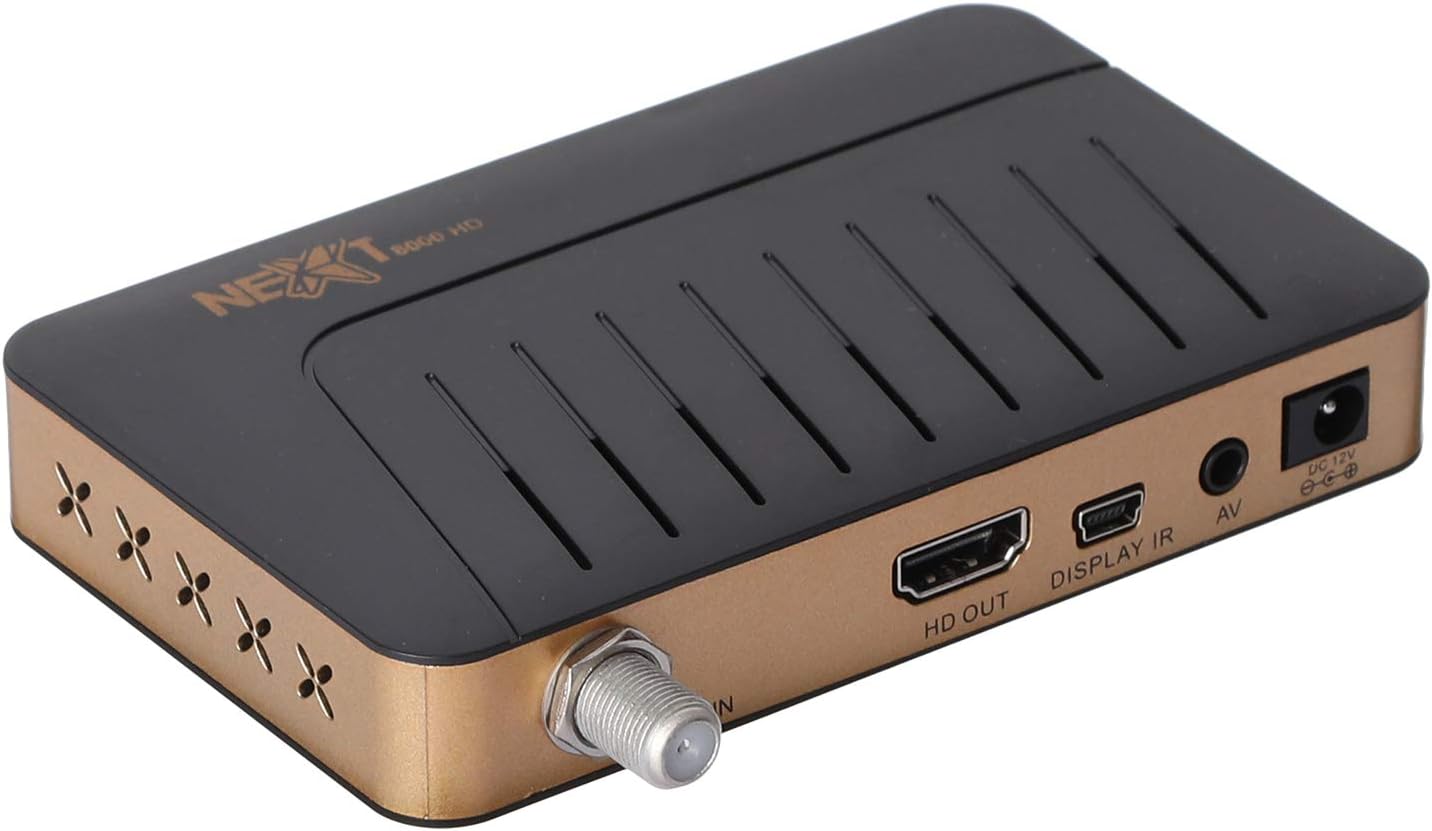
Imagine: Spate view of the NEXT 8000 receiver, highlighting the LNB IN, HD OUT (HDMI), AV, and DC 12V power input ports.
2. Pornirea inițială și configurarea
După conectarea tuturor cablurilor:
- Turn on your television and select the correct HDMI or AV input source.
- The receiver will power on automatically. The initial setup wizard should appear on your screen.
- Follow the on-screen instructions to select your preferred language, time zone, and perform a channel scan. Refer to the 'Operating Instructions' section for details on channel scanning.
3. Control de la distanță pesteview
Familiarizați-vă cu funcțiile telecomenzii:

Image: The remote control for the NEXT 8000 satellite receiver, showing various buttons for power, navigation, volume, channel, and special functions.
- Buton de alimentare: Turns the receiver on/off or to standby mode.
- MENIUL: Accesează meniul principal pentru setări și funcții.
- OK: Confirms selections or displays channel list.
- Butoane săgeată (Sus/Jos/Stânga/Dreapta): Navigați prin meniuri și opțiuni.
- IEȘIRE: Revine la ecranul anterior sau iese din meniu.
- VOL +/-: Reglează volumul.
- CH +/-: Schimbă canale.
- EPG: Afișează Ghidul electronic de programe.
- SAT: Selects satellite.
- USB: Accesses USB media playback.
- Schimbare de timp: Activates the Timeshift function (requires USB storage).
Instrucțiuni de operare
1. Channel Search and Management
To find and organize channels:
- Apăsați tasta MENIU butonul de pe telecomandă.
- Navigate to 'Installation' or 'Channel Search' using the arrow buttons and press OK.
- Select 'Multi-satellite search' or 'Network search' based on your setup.
- Follow the on-screen prompts to initiate the scan. The receiver will automatically detect available channels.
- After the scan, you can access options to 'Program lock', 'Delete', 'Move', or 'Rename' channels within the channel management menu.
2. Media Playback via USB
The receiver supports media playback from a USB flash drive.
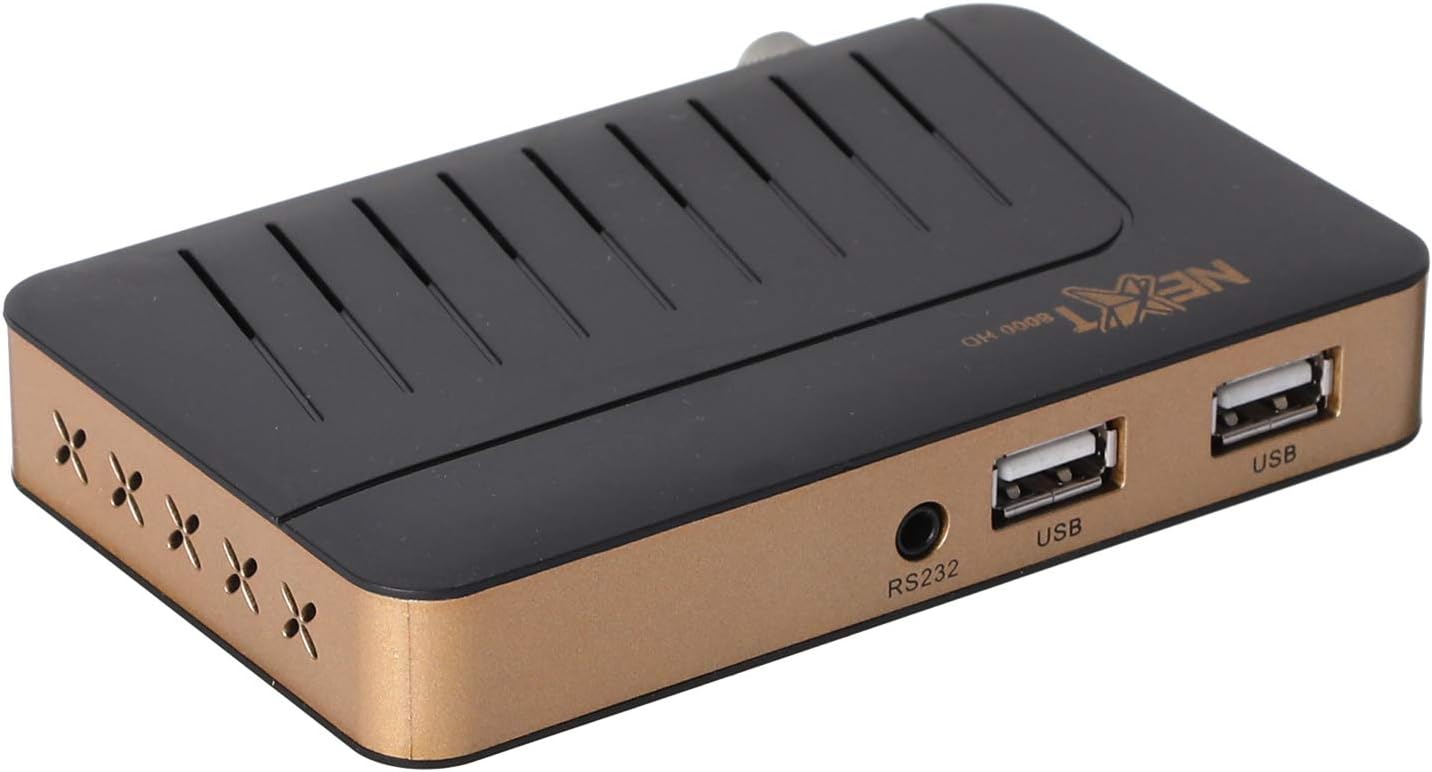
Imagine: față view of the NEXT 8000 receiver, showing the two USB ports available for connecting external storage devices.
- Insert a USB flash drive into one of the USB ports on the receiver.
- Apăsați tasta USB button on the remote control or navigate to the 'Media' menu.
- Selectați tipul de fișier media pe care doriți să îl redați (de exemplu, video, muzică, fotografie).
- Browse your USB drive content and select the desired file. The receiver supports AVI, MKV, TS, TP, TRP, MPG, and MP4 files.
3. Înregistrare și Timeshift
To record programs or use the Timeshift function, a USB storage device must be connected.
- Înregistrare: În timp ce vizionați un program, apăsați butonul Înregistra button (usually a red circle) on the remote control to start recording. Press it again to stop. Recorded content will be saved to the connected USB drive.
- Schimbare de timp: Apăsați tasta Timeshift button on the remote control to pause live TV. You can then fast-forward or rewind within the buffered content.
4. Ghid electronic de programe (EPG)
Apăsați tasta EPG butonul de pe telecomandă pentru a view the 7-day electronic program guide. This allows you to see upcoming programs and set reminders or recordings.
5. Parental Lock
To restrict access to certain channels or menus, navigate to the 'System Settings' or 'Parental Control' menu. You can set a password to lock programs or specific functions.
Întreţinere
1. Software Upgrade via USB
To ensure your receiver has the latest features and bug fixes, you can upgrade its software:
- Descărcați cel mai recent software file from the official NEXT website to a USB flash drive. Ensure the file is placed in the root directory of the USB drive.
- Insert the USB flash drive into the receiver's USB port.
- Du-te la MENIU > 'System Settings' > 'Software Upgrade' (or similar option).
- Select 'Upgrade by USB' and choose the software file.
- Confirm the upgrade. The receiver will restart automatically after the upgrade is complete. Do not power off the receiver during the upgrade process.
2. Curatenie
To clean the receiver, disconnect it from the power supply. Use a soft, dry cloth to wipe the exterior surfaces. Do not use liquid cleaners or abrasive materials.
Depanare
If you encounter issues with your NEXT 8000 receiver, refer to the following table:
| Problemă | Cauza posibila | Soluţie |
|---|---|---|
| Fără imagine sau sunet | Incorrect TV input selected; Loose HDMI/AV cable; Receiver not powered on. | Select correct TV input; Check all cable connections; Ensure receiver is powered on. |
| Nu s-au găsit canale | Satellite dish not aligned; Incorrect LNB settings; Channel scan not performed. | Check satellite dish alignment; Verify LNB settings in menu; Perform a channel scan. |
| Telecomanda nu funcționează | Dead batteries; Obstruction between remote and receiver; Remote sensor blocked. | Replace batteries; Remove obstructions; Ensure receiver's IR sensor is clear. |
| Suportul USB nu este redat | Neacceptat file format; USB drive not properly inserted; Corrupted file. | Verifica file format compatibility; Re-insert USB drive; Try a different USB drive or file. |
Dacă problema persistă după ce încercați aceste soluții, vă rugăm să contactați serviciul de asistență pentru clienți.
Specificații
Key technical specifications for the NEXT 8000 Full HD Satellite Receiver:
- Model: 8000
- Rezoluție de ieșire video: 576i, 576p, 720p, 1080i, 1080p (50/60 Hz)
- Conectivitate: HDMI, USB (2 ports), RS232, AV
- Formate audio acceptate: Dolby Digital, DTS, AAC, PCM
- Supported Video/Media Formats: AVI, MKV, TS, TP, TRP, MPG, MP4
- Memorie de stocare: 100 satellites, 4000 frequencies, 8000 channels
- Procesor: Sunplus
- Caracteristici: Recording by USB flash, Screen enlargement, Multi-satellite search, Network search, Media playback, 7-day Electronic Program Guide (EPG), Teletex, Timeshift, Parental lock.
- Dimensiuni: 19.6 x 17.4 x 6.6 cm
- Greutate: 396 g
Garanție și suport
For warranty information and technical support, please refer to the documentation provided with your purchase or visit the official NEXT product support webPăstrați bonul fiscal ca dovadă a achiziției pentru reclamații în garanție.
Ask a question about this manual
Ask about setup, troubleshooting, compatibility, parts, safety, or missing instructions. Manuals+ will review the question and use this page’s manual context to help answer it.