
1. Introducere
Mulțumesc pentru achizițieasing the QFX E-B3 Bluetooth Professional High-Power Speaker. This manual provides essential information for the safe and efficient operation of your speaker. Please read it thoroughly before use and retain it for future reference.
The QFX E-B3 is designed to deliver powerful audio with features including Bluetooth connectivity, FM radio, USB/SD card playback, LED party lights, and a 250W power amplifier. It also supports True Wireless System (TWS) for stereo pairing with another compatible speaker.
2. Informații de siguranță
- Sursa de alimentare: Connect the speaker only to the specified power supply as indicated on the unit.
- Ventilare: Asigurați o ventilație adecvată în jurul difuzorului. Nu blocați nicio deschidere de ventilație.
- Apă și umiditate: This speaker is not waterproof. Do not expose it to rain, moisture, or any liquids to prevent electric shock or fire.
- Căldură: Țineți difuzorul departe de surse de căldură, cum ar fi calorifere, registre de căldură, sobe sau alte aparate care produc căldură.
- curatenie: Unplug the speaker from the power outlet before cleaning. Use a dry cloth for cleaning. Do not use liquid cleaners or aerosol cleaners.
- Service: Nu încercați să reparați singur acest produs. Consultați toate lucrările de service către personalul calificat de service.
- Plasare: Așezați difuzorul pe o suprafață stabilă și plană pentru a-l împiedica să cadă.
3. Conținutul pachetului
Verificați dacă toate articolele sunt prezente în colet:
- QFX E-B3 High-Power Speaker
- Microfon
- Telecomanda
- Cablu de alimentare CA.
- Manual de utilizare (acest document)
4. Produs terminatview
The QFX E-B3 speaker features dual 15-inch woofers and a 1-inch tweeter, protected by a metal grill. It includes integrated handles and wheels for portability.

Figura 4.1: Față view of the QFX E-B3 Speaker.
Rear Panel Controls and Ports
The rear panel houses all input/output connections and control knobs.
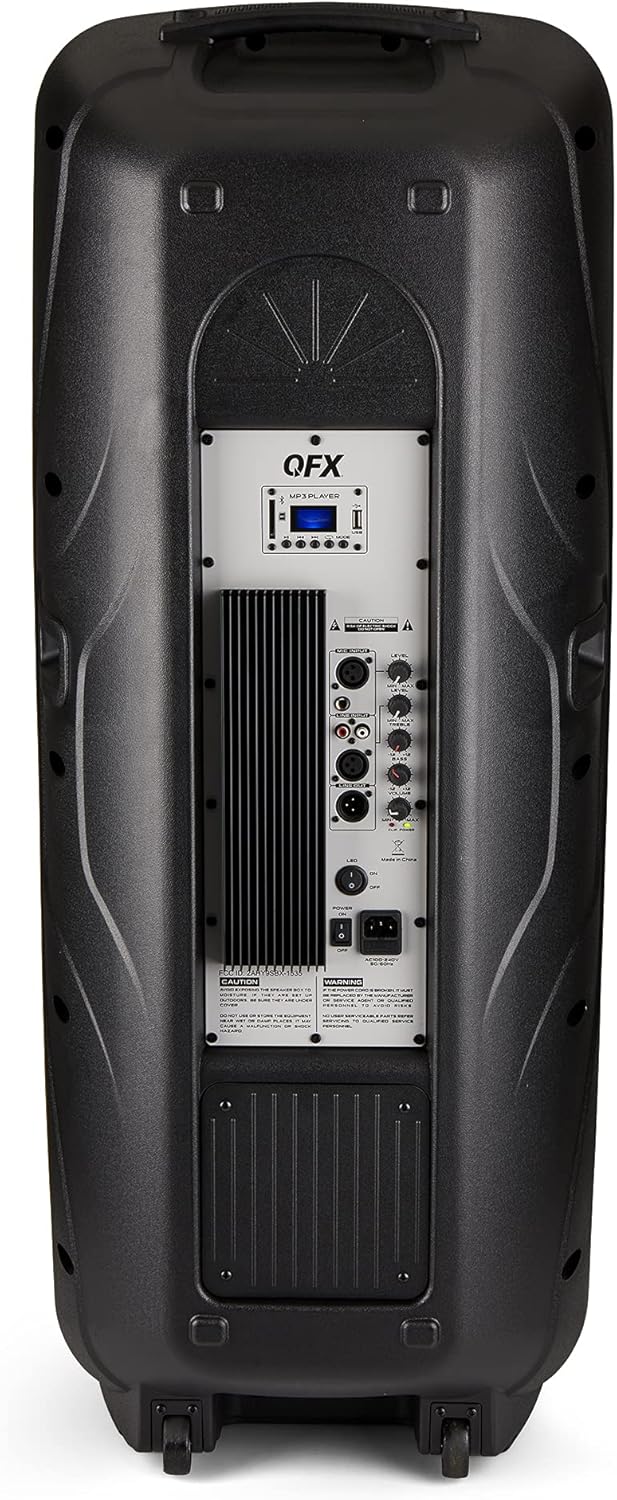
Figure 4.2: Rear panel with controls and ports.
- Întrerupător: Pornește/oprește difuzorul.
- Intrare AC: Connects the AC power cable.
- USB/SD Card Ports: Pentru redarea audio filede pe unități USB sau carduri SD.
- Ecran de afișare: Afișează modul curent și informații despre piesă.
- Butonul de mod: Switches between input modes (Bluetooth, FM, USB, SD, RCA).
- Buton Redare/Pauză: Controlează redarea pentru USB/SD/Bluetooth.
- Butoane de urmărire anterioară/următoare: Navighează printre melodii sau posturi FM.
- Butonul de volum principal: Reglează volumul general.
- Bass/Treble Control Knobs: Adjusts low and high frequencies.
- Intrare microfon XLR: Connects a wired microphone.
- Microphone Volume/Echo Knobs: Adjusts microphone volume and echo effect.
- RCA Input (L/R): Connects external audio devices via RCA cables.
- XLR Line Input/Output: For connecting to other audio equipment.
5. Configurare
Plasamentul inițial
Place the speaker on a stable, flat surface. For optimal sound, position it in a central location within the listening area. The integrated wheels and handle allow for easy transport.

Figure 5.1: Speaker being moved with handle and wheels.
Conexiune de alimentare
- Asigurați-vă că întrerupătorul de alimentare al difuzorului este în poziția OPRIT.
- Connect the AC power cable to the AC input on the rear panel of the speaker.
- Conectați celălalt capăt al cablului de alimentare CA la o priză standard de perete.
- Flip the power switch to the ON position. The display screen will illuminate.
6. Instrucțiuni de utilizare
Asociere Bluetooth
- Turn on the QFX E-B3 speaker.
- Apăsați tasta MOD button on the speaker or remote control until "BLUE" appears on the display screen, indicating Bluetooth mode.
- Activați Bluetooth pe dispozitivul mobil (smartphone, tabletă etc.).
- Caută available Bluetooth devices and select "QFX E-B3" from the list.
- Once paired, the speaker will emit a confirmation sound. You can now play audio from your device through the speaker.
Împerecherea sistemului True Wireless (TWS)
TWS allows two QFX E-B3 speakers to connect wirelessly for a stereo sound experience. This feature works only in Bluetooth mode.
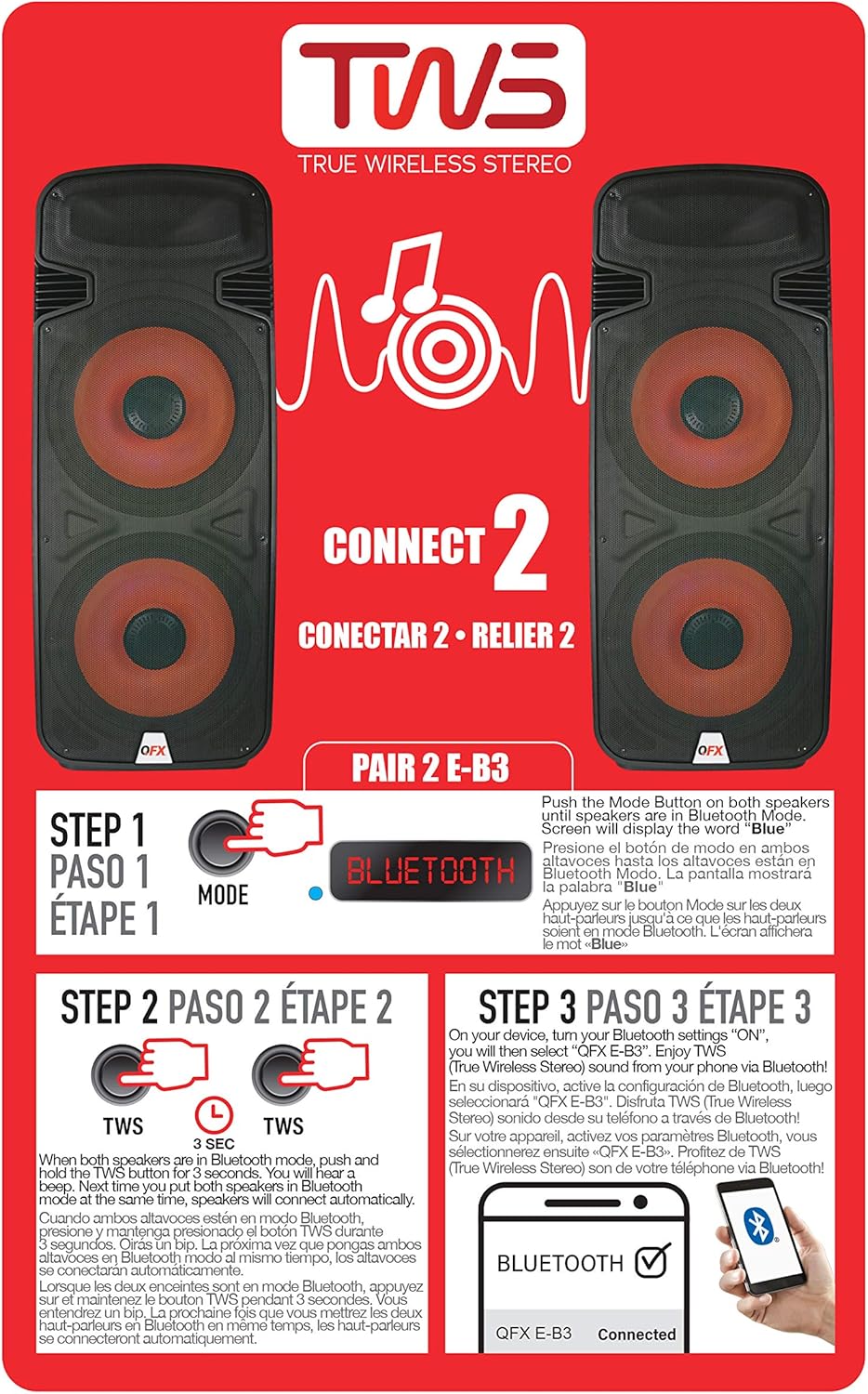
Figure 6.1: TWS Pairing Instructions.
- Ensure both QFX E-B3 speakers are powered on and in Bluetooth mode. The display on both speakers should show "BLUE".
- On one of the speakers (this will be your primary speaker), press and hold the TWS button for approximately 3 seconds. The speakers will attempt to connect to each other.
- Once successfully paired, you will hear a confirmation sound, and the display on the primary speaker will show "BLUE" while the secondary speaker will show "BLUE" as well.
- On your Bluetooth-enabled device, search for and select "QFX E-B3". The two speakers will now play audio in stereo.
Funcționare radio FM
- Apăsați tasta MOD button to switch to FM radio mode. The display will show the FM frequency.
- Țineți apăsat butonul Redare/Pauză button to initiate an automatic scan for FM stations. The speaker will save all found stations.
- Utilizați Piesa anterioară/următoare butoane pentru a naviga prin posturile FM salvate.
Redare card USB/SD
- Insert a USB flash drive or SD card (with compatible audio files) into the respective port on the rear panel.
- Difuzorul va comuta automat în modul USB/SD și va începe să redea sunetul. files. Dacă nu, apăsați butonul MOD pentru a selecta modul USB sau SD.
- Utilizați Redare/Pauză şi Piesa anterioară/următoare butoane pentru a controla redarea.
Intrare microfon
- Connect a microphone to the XLR Microphone Input on the rear panel.
- Adjust the Microphone Volume and Echo knobs to achieve the desired sound.
Intrare RCA
- Connect an external audio source (e.g., CD player, mixer) to the RCA Input (L/R) ports using appropriate RCA cables.
- Apăsați tasta MOD button to select RCA input mode.
- Adjust the master volume on the speaker and the volume on your external audio source.
Lumini LED pentru petrecere
The speaker features integrated LED party lights that activate automatically when the speaker is powered on. There are no specific controls for the LED lights mentioned; they are designed to enhance the audio experience.
7. Întreținere
Curatenie
- Deconectați întotdeauna difuzorul înainte de curățare.
- Folosiți o lavetă moale și uscată pentru a șterge suprafețele exterioare ale difuzorului.
- Nu utilizați agenți de curățare abrazivi, ceară sau solvenți, deoarece aceștia pot deteriora finisajul.
- Păstrați orificiile de ventilație libere de praf și resturi.
Depozitare
When not in use for extended periods, store the speaker in a cool, dry place, away from direct sunlight and extreme temperatures. Cover the speaker to protect it from dust.
8. Depanare
If you encounter issues with your QFX E-B3 speaker, refer to the following common problems and solutions:
| Problemă | Cauza posibila | Soluţie |
|---|---|---|
| Fără putere | Power cable not connected; Power outlet not active; Speaker power switch off. | Ensure AC cable is securely connected to speaker and outlet. Check if outlet is working. Turn speaker power switch ON. |
| Nici un sunet | Volume too low; Incorrect input mode selected; Audio source not playing. | Increase master volume. Press MODE button to select correct input. Ensure audio source is playing and its volume is up. |
| Bluetooth nu se conectează | Speaker not in Bluetooth mode; Device Bluetooth off; Speaker already paired to another device; Device too far. | Ensure speaker is in Bluetooth mode ("BLUE" on display). Turn on device Bluetooth. Disconnect from other devices. Move device closer to speaker (within 30 feet). |
| Asocierea TWS a eșuat | Speakers not in Bluetooth mode; TWS button not held long enough. | Ensure both speakers are in Bluetooth mode. Press and hold the TWS button on one speaker for 3 seconds. |
| Redarea pe USB/SD nu funcționează | Mod incorect; Incompatibil file formatare; Card USB/SD corupt. | Press MODE to select USB/SD. Ensure audio files are in a compatible format (e.g., MP3). Try a different USB/SD card. |
9. Specificații
| Caracteristică | Caietul de sarcini |
|---|---|
| Marca | QFX |
| Numărul de model | E-B3 |
| Putere maximă de ieșire difuzor | 250 wați |
| Tehnologia de conectivitate | USB, Bluetooth |
| Mod ieșire audio | Stereo |
| Tip de montare | Plug Mount, Wheel Mount |
| Tip difuzor | Woofer (Dual 15 Inches) |
| Tip controler | Telecomanda |
| Culoare | Party LED |
| Este rezistent la apă | Fals |
| Metoda de control | Telecomanda |
| Diametrul wooferului | 15 inchi |
| Numărul de canale audio | 2.0 |
| Tehnologia fără fir | Bluetooth |
| Protocol de conectivitate | Bluetooth |
| Sursa de alimentare | Electric cu fir |
| Tip de driver audio | Driver dinamic |
| Dimensiunea driverului audio | 15 inchi |
| Dimensiuni articol (D x L x H) | 16.77" D x 13.98" L x 23.74" H |
| Greutatea articolului | 13.2 lire sterline |
| Dispozitive compatibile | Laptop, MP3 Player, Smartphone, Tablet, Television |
| UPC | 606540039618 |
10. Informații despre garanție
This product is covered by a limited warranty. For specific details regarding warranty coverage and terms, please refer to the warranty information provided at the point of purchase or contact QFX customer support directly. The warranty is typically per contract with the retailer.
11. Suport
For technical assistance, troubleshooting beyond this manual, or inquiries about your QFX E-B3 speaker, please contact QFX customer support or your retailer. Contact information can usually be found on the manufacturer's website sau pe bonul fiscal.